


 NuGet
Supported platforms and prerequisites
The Avalonia HTML Editor runs on Windows, macOS and Linux. Native editor testing covers Windows 11 x64, Apple silicon macOS and Ubuntu 24.04 x64 with Xorg.
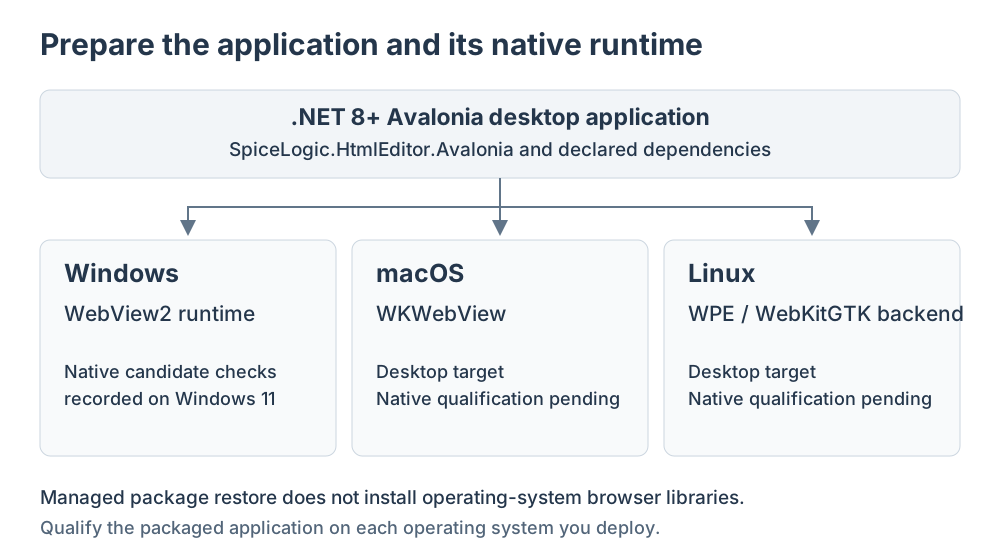
Restore the editor package and its matching Avalonia dependencies, then include the native browser prerequisites for each operating system in your application's deployment.
Framework and dependencies
The package targets net8.0 and can be consumed by .NET 8 or .NET 10 desktop applications. Build with .NET SDK 9.0.300 or newer, with SDK 10 recommended. Avalonia's analyzers require the newer compiler even when the application targets .NET 8.
Use the dependencies declared by SpiceLogic.HtmlEditor.Avalonia, including the matching Avalonia controls and native WebView package. Shared SpiceLogic assemblies, dictionaries and third-party notices are included.
Tested desktop environments
The control targets Windows, macOS and Linux. The table lists the desktop configurations our team has tested.
| Platform and environment | Browser prerequisite | Recorded result |
|---|---|---|
| Windows 11 x64, build 26200; 100% and 200% display scaling | Microsoft Edge WebView2 Runtime | 72 native cases passed in each baseline environment. Later visible checks covered selected-text formatting, images, Undo/Redo and Save/Open. |
| macOS on Apple M1 arm64; focused runtime report: Darwin 25.6.0, .NET 8.0.33, display scaling 1 | System WKWebView | 1,710 cases passed: 551 common, 515 managed Avalonia, 581 browser and all 63 native desktop cases. Zero failures or skips. Visible checks also covered table selection, formatting, images and Save/Open. |
| Ubuntu 24.04.5 LTS x64; Xorg/Xfce; .NET 8.0.32; 100% display scaling | WebKitGTK 2.52.6, GTK 3 / WebKitGTK 4.1 runtime | All 63 native cases passed with zero skips, covering keyboard input, selection, clipboard, Undo/Redo, modes, dialogs and Light/Dark appearance. |
Windows is the release qualification baseline. Mac testing covers native Command shortcuts, table interaction and clipboard and input workflows.
These results apply to the listed environments. They do not establish Intel Mac, other macOS versions, Retina scaling, third-party IME, other Linux distributions or Wayland coverage. Test your packaged application on the operating systems, architectures and display environments you distribute. Mobile and WebAssembly are outside this desktop edition.
Windows deployment
Install a compatible Microsoft Edge WebView2 Runtime before running the application.
macOS deployment
The editor uses the operating system's WKWebView. No separate WebView2 installation is required. Include the matching Avalonia native dependencies when packaging your macOS application.
Linux deployment
The tested Ubuntu/Xorg environment uses the WebKitGTK backend in Avalonia.Controls.WebView 12.1.1. Install GTK 3, WebKitGTK 4.1 and libsoup 3. On Ubuntu, the packages are libgtk-3-0, libwebkit2gtk-4.1-0 and libsoup-3.0-0. WebKitGTK 4.1 is the runtime API; the tested WebKit engine version is 2.52.6.
Avalonia WebView also offers a WPE backend when its native libraries are present; that does not extend the editor's recorded Ubuntu/Xorg qualification to WPE or Wayland. See Avalonia's native browser prerequisites. A successful NuGet restore does not install these operating-system libraries or establish that a graphical desktop session is available.
Offline deployment
The product download page provides a standalone developer demo and bundled package feed when company policy blocks GitHub. Follow the archive's own setup instructions and use its matching package feed. Keep NuGet dependency installation separate from operating-system browser prerequisites. Your application controls external document resources; installing packages does not grant file or network access to authored HTML.