


 NuGet
NuGet
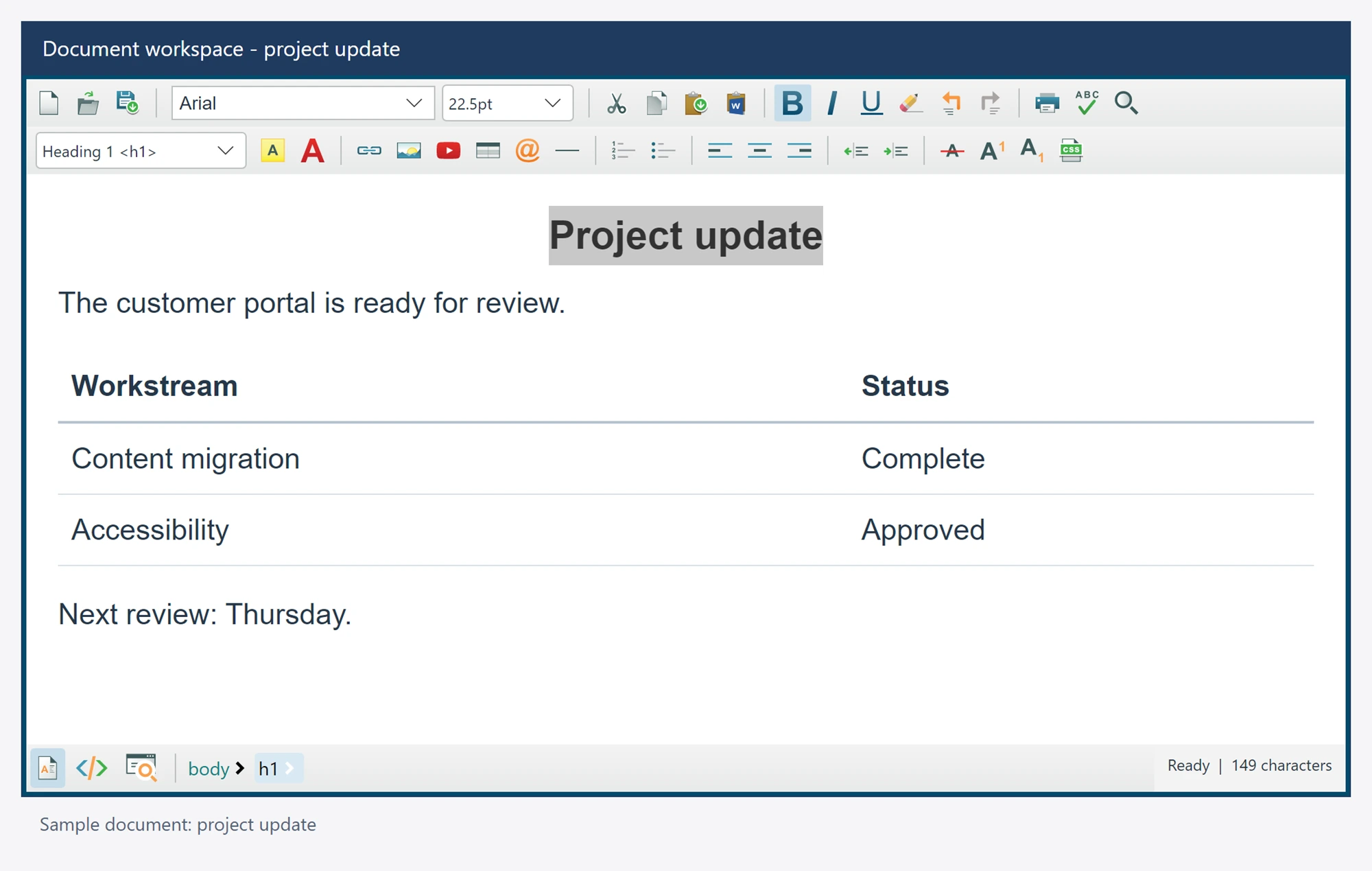
Formatting service
Apply character and paragraph formatting to the current editor selection. Use these operations for application-owned formatting controls.
The facade is available as editor.Formatting; its interface can be replaced by an application implementation.
Use it in your application
Formatting requires an appropriate editable selection or caret. Source mode supports the documented literal wrapping and insertion adaptations; it is not a hidden Design selection.
All examples assume an editor named editor, already attached to a visible window, and an awaited editor.Ready. Keep operations asynchronous instead of blocking the UI thread.
await editor.Formatting.BoldAsync();
await editor.Formatting.ChangeFontSizeAsync("12pt");
Members
These declarations come from the package's own XML documentation. Await operations and supply cancellation tokens where your application needs them.
AlignCenterAsync Method
Centers the current design selection.
Syntax
Task AlignCenterAsync(CancellationToken cancellationToken = default)
AlignLeftAsync Method
Aligns the current design selection to the left.
Syntax
Task AlignLeftAsync(CancellationToken cancellationToken = default)
AlignRightAsync Method
Aligns the current design selection to the right.
Syntax
Task AlignRightAsync(CancellationToken cancellationToken = default)
ApplyListAsync Method
Sets, clears or toggles the requested list format in design mode.
Syntax
Task ApplyListAsync(ListTypes listType, FormatOptions option = FormatOptions.Toggle, CancellationToken cancellationToken = default)
ApplyTitleHeaderAsync Method
Applies heading level 1 through 6, or a paragraph for level 0.
Syntax
Task ApplyTitleHeaderAsync(int headerNumber, CancellationToken cancellationToken = default)
BoldAsync Method
Sets, clears or toggles bold on the design selection, or wraps the source selection with its matching paired tag.
Syntax
Task BoldAsync(FormatOptions option = FormatOptions.Toggle, CancellationToken cancellationToken = default)
ChangeFontAsync Method
Applies font family, CSS size and native color together to the current design selection.
Syntax
Task ChangeFontAsync(string fontFamilyName, string fontSize, Color foreColor, CancellationToken cancellationToken = default)
ChangeFontNameAsync Method
Applies a font family to the current design selection.
Syntax
Task ChangeFontNameAsync(string fontFamilyName, CancellationToken cancellationToken = default)
ChangeFontSizeAsync Method
Applies the supplied CSS font size and unit to the current design selection.
Syntax
Task ChangeFontSizeAsync(string fontSize, CancellationToken cancellationToken = default)
ChangeForeColorAsync Method
Applies a native foreground color to the current design selection.
Syntax
Task ChangeForeColorAsync(Color foreColor, CancellationToken cancellationToken = default)
ChangeHighlightColorAsync Method
Applies a native highlight color to the current design selection.
Syntax
Task ChangeHighlightColorAsync(Color highlightColor, CancellationToken cancellationToken = default)
IndentAsync Method
Increases indentation of the current design selection.
Syntax
Task IndentAsync(CancellationToken cancellationToken = default)
ItalicAsync Method
Sets, clears or toggles italic on the design selection, or wraps the source selection with its matching paired tag.
Syntax
Task ItalicAsync(FormatOptions option = FormatOptions.Toggle, CancellationToken cancellationToken = default)
OutdentAsync Method
Decreases indentation of the current design selection.
Syntax
Task OutdentAsync(CancellationToken cancellationToken = default)
RemoveAlignmentAsync Method
Removes authored alignment from selected design blocks.
Syntax
Task RemoveAlignmentAsync(CancellationToken cancellationToken = default)
RemoveFormatAllAsync Method
Resets the complete writable design body in one undo operation, preserving the shared reserved tags, their attributes and canonical field/video atoms. Source and preview are rejected.
Syntax
Task RemoveFormatAllAsync(CancellationToken cancellationToken = default)
RemoveFormatFromSelectionAsync Method
Removes inline formatting from the current design selection.
Syntax
Task RemoveFormatFromSelectionAsync(CancellationToken cancellationToken = default)
RemoveHeaderTitleAsync Method
Changes the selected heading to a paragraph.
Syntax
Task RemoveHeaderTitleAsync(CancellationToken cancellationToken = default)
StrikeThroughAsync Method
Sets, clears or toggles strike through on the design selection, or wraps the source selection with its matching paired tag.
Syntax
Task StrikeThroughAsync(FormatOptions option = FormatOptions.Toggle, CancellationToken cancellationToken = default)
SubscriptAsync Method
Sets, clears or toggles subscript on the design selection, or wraps the source selection with its matching paired tag.
Syntax
Task SubscriptAsync(FormatOptions option = FormatOptions.Toggle, CancellationToken cancellationToken = default)
SuperscriptAsync Method
Sets, clears or toggles superscript on the design selection, or wraps the source selection with its matching paired tag.
Syntax
Task SuperscriptAsync(FormatOptions option = FormatOptions.Toggle, CancellationToken cancellationToken = default)
UnderlineAsync Method
Sets, clears or toggles underline on the design selection, or wraps the source selection with its matching paired tag.
Syntax
Task UnderlineAsync(FormatOptions option = FormatOptions.Toggle, CancellationToken cancellationToken = default)