


 NuGet
NuGet
MCP server for AI coding assistants
Coding assistants learned the HTML Editor from whatever was on the web when they were trained, so they guess member names that no longer exist and put the licence key where it silently does nothing. The documentation MCP server removes the guessing. One URL gives Claude Code, GitHub Copilot, Cursor, Codex and every other MCP client the shipped Avalonia HTML Editor package's real signatures, its guides and samples, and the exact licence code. No account, no key, nothing to install.
Connect your coding assistant
Paste one sentence into your assistant. It writes its own configuration; the client-by-client reference further down is for anyone who prefers to edit the file by hand.
Add the MCP server at https://mcp.spicelogic.com/html-editor/avaloniaWhen the client asks, enable the new tools, then check that the first answer really came through a SpiceLogic tool call. Restart only if the client requires it.
Streamable HTTP, read-only, public. Nothing to sign up for.
What changes once it is connected
This is a real session, run against the live endpoint while this page was written. Claude Code, with nothing but this server connected, was given one request:
The prompt
Using the SpiceLogic Avalonia documentation tools, show me how to load HTML into the editor, make it read-only, and apply my licence key at startup. Keep the answer short.Before writing a line of code, the assistant made three tool calls:
| Call | What came back |
|---|---|
get_licensing() | The static AvaloniaHtmlEditor.LicenseKey property, the Program.cs startup code in C# and VB, and the edition-specific rules: a WPF or WinForms key does not activate the Avalonia edition |
get_quickstart() | The package id SpiceLogic.HtmlEditor.Avalonia, the version currently on NuGet, the install command and a starter window that compiles against it |
search_api("read only") | 141 members that mention read-only, ranked so the IsReadOnly styled property came first, each with its XML documentation |
Then it answered, quoted here as it was returned, trimmed only for length:
// Program.cs: set the key before Avalonia creates any editor
using SpiceLogic.HtmlEditor.Avalonia;

public static void Main(string[] args)
{
    AvaloniaHtmlEditor.LicenseKey = "your-signed-Avalonia-key"; // static, process-wide
    BuildAvaloniaApp().StartWithClassicDesktopLifetime(args);
}

// Wherever you create the editor
var editor = new AvaloniaHtmlEditor { IsReadOnly = true };   // blocks user edits in every mode

await editor.Ready.WaitAsync(TimeSpan.FromSeconds(30), token); // wait until the editor is ready
await editor.SetDocumentHtmlAsync("<!DOCTYPE html><html><body><h1>Hello</h1></body></html>", token);- Licence: use the Avalonia key from members.spicelogic.com. WPF and WinForms keys don't activate this edition. A wrongly placed key doesn't throw. Without one, the editor silently runs as a 14-day trial. Check
LicenseStatusorawait ValidateLicenseAsync()to confirm the key took. - Read-only:
IsReadOnlyis also a bindable styled property. Links in a read-only editor still raiseLinkClicked. - Loading HTML:
SetDocumentHtmlAsyncis the call the quickstart uses for a full document.
Every name in that answer exists in the shipped package, the key is assigned before Avalonia creates the editor, and the wait on Ready came from the quickstart the server returned. The assistant did not know any of this before the request; it looked it up, the way a careful developer would.
For comparison, the same assistant was asked the same question with no tools and told to answer from memory. It declined to write any code at all, because it could not recall the control's namespace, its loading members or how it takes a licence key, and warned that a guessed licence call could leave a trial watermark in place. That is the honest best an assistant can do from training data. The server turns it into the answer above.
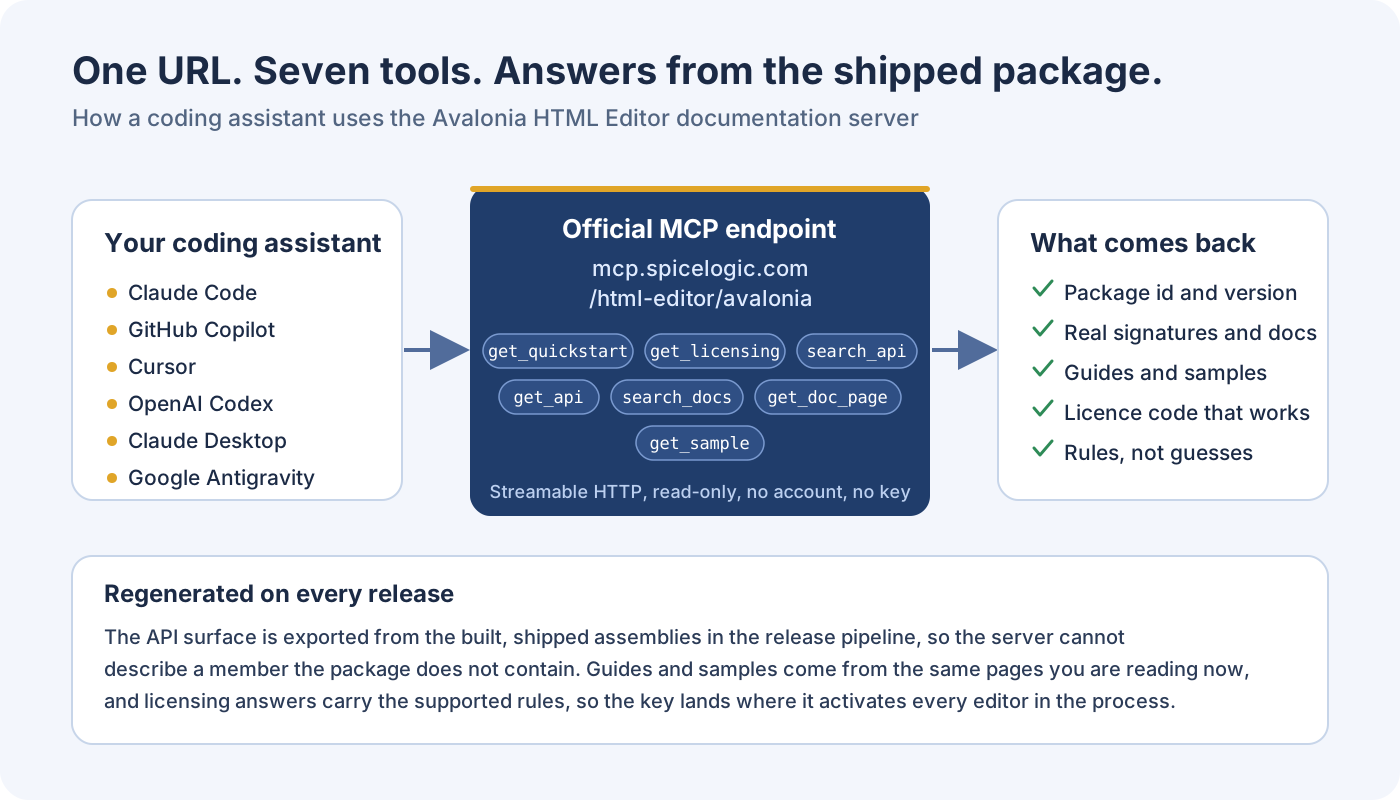
What your assistant gets
Seven tools. The server's own instructions tell the assistant the working order: get_quickstart first in a project that does not reference the package yet, get_licensing before any licence code, and get_api before it writes a member name from memory.
| Tool | Returns | The assistant uses it when |
|---|---|---|
get_quickstart() | Package id, current version, install command and starter code that compiles | The project does not reference the editor yet |
get_licensing() | The static AvaloniaHtmlEditor.LicenseKey property, startup code in C# and VB, and the rules | Before writing any licence code |
search_api(query, kind) | Members matching a task in plain words, with declaring type, signature and documentation | It knows what the editor should do but not which member does it |
get_api(symbol) | Every member of one public type with signatures and XML documentation | It needs the exact signature before writing code |
search_docs(query) | Matching guide titles, slugs and categories | The question is a how-to rather than an API lookup |
get_doc_page(slug) | The full content of one documentation page | A search hit needs reading in full |
get_sample(task) | The documented working example closest to the task | A working example beats a description |
On this product-specific URL the product argument is optional and ignored: the URL always selects the Avalonia edition, so a client connected here can never be answered with another edition's API.
Prompts worth trying
Each block has a copy button. They assume the server is connected and its tools are enabled.
Create a small Avalonia desktop app, install the SpiceLogic HTML Editor, add it to the main window, load a heading and a bulleted list, and add a button that inserts today's date. Build and run it.Apply my SpiceLogic licence key the supported way, and show me how to confirm the editor is no longer running in trial mode.Users paste from Word and the resulting HTML is a mess. Which SpiceLogic Avalonia HTML Editor setting cleans it up, and how do I turn it on?Add a custom toolbar command to the SpiceLogic Avalonia HTML Editor that wraps the current selection in a highlighted span. Use the documentation tools for the exact API.Why the answers stay right
- API and quickstart answers are generated from the shipped NuGet package and its XML documentation on every release. The server cannot describe a member the package does not contain.
- Licensing answers carry the supported rules in one place, so the key is set once at startup, where it activates every editor in the process.
- The documentation tools read the same pages you are looking at now. A guide corrected here is corrected for the assistant in the same moment.
- The server is read-only, public and rate limited to 60 calls a minute per IP address. Assistants that do not make tool calls can read llms.txt, a plain-text index of the documentation.
Client setup
Every MCP client accepts the same URL; what differs is where it keeps the setting. Ask the assistant to add it, or follow the steps for your client, then verify a real call as described at the end of this page.
Visual Studio (GitHub Copilot)
Visual Studio 2026, or Visual Studio 2022 version 17.14 and later.
- Open Copilot Chat from View > GitHub Copilot Chat, select Agent mode, then click Select tools and skills, the tools icon under the chat box.
- Click the plus button at the top of the Tools list, then Add custom MCP server.
- Destination: keep Global - Available in all solutions to get the server in every solution, or choose the solution-scoped file to commit it for your team.
- Server ID:
spicelogic-avalonia-editor. Type:HTTP. URL:https://mcp.spicelogic.com/html-editor/avalonia. Leave Headers empty, because the endpoint is public and takes no key. - Save the server and enable the SpiceLogic tools in that same tools list.
- Submit an editor question that asks Copilot to use the SpiceLogic documentation tools. Review and allow the tool invocation if prompted, then inspect the returned documentation.
Choosing HTTP is what turns the Command box into the URL box, and Environment Variables into Headers; stdio is for servers that run as a local process. Saving the server does not by itself enable its tools. Enable the SpiceLogic tools in the tool picker; the displayed tool count can change as the server evolves. Microsoft's Visual Studio MCP guide covers the client's own controls.
The same registration in JSON, for anyone who would rather write the file. Visual Studio reads <solution>\.mcp.json, %USERPROFILE%\.mcp.json for every solution, and <solution>\.vs\mcp.json for a machine-local setup:
{
  "servers": {
    "spicelogic-avalonia-editor": {
      "type": "http",
      "url": "https://mcp.spicelogic.com/html-editor/avalonia"
    }
  }
}
That file is also where a server is removed: delete its entry from the .mcp.json it was saved to.
VS Code (GitHub Copilot Chat)
Run MCP: Add Server, choose HTTP, and enter https://mcp.spicelogic.com/html-editor/avalonia. Give the server a unique name, choose its configuration scope, and review any trust prompt. The same guided flow is available from Chat: Open Customizations > MCP Servers > Add Server; the VS Code MCP guide explains the scopes.
For the VS Code workspace or profile configuration, the equivalent entry in .vscode/mcp.json uses a top-level servers object:
{
  "servers": {
    "spicelogic-avalonia-editor": {
      "type": "http",
      "url": "https://mcp.spicelogic.com/html-editor/avalonia"
    }
  }
}
Use an agent session, enable the server tools, and verify a real call as described below. If you choose the portable Copilot configuration instead, let the guided flow write its client-specific format; do not copy a configuration wrapper from another client.
GitHub Copilot CLI
copilot mcp add --transport http spicelogic-avalonia-editor https://mcp.spicelogic.com/html-editor/avaloniaClaude Code
claude mcp add --transport http spicelogic-avalonia-editor https://mcp.spicelogic.com/html-editor/avaloniaIn Claude Code, use /mcp to inspect the server and its tools. Review any project approval or trust request, then verify an actual documentation call. A successful add command confirms saved configuration, not a completed documentation query. Claude Code's MCP guide covers scopes and permissions.
Claude Desktop
Open Settings, choose Connectors, choose Add custom connector, paste https://mcp.spicelogic.com/html-editor/avalonia, and add it.
Cursor
Add this to ~/.cursor/mcp.json, or .cursor/mcp.json inside a project (Cursor's MCP guide):
{
  "mcpServers": {
    "spicelogic-avalonia-editor": {
      "url": "https://mcp.spicelogic.com/html-editor/avalonia"
    }
  }
}
OpenAI Codex CLI
Add it from the terminal:
codex mcp add spicelogic-avalonia-editor --url https://mcp.spicelogic.com/html-editor/avaloniaRun codex mcp list to inspect the saved entry and use /mcp inside the Codex CLI session to inspect active servers. Start or reload the session if the client requires it, then verify a real documentation call. Hosted ChatGPT does not read local Codex configuration.
Or add it to ~/.codex/config.toml:
[mcp_servers.spicelogic-avalonia-editor]
url = "https://mcp.spicelogic.com/html-editor/avalonia"
Google Antigravity
Open the MCP Servers panel, choose "Manage MCP Servers", then "View raw config". Add this to the global ~/.gemini/config/mcp_config.json file or the workspace .agents/mcp_config.json file. Antigravity uses serverUrl for a remote Streamable HTTP server:
{
  "mcpServers": {
    "spicelogic-avalonia-editor": {
      "serverUrl": "https://mcp.spicelogic.com/html-editor/avalonia"
    }
  }
}
Check your client's server and tool list to confirm the SpiceLogic documentation tools are available and enabled. The client may require a refresh or a new session after a configuration change.
Verify the first documentation call
A saved connection is only the first step. In an agent session, ask the assistant to use the SpiceLogic Avalonia documentation tools for an editor question. Review any tool permission request, then expand the actual call and check its output.
- Confirm that the call uses
https://mcp.spicelogic.com/html-editor/avalonia. - Check that the intended documentation tool succeeds and returns the relevant guide or API signature.
- Compare the returned package and member with the package installed in your project, then review and test the proposed code.
If tools are unavailable, check the selected endpoint, enabled tools, client connection status and your organisation's policy. Reload or restart only when your client requires it. Documentation access grounds an answer; the returned code still deserves a read before it ships.