


 NuGet
NuGet
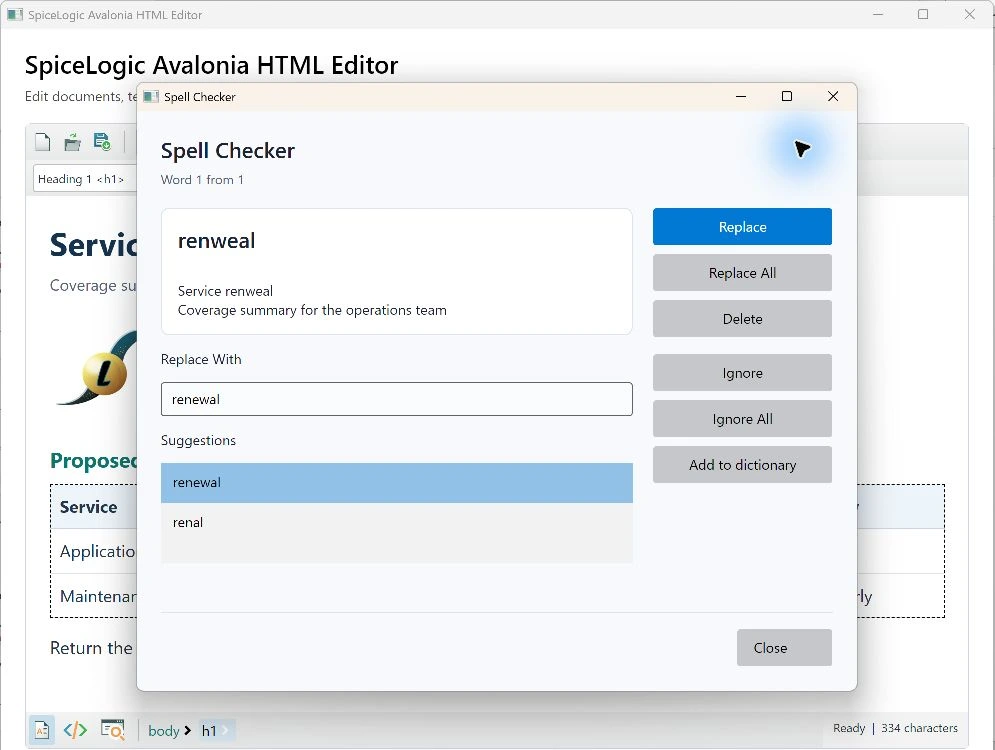
Inline spelling and spelling review
The editor checks document text with bundled local dictionaries. Inline marks use browser CSS Highlights and do not become part of saved HTML.
editor.SpellCheckLanguage = "en_US";
editor.EnableInlineSpellChecking = true;
await editor.CheckSpellingAsync();
Open spelling review from an attached owner window in editable design mode. The review captures the current text, document generation and revision before accepting replacements. A changed document rejects a stale result. Block, cell and line-break boundaries separate words without changing the original character offsets.
Custom words and ignored words
DictionaryFile.EnableUserDictionary defaults to true, while UserDictionaryFilePath defaults to empty. There is no automatic persistent destination. Configure an explicit writable local UTF-8 word-per-line file before offering Add; disabling the option hides Add. Persistence failures are reported rather than silently presented as a saved word. Ignored words apply to the current checker instance, including later documents checked by that instance; other editor instances keep their own ignored-word state. Changing dictionary or scan options recreates the checker.
Bounded scanning and localization
SpellCheckOptions configures the scan. The native host accepts at most 5,000 issues per scan. Close an active review before changing its dictionary or options. A newer exact document snapshot cancels its older scan. Action, review-status and completion captions use the editor instance's shared language resources.
The native spelling workflow and final packaged application require actual platform qualification. Local dictionary processing does not itself imply that every other document resource is offline.
Local dictionary scope
Ignored words remain local to the checker instance. Configured custom-word persistence uses bounded, leased atomic storage; a failed write does not accept the word. Local spelling processing does not grant any document image or online resource permission.
// Your application chooses a permanent writable local path.
editor.SpellCheckOptions.DictionaryFile.UserDictionaryFilePath = configuredUserWordsPath;
editor.SpellCheckOptions.DictionaryFile.EnableUserDictionary = true;
The default spelling language follows the instance interface language. Set SpellCheckOptions.SpellCheckLanguage explicitly to select a different policy. Custom dictionaries require a complete local .dic/.aff pair; an application engine uses the shared ISpellCheckerEngine contract with one live editor owner.