


 NuGet
NuGet
Table authoring service
Create and edit tables through the same public authoring service used by native commands. Operations act on the current table or the explicitly selected rectangular cell region.
Use it for application-owned table commands and inspect selected-cell state before merging or splitting.
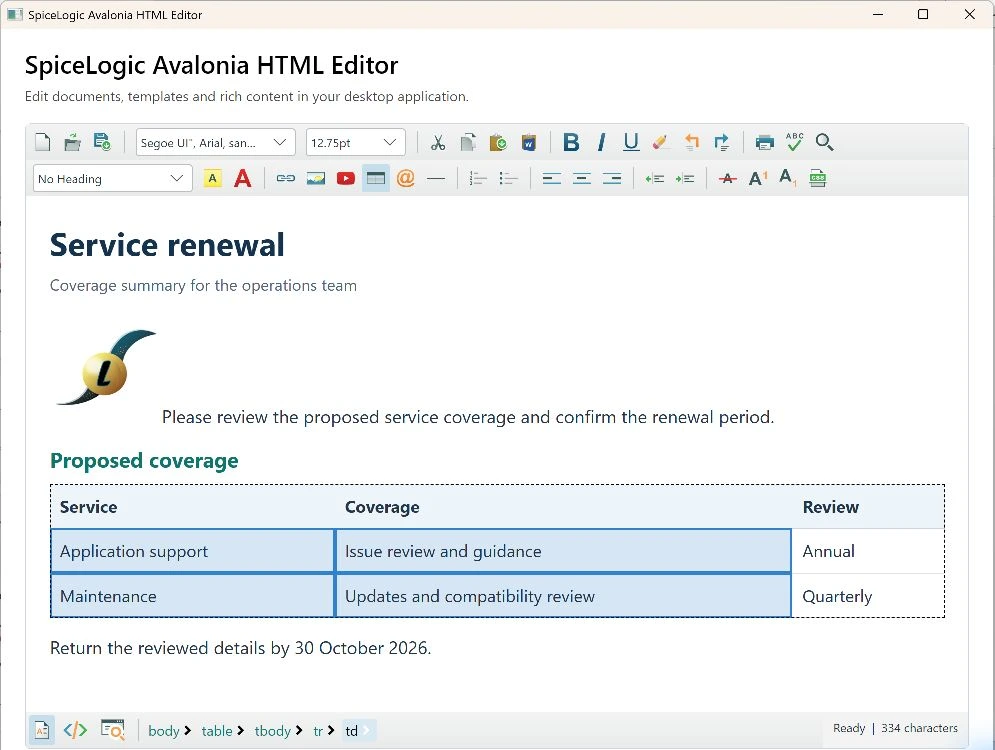
Use it in your application
Await insertion before subsequent table operations. A document or selection change can invalidate a pending table request.
Merge only a valid rectangular region belonging to one table. Inspect spans and the visible result after structural edits.
Read-only mode rejects authoring. Export after the command completes to persist the actual accepted table structure.
await editor.TableAuthoringService.InsertTableAsync(2, 2);
var selected = await editor.TableAuthoringService.GetSelectedCellsAsync();
Members
These signatures come from the delivered 1.0.2 assemblies and XML documentation. Cancellation tokens can be supplied to awaited operations. Follow the source-specific notes above when adapting a WPF integration.
| Member | Signature |
|---|---|
DeleteColumnAsync | Task<EditorSnapshot> DeleteColumnAsync(CancellationToken cancellationToken) |
DeleteRowAsync | Task<EditorSnapshot> DeleteRowAsync(CancellationToken cancellationToken) |
DeleteTableAsync | Task<EditorSnapshot> DeleteTableAsync(CancellationToken cancellationToken) |
GetSelectedCellsAsync | Task<TableCellSelection> GetSelectedCellsAsync(CancellationToken cancellationToken) |
InsertColumnAsync | Task<EditorSnapshot> InsertColumnAsync(InsertPositions position, CancellationToken cancellationToken) |
InsertRowAsync | Task<EditorSnapshot> InsertRowAsync(InsertPositions position, CancellationToken cancellationToken) |
InsertTableAsync | Task<EditorSnapshot> InsertTableAsync(int rows, int columns, IReadOnlyDictionary<string, string> styles, CancellationToken cancellationToken) |
MergeCellsAsync | Task<EditorSnapshot> MergeCellsAsync(CancellationToken cancellationToken) |
MergeWithRightCellAsync | Task<EditorSnapshot> MergeWithRightCellAsync(CancellationToken cancellationToken) |
SelectCellsAsync | Task<EditorSnapshot> SelectCellsAsync(int row, int column, int rowCount, int columnCount, CancellationToken cancellationToken) |
SetCellPropertiesAsync | Task<EditorSnapshot> SetCellPropertiesAsync(TableCellDialogState properties, CancellationToken cancellationToken) |
SetCellStylesAsync | Task<EditorSnapshot> SetCellStylesAsync(IReadOnlyDictionary<string, string> styles, CancellationToken cancellationToken) |
SetTablePropertiesAsync | Task<EditorSnapshot> SetTablePropertiesAsync(TableDialogState properties, CancellationToken cancellationToken) |
SetTableStylesAsync | Task<EditorSnapshot> SetTableStylesAsync(IReadOnlyDictionary<string, string> styles, CancellationToken cancellationToken) |
SplitCellAsync | Task<EditorSnapshot> SplitCellAsync(CancellationToken cancellationToken) |