


Download Avalonia HTML Editor Control
Add the NuGet package to a .NET 8 or newer Avalonia application, or start from the C# samples. The editor is natively tested on Windows, macOS and Linux. Build with .NET SDK 9.0.300 or newer; SDK 10 is recommended. Windows uses WebView2, macOS uses WKWebView and Linux requires WebKitGTK.
Free 14-day evaluation. No license key required.
Add the NuGet package
dotnet add package SpiceLogic.HtmlEditor.AvaloniaPM> Install-Package SpiceLogic.HtmlEditor.AvaloniaOr start from the Avalonia sample
Get the sample projects
Runnable C# Avalonia Quickstart and ScenarioGallery projects, referencing this edition's NuGet package. Restore the package and install the native browser prerequisites before running them.
Open the GitHub repositorygit clone https://github.com/spicelogic/avalonia-html-editor-control-samples.gitDownload the samples as a zip
A standalone Avalonia demo, the editor package and an offline dependency feed. Follow the included README, then build demo/AvaloniaHtmlEditorDemo.csproj. Native browser prerequisites still apply.
Download the zip anywayUnblocking the zip
On Windows, a downloaded zip may need to be unblocked before building:
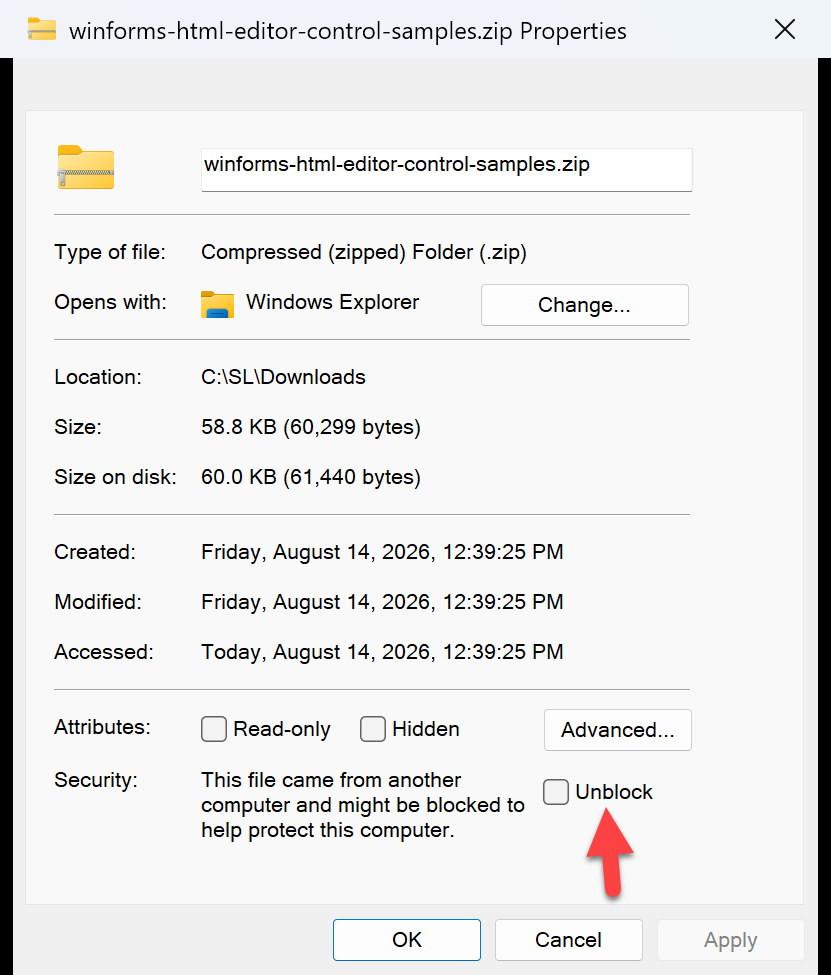
- Right-click the downloaded .zip file and choose Properties.
- On the General tab, look at the bottom for a Security line.
- Tick Unblock, then click OK.
- Extract the zip, read its README and open
demo/AvaloniaHtmlEditorDemo.csproj.
We do not ship a script for this on purpose: running one to silence a security warning is a worse habit than the one-time checkbox.