


Criterion Data Types
One thing that makes the SpiceLogic Decision Tree software stand out is how much detail you can put into a criterion. A criterion is just something you care about in a decision, like cost, safety, or how much you like a place. You do not have to squeeze every criterion into a single number. You describe each one in the way that fits it best.
You can model a criterion as any of these data types:
- Subjective - for things you judge by feel, with no exact number, like how spacious a garage feels or how nice a neighborhood is.
- Boolean - for plain yes or no facts, like "the car has a built-in GPS" or it does not.
- Number - for anything you can measure, like distance, time, or weight.
- Monetary - for amounts of money, such as price or yearly cost.
- Categorical - for picking from a fixed set of choices, like a car body type of Truck, SUV, or Sedan.
Why does this matter? Real decisions are a mix of these. Take buying a house. Part of it is money, like the price. Part of it is a number, like the commute in minutes. And part of it is feel, like whether the yard has enough trees. If you forced all of that into one plain number, you would lose what each thing really means. When the software knows the true nature of each criterion, it shows you the right input screen for it and scores it correctly. So your model matches how you actually think about the choice.
Here is the Payoff window, where you enter these values for a branch of the tree.
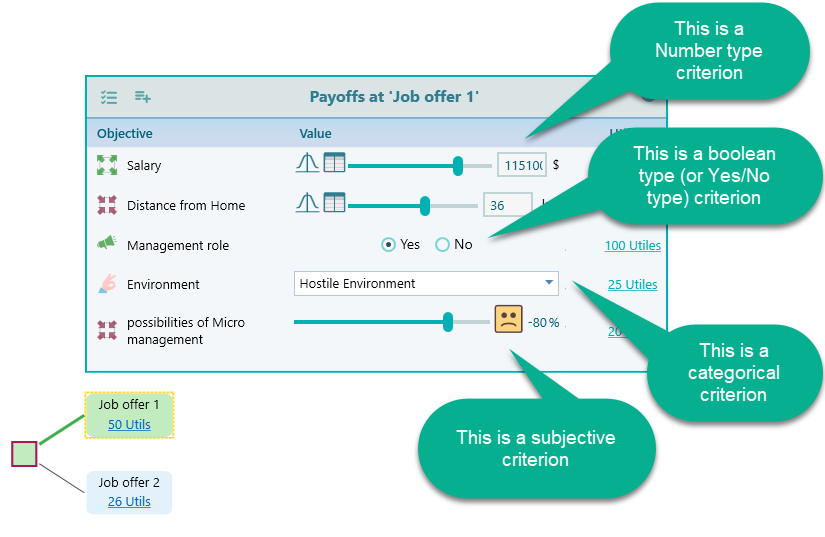
To get this kind of payoff screen, you first tell the software what data type each objective uses when you set up your objectives. Once an objective is marked as, say, a number or a yes/no answer, the Payoff window shows the matching input for it on its own. A money objective gives you a money box. A yes/no objective gives you a simple toggle. A number objective gives you a number box. You set the type once, and the right input follows you everywhere in the tree.
This saves you from a lot of small mistakes. You will not type words into a number field by accident, and you will not have to remember the format you used last time. For example, mark "Has a garage" as a yes/no objective once, and every branch where you fill it in shows a clean on/off toggle instead of a free text box.
Each data type has its own page that walks through how it works and when to use it. Pick the one you need:
- Subjective type - for judgments you make by feel, with no exact number.
- Boolean type - for plain yes or no answers.
- Number type - for measured values like time, distance, or weight.
- Categorical type - for choosing from a fixed set of options.