


Decision Criteria
Different decision-makers have different attitudes toward risk. A person who can afford a loss may choose differently from someone who cannot. That is why choosing the right decision criterion matters.
A decision criterion tells the software how to judge the best strategy. Some criteria focus on expected utility. Some are cautious. Some are optimistic. Some try to reduce regret.
SpiceLogic Decision Tree Pro supports the following decision criteria for evaluating the best strategy.
1. Maximize Expected Utility Criterion
2. Maximin / Leximin Criterion
3. Maximax Criterion
4. Minimax Regret Criterion
5. Most Likely Criterion
6. Hurwicz Optimism-Pessimism Rule
7. Laplace Insufficient Reason, or Principle of Indifference
Maximize Expected Utility Criterion
The Maximize Expected Utility criterion selects the action with the highest expected utility.
Expected utility means the expected value of utility. Decision Tree Pro lets you define a utility function for real-world outcomes such as money, time, or health benefit. After utility functions are defined, the software converts payoffs into utility values, calculates expected utility, and highlights the optimum path in green.
If you do not model a specific utility function, the criterion works like expected value for that objective.
By default, Decision Tree Pro uses the Maximize Expected Utility criterion. You can select the decision criterion from the ribbon.
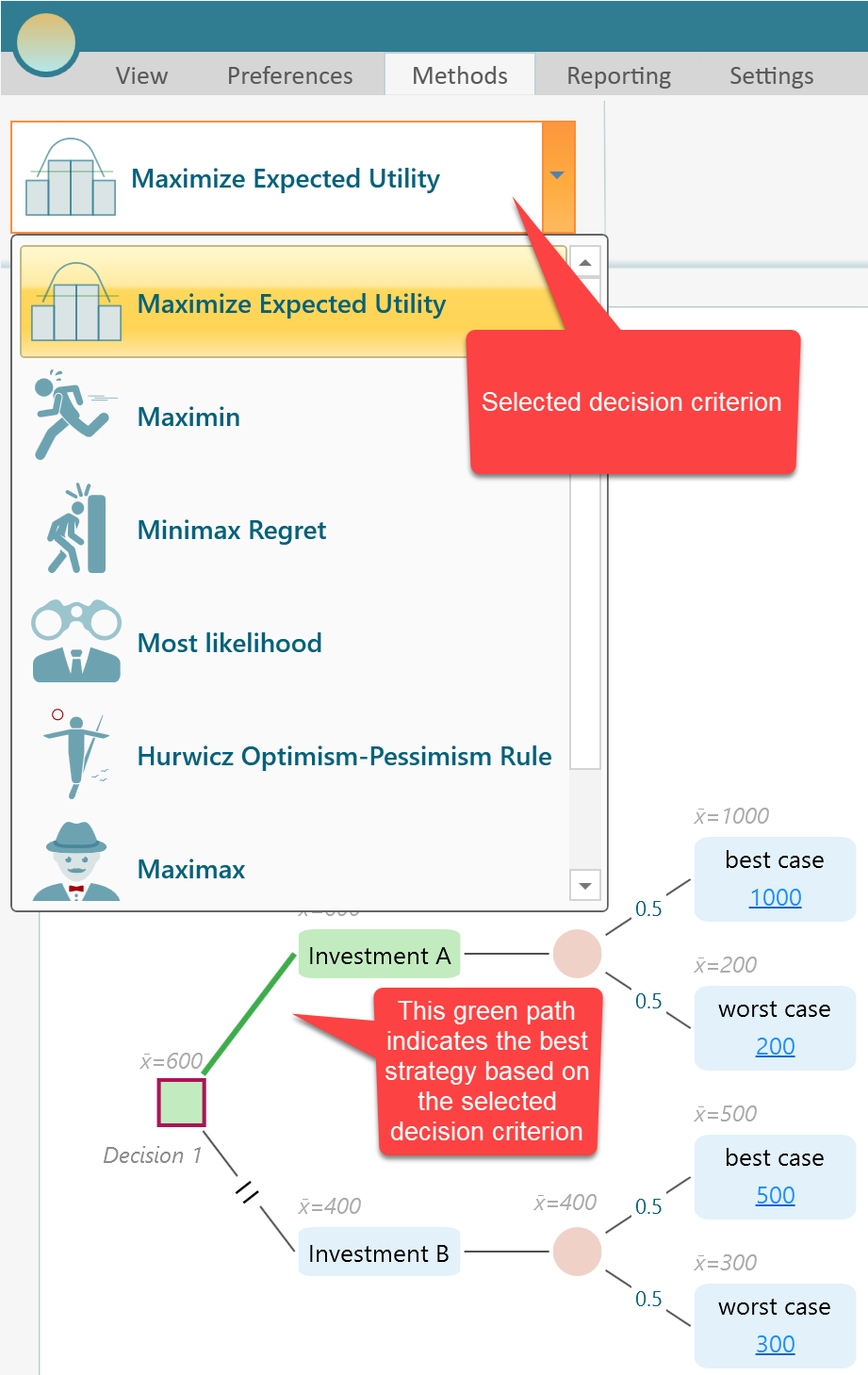
In decision theory, the von Neumann-Morgenstern utility theorem shows that under certain rational-behavior assumptions, a decision-maker facing risky outcomes behaves as if maximizing the expected value of a utility function. This is the basis of expected utility theory.
For a Number-type criterion, you can define a utility function. If you do not define one, Decision Tree Pro uses a straight-line risk-neutral utility function behind the scenes. That is equivalent to using expected value.
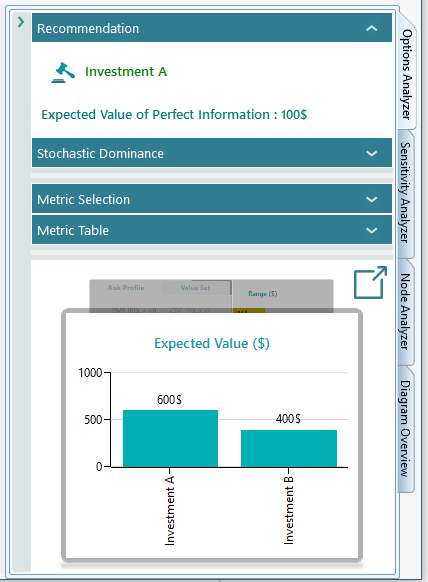
Expected utility values are shown in the Options Analyzer chart carousel.

Maximin / Leximin Criterion
Maximin means "maximize the minimum payoff".
This criterion fits a cautious or pessimistic decision-maker. For each action, look at the worst outcome that can happen. Then choose the action whose worst outcome is best.
For example, suppose Investment A has an expected value of $600 and Investment B has an expected value of $400. Under Maximize Expected Utility, Investment A is recommended.
But under Maximin, Investment B may be recommended. If the worst payoff for Investment A is $200 and the worst payoff for Investment B is $300, then Investment B has the better worst case. Maximin appeals to someone who wants a known minimum payoff if things go badly.
The Options Analyzer includes a Range Chart that helps compare the minimum and maximum outcomes.
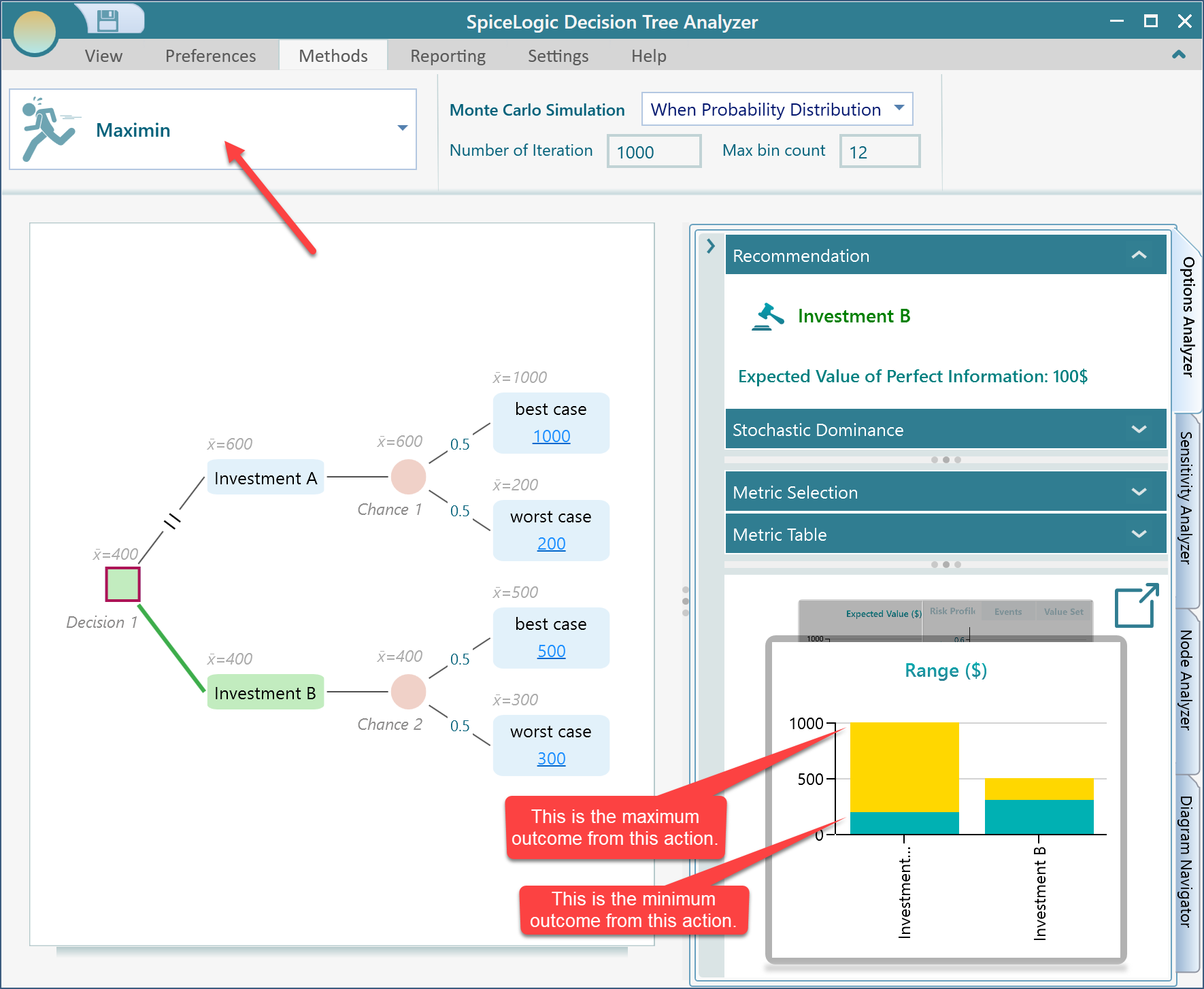
In the Range Chart, you can compare the minimum and maximum possible outcomes at the same time. A pessimistic decision-maker may choose Investment B because its minimum outcome is higher than the minimum outcome for Investment A.

Maximax Payoff Criterion
Maximax means "maximize the maximum payoff".
This is an optimistic criterion. It focuses on the best possible outcome for each action and chooses the action with the highest best-case payoff.
For example, if two investments have different best-case payoffs, the maximax criterion chooses the investment with the larger best-case payoff, even if it carries more downside risk.
This criterion can be useful in rare cases where the decision-maker is comfortable taking risk for the highest possible upside.

Minimax Regret Criterion
Minimax Regret means "minimize the maximum regret".
Regret measures how much you lose by choosing one option instead of the best option that would have been available after the outcome is known. It is also closely related to opportunity cost. Consider the same decision tree again.
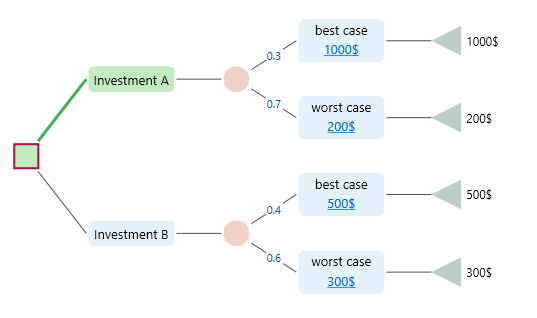
If the decision-maker chooses Investment B, the worst case may give $300. Looking back, Investment A could have produced as much as $1000. The maximum regret for choosing Investment B is $1000 - $300 = $700.
If the decision-maker chooses Investment A, the maximum regret is $500 - $200 = $300. A decision-maker who wants to minimize regret would choose the option with the lower maximum regret, which is Investment A in this example.
When you select the Minimax Regret criterion, the tree updates and highlights the recommended path in green. The Maximum Regret chart also appears in the chart carousel.
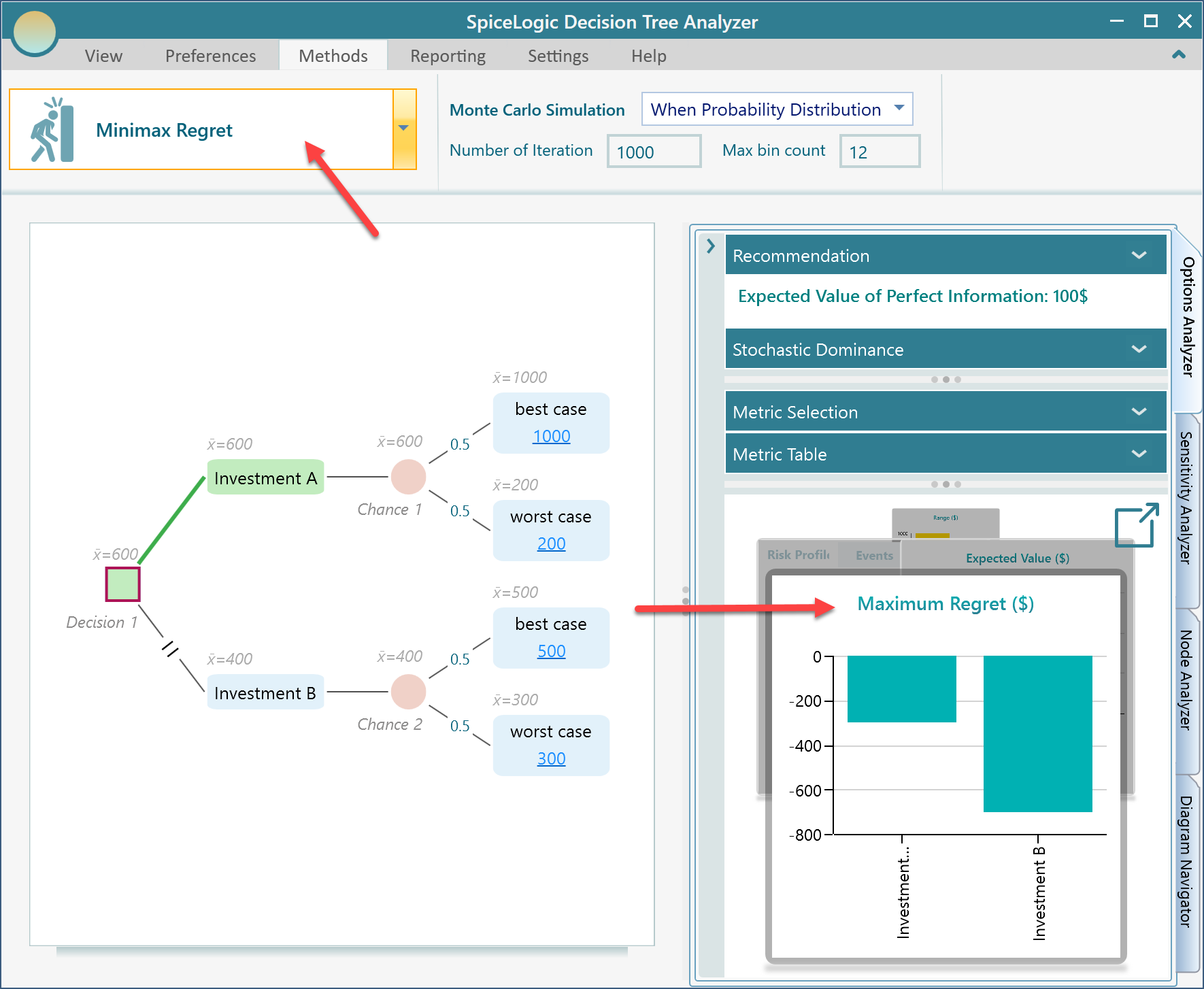
Maximum Regret is shown with a minus sign because it represents the difference between the payoff from the chosen action and the best payoff available in that state.
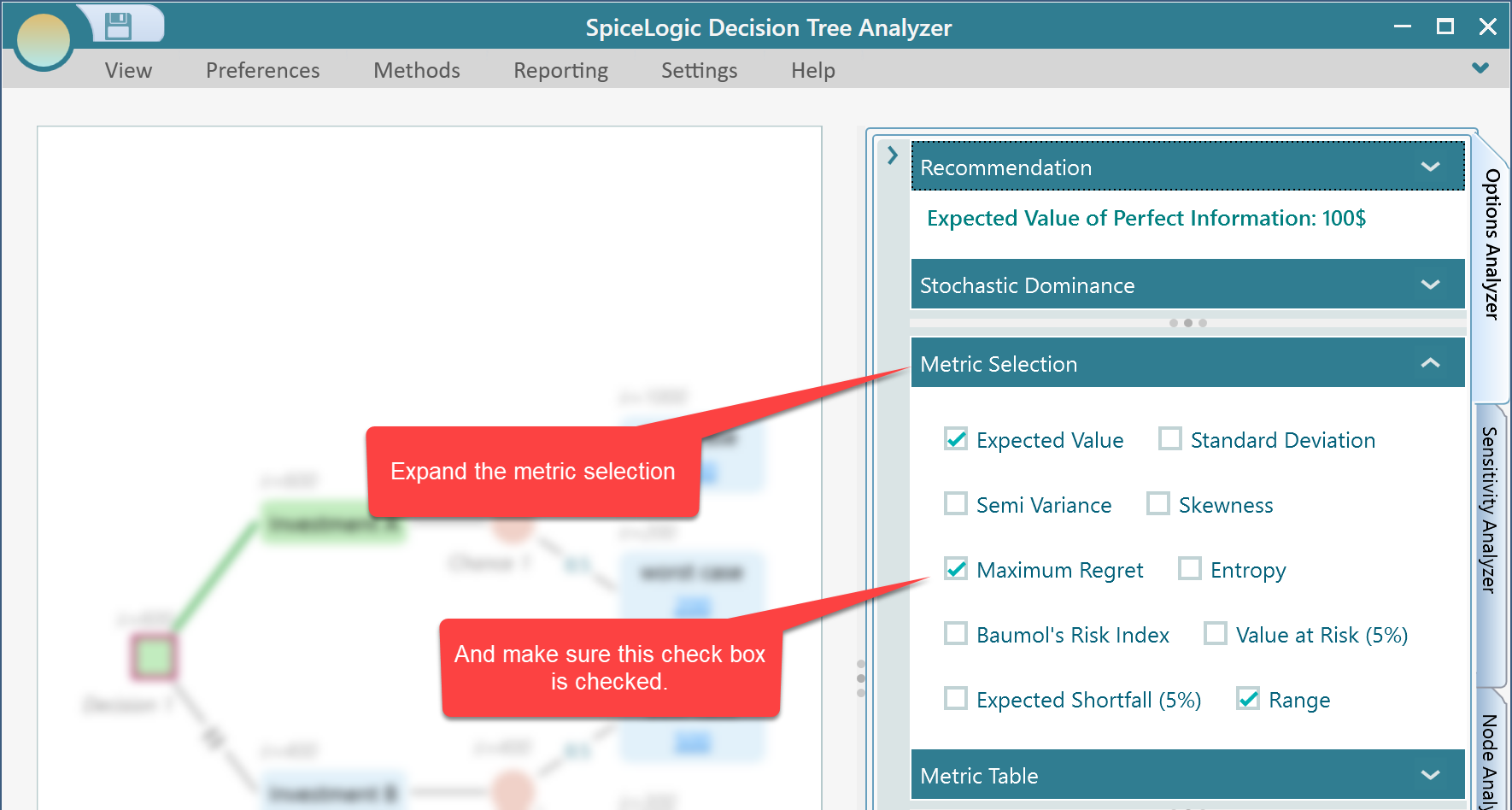
If the Maximum Regret chart does not appear in the carousel, expand the metric selection panel and make sure the Maximum Regret checkbox is selected.

Most Likely Criterion
Under the Most Likely criterion, the decision-maker assumes that the event with the highest probability at each chance node will happen. Based on that assumption, the software chooses the action with the highest payoff. Consider the following decision tree.
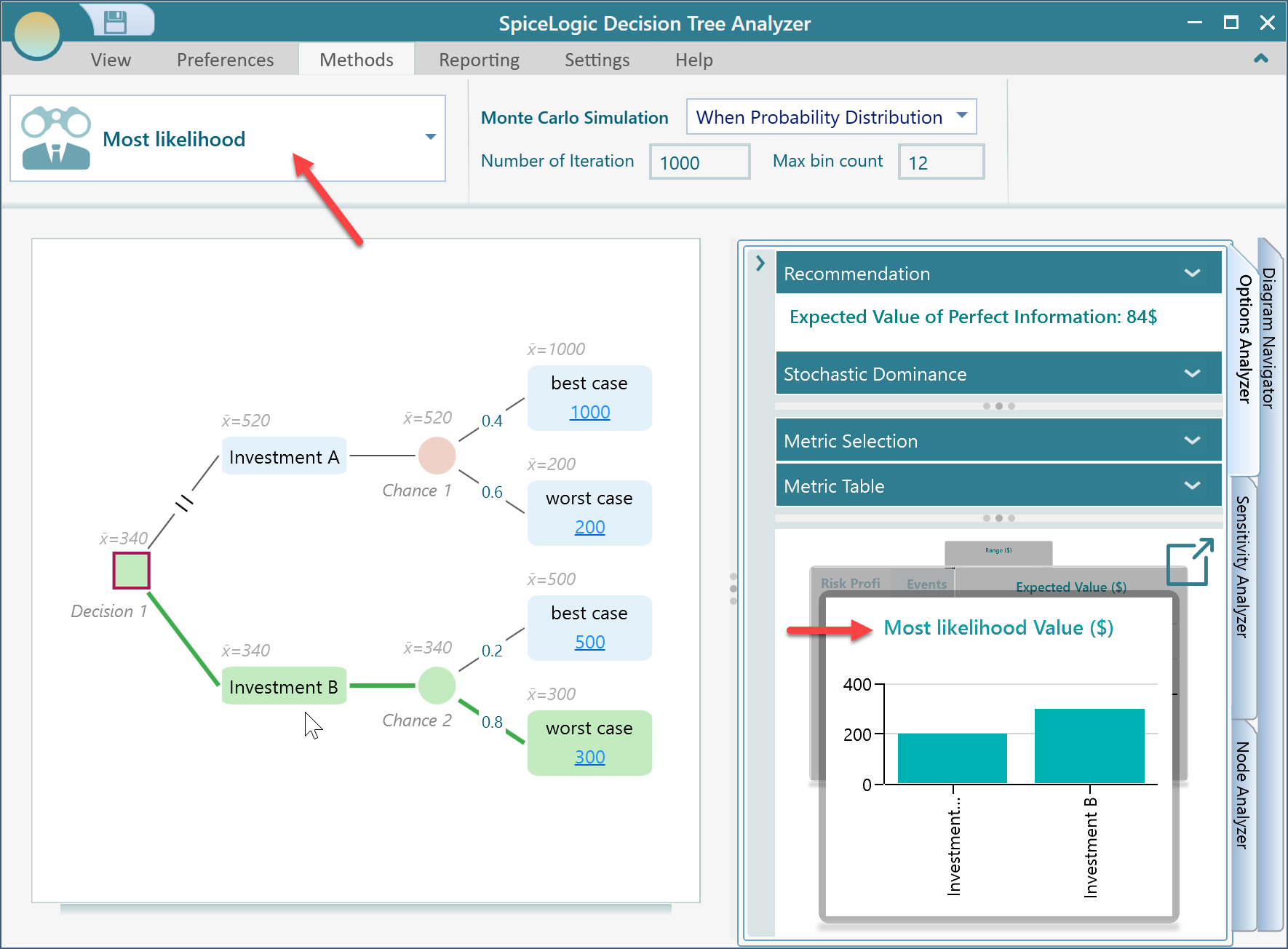
In this tree, Investment B has a worse outcome with probability 0.8 and a better outcome with probability 0.2. Investment A has a worse outcome with probability 0.6 and a better outcome with probability 0.4.
If we assume the most likely event happens, Investment A gives $200 and Investment B gives $300. Therefore, Investment B is recommended under the Most Likely criterion. The recommended path is highlighted in green.

Hurwicz Optimism-Pessimism Rule
The Hurwicz rule balances optimism and pessimism. It does not assume only the best case, and it does not assume only the worst case. Instead, it lets you choose a degree of optimism.
For each action, the rule combines the best outcome and the worst outcome:
Value = Best Outcome * alpha + Worst Outcome * (1 - alpha)
Here, alpha is the degree of optimism. If alpha is 0, the rule becomes Maximin. If alpha is 1, it becomes Maximax.
Leonid Hurwicz suggested this rule in 1951 as a middle ground between fully optimistic and fully pessimistic criteria.
Using the same decision tree, suppose alpha = 0.1, or 10% optimism.
Investment A = 1000 * 0.1 + 200 * (1 - 0.1) = 280
Investment B = 500 * 0.1 + 300 * (1 - 0.1) = 320
With alpha = 0.1, Investment B is the winner. In Decision Tree Pro, select the Hurwicz Optimism-Pessimism rule and set the degree of optimism in the Hurwicz parameters tab.
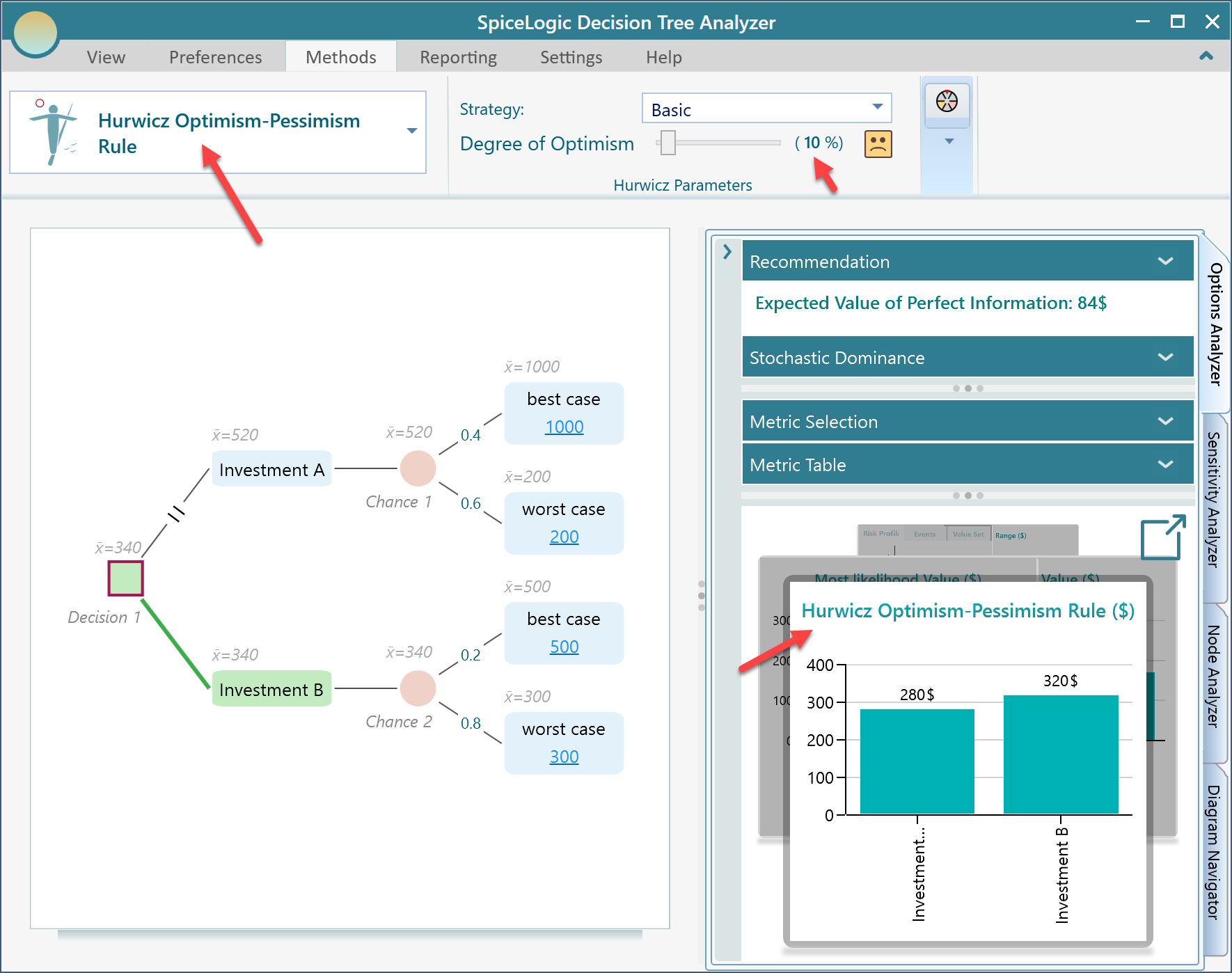
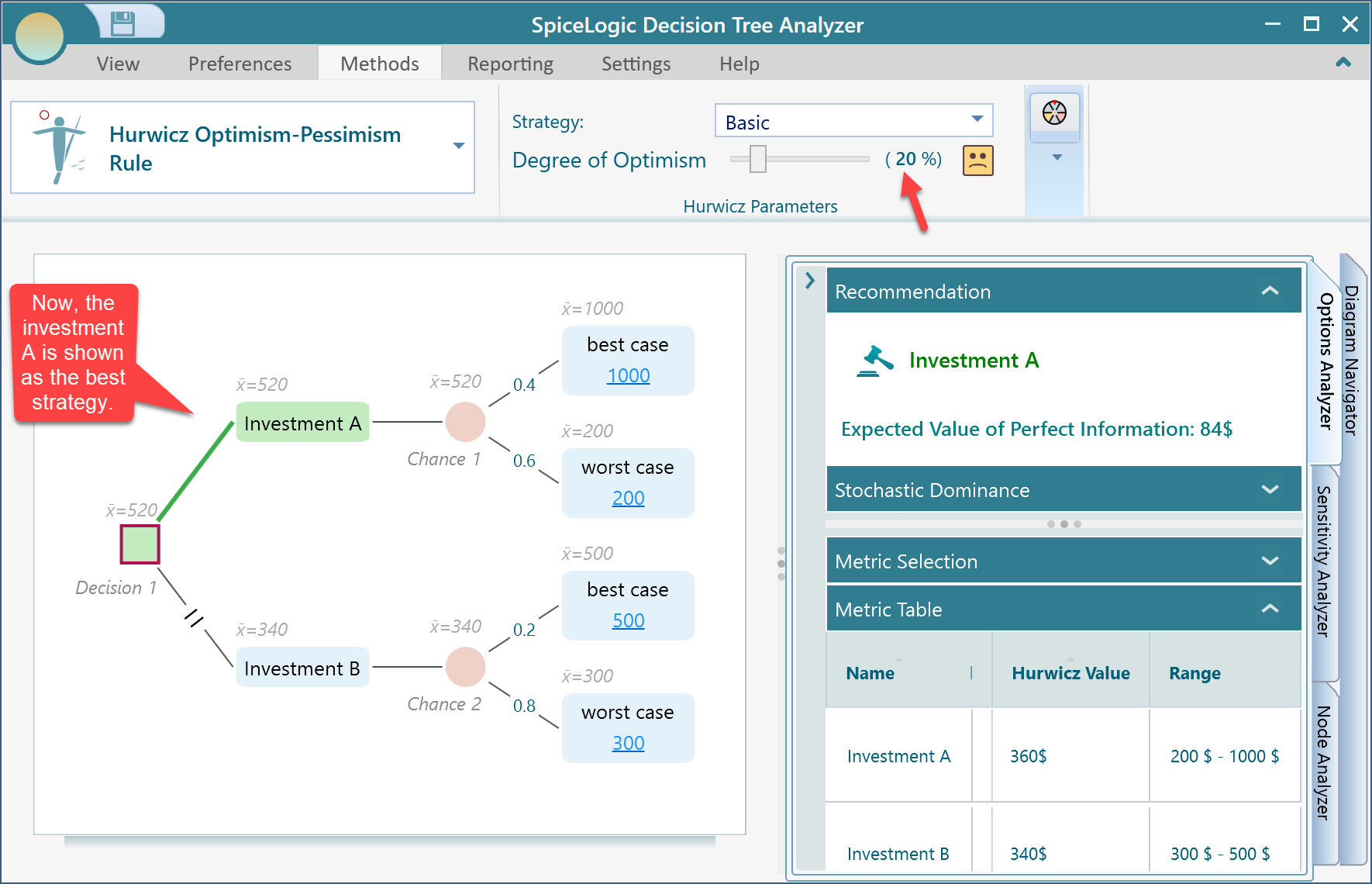
If you change the degree of optimism to 20%, the result changes:
Investment A = 1000 * 0.2 + 200 * (1 - 0.2) = 360
Investment B = 500 * 0.2 + 300 * (1 - 0.2) = 340
With alpha = 0.2, Investment A becomes the optimum strategy.
Modifications of Hurwicz Decision Rule
If you are interested in the paper on modifications of Hurwicz decision rule, Decision Tree Pro can model the APO and SAPO methods as well.
By default, the software uses the original basic rule. Expand the Strategy dropdown to see the supported modifications. The software supports the original basic rule, APO, and SAPO (CS). When you select SAPO (CS), extra sliders appear in the ribbon for the related parameters.


Laplace Insufficient Reason, or Principle of Indifference
The principle of indifference says that if there is no reason to believe one uncertain outcome is more likely than another, it is reasonable to treat all outcomes as equally likely. If there are N possible outcomes, each outcome receives probability 1 / N.
With this approach, the decision-maker calculates the expected payoff for each alternative and selects the alternative with the largest value.
To use this approach in Decision Tree Pro, select the Maximize Expected Utility criterion and set the chance-node probabilities to Unknown.
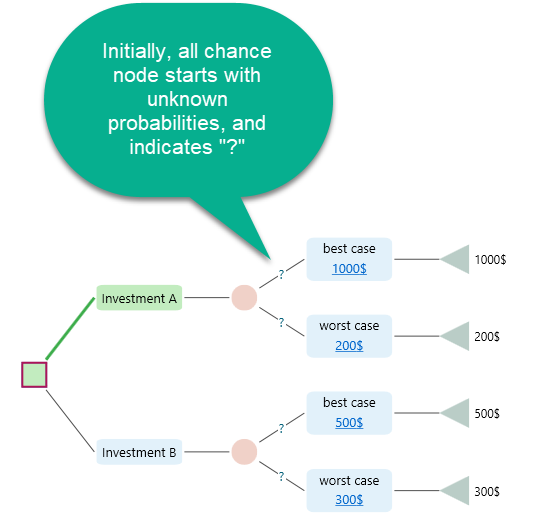
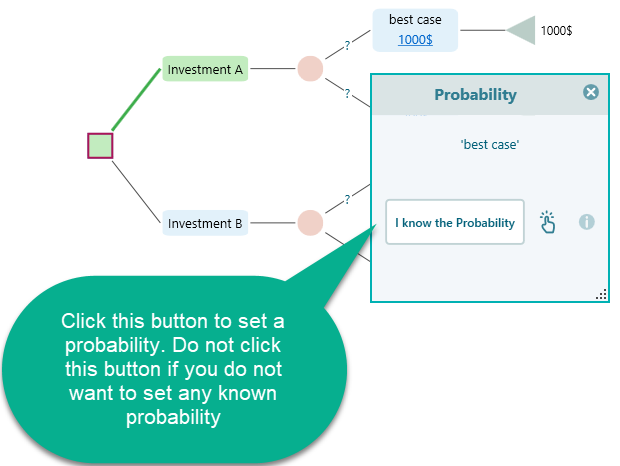
To set probabilities manually, click the question mark on the edge. The probability dialog opens.
If probabilities are already set for a chance node, you can set them back to unknown by unchecking the probability checkbox.
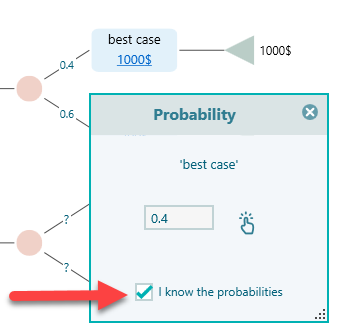
If you do not set probabilities for a chance node, the software assigns equal probabilities to all events behind the scenes according to the principle of indifference.
So, to use the Laplace insufficient reason criterion, leave the chance-node probabilities unknown and use the Maximize Expected Utility criterion.
