


Data Collection
Like most software today, RationalWill collects a small amount of usage information. We call this telemetry. It tells us where the app feels slow, when something crashes, and what is going wrong, so we can fix bugs faster. None of it identifies you personally. For example, it might record that a certain screen took a few seconds to open, but never who you are or what you typed. You can read exactly what we collect, and how we handle it, in our privacy policy.
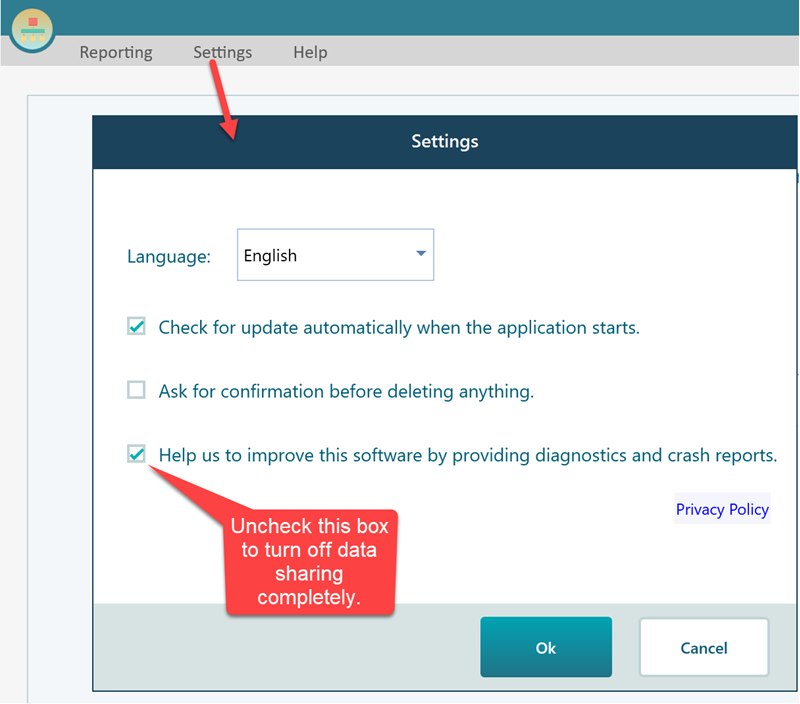
If you would rather not share any of this, that is fine. You can turn it off. Open the Settings menu and switch off the data sharing option, as shown below. Once it is off, the app stops sending telemetry right away. Changed your mind later? You can turn it back on at any time from the same place. Nothing is hidden, and the choice is always yours.
There is one more case worth knowing about. If RationalWill ever crashes, a small window pops up and asks if you would like to report the crash. If you click the REPORT CRASH button in that window, the crash log is sent to us so we can find out what went wrong and fix it.
This is the one time a log is sent even when telemetry is switched off. That is on purpose. Clicking that button is a clear sign that you want to report the problem, so we honor it. If you do not click it, nothing is sent. The report holds the technical details of the crash, like what the app was doing the moment it failed. It does not include your documents or personal data. Say you were building a decision tree and the app froze and closed. That one click tells us where it broke, and it helps us make the next version more stable for everyone.