


Choosing between two treatments (Markov Decision Process)
On this page I will walk you through a real example: how to put a Markov Chain inside a Decision Tree. The idea is simple. Each branch of the decision gets its own Markov chain. The tree runs both chains forward over time, then it compares the expected values, so you can see which choice comes out ahead.
Why bother? A plain decision tree is good for a one-time choice. But many real choices play out over years. A patient does not just pick a treatment once and stop. They live with it, year after year, and their health can change. A Markov chain captures that. It tracks how a patient moves between health states over time. Put the two together and you can score a long-term choice, not just a snapshot.
Here we look at a patient facing two treatment choices: Surgery or Medication. We want to know which one gives the patient more good years of life over the next 10 years.
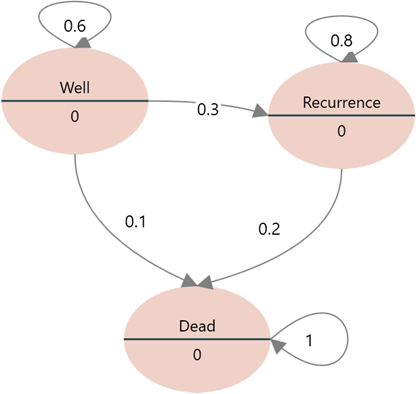
If the patient chooses surgery, they can move through three states over those 10 years:
- "Well"
- "Recurrence"
- "Dead"
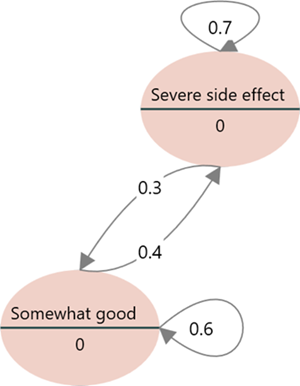
If the patient stays on medication, they can move through these states instead:
- "Somewhat good"
- "Severe side effect"
Each state is worth a certain quality of life, measured in QALY (Quality-Adjusted Life Years). A QALY of 1.0 means a full year in perfect health. A QALY of 0 means death. So a year spent in a state worth 0.5 counts as half a healthy year. Here are the values we will use:
| State | QALY |
| Well | 0.89 |
| Recurrence | 0.5 |
| Dead | 0 |
| Somewhat good | 0.68 |
| Severe side effect | 0.2 |
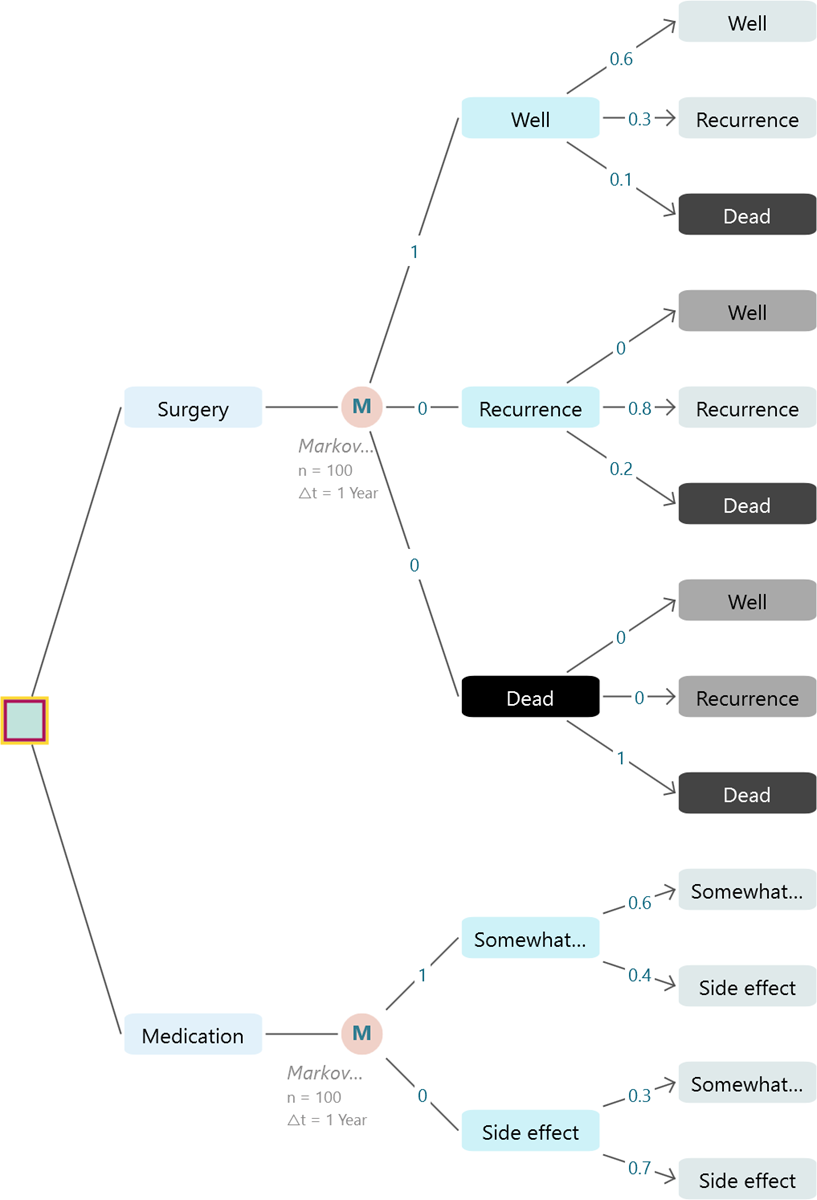
The last thing we need is the transition probabilities. These say how likely the patient is to move from one state to another each year. For example, someone who is "Well" this year might stay "Well" next year, or slip into "Recurrence". Those numbers are shown below.
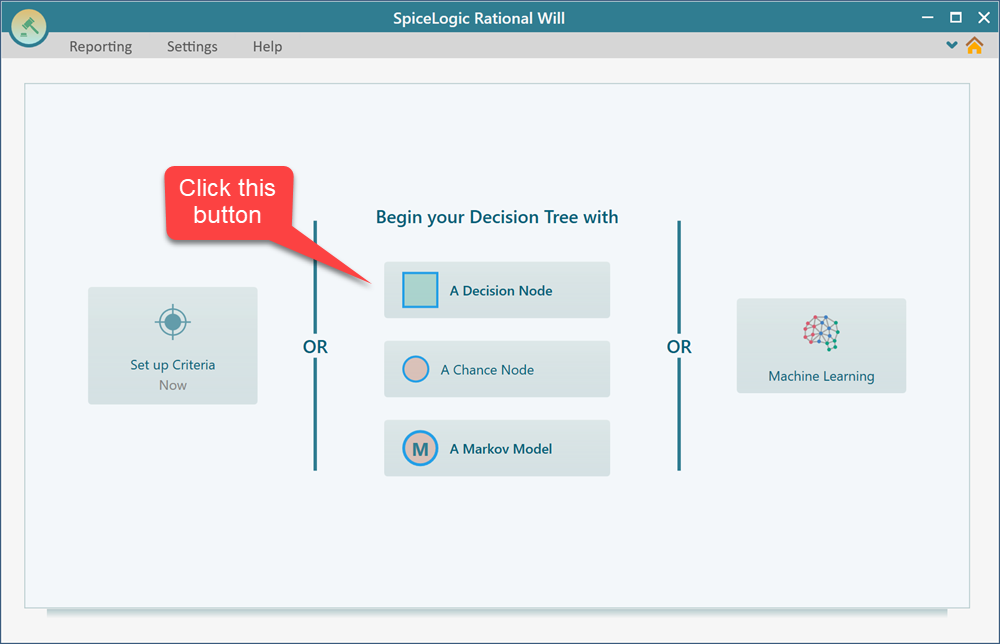
Let's begin. Open Rational Will (or the Decision Tree software) and pick a Decision Node as the root of the tree. This is the point where the patient has to choose between the two treatments. The root is where every branch starts, so the whole model grows out from here.
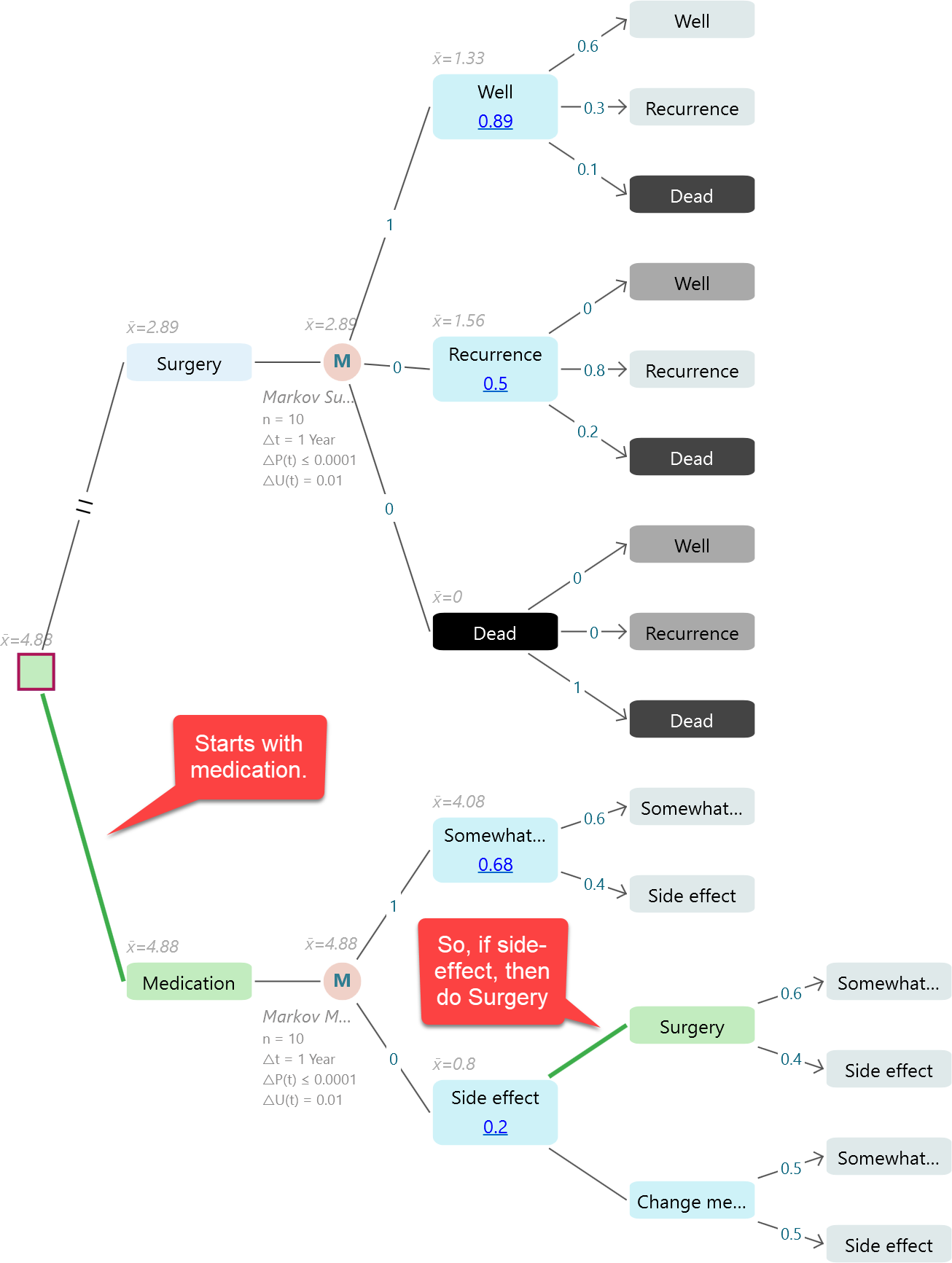
Next, create the two actions for the two treatment choices, as shown below. One action is "Surgery" and the other is "Medication". Once they are in place, add a Markov node to the "Surgery" action. That Markov node is where the surgery outcomes will play out year by year over the 10 years.
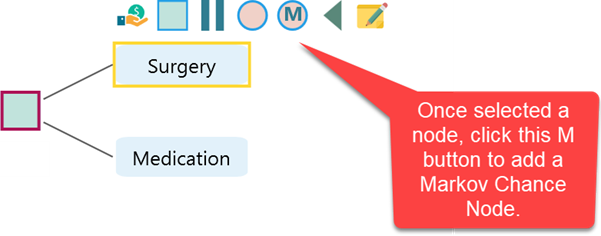
As shown above, attach a Markov chance node to each of the two actions, so both surgery and medication have their own Markov chain. As soon as you click the Markov Chance Node, a wizard opens to help you set it up. Follow the same steps you learned in QALY and Cost with Markov Model. Add each state, then enter the transition probabilities for it. Do this for both Markov chains, as shown below.
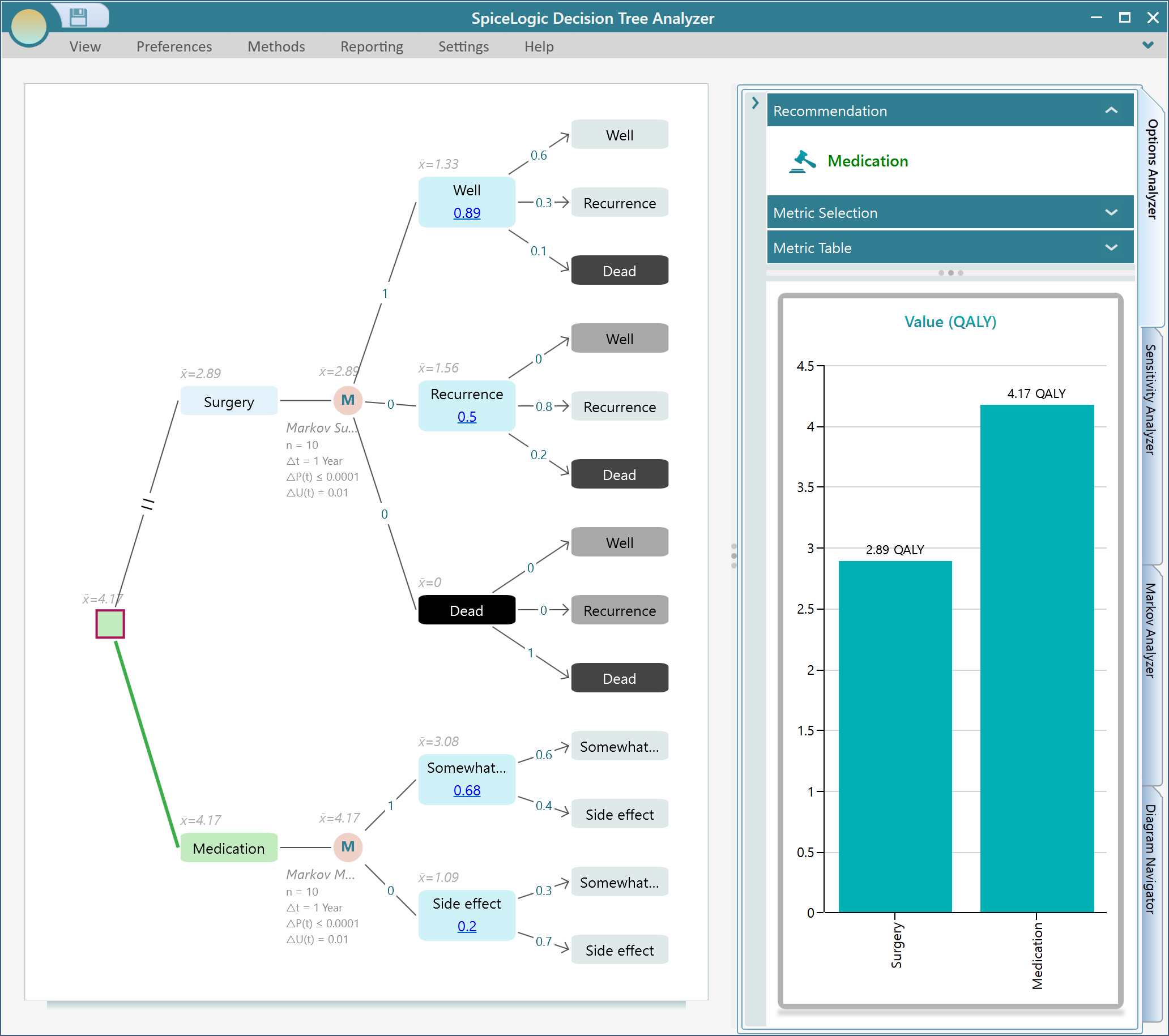
Now set the payoff for each state, using the QALY values from earlier. As soon as you do, the decision tree runs the full simulation for both treatments and shows you the result. Surgery comes out to an expected 2.89 QALY over the next 10 years. Medication comes out to 4.17 QALY over the same period. So medication buys the patient more than a full extra good year of life. The tree highlights the winning path in green, and in this case green points to Medication as the better choice.
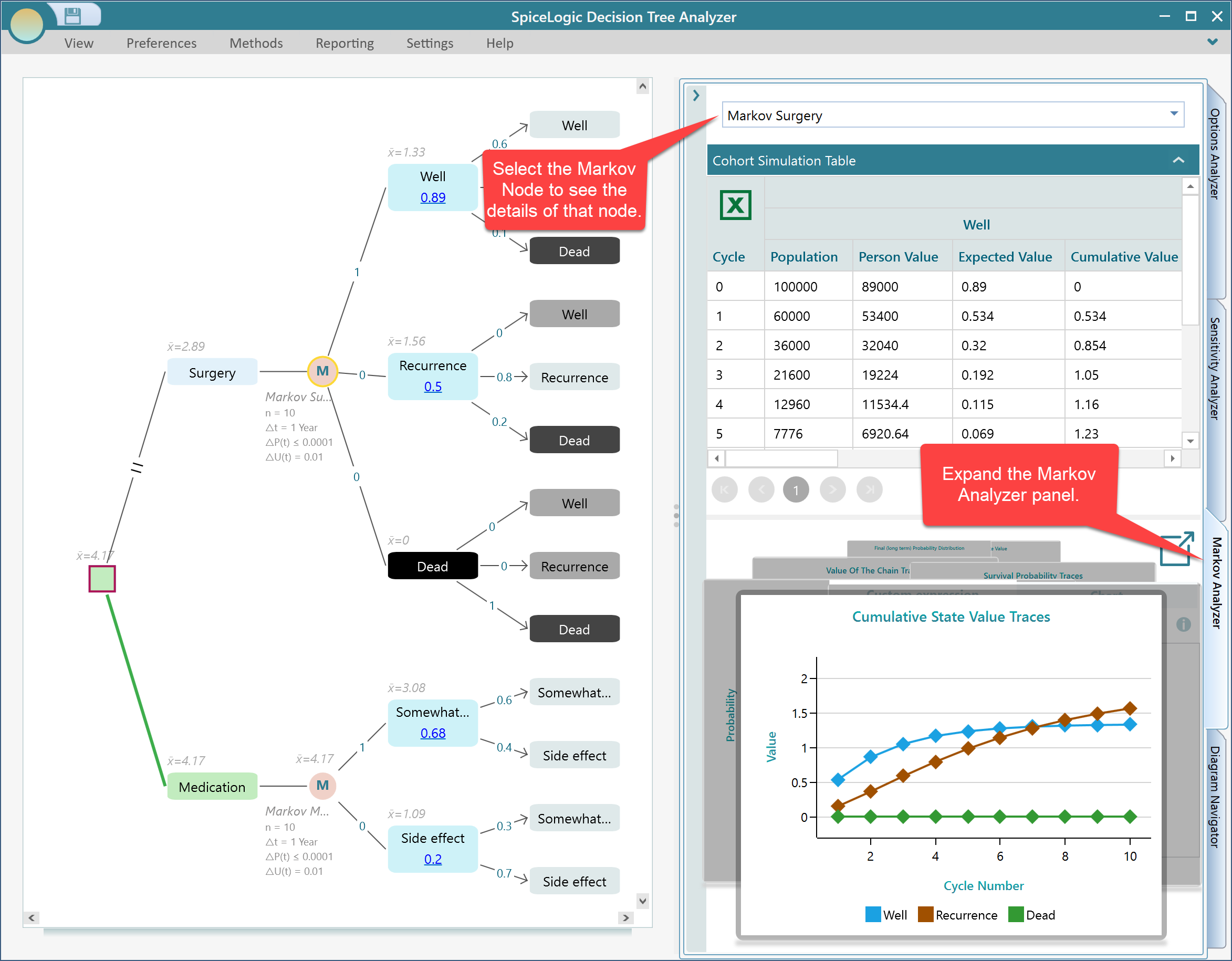
Want to check the numbers behind that result? Expand the Markov Analyzer panel and click on any Markov node. The panel shows you the details for that node, so you can see exactly how the chain played out year by year. This is handy when a result surprises you and you want to trust it before you act on it.
Extending to a Markov Decision Process
Here is where it gets more interesting. Think about the "Severe side effect" state. If the patient lands there on medication, they are not stuck. They can react in more than one way. They could go ahead and have surgery, or they could switch to a different medication. Each of those reactions has its own transition probabilities and its own outcome.
So a natural question follows. Once a patient hits the side-effect state, what is the best thing to do next? That is exactly what a Markov Decision Process answers. It lets you place decisions inside the states of a Markov model, then it works out the best action for each one. The SpiceLogic Decision Tree software supports this directly.
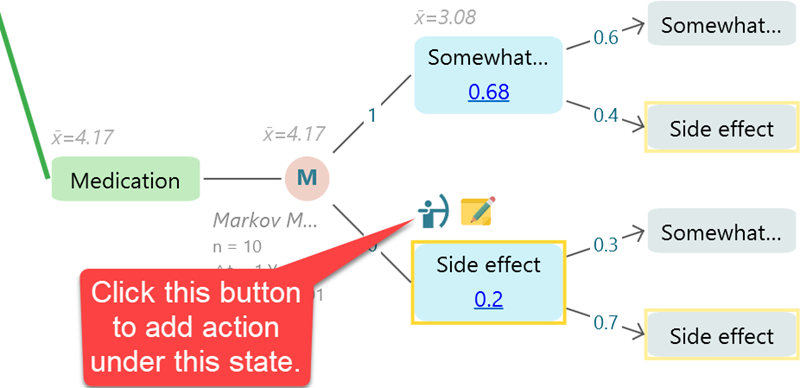
Let's try it. Select the "Side effect" state, click the fly-over menu item to add actions, and create two actions: "Surgery" and "Change medication".
Now watch what happens. The software runs the calculation again and works out that having surgery at the "Side effect" state gives the best overall QALY. In other words, it hands you a complete policy. That is a clear plan for what to do in each situation:
- Start with medication.
- If you run into a severe side effect, switch to surgery.
That is the real value of a Markov Decision Process. Instead of one up-front choice, you get the best response for every state the patient might reach. The model has thought ahead for you.
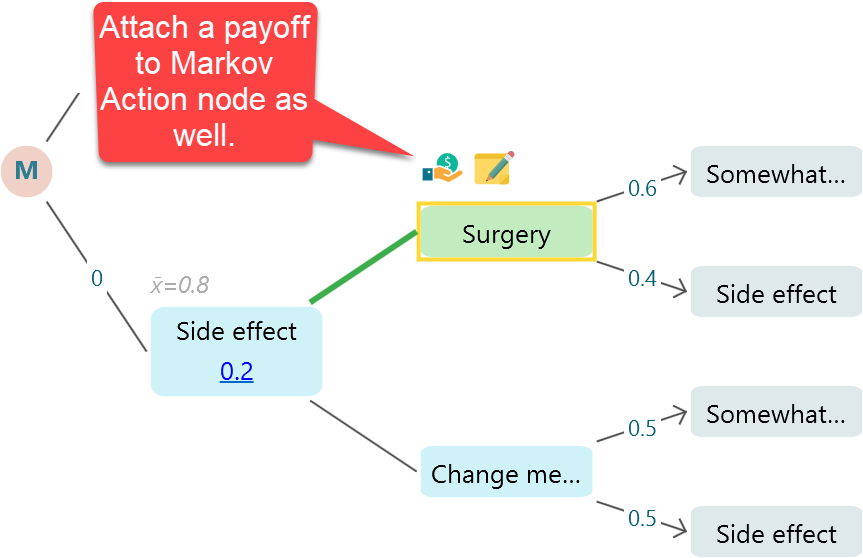
There is one more thing worth showing. Just as you attach a payoff to a state, you can also attach a payoff to a Markov action, and that payoff is folded into the final QALY calculation. This matters because the actions themselves often have a cost. Surgery might be expensive, while switching medication might be cheap. Using a Cost-Effectiveness payoff, you can attach a cost to each action. Now the model weighs the health benefit against the money spent, and gives you a more realistic recommendation. For example, if two plans deliver almost the same QALY but one costs far less, the model can steer you to the cheaper one.
That wraps up the example. You started with a single decision, gave each branch its own Markov chain to play out over 10 years, then went a step further and let the model pick the best response inside a state. The same approach works for any choice that unfolds over time, not just medical ones. Try it on your own problem and let the tree do the math.