


 NuGet
Deploy your application
An application that hosts the WPF HTML Editor needs nothing installed or registered on the target machine. The NuGet package copies everything the editor uses into your build output, so you ship that output folder as a whole.
This page shows what lands in the folder and why, how to package it with a plain copy, an installer or ClickOnce, and what the target machine needs.
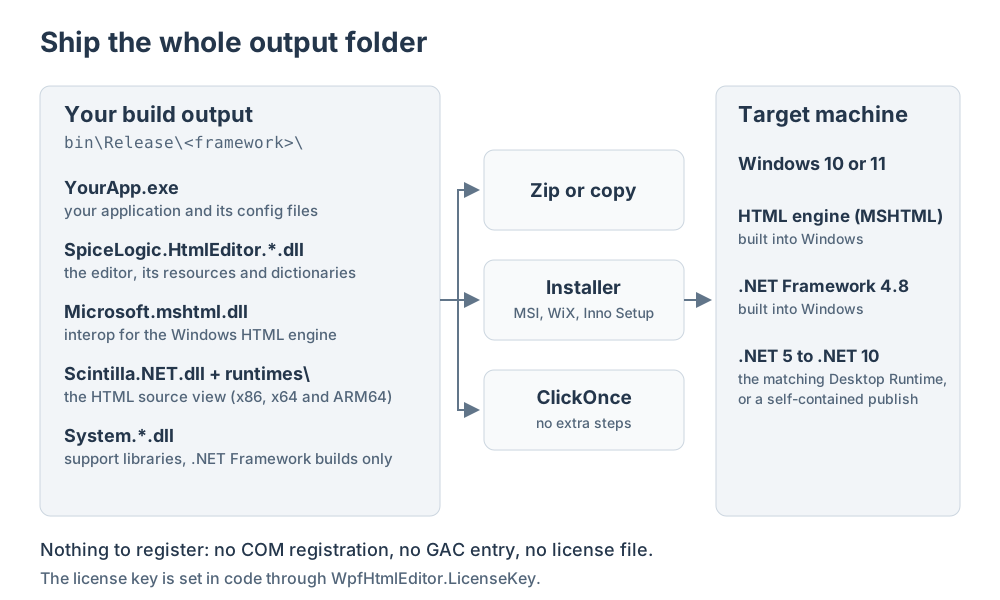
What your build output contains
Build your application in Release and open bin\Release\<framework>\. Next to your own files you will find these, all copied there by the NuGet package:
| Files | What they do |
|---|---|
SpiceLogic.HtmlEditor.WPF.dll and the other SpiceLogic.HtmlEditor.*.dll assemblies | The editor itself. SpiceLogic.HtmlEditor.Resources.dll is the largest file, about 41 MB, because it carries the toolbar images, the localized text and the built-in spell-check dictionaries for 14 languages. |
Microsoft.mshtml.dll | The .NET interop assembly for the Windows HTML engine (MSHTML). Ship this file. The engine itself, mshtml.dll in the Windows system folder, is part of Windows: never copy it into your application. |
Scintilla.NET.dll, plus Scintilla.dll and Lexilla.dll under runtimes\win-x86, runtimes\win-x64 and runtimes\win-arm64 | The syntax-highlighted HTML source view, which loads its native files from the runtimes folder, so keep that folder with its structure. Builds for .NET Framework 4.5 and for .NET 5, 6 and 7 use x86 and x64 folders beside the EXE instead; ship those the same way. |
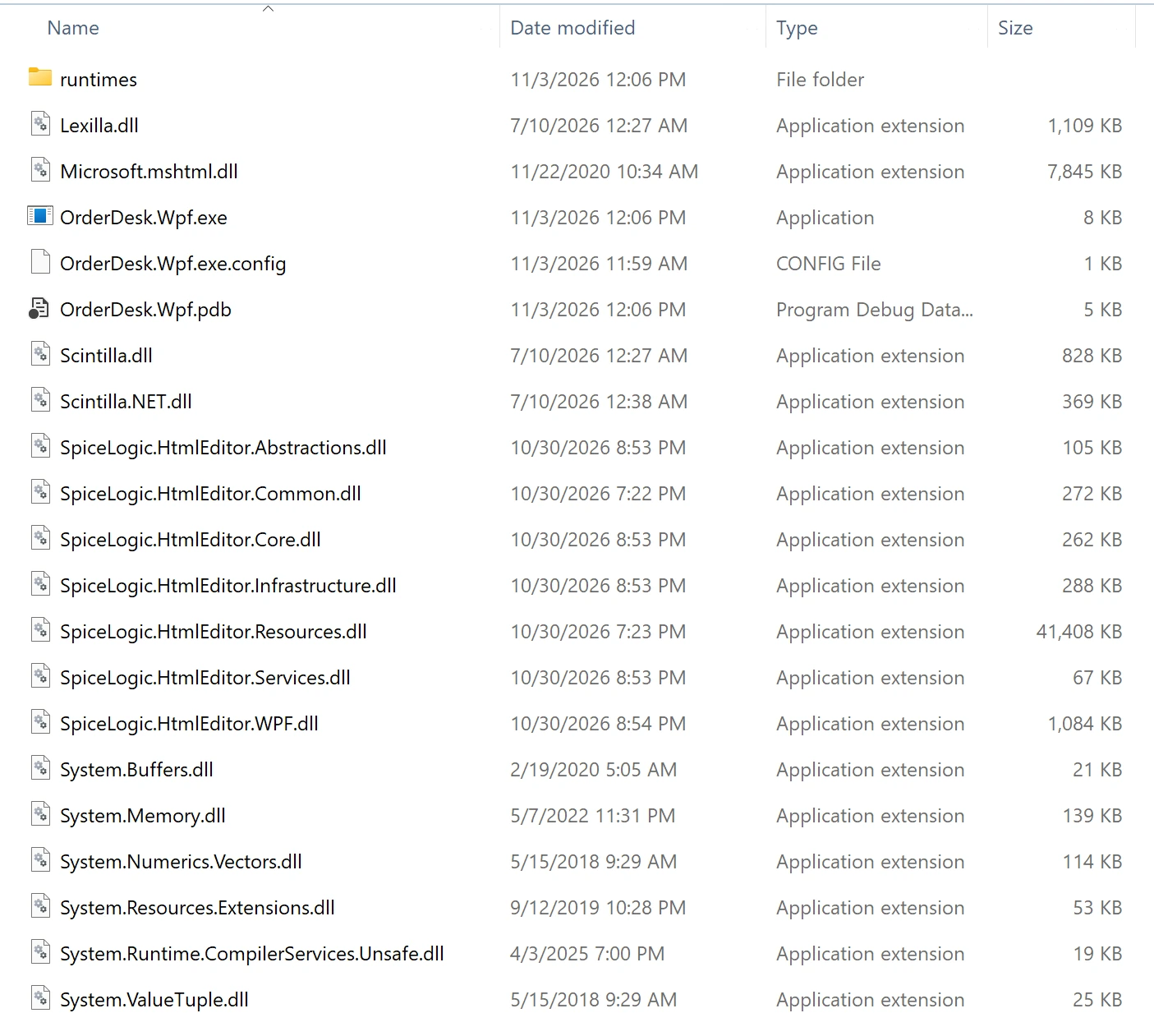
System.Buffers.dll, System.Memory.dll, System.Numerics.Vectors.dll, System.Resources.Extensions.dll, System.Runtime.CompilerServices.Unsafe.dll, System.ValueTuple.dll | Support libraries for .NET Framework builds. On .NET 5 and later they are part of .NET itself, so they appear only in .NET Framework output. Ship the exact versions your build produced. |
*.pdb | Debug symbols. Optional: leave them out of a release package unless you collect crash stack traces with line numbers. |
The complete folder for the sample application shown below is about 58 MB. There is no license file to ship: the key is set in your code through WpfHtmlEditor.LicenseKey, so it travels inside your own executable (see License activation).
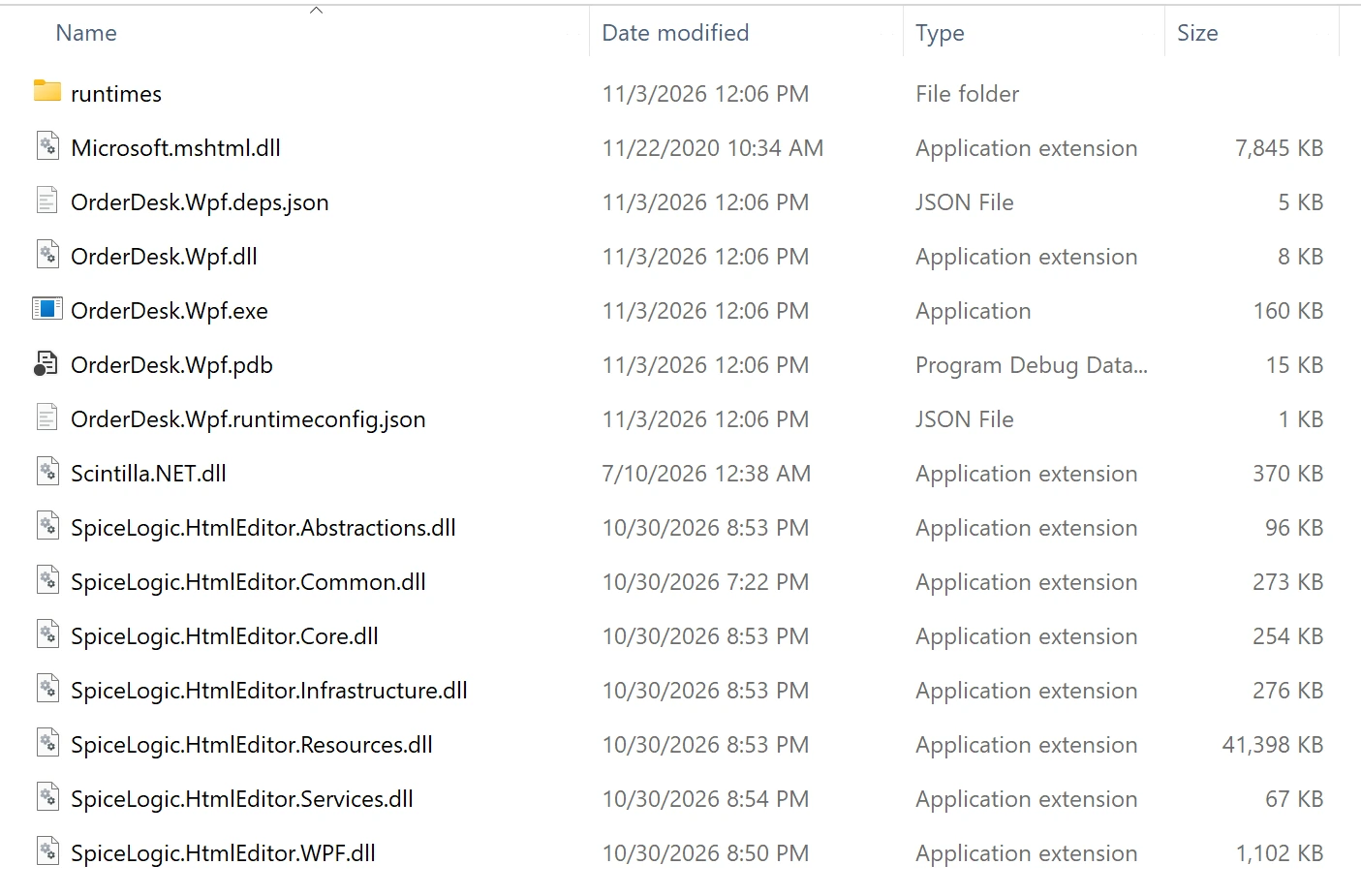
.NET 5 to .NET 10 builds
A build for .NET 5 or later contains the same editor files without the System.*.dll support libraries. In their place .NET adds YourApp.dll, YourApp.deps.json and YourApp.runtimeconfig.json. Ship all three with the EXE, which is only a launcher for them.
Package the folder
Copy or zip
Copying the folder to the target machine, or unzipping it there, is a complete deployment. Nothing needs to run first.
An installer
Whether you use MSI, WiX, Inno Setup or another tool, point the installer at the whole output folder, including its subfolders, rather than at a hand-picked list of files. A later package update that adds a file is then picked up without any change to your setup project. The installer registers nothing: do not register Microsoft.mshtml.dll for COM and do not add it to the global assembly cache.
ClickOnce
ClickOnce publishing works with no extra steps, and it includes the runtimes folder automatically. In the Visual Studio publish settings, open Application Files and keep Microsoft.mshtml.dll at Include. Never change it to Prerequisite, which tells ClickOnce to expect the file to be installed on every machine already.
A self-contained .NET publish
A .NET 5 or later application normally relies on the .NET Desktop Runtime being installed on the machine. To remove that requirement, publish it self-contained for each architecture you support:
dotnet publish -c Release -r win-x64 --self-contained trueThe publish folder then holds the .NET runtime as well as your application and the editor. Keep its runtimes folder too: the source view still loads its native files from there.
What the target machine needs
- Windows 10 or Windows 11. The HTML engine the editor uses is part of Windows, so there is no browser, runtime or other component to install for it.
- A .NET Framework 4.8 build needs nothing more: Windows 10 version 1903 and later, and Windows 11, include .NET Framework 4.8.
- A .NET 5 to .NET 10 build needs the matching .NET Desktop Runtime, unless you published it self-contained.
Source Code license builds
When you build the editor from the Source Code license, your build produces the same set of SpiceLogic.HtmlEditor.*.dll assemblies. Ship all of them with your application, exactly as you would the NuGet build.
Troubleshooting
FileNotFoundExceptionforMicrosoft.mshtmlwhen the application starts on another machine:Microsoft.mshtml.dllwas left out of the package. Deploy it beside your EXE.- An exception naming
Scintilla.dllorLexilla.dllwhen a user opens the HTML source view: theruntimesfolder (or, for .NET Framework 4.5 and .NET 5 to 7 builds, thex86andx64folders) was not deployed.
Related guides
Ask your AI to do this
Connect the SpiceLogic MCP server, then give your coding assistant this prompt.
I use the SpiceLogic WPF HTML Editor. Help me package my application for release: list the files from my build output that must ship, and set up my installer or ClickOnce profile to include them. Confirm the file list and package version with the SpiceLogic MCP documentation, then show the changes for my project.