


 NuGet
NuGet
Relative URLs and BaseUrl
A relative path such as images/logo.png needs a starting location before the editor can find the file. BaseUrl supplies that location for images and stylesheets. The URL options control how those paths are written when you save the HTML.
Set BaseUrl on the WpfHtmlEditor to the folder that holds those images, so relative URLs resolve correctly while editing:
private void OnLoaded(object sender, RoutedEventArgs e)
{
    editor.BaseUrl = Path.Combine(AppContext.BaseDirectory, "handbook-content");
}
Private Sub OnLoaded(sender As Object, e As RoutedEventArgs)
editor.BaseUrl = Path.Combine(AppContext.BaseDirectory, "handbook-content")
End SubWith BaseUrl set, relative URLs in the document resolve against that folder. An <img src="leave-policy.png" /> tag renders correctly in the editor, and the built-in image picker dialog opens on the same folder by default, so authors do not have to navigate the file system every time they insert a screenshot.
Match the base location to the markup: images/leave-policy.png needs the document folder, while leave-policy.png needs the image folder. The example above uses the image folder.
Two options handle the save-time URL rewrite. ConvertFileUrlsToLocalPaths turns file:///D:/handbook/content/images/x.png into D:\handbook\content\images\x.png. ConvertAbsoluteUrlsToRelativeUrls then trims away the part that matches BaseUrl, leaving the relative remainder your target host expects.
editor.Options.ConvertFileUrlsToLocalPaths = true;
editor.Options.ConvertAbsoluteUrlsToRelativeUrls = true;
editor.Options.ConvertFileUrlsToLocalPaths = True
editor.Options.ConvertAbsoluteUrlsToRelativeUrls = TrueLeave UrlEncodeHyperlinkHRefs enabled to preserve encoded hyperlink targets. Setting it to false URL-decodes anchor href values; the cleaner does not percent-encode arbitrary input when it is true. Link text is unchanged.
editor.Options.UrlEncodeHyperlinkHRefs = true;editor.Options.UrlEncodeHyperlinkHRefs = True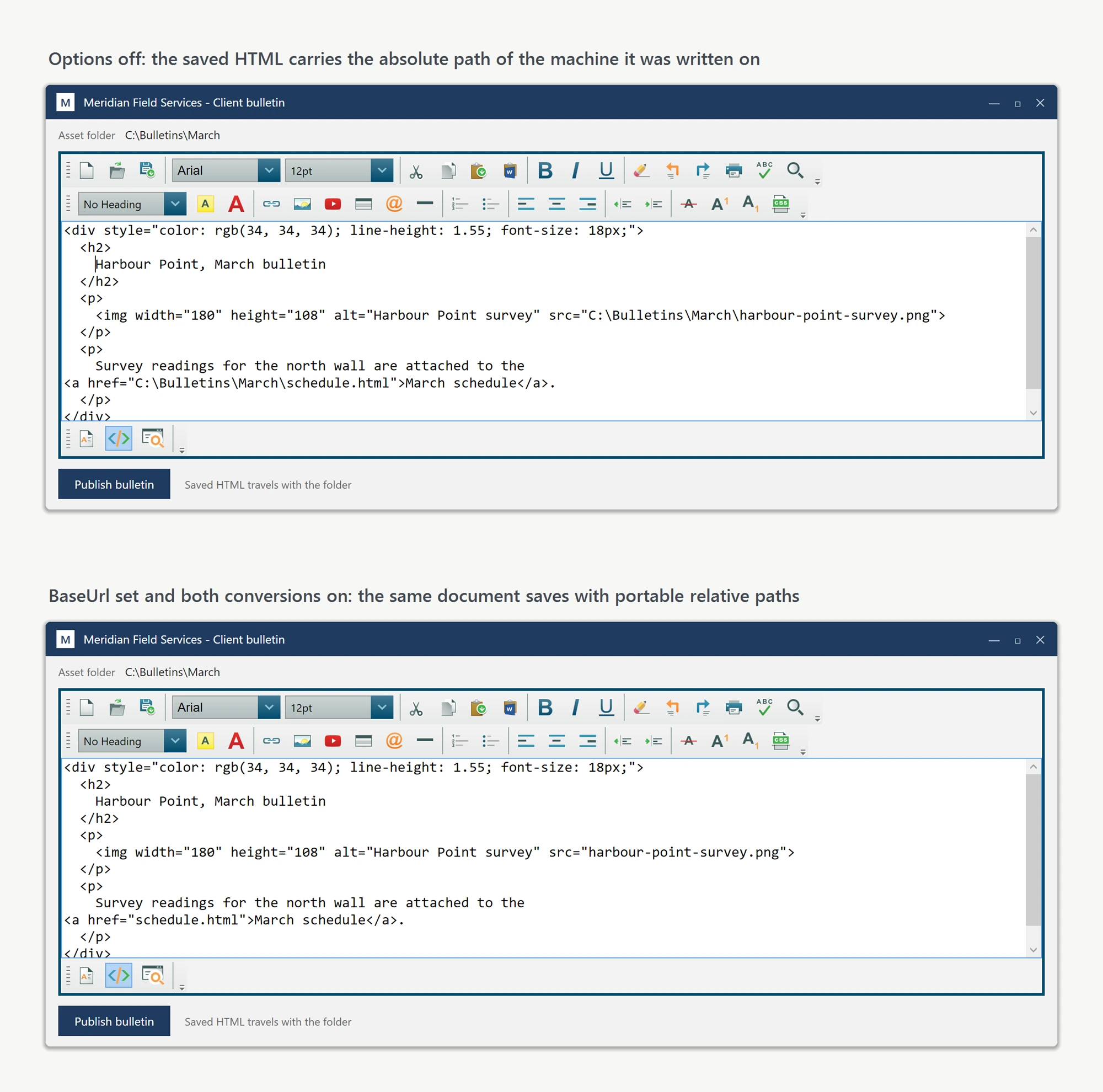
The URL options are shared by both editions; set BaseUrl on each editor instance. Reuse an options helper if your application hosts both controls.
Troubleshooting: images or CSS not showing when you open an HTML file
Opening an existing HTML file (through the toolbar's open command, Content.OpenFile, or Content.LoadDocumentHtmlFromFile) loads the file's markup only - the editor does not record which folder the file came from. Every image referenced by a relative path shows as a broken or blank placeholder, and a stylesheet referenced by a relative <link> tag is not applied, so the document renders unstyled. Nothing is wrong with the file; the editor simply has no base location to resolve relative paths against.
Set BaseUrl to the folder that contains the opened file, and the images and CSS display:
editor.BaseUrl = @"C:\Newsletters\Spring\";   // the folder that contains index.html
editor.Content.OpenFile(@"C:\Newsletters\Spring\index.html");
editor.BaseUrl = "C:\Newsletters\Spring\" ' the folder that contains index.html
editor.Content.OpenFile("C:\Newsletters\Spring\index.html")Set BaseUrl when you initialize the editor (for example in the window's Loaded event); setting it after a document is already loaded updates the live document too. The same fix applies when the HTML arrives as a string through BodyHtml rather than from a file and references images relative to a folder on disk.
Ask your AI to do this
Connect the SpiceLogic MCP server, then give your coding assistant this prompt.
I use the SpiceLogic WPF HTML Editor. Help me set BaseUrl to the export document folder and choose the relative-path and file-URI conversion options. Explain that UrlEncodeHyperlinkHRefs preserves encoded targets when enabled and decodes them when disabled. Confirm the exact API names, types and defaults with the SpiceLogic MCP documentation, then show the changes for my project.