NuGet
NuGet
Preview YouTube embeds
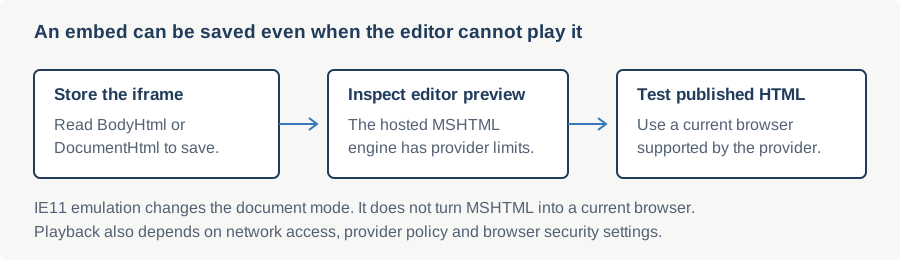
A YouTube embed places a video frame in HTML so readers can play it where playback is supported. The editor can preserve that iframe markup, while playback depends on the embedded browser and YouTube. Browser emulation affects rendering but cannot guarantee playback.
Check the embedded browser document mode
The WPF editor hosts System.Windows.Controls.WebBrowser, which uses Windows MSHTML. Without host-specific configuration it commonly uses a legacy document mode. Browser emulation changes the mode, not the engine.
Compare the effective document mode and test the same embed outside the editor. A difference in browser-emulation settings can explain a rendering difference, but a registry value alone cannot establish the cause of every playback failure.
Step 1: inspect the embed in preview
Use EditorModes.ReadOnlyPreview to inspect the stored document, then verify video playback in a supported current browser. YouTube no longer supports Internet Explorer, so IE11 emulation does not guarantee playback.
// Switch to preview to inspect the embedded document:
NoteEditor.EditorMode = SpiceLogic.HtmlEditor.Abstractions.EditorModes.ReadOnlyPreview;
' Switch to preview to inspect the embedded document:
NoteEditor.EditorMode = SpiceLogic.HtmlEditor.Abstractions.EditorModes.ReadOnlyPreviewStep 2: register the executable for modern emulation
Ship a registry entry that upgrades your application's WebBrowser host to IE11 edge mode. Add a DWORD value named after the executable's file name (including the extension) with the value 11001 decimal under FEATURE_BROWSER_EMULATION:
Windows Registry Editor Version 5.00

; Per-user (no admin required):
[HKEY_CURRENT_USER\Software\Microsoft\Internet Explorer\Main\FeatureControl\FEATURE_BROWSER_EMULATION]
"YourApp.exe"=dword:00002af9

; Per-machine (admin required):
[HKEY_LOCAL_MACHINE\SOFTWARE\Microsoft\Internet Explorer\Main\FeatureControl\FEATURE_BROWSER_EMULATION]
"YourApp.exe"=dword:00002af9
Common decimal values: 11001 (IE11 edge), 11000 (IE11), 10001 (IE10 edge), 9999 (IE9). The hex equivalent of 11001 is 0x00002AF9.
This is a per-process registry key, not a per-control setting, so it applies identically regardless of whether the process hosts WpfHtmlEditor or the WinForms edition. One difference from the WinForms authoring flow: WPF's XAML designer in Visual Studio does not host a live WebBrowser at design time the way the WinForms Windows Forms designer does, so there is no devenv.exe registration to add for design-time preview. Only your compiled application's own executable needs the key.
Step 3: ship it from the installer, or set it at startup
A WiX installer is the right place to write the registry key; a deployed field image picks it up automatically on next update. For shops without an installer pipeline, set the value at application startup, before any WpfHtmlEditor instance is constructed. The host process picks the emulation level up the first time it instantiates a WebBrowser:
using Microsoft.Win32;

static void SetIeEmulation()
{
    string exe = System.IO.Path.GetFileName(
        System.Diagnostics.Process.GetCurrentProcess().MainModule.FileName);
    using var key = Registry.CurrentUser.CreateSubKey(
        @"Software\Microsoft\Internet Explorer\Main\FeatureControl\FEATURE_BROWSER_EMULATION");
    key.SetValue(exe, 11001, RegistryValueKind.DWord);
}
Imports Microsoft.Win32
Shared Sub SetIeEmulation()
Dim exe As String = System.IO.Path.GetFileName(
System.Diagnostics.Process.GetCurrentProcess().MainModule.FileName)
Using key = Registry.CurrentUser.CreateSubKey(
"Software\Microsoft\Internet Explorer\Main\FeatureControl\FEATURE_BROWSER_EMULATION")
key.SetValue(exe, 11001, RegistryValueKind.DWord)
End Using
End SubBrowser emulation can improve legacy rendering, but does not guarantee YouTube or other provider playback. Keep the embed for published HTML and test it in a browser supported by the provider.
Ask your AI to do this
Connect the SpiceLogic MCP server, then give your coding assistant this prompt.
I use the SpiceLogic WPF HTML Editor. Help me inspect an embedded video in preview mode and verify the exported HTML in a browser supported by the provider. Diagnose document mode separately, since MSHTML and IE11 emulation cannot guarantee current YouTube playback. Confirm the exact API names, types and defaults with the SpiceLogic MCP documentation, then show the changes for my project.