


 NuGet
NuGet
Use a custom spell-check engine
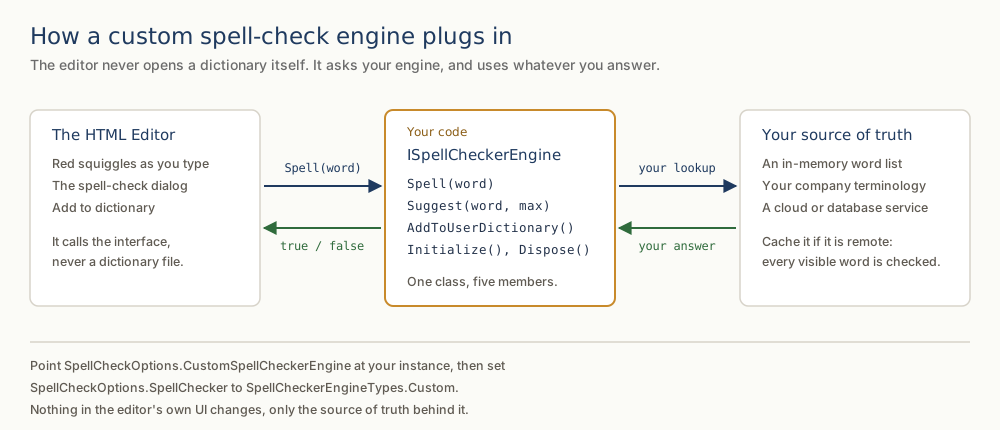
A custom spell-check engine lets your application decide which words are valid and which corrections to suggest, using its own vocabulary or spelling service. Implement ISpellCheckerEngine and register it through SpellCheckOptions to use those decisions in inline and dialog checks.
What the interface asks for
The interface defines four methods plus Dispose. Initialize is called once with the dictionary, affix, and user-dictionary file paths configured on the editor; ignore these if you are not using local dictionary files. Spell returns whether a single word is correct. Suggest returns the alternatives shown on right-click. AddToUserDictionary fires when the user selects Add to Dictionary, so you can route new words to your own storage or approval workflow instead of a local file.
public interface ISpellCheckerEngine
{
    void Initialize(string dictionaryPath, string affixPath, string userDictionaryPath);
    bool Spell(string word);
    IEnumerable<string> Suggest(string word, int? max = null);
    void AddToUserDictionary(string word);
    void Dispose();
}
Public Interface ISpellCheckerEngine
Sub Initialize(dictionaryPath As String, affixPath As String, userDictionaryPath As String)
Function Spell(word As String) As Boolean
Function Suggest(word As String, Optional max As Integer? = Nothing) As IEnumerable(Of String)
Sub AddToUserDictionary(word As String)
Sub Dispose()
End Interface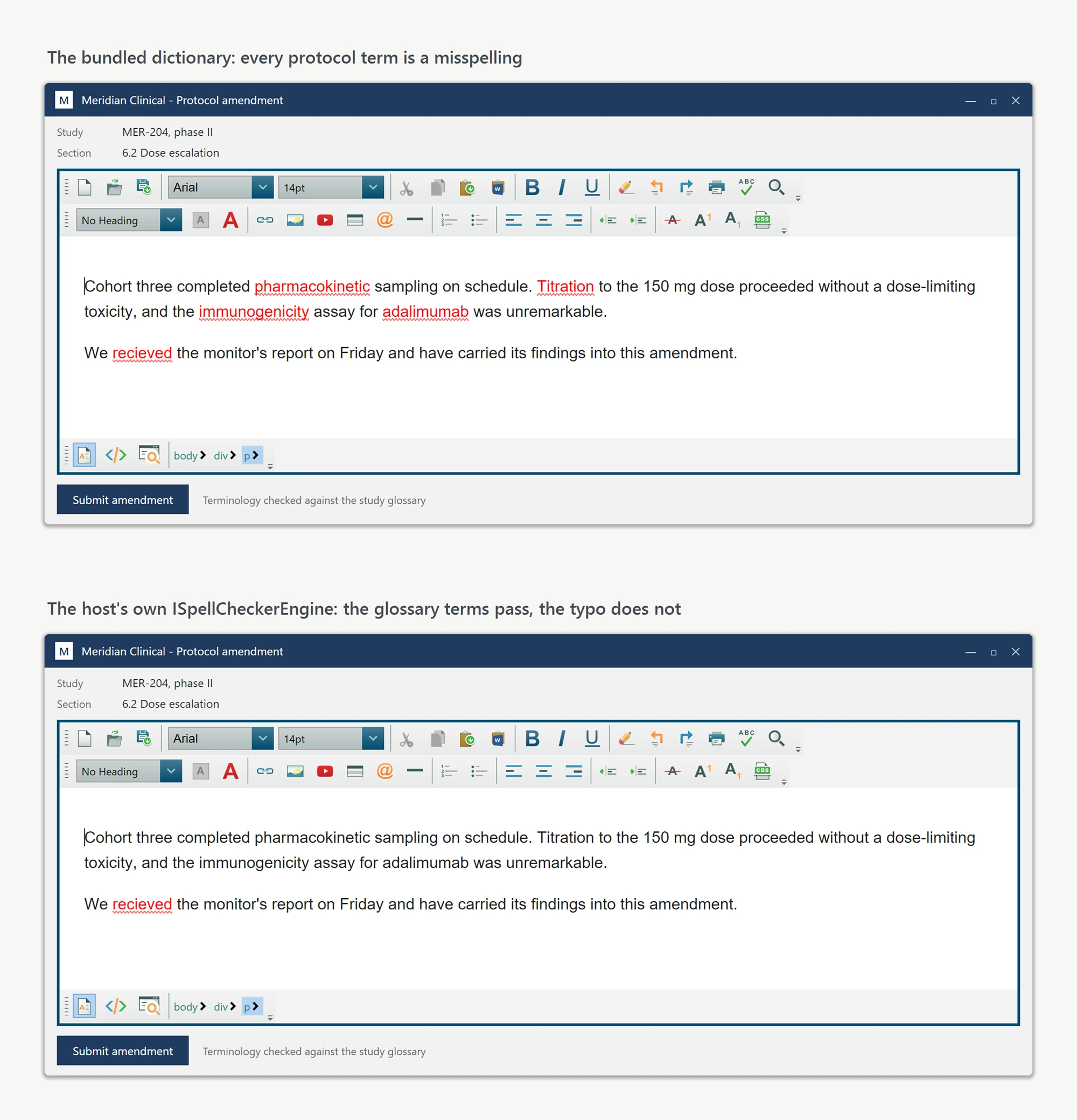
Plugging it in
Two property assignments complete the swap: one supplies the engine instance, the other tells the editor to call it instead of the built-in checker.
BrochureEditor.SpellCheckOptions.CustomSpellCheckerEngine = new TrialsTerminologyEngine(_terminologyClient);
BrochureEditor.SpellCheckOptions.SpellChecker = SpellCheckerEngineTypes.Custom;
BrochureEditor.SpellCheckOptions.CustomSpellCheckerEngine = New TrialsTerminologyEngine(_terminologyClient)
BrochureEditor.SpellCheckOptions.SpellChecker = SpellCheckerEngineTypes.CustomFrom that point on, the editor's inline squiggles, the suggestion dialog, and Add to Dictionary all reflect your custom engine's decisions. Nothing in the editor's UI changes, only the source of truth behind it.
When the engine cannot answer fast
The engine methods are synchronous. Keep lookups fast with a local vocabulary or cache; avoid a network round trip for each word. InlineSpellCheckDebounceMilliseconds delays repeated scans during typing, but it cannot make a slow engine call nonblocking. Consider dialog-only checking for costly vocabularies.
Shipping it
Ship your ISpellCheckerEngine implementation as part of the same assembly that hosts the editor; no additional configuration is required on user machines. Select the target environment (for example, production versus a sandbox) through your application's existing dependency-injection setup. The 07-CustomSpellChecker-CS sample in our public sample repository includes a working ISpellCheckerEngine implementation backed by an in-memory list, a useful starting point when a network-backed engine is unnecessary. A VB.NET version sits alongside it in 07-CustomSpellChecker-VB. You can read the engine itself without cloning anything: CustomSpellCheckerEngine.cs.
Ask your AI to do this
Connect the SpiceLogic MCP server, then give your coding assistant this prompt.
I use the SpiceLogic WPF HTML Editor. Help me implement the custom spell-check engine contract. Keep synchronous callbacks fast and avoid a network request for each word. Confirm the exact API names, types and defaults with the SpiceLogic MCP documentation, then show the changes for my project.