


 NuGet
NuGet
Open links in the default browser
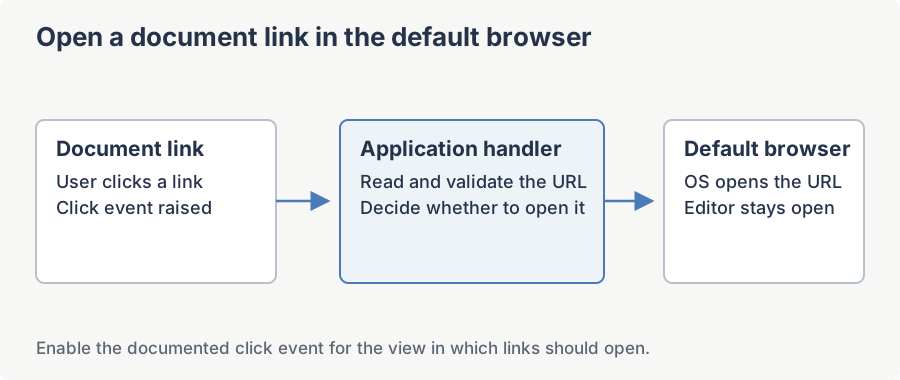
Your application can open document links in the user's default browser while keeping the editor available for writing. Use HtmlElementClicked and FireHtmlElementClickEventFor to handle link clicks, and check the editor mode before launching a URL.
The problem
Design mode vs. Preview mode
HtmlElementClicked reports clicks in the rendered design or preview document. HTML source editing has no rendered DOM click target. Check EditorMode when deciding whether to navigate or continue authoring.
The hook: HtmlElementClicked + FireHtmlElementClickEventFor
The WPF editor exposes a CLR event HtmlElementClicked on WpfHtmlEditor whose args (SpiceLogic.HtmlEditor.WPF.EditorEventArgs.HtmlElementClickedEventArgs, derived from RoutedEventArgs) carry the clicked DOM element as ClickedElement (an mshtml.IHTMLElement), the raw event payload as EventData (IHTMLEventObj), and a strongly-typed ElementType of enum HtmlElementTypes (Hyperlink, Image, Table, etc.). To make the event fire only for hyperlink clicks and skip the noise from spans, divs, and paragraphs, set MyEditor.Options.FireHtmlElementClickEventFor = HtmlElementTypes.Hyperlink;.
Inside the handler, cancel the default in-host navigation and launch the URL via System.Diagnostics.Process.Start with UseShellExecute = true. UseShellExecute = true is the part that matters - it tells Windows to resolve the URL through the registered protocol handler for http / https, which is the user's OS default browser.
Full WPF snippet
using System;
using System.Diagnostics;
using SpiceLogic.HtmlEditor.Abstractions;
using SpiceLogic.HtmlEditor.WPF.EditorEventArgs;

// In your Window / UserControl Loaded handler:
MyEditor.Options.FireHtmlElementClickEventFor = HtmlElementTypes.Hyperlink;
MyEditor.HtmlElementClicked += MyEditor_HyperlinkClicked;
private void MyEditor_HyperlinkClicked(object sender, HtmlElementClickedEventArgs e)
{
    // Only launch in Preview mode - never while the user edits.
    if (MyEditor.EditorMode != EditorModes.ReadOnlyPreview)
        return;
    if (e.ElementType != HtmlElementTypes.Hyperlink || e.ClickedElement == null)
        return;
    string href = e.ClickedElement.getAttribute("href", 0) as string;
    if (!TryGetSafeExternalUrl(href, out string safeUrl))
        return;
    e.Handled = true; // stop routed event
    // UseShellExecute = true routes through the OS default browser.
    Process.Start(new ProcessStartInfo { FileName = safeUrl, UseShellExecute = true });
}

private static bool TryGetSafeExternalUrl(string href, out string url)
{
    url = null;
    if (string.IsNullOrWhiteSpace(href))
        return false;
    if (href.StartsWith("#"))
        return false; // in-page anchor
    if (href.StartsWith("javascript:", StringComparison.OrdinalIgnoreCase))
        return false; // script injection
    if (!Uri.TryCreate(href, UriKind.Absolute, out Uri parsed))
        return false;
    if (parsed.Scheme == Uri.UriSchemeHttp || parsed.Scheme == Uri.UriSchemeHttps || parsed.Scheme == Uri.UriSchemeMailto || parsed.Scheme == "tel")
    {
        url = parsed.AbsoluteUri;
        return true;
    }

    return false;
}
Imports System
Imports System.Diagnostics
Imports SpiceLogic.HtmlEditor.Abstractions
Imports SpiceLogic.HtmlEditor.WPF.EditorEventArgs
' In your Window / UserControl Loaded handler:
MyEditor.Options.FireHtmlElementClickEventFor = HtmlElementTypes.Hyperlink
AddHandler MyEditor.HtmlElementClicked, AddressOf MyEditor_HyperlinkClicked
Private Sub MyEditor_HyperlinkClicked(sender As Object, e As HtmlElementClickedEventArgs)
' Only launch in Preview mode - never while the user edits.
If MyEditor.EditorMode <> EditorModes.ReadOnlyPreview Then Return
If e.ElementType <> HtmlElementTypes.Hyperlink OrElse e.ClickedElement Is Nothing Then Return
Dim href As String = TryCast(e.ClickedElement.getAttribute("href", 0), String)
Dim safeUrl As String = Nothing
If Not TryGetSafeExternalUrl(href, safeUrl) Then Return
e.Handled = True ' stop routed event
' UseShellExecute = True routes through the OS default browser.
Process.Start(New ProcessStartInfo With {.FileName = safeUrl, .UseShellExecute = True})
End Sub
Private Shared Function TryGetSafeExternalUrl(href As String, ByRef url As String) As Boolean
url = Nothing
If String.IsNullOrWhiteSpace(href) Then Return False
If href.StartsWith("#") Then Return False ' in-page anchor
If href.StartsWith("javascript:", StringComparison.OrdinalIgnoreCase) Then Return False ' script injection
Dim parsed As Uri = Nothing
If Not Uri.TryCreate(href, UriKind.Absolute, parsed) Then Return False
If parsed.Scheme = Uri.UriSchemeHttp OrElse parsed.Scheme = Uri.UriSchemeHttps OrElse
parsed.Scheme = Uri.UriSchemeMailto OrElse parsed.Scheme = "tel" Then
url = parsed.AbsoluteUri
Return True
End If
Return False
End FunctionWinForms variant (same idea, different event-args)
If you also ship the WinForms control, the same pattern applies on WinFormHtmlEditor. The differences: the event args type is SpiceLogic.HtmlEditor.WinForms.Models.BOs.EditorEventArgs.HtmlElementClickedEventArgs, ClickedElement is a System.Windows.Forms.HtmlElement so you read the href via e.ClickedElement.GetAttribute("href"), and to cancel the default navigation you set e.EventData.ReturnValue = false; instead of e.Handled = true;. The TryGetSafeExternalUrl helper is reusable verbatim.
Edge cases worth handling
- Anchor jumps inside the same document (
<a href="#footnote-3">) - do not launch the browser; let the host scroll. The helper filters these out by checking for a leading#. - javascript: pseudo-URLs - never pass these to
Process.Start. They are a script-execution vector, not a navigation request. - mailto: and tel: - safe to shell-execute. Windows routes them to the user's default mail client / phone-dialer association.
- file:// URLs - the helper rejects these by default; whitelist
Uri.UriSchemeFileif you want them, but treat anyfile:href from untrusted HTML with suspicion. - Relative URLs (
about-us.html) - rejected byUriKind.Absolute; combine withMyEditor.BaseUrlbefore launching if you need them resolved. - Null or empty href - the helper short-circuits on whitespace.
Security note
If the HTML your editor displays comes from untrusted input, validate the URL before calling Process.Start. The whitelist approach in TryGetSafeExternalUrl - check the parsed Uri.Scheme against an explicit allow-list of http, https, mailto, tel - is the correct pattern. Never pass a raw href from the DOM straight to Process.Start with UseShellExecute = true: a malicious document can specify shell:, vbscript:, or a custom protocol handler that runs arbitrary code on the user's machine.
What about the older "Hyperlink in default browser instead of MSIE" page?
An older page in the WinForms Programming category describes the same idea using Internet Explorer era terminology. This page is the current, cross-product reference - use the HtmlElementClicked + Options.FireHtmlElementClickEventFor + UseShellExecute = true pattern documented here for both controls, and treat the legacy page as historical context only.
Ask your AI to do this
Connect the SpiceLogic MCP server, then give your coding assistant this prompt.
I use the SpiceLogic WPF HTML Editor. Help me open approved hyperlinks in the Windows default browser from preview mode. Confirm the exact API names, types and defaults with the SpiceLogic MCP documentation, then show the changes for my project.