


 NuGet
NuGet
MVVM and data binding
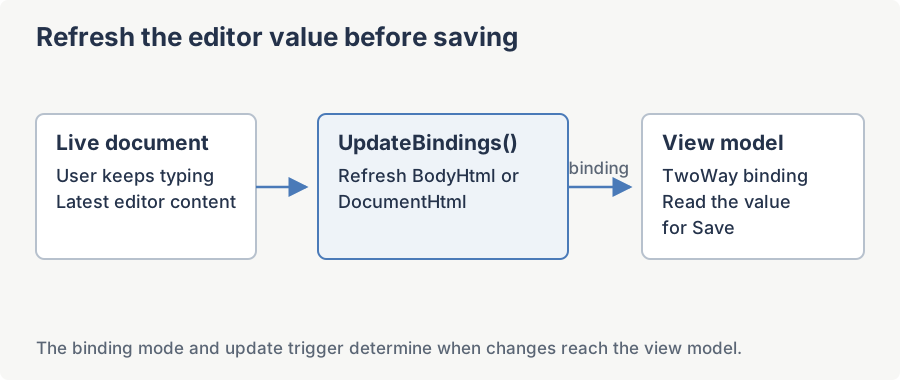
Data binding connects the editor's HTML to a view-model property, so your WPF application can load and save content through its model. Bind BodyHtml or DocumentHtml, then call UpdateBindings() before saving when the editor may still have focus.
Why MVVM with this editor is trickier than with a plain TextBox
The following dependency properties cover common content and application-state bindings. The toolbar extension area also exposes Toolbar1ItemsSource and Toolbar2ItemsSource for item collections:
| Property | Type | Default Mode | Default Trigger | Typical Use |
|---|---|---|---|---|
BodyHtml | string | TwoWay | LostFocus | The HTML inside <body>. The property most ViewModels want to bind. |
DocumentHtml | string | TwoWay | LostFocus | The full document including <head>. Use when you need DOCTYPE / meta / style preserved. |
DocumentTitle | string | TwoWay | LostFocus | The contents of <title>. |
EditorMode | EditorModes | OneWay | PropertyChanged | Switch WYSIWYG / Source / Preview from a ViewModel toggle. |
Language | EditorLanguage | OneWay | PropertyChanged | Set the UI locale from a settings ViewModel. |
Toolbar1ItemsSource | IEnumerable | OneWay | PropertyChanged | Inject extra toolbar items from a collection. |
Toolbar2ItemsSource | IEnumerable | OneWay | PropertyChanged | Same, for the second toolbar strip. |
Settings such as Options, DefaultFontFamily, DefaultFontSizeInPt, DefaultForeColor, BaseUrl and SpellCheckOptions are CLR properties. Set them from view code or expose them through an attached property. LicenseKey is static and belongs in application startup.
One-way binding from ViewModel to editor
The simplest case: render whatever the ViewModel has into the editor and never push edits back. Use this for read-only previews of HTML produced elsewhere.
<wpfeditor:WpfHtmlEditor x:Name="MyEditor"

                         BodyHtml="{Binding HtmlContent, Mode=OneWay}" />
Two-way binding (the recommended pattern)
The three string DPs ship with BindsTwoWayByDefault = true and DefaultUpdateSourceTrigger = LostFocus, so the minimal XAML already writes back when the editor loses focus:
<wpfeditor:WpfHtmlEditor x:Name="MyEditor"

                         BodyHtml="{Binding HtmlContent}" />
For explicitness, spell out the mode and the trigger:
<wpfeditor:WpfHtmlEditor x:Name="MyEditor"

                         BodyHtml="{Binding HtmlContent,

                                            Mode=TwoWay,

                                            UpdateSourceTrigger=LostFocus}" />
Important: do not switch to UpdateSourceTrigger=PropertyChanged for BodyHtml. The editor fires HtmlChanged on every keystroke, paste, undo step, and toolbar action. With PropertyChanged the ViewModel setter is invoked on every one of those, which (a) thrashes the GC with new strings, and (b) commonly causes the customer's OnHtmlContentChanged handler to re-enter the editor (for example to re-format), which resets the caret. LostFocus writes one snapshot per editing session and is what every shipped sample uses.
Properties that are NOT dependency properties - the workarounds
When the property you want is on editor.Options or is a top-level CLR property (for example BaseUrl or DefaultFontFamily), you have two clean options:
Option A: a one-line code-behind projection
The view's code-behind is allowed to read the DataContext and copy values onto the editor. This is still MVVM-clean - the ViewModel does not reference any WPF type - because the projection lives in the view layer:
public partial class MainWindow : Window
{
    public MainWindow()
    {
        InitializeComponent();
        DataContextChanged += (s, e) => ApplyVmToEditor();
    }

    private void ApplyVmToEditor()
    {
        if (DataContext is MainViewModel vm)
        {
            MyEditor.DefaultFontFamily = vm.StandardFontName;
            MyEditor.DefaultFontSizeInPt = vm.StandardFontSize;
            MyEditor.Options.AutoDetectWordPaste = vm.CleanWordPaste;
            MyEditor.BaseUrl = vm.ImageBaseUrl;
        }
    }
}
Partial Public Class MainWindow
Inherits Window
Public Sub New()
InitializeComponent()
AddHandler DataContextChanged, Sub(s, e) ApplyVmToEditor()
End Sub
Private Sub ApplyVmToEditor()
Dim vm = TryCast(DataContext, MainViewModel)
If vm IsNot Nothing Then
MyEditor.DefaultFontFamily = vm.StandardFontName
MyEditor.DefaultFontSizeInPt = vm.StandardFontSize
MyEditor.Options.AutoDetectWordPaste = vm.CleanWordPaste
MyEditor.BaseUrl = vm.ImageBaseUrl
End If
End Sub
End ClassOption B: an attached behavior
If you would rather keep the wiring in XAML, write a one-property attached behavior. The example below makes the editor's non-bindable BaseUrl reachable from a {Binding}:
using System.Windows;
using SpiceLogic.HtmlEditor.WPF;

public static class EditorBindingBehaviors
{
    public static readonly DependencyProperty BaseUrlProperty = DependencyProperty.RegisterAttached("BaseUrl", typeof(string), typeof(EditorBindingBehaviors), new PropertyMetadata(string.Empty, OnBaseUrlChanged));
    public static string GetBaseUrl(DependencyObject o) => (string)o.GetValue(BaseUrlProperty);
    public static void SetBaseUrl(DependencyObject o, string value) => o.SetValue(BaseUrlProperty, value);
    private static void OnBaseUrlChanged(DependencyObject d, DependencyPropertyChangedEventArgs e)
    {
        if (d is WpfHtmlEditor editor && e.NewValue is string url)
            editor.BaseUrl = url;
    }
}
Imports System.Windows
Imports SpiceLogic.HtmlEditor.WPF
Public NotInheritable Class EditorBindingBehaviors
Public Shared ReadOnly BaseUrlProperty As DependencyProperty = DependencyProperty.RegisterAttached("BaseUrl", GetType(String), GetType(EditorBindingBehaviors), New PropertyMetadata(String.Empty, AddressOf OnBaseUrlChanged))
Public Shared Function GetBaseUrl(o As DependencyObject) As String
Return CStr(o.GetValue(BaseUrlProperty))
End Function
Public Shared Sub SetBaseUrl(o As DependencyObject, value As String)
o.SetValue(BaseUrlProperty, value)
End Sub
Private Shared Sub OnBaseUrlChanged(d As DependencyObject, e As DependencyPropertyChangedEventArgs)
Dim editor = TryCast(d, WpfHtmlEditor)
If editor IsNot Nothing AndAlso TypeOf e.NewValue Is String Then
editor.BaseUrl = CStr(e.NewValue)
End If
End Sub
End ClassThen in XAML:
<wpfeditor:WpfHtmlEditor x:Name="MyEditor"

                         BodyHtml="{Binding HtmlContent}"

                         local:EditorBindingBehaviors.BaseUrl="{Binding ImageBaseUrl}" />
The same pattern works for DefaultFontFamily, DefaultFontSizeInPt, LicenseKey, or any other regular CLR property on the control.
Tracking every change for autosave / dirty state
BodyHtml with UpdateSourceTrigger=LostFocus writes back once per focus session, which is exactly what you want for typing performance but not enough for "autosave every 5 seconds" or "light up the Save button on the first edit". Use the editor's HtmlChanged event for those:
public event EventHandler<EventArgs> HtmlChanged;Public Event HtmlChanged As EventHandler(Of EventArgs)It fires on every modification - keystroke, paste, undo, toolbar formatting command, drag & drop. The MVVM-clean way to forward it is a one-line code-behind handler that invokes an ICommand on the ViewModel:
<wpfeditor:WpfHtmlEditor x:Name="MyEditor"

                         BodyHtml="{Binding HtmlContent}"

HtmlChanged="MyEditor_HtmlChanged" />private void MyEditor_HtmlChanged(object sender, EventArgs e)
{
if (DataContext is MainViewModel vm && vm.MarkDirtyCommand.CanExecute(null))
vm.MarkDirtyCommand.Execute(null);
}Private Sub MyEditor_HtmlChanged(sender As Object, e As EventArgs)
Dim vm = TryCast(DataContext, MainViewModel)
If vm IsNot Nothing AndAlso vm.MarkDirtyCommand.CanExecute(Nothing) Then
vm.MarkDirtyCommand.Execute(Nothing)
End If
End SubFor autosave, debounce HtmlChanged notifications. Before your save action reads a bound HTML value, call UpdateBindings() from the view to commit pending edits without moving focus. Dirty-state notifications alone do not update a LostFocus binding.
A complete worked example (CommunityToolkit.Mvvm)
MainViewModel.cs - a single ObservableObject with two bindable properties and a Save command:
using CommunityToolkit.Mvvm.ComponentModel;
using CommunityToolkit.Mvvm.Input;

public partial class MainViewModel : ObservableObject
{
    [ObservableProperty]
    private string htmlContent = "<p>Edit me, then click <b>Save</b>.</p>";
    [ObservableProperty]
    private bool isDirty;
    [RelayCommand(CanExecute = nameof(CanSave))]
    private void Save()
    {
        // Persist HtmlContent to your store...
        IsDirty = false;
    }

    private bool CanSave() => IsDirty;
    [RelayCommand]
    private void MarkDirty() => IsDirty = true;
    partial void OnIsDirtyChanged(bool value) => SaveCommand.NotifyCanExecuteChanged();
}
Imports CommunityToolkit.Mvvm.ComponentModel
Imports CommunityToolkit.Mvvm.Input
' The MVVM Toolkit source generators are C# only, so VB writes the same members by hand.
Public Class MainViewModel
Inherits ObservableObject
Private _htmlContent As String = "<p>Edit me, then click <b>Save</b>.</p>"
Private _isDirty As Boolean
Public Property HtmlContent As String
Get
Return _htmlContent
End Get
Set(value As String)
SetProperty(_htmlContent, value)
End Set
End Property
Public Property IsDirty As Boolean
Get
Return _isDirty
End Get
Set(value As Boolean)
If SetProperty(_isDirty, value) Then SaveCommand.NotifyCanExecuteChanged()
End Set
End Property
Public ReadOnly Property SaveCommand As New RelayCommand(AddressOf Save, AddressOf CanSave)
Public ReadOnly Property MarkDirtyCommand As New RelayCommand(AddressOf MarkDirty)
Private Sub Save()
' Persist HtmlContent to your store...
IsDirty = False
End Sub
Private Function CanSave() As Boolean
Return IsDirty
End Function
Private Sub MarkDirty()
IsDirty = True
End Sub
End ClassMainWindow.xaml:
<Window x:Class="DemoApp.MainWindow"

        xmlns="http://schemas.microsoft.com/winfx/2006/xaml/presentation"

        xmlns:x="http://schemas.microsoft.com/winfx/2006/xaml"

        xmlns:wpfeditor="clr-namespace:SpiceLogic.HtmlEditor.WPF;assembly=SpiceLogic.HtmlEditor.WPF"

        Title="HTML Editor MVVM Demo" Height="600" Width="900">

    <DockPanel>

        <Button DockPanel.Dock="Top"

                Content="Save"

                Command="{Binding SaveCommand}" />


        <wpfeditor:WpfHtmlEditor x:Name="MyEditor"

                                 BodyHtml="{Binding HtmlContent,

                                                    Mode=TwoWay,

                                                    UpdateSourceTrigger=LostFocus}"

                                 HtmlChanged="MyEditor_HtmlChanged" />

    </DockPanel>

</Window>MainWindow.xaml.cs:
using System;
using System.Windows;

public partial class MainWindow : Window
{
    public MainWindow()
    {
        InitializeComponent();
        DataContext = new MainViewModel();
    }

    private void MyEditor_HtmlChanged(object sender, EventArgs e)
    {
        if (DataContext is MainViewModel vm)
            vm.MarkDirtyCommand.Execute(null);
    }
}
Imports System
Imports System.Windows
Partial Public Class MainWindow
Inherits Window
Public Sub New()
InitializeComponent()
DataContext = New MainViewModel()
End Sub
Private Sub MyEditor_HtmlChanged(sender As Object, e As EventArgs)
Dim vm = TryCast(DataContext, MainViewModel)
If vm IsNot Nothing Then
vm.MarkDirtyCommand.Execute(Nothing)
End If
End Sub
End ClassThe example marks the model dirty on edits. With LostFocus, HTML reaches the model when focus leaves the editor; add UpdateBindings() before a keyboard-triggered save reads the model. Keep that editor call in the view layer.
Putting it all together: the rules
- Bind
BodyHtml(orDocumentHtmlwhen you need the full document) TwoWay with LostFocus. NeverPropertyChanged. - For everything that is not in the seven-DP list above, use a code-behind projection or a one-property attached behavior. The ViewModel stays free of WPF types.
- For autosave / dirty tracking, forward
HtmlChangedto anICommandon the ViewModel - do not lower the binding trigger. - Set
DefaultFontFamily/DefaultFontSizeInPt/DefaultForeColoronce at construction (XAML attribute or constructor). They are not dependency properties; they are designed as startup-time defaults, not as live-bindable properties.
Ask your AI to do this
Connect the SpiceLogic MCP server, then give your coding assistant this prompt.
I use the SpiceLogic WPF HTML Editor. Help me bind the document to a view model and commit writable bindings before a Save command reads the model. Confirm the exact API names, types and defaults with the SpiceLogic MCP documentation, then show the changes for my project.