


 NuGet
NuGet
Table authoring service
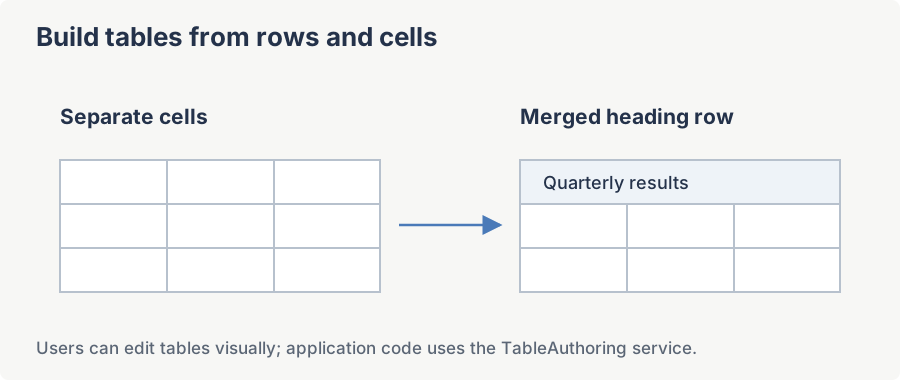
The table authoring service lets your application insert or remove rows and columns, merge cells and control table-editing guidelines. Use it to provide table commands in your own toolbar, ribbon or shortcuts. Access the service through Content.TableAuthoringService.
Namespace: SpiceLogic.HtmlEditor.Abstractions.Services.ElementAuthoring
Assembly: SpiceLogic.HtmlEditor.Abstractions.dll
Accessor: MyEditor.Content.TableAuthoringService
The service implements IDisposable; the editor owns its lifetime, so customer code never needs to call Dispose directly.
InsertColumn(InsertPositions position)
Inserts a new empty column adjacent to the column that currently contains the caret.
Syntax
void InsertColumn(InsertPositions position);Parameters
| Name | Type | Description |
|---|---|---|
| position | InsertPositions | InsertPositions.Before inserts the new column to the left of the caret column; InsertPositions.After inserts it to the right. |
Remarks
Silently does nothing unless the editor is in EditorModes.WysiwygDesign mode and the caret is inside a table cell.
Example
using SpiceLogic.HtmlEditor.Abstractions;
using SpiceLogic.HtmlEditor.Abstractions.Services.ElementAuthoring;

ITableAuthoringService tables = MyEditor.Content.TableAuthoringService;
tables.InsertColumn(InsertPositions.Before);
Imports SpiceLogic.HtmlEditor.Abstractions
Imports SpiceLogic.HtmlEditor.Abstractions.Services.ElementAuthoring
Dim tables As ITableAuthoringService = MyEditor.Content.TableAuthoringService
tables.InsertColumn(InsertPositions.Before)DeleteColumn()
Removes the column that currently contains the caret. If the deleted column was the last column in the table, the table itself is removed.
Syntax
void DeleteColumn();Remarks
Silently does nothing unless the editor is in EditorModes.WysiwygDesign mode and the caret is inside a table cell.
Example
private void DeleteColumn_Click(object sender, RoutedEventArgs e)
{
    MyEditor.Content.TableAuthoringService.DeleteColumn();
}
Private Sub DeleteColumn_Click(sender As Object, e As RoutedEventArgs)
MyEditor.Content.TableAuthoringService.DeleteColumn()
End SubInsertRow(InsertPositions position)
Inserts a new empty row adjacent to the row that currently contains the caret.
Syntax
void InsertRow(InsertPositions position);Parameters
| Name | Type | Description |
|---|---|---|
| position | InsertPositions | InsertPositions.Before inserts the row above the caret row; InsertPositions.After inserts it below. |
Remarks
Silently does nothing unless the editor is in EditorModes.WysiwygDesign mode and the caret is inside a table cell.
Example
MyEditor.Content.TableAuthoringService.InsertRow(InsertPositions.After);DeleteRow()
Removes the row that currently contains the caret. If the deleted row was the last row, the table itself is removed.
Syntax
void DeleteRow();Remarks
Silently does nothing unless the editor is in EditorModes.WysiwygDesign mode and the caret is inside a table cell.
Example
if (MessageBox.Show("Delete current row?", "Confirm", MessageBoxButton.YesNo) == MessageBoxResult.Yes)
{
    MyEditor.Content.TableAuthoringService.DeleteRow();
}
If MessageBox.Show("Delete current row?", "Confirm", MessageBoxButton.YesNo) = MessageBoxResult.Yes Then
MyEditor.Content.TableAuthoringService.DeleteRow()
End IfMergeSelectedCells()
Merges the cells in the current selection into a single cell. The merge uses colspan / rowspan attributes on the surviving cell and discards the others.
Syntax
void MergeSelectedCells();Remarks
Call CanMergeCells() first. The merge is disabled when EnableTableCellMerging is false. Unlike the row and column operations above, this runs regardless of editor mode.
Example
var tables = MyEditor.Content.TableAuthoringService;
if (tables.CanMergeCells())
{
    tables.MergeSelectedCells();
}
Dim tables = MyEditor.Content.TableAuthoringService
If tables.CanMergeCells() Then
tables.MergeSelectedCells()
End IfShowGuidelinesForTablesWithZeroBorder(bool inBackground = false)
Applies a dotted CSS outline to every table whose border attribute is 0 so authors can still see cell boundaries while editing. The outline is visual only and is stripped before the HTML is returned to the customer.
Syntax
void ShowGuidelinesForTablesWithZeroBorder(bool inBackground = false);Parameters
| Name | Type | Description |
|---|---|---|
| inBackground | bool | When true, the whole-document scan runs on a background thread instead of blocking the caller; a background call issued while a previous background pass is still running for the same operation is dropped rather than queued, and any exception is swallowed. Defaults to false, which runs synchronously on the caller's thread and lets any exception propagate. |
Remarks
Silently does nothing unless the editor is in EditorModes.WysiwygDesign mode.
Example
private void ToggleGuides_Click(object sender, RoutedEventArgs e)
{
    MyEditor.Content.TableAuthoringService.ShowGuidelinesForTablesWithZeroBorder();
}
Private Sub ToggleGuides_Click(sender As Object, e As RoutedEventArgs)
MyEditor.Content.TableAuthoringService.ShowGuidelinesForTablesWithZeroBorder()
End SubHideGuidelinesOfTablesWithZeroBorder(bool inBackground = false)
Removes the dotted overlay added by ShowGuidelinesForTablesWithZeroBorder.
Syntax
void HideGuidelinesOfTablesWithZeroBorder(bool inBackground = false);Parameters
| Name | Type | Description |
|---|---|---|
| inBackground | bool | When true, the whole-document revert scan runs on a background thread instead of blocking the caller, with the same drop-if-already-running behavior as ShowGuidelinesForTablesWithZeroBorder. Defaults to false, which runs synchronously on the caller's thread and lets any exception propagate. |
Remarks
Silently does nothing unless the editor is in EditorModes.WysiwygDesign mode.
Example
MyEditor.Content.TableAuthoringService
    .HideGuidelinesOfTablesWithZeroBorder();
IsTableBorderZero(IHTMLElement tableElement)
Returns true when the supplied table element has no visible border -- via the border="0" attribute or via CSS that resolves to zero border width (and is therefore a candidate for the zero-border guideline overlay).
Syntax
bool IsTableBorderZero(IHTMLElement tableElement);Parameters
| Name | Type | Description |
|---|---|---|
| tableElement | mshtml.IHTMLElement | The HTML <table> element to inspect. |
Returns
true when the table has no visible border, whether set via the border attribute or via CSS; otherwise false.
Example
using mshtml;

var tables = MyEditor.Content.TableAuthoringService;
IHTMLElement table = MyEditor.StateQuery.GetActiveHtmlElement();
if (table?.tagName == "TABLE" && tables.IsTableBorderZero(table))
{
    tables.ShowGuidelinesForTablesWithZeroBorder();
}
Imports mshtml
Dim tables = MyEditor.Content.TableAuthoringService
Dim table As IHTMLElement = MyEditor.StateQuery.GetActiveHtmlElement()
If table?.tagName = "TABLE" AndAlso tables.IsTableBorderZero(table) Then
tables.ShowGuidelinesForTablesWithZeroBorder()
End IfCanMergeCells()
Reports whether the current cell selection can be merged.
Syntax
bool CanMergeCells();Returns
true if at least two adjacent table cells are selected and cell merging is enabled; otherwise false. Use this to drive the enabled state of a custom Merge-Cells command.
Example
MyEditor.SelectionChanged += (s, e) =>
{
    MergeCellsButton.IsEnabled =
        MyEditor.Content.TableAuthoringService.CanMergeCells();
};
GetTableManipulator()
Returns the underlying ITableManipulator instance, created once per document the first time it is requested and cached from then on -- it is not re-created per call or scoped to the caret. Its public surface is a single member, CanMerge(), which CanMergeCells forwards to; use the dedicated methods on this interface for row/column operations rather than reaching through this.
Syntax
ITableManipulator GetTableManipulator();Returns
The current ITableManipulator instance. It is never null, regardless of caret position; call ResetTableManipulator to force a fresh instance.
Example
var manip = MyEditor.Content.TableAuthoringService.GetTableManipulator();
if (manip.CanMerge())
{
    Debug.WriteLine("Selection can be merged.");
}
Dim manip = MyEditor.Content.TableAuthoringService.GetTableManipulator()
If manip.CanMerge() Then
Debug.WriteLine("Selection can be merged.")
End IfResetTableManipulator()
Immediately disposes the cached ITableManipulator and creates a fresh one against the current document, rather than deferring the re-creation to the next GetTableManipulator call. Call this after replacing the document HTML wholesale, so table operations do not keep operating through MSHTML references left over from the previous document.
Syntax
void ResetTableManipulator();Remarks
This also re-derives EnableTableCellMerging from Options.EnableTableCellMerge, discarding any value set directly on the property beforehand.
Example
MyEditor.Content.SetBodyHtml("<table><tr><td>Z</td></tr></table>");
MyEditor.Content.TableAuthoringService.ResetTableManipulator();
SelectedCellBackgroundColor Property
Gets or sets the background color used to highlight cells that are part of the current multi-cell selection (the visual feedback the editor draws while the user drags across cells).
Syntax
Color SelectedCellBackgroundColor { get; set; }Property Value
A System.Drawing.Color. The default is a light blue chosen for legibility on most page backgrounds.
Example
using System.Drawing;

MyEditor.Content.TableAuthoringService.SelectedCellBackgroundColor = Color.FromArgb(120, 0, 122, 204); // brand-blue overlay
Imports System.Drawing

MyEditor.Content.TableAuthoringService.SelectedCellBackgroundColor = Color.FromArgb(120, 0, 122, 204) ' brand-blue overlay
EnableTableCellMerging Property
Gets or sets whether the service permits cell merging. When false, MergeSelectedCells and CanMergeCells are inert.
Syntax
bool EnableTableCellMerging { get; set; }Property Value
true to allow cell merging; false to forbid it. The editor mirrors this from Options.EnableTableCellMerge at startup, and again every time ResetTableManipulator runs.
Example
// Make cell-merging available only in expert mode.
MyEditor.Content.TableAuthoringService.EnableTableCellMerging = appPrefs.ExpertMode;
Ask your AI to do this
Connect the SpiceLogic MCP server, then give your coding assistant this prompt.
I use the SpiceLogic WPF HTML Editor. Help me drive row, column and cell operations from my application toolbar. Confirm the exact API names, types and defaults with the SpiceLogic MCP documentation, then show the changes for my project.