


 NuGet
NuGet
IME, Unicode and right-to-left text
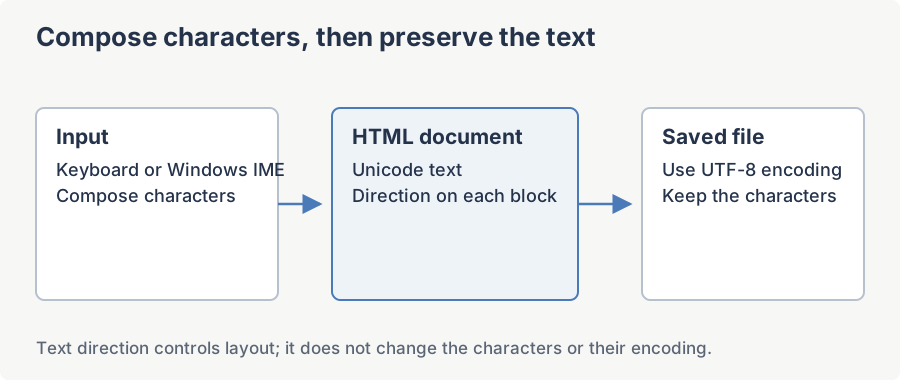
Multilingual editing may need more than a different font: Chinese, Japanese and Korean use an input method to compose characters, while Arabic and Hebrew also need right-to-left layout. Use the Windows input method for composition, preserve Unicode when saving, and set the document direction for right-to-left text.
IME (Chinese, Japanese, Korean) input
The editor uses the Windows MSHTML editing surface and participates in Windows IME composition. Install and select the required input method, then verify composition in your application. Avoid replacing the HTML or moving focus while the user is composing text.
The WPF-specific knob to be aware of is the attached property InputMethod.IsInputMethodEnabled. WPF leaves this on by default; some application chrome (modal dialogs, busy overlays) explicitly switches it off on a parent container and the setting inherits down to every descendant. Make sure the editor and its visual parents do not opt out:
<hed:WpfHtmlEditor x:Name="MyEditor"

                   InputMethod.IsInputMethodEnabled="True"

                   InputMethod.PreferredImeState="On" />
The "characters disappear when I type fast" complaint is almost always one of two things. (1) A PreviewKeyDown handler on a parent Window that returns e.Handled = true for keys that are still being composed by the IME. WPF surfaces composition keys as Key.ImeProcessed - short-circuit your handler when you see that. (2) An HtmlChanged handler that reads BodyHtml on every keystroke and re-assigns it. Re-assigning the document HTML resets the IME composition state, so partially composed characters get wiped. Throttle that work with a DispatcherTimer (250-500 ms).
Pasting Asian text without mojibake
Pasted Chinese or Japanese text turns into "random characters" when the source application puts UTF-8 bytes on the clipboard but tags them with the wrong code page (or vice versa). Modern .NET already decodes clipboard HTML as UTF-8, so no extra re-decoding step is required on your side for the common Chrome / Edge / Word paste paths.
If you still see mojibake for one specific source application, hook the Pasting event and normalize the payload yourself. PastingHtml is read/write - replace it before the editor inserts:
using System.Text.RegularExpressions;

MyEditor.Pasting += (sender, e) =>
{
    if (string.IsNullOrEmpty(e.PastingHtml))
        return;
    // Strip the clipboard's <meta charset> tag. Some apps emit one
    // that lies about the encoding; the editor will treat the rest of
    // the fragment as UTF-8 (which is what Windows actually put there).
    e.PastingHtml = Regex.Replace(e.PastingHtml, @"<meta[^>]*charset[^>]*>", string.Empty, RegexOptions.IgnoreCase);
};
Imports System.Text.RegularExpressions
AddHandler MyEditor.Pasting,
Sub(sender, e)
If String.IsNullOrEmpty(e.PastingHtml) Then Return
' Strip the clipboard's <meta charset> tag. Some apps emit one
' that lies about the encoding; the editor will treat the rest of
' the fragment as UTF-8 (which is what Windows actually put there).
e.PastingHtml = Regex.Replace(e.PastingHtml, "<meta[^>]*charset[^>]*>", String.Empty, RegexOptions.IgnoreCase)
End SubIf you receive a string from outside the editor (a database column, an API response) that is already mis-decoded, you can put it through the same UTF-8 round-trip the clipboard layer uses before inserting it:
using SpiceLogic.HtmlEditor.Infrastructure;

string fixedText = ClipboardUtils.ConvertDefaultToUtf8Encoding(rawText);
MyEditor.Content.InsertText(fixedText);
Imports SpiceLogic.HtmlEditor.Infrastructure
Dim fixedText As String = ClipboardUtils.ConvertDefaultToUtf8Encoding(rawText)
MyEditor.Content.InsertText(fixedText)For pre-built HTML fragments (for example, generated server-side in Chinese), prefer Content.InsertHtml over setting the BodyHtml dependency property - the InsertHtml path goes through the editor's normalization pipeline, while a raw BodyHtml assignment can re-trigger the WebView's own charset guessing.
Right-to-left languages: Arabic, Hebrew, Persian, Urdu
RTL is controlled by the document's body element, not by the WPF FlowDirection of the host control. The editor exposes a clean API on top of the underlying DIRECTION: rtl body style:
using System.Windows.Forms; // for the RightToLeft enum

// Flip the editor surface to RTL.
MyEditor.Content.SetRightToLeft(RightToLeft.Yes);
// Read it back (returns RightToLeft.Yes / No).
RightToLeft current = MyEditor.Content.GetRightToLeft();
// To toggle back to LTR:
MyEditor.Content.SetRightToLeft(RightToLeft.No);
Imports System.Windows.Forms
' for the RightToLeft enum
' Flip the editor surface to RTL.
MyEditor.Content.SetRightToLeft(RightToLeft.Yes)
' Read it back (returns RightToLeft.Yes / No).
Dim current As RightToLeft = MyEditor.Content.GetRightToLeft()
' To toggle back to LTR:
MyEditor.Content.SetRightToLeft(RightToLeft.No)Setting RTL flips text direction, list-bullet alignment, table cell flow, and indent/outdent semantics inside the document. The toolbar that wraps the WebView keeps its WPF FlowDirection, so the toolbar icons stay in their LTR positions on purpose - mirroring the toolbar is a host-window concern. Set FlowDirection="RightToLeft" on the parent Window (or on the Grid hosting the editor) if you want the whole window mirrored alongside the document.
Italic and bold in RTL: Arabic and Hebrew fonts frequently ship without true italic or bold faces, so the WebView falls back to font synthesis (slanting the glyphs algorithmically). The result looks crude. If your customers complain, point the editor at a font family that ships real italic / bold faces - for Arabic, "Noto Naskh Arabic" or "Amiri"; for Hebrew, "Noto Sans Hebrew" or "David Libre". Set it via the editor's default font or by wrapping inserted text in a <span style="font-family: ...">.
Unicode and the document <meta charset> tag
Save the file bytes with the same encoding declared in the document. A charset declaration does not convert bytes, and consumers can also use transport headers or a byte-order mark when deciding how to decode HTML.
The current charset is exposed through the Charset dependency property. The default value is "unicode", which is the MSHTML alias for UTF-16 - safe for in-memory use but almost never what you want on disk. Change it to utf-8 before you persist:
// Inspect what the document declares today.
string declared = MyEditor.Charset;
// Force UTF-8 so emoji and CJK survive any downstream consumer.
MyEditor.Charset = "utf-8";
' Inspect what the document declares today.
Dim declared As String = MyEditor.Charset
' Force UTF-8 so emoji and CJK survive any downstream consumer.
MyEditor.Charset = "utf-8"When you write the document to disk, write the bytes as UTF-8 to match the declared charset - File.WriteAllText(path, MyEditor.DocumentHtml, new UTF8Encoding(false)). Mixing a UTF-8 <meta charset> with a file that was actually saved as the system code page (windows-1252 on most Western Windows installs) is the #1 cause of broken emoji and missing CJK glyphs in the field.
If you need to fix an existing document programmatically, the EncodingUtils helper in SpiceLogic.HtmlEditor.Infrastructure rewrites the <meta charset> tag in place:
using SpiceLogic.HtmlEditor.Infrastructure;

string current = EncodingUtils.ReadCharSetValueFromDocumentHtml(html);
string fixedHtml = EncodingUtils.SetCharSetValueInDocumentHtml(html, "utf-8");
Imports SpiceLogic.HtmlEditor.Infrastructure
Dim current As String = EncodingUtils.ReadCharSetValueFromDocumentHtml(html)
Dim fixedHtml As String = EncodingUtils.SetCharSetValueInDocumentHtml(html, "utf-8")Verifying your build end-to-end
Paste the following test paragraph into a running editor, save the document to disk as UTF-8, then re-open it. Every glyph should round-trip cleanly. If any of them fall back to ? or tofu boxes, the writer side is not honoring the declared charset.
const string verificationParagraph = "English mixed with 中文 (Chinese), 日本語 (Japanese), " + "한국어 (Korean), العربية (Arabic), עברית (Hebrew), " + "and emoji ✨ \U0001F30D \U0001F389.";
MyEditor.Charset = "utf-8";
MyEditor.Content.InsertText(verificationParagraph);
MyEditor.Content.SetRightToLeft(System.Windows.Forms.RightToLeft.Yes);
System.IO.File.WriteAllText(@"C:\temp\rtl-cjk-emoji.html", MyEditor.DocumentHtml, new System.Text.UTF8Encoding(encoderShouldEmitUTF8Identifier: false));
Const verificationParagraph As String = "English mixed with 中文 (Chinese), 日本語 (Japanese), " & "한국어 (Korean), العربية (Arabic), עברית (Hebrew), ".ToString() & "and emoji ✨ 🌍 🎉."
MyEditor.Charset = "utf-8"
MyEditor.Content.InsertText(verificationParagraph)
MyEditor.Content.SetRightToLeft(System.Windows.Forms.RightToLeft.Yes)
System.IO.File.WriteAllText("C:\temp\rtl-cjk-emoji.html", MyEditor.DocumentHtml, New System.Text.UTF8Encoding(encoderShouldEmitUTF8Identifier:=False))If the round-trip fails, the culprit is almost always one of three things: an encoding mismatch in the file writer (use UTF-8 without BOM), a missing CJK or Arabic font on the rendering machine, or a downstream renderer that ignores <meta charset> (some email clients re-decode with the recipient's system code page - in that case ship Content-Type: text/html; charset=utf-8 in the MIME header as well).
Ask your AI to do this
Connect the SpiceLogic MCP server, then give your coding assistant this prompt.
I use the SpiceLogic WPF HTML Editor. Help me diagnose an IME composition problem using a minimal document. Check host input handlers and text encoding, and avoid reloading HTML during composition. Confirm the exact API names, types and defaults with the SpiceLogic MCP documentation, then show the changes for my project.