


 NuGet
NuGet
Caret service
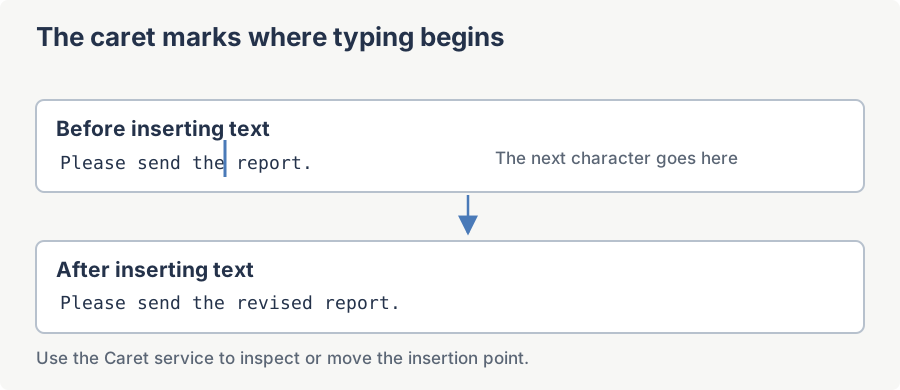
The caret is the insertion point where the next character will appear. The caret service lets your application inspect or move that position, for example to continue editing at a particular location. Access it through Caret, then choose a method that uses text indices, coordinates or document positions.
Reach the service via the Caret property of the WpfHtmlEditor control. Wait until the document has finished loading before using caret operations. Behavior when a document is unavailable depends on the method, as described below.
Indices returned by GetCaretIndex are zero-based offsets into the visible text content (no HTML markup). GetCaretIndexInHtml returns the offset within the raw HTML source instead, which is useful when you need to splice markup at the cursor.
SetCaretAt(int x, int y, bool scrollToView)
Places the caret at the editor-local pixel coordinates (x, y). The point is hit-tested against the rendered document; if it falls outside any text node the caret is moved to the nearest valid insertion point. Only WysiwygDesign mode is supported. If the document has not finished loading yet (its body is not realized), the call throws InvalidOperationException rather than silently doing nothing.
Syntax
void SetCaretAt(int x, int y, bool scrollToView);Parameters
| Name | Type | Description |
|---|---|---|
| x | int | Horizontal pixel offset (editor-local). |
| y | int | Vertical pixel offset (editor-local). |
| scrollToView | bool | When true, scrolls the caret into view after positioning. |
Example
// Drop the caret near the top-left of the editor and bring it on-screen.
MyEditor.Caret.SetCaretAt(50, 120, scrollToView: true);
MyEditor.Focus();
' Drop the caret near the top-left of the editor and bring it on-screen.
MyEditor.Caret.SetCaretAt(50, 120, scrollToView:=True)
MyEditor.Focus()GetCaretPosition()
Returns the current caret position as a System.Drawing.Point expressed in editor-local pixel coordinates. The returned point identifies the top-left corner of the caret glyph.
Syntax
System.Drawing.Point GetCaretPosition();Returns
Point - X and Y are pixel offsets relative to the editor surface.
Remarks
Outside WysiwygDesign mode this always returns (0, 0). Within WysiwygDesign mode it returns (-1, -1) instead when there is no caret to query yet, for example before the browser has realized a document.
Example
// Show the live caret position in the WPF status bar.
var pt = MyEditor.Caret.GetCaretPosition();
StatusText.Text = $"Caret at ({pt.X}, {pt.Y})";
' Show the live caret position in the WPF status bar.
Dim pt = MyEditor.Caret.GetCaretPosition()
StatusText.Text = $"Caret at ({pt.X}, {pt.Y})"SetCaretPosition(int x, int y, bool scrollToView)
Moves the caret to the specified editor-local pixel coordinates. Functionally equivalent to SetCaretAt; provided as a symmetric counterpart to GetCaretPosition. Only WysiwygDesign mode is supported, and it throws InvalidOperationException if the document has not finished loading yet.
Syntax
void SetCaretPosition(int x, int y, bool scrollToView);Parameters
| Name | Type | Description |
|---|---|---|
| x | int | Target horizontal pixel offset. |
| y | int | Target vertical pixel offset. |
| scrollToView | bool | Scroll the editor so the caret is visible. |
Example
// Round-trip a caret position across an HTML insertion.
var saved = MyEditor.Caret.GetCaretPosition();
MyEditor.Content.InsertHtml("<b>mark</b>", keepSelected: false);
MyEditor.Caret.SetCaretPosition(saved.X, saved.Y, scrollToView: true);
' Round-trip a caret position across an HTML insertion.
Dim saved = MyEditor.Caret.GetCaretPosition()
MyEditor.Content.InsertHtml("<b>mark</b>", keepSelected:=False)
MyEditor.Caret.SetCaretPosition(saved.X, saved.Y, scrollToView:=True)Hide()
Hides the caret glyph without changing its logical position. Typing or programmatic insertion still occur at the hidden caret position; call Show to make it visible again. Only WysiwygDesign mode is supported; called from HtmlEdit or ReadOnlyPreview mode it is a silent no-op.
Syntax
void Hide();Example
// Suppress caret flicker during a batch insert.
MyEditor.Caret.Hide();
foreach (var html in snippets)
    MyEditor.Content.InsertHtml(html, keepSelected: false);
MyEditor.Caret.Show(scrollToView: true);
' Suppress caret flicker during a batch insert.
MyEditor.Caret.Hide()
For Each html In snippets
MyEditor.Content.InsertHtml(html, keepSelected:=False)
Next
MyEditor.Caret.Show(scrollToView:=True)Show(bool scrollToView)
Restores the caret display after a prior call to Hide. When scrollToView is true the editor scrolls so the caret is on screen. In HtmlEdit mode this scrolls the raw HTML source textbox to its caret instead; a no-op in ReadOnlyPreview mode.
Syntax
void Show(bool scrollToView);Parameters
| Name | Type | Description |
|---|---|---|
| scrollToView | bool | If true, scrolls the caret into view. |
Example
// Show the caret again after a long programmatic edit.
MyEditor.Caret.Show(scrollToView: true);
' Show the caret again after a long programmatic edit.
MyEditor.Caret.Show(scrollToView:=True)ScrollToCaretView()
Scrolls the editor viewport so the current caret position is visible. Useful after operations that move the caret without auto-scrolling (for example a programmatic SetCaretByIndex with no scroll flag). In HtmlEdit mode this scrolls the raw HTML source textbox to its caret instead; a no-op in ReadOnlyPreview mode.
Syntax
void ScrollToCaretView();Example
// Jump to a deep offset and bring it on screen.

MyEditor.Caret.SetCaretByIndex(2048);

MyEditor.Caret.ScrollToCaretView();
GetCaretIndex()
Returns the zero-based character offset of the caret within the document's plain-text content. Markup tags do not count toward the index, so the value is suitable for use with SelectionStart/SelectionLength-style APIs. Only WysiwygDesign mode is supported.
Syntax
int GetCaretIndex();Returns
int - the zero-based plain-text index of the caret. Returns -1 outside WysiwygDesign mode, or when there is no active selection/caret range to measure.
Example
// Persist the caret offset in user settings.
int caret = MyEditor.Caret.GetCaretIndex();
Properties.Settings.Default.LastCaret = caret;
Properties.Settings.Default.Save();
' Persist the caret offset in user settings.
Dim caret As Integer = MyEditor.Caret.GetCaretIndex()
Properties.Settings.[Default].LastCaret = caret
Properties.Settings.[Default].Save()SetCaretByIndex(int index)
Moves the caret to the given zero-based plain-text index in the document body. The editor does not auto-scroll; call ScrollToCaretView afterwards if needed. Acts on the live document in both WysiwygDesign and ReadOnlyPreview mode; in HtmlEdit mode it is a silent no-op, since there is no live document to position a caret in.
Syntax
void SetCaretByIndex(int index);Parameters
| Name | Type | Description |
|---|---|---|
| index | int | Zero-based plain-text offset within the document body. |
Example
// Restore a previously saved caret offset.
int saved = Properties.Settings.Default.LastCaret;
MyEditor.Caret.SetCaretByIndex(saved);
MyEditor.Caret.ScrollToCaretView();
' Restore a previously saved caret offset.
Dim saved As Integer = Properties.Settings.[Default].LastCaret
MyEditor.Caret.SetCaretByIndex(saved)
MyEditor.Caret.ScrollToCaretView()SetCaretByIndex(int index, int length)
Positions the caret at index and extends a selection forward by length characters. Equivalent to calling SetCaretByIndex(index) followed by selecting length characters to the right. Acts on the live document in both WysiwygDesign and ReadOnlyPreview mode; in HtmlEdit mode it is a silent no-op.
Syntax
void SetCaretByIndex(int index, int length);Parameters
| Name | Type | Description |
|---|---|---|
| index | int | Zero-based plain-text starting offset. |
| length | int | Number of characters to include in the selection; 0 for a pure caret move. |
Example
// Select the 12 characters starting at offset 100, then italicise them.

MyEditor.Caret.SetCaretByIndex(100, 12);

MyEditor.Formatting.SetItalic();
GetCaretIndexInHtml()
Returns the offset of the caret within the raw HTML source of the document, including all markup tags. Use this when you need to splice raw HTML at the cursor position. Only WysiwygDesign mode is supported.
Syntax
int GetCaretIndexInHtml();Returns
int - offset of the caret within the editor's HTML source string. Returns -1 outside WysiwygDesign mode, or 0 within that mode when there is no caret to measure, for example before the document body exists.
Remarks
The HTML index changes whenever the source markup changes (for example after applying a style that introduces a new <span>); do not cache it across edits.
Example
// Splice a custom marker into the raw HTML at the caret.
int idx = MyEditor.Caret.GetCaretIndexInHtml();
string html = MyEditor.DocumentHtml;
MyEditor.DocumentHtml = html.Insert(idx, "<!-- mark -->");
' Splice a custom marker into the raw HTML at the caret.
Dim idx As Integer = MyEditor.Caret.GetCaretIndexInHtml()
Dim html As String = MyEditor.DocumentHtml
MyEditor.DocumentHtml = html.Insert(idx, "<!-- mark -->")SetCaretAtHome()
Moves the caret to the very beginning of the document body, before the first character of the first block element. Only WysiwygDesign mode is supported; a no-op otherwise.
Syntax
void SetCaretAtHome();Example
// Scroll to the top of the document on a button click.
private void GoToTop_Click(object sender, RoutedEventArgs e)
{
    MyEditor.Caret.SetCaretAtHome();
    MyEditor.Caret.ScrollToCaretView();
}
' Scroll to the top of the document on a button click.
Private Sub GoToTop_Click(sender As Object, e As RoutedEventArgs)
MyEditor.Caret.SetCaretAtHome()
MyEditor.Caret.ScrollToCaretView()
End SubSetCaretAtLineBeginning()
Moves the caret to the beginning of the current line, mirroring the behaviour of the Home key. Supported in WysiwygDesign and HtmlEdit mode; a no-op in ReadOnlyPreview mode.
Syntax
void SetCaretAtLineBeginning();Remarks
Implemented by focusing the editor and sending a synthetic Home keystroke, so it requires the editor to be able to take focus and affects whichever control ends up focused.
Example
// Indent the current line at its beginning.
MyEditor.Caret.SetCaretAtLineBeginning();
MyEditor.Editor.ExecCommand("InsertHTML", false, " ");
' Indent the current line at its beginning.
MyEditor.Caret.SetCaretAtLineBeginning()
MyEditor.Editor.ExecCommand("InsertHTML", False, " ")SetCaretAtLineEnd()
Moves the caret to the end of the current line, mirroring the behaviour of the End key. Supported in WysiwygDesign and HtmlEdit mode; a no-op in ReadOnlyPreview mode.
Syntax
void SetCaretAtLineEnd();Remarks
Implemented by focusing the editor and sending a synthetic End keystroke, so it requires the editor to be able to take focus and affects whichever control ends up focused.
Example
// Append a footnote marker to the current line.
MyEditor.Caret.SetCaretAtLineEnd();
MyEditor.Editor.ExecCommand("InsertHTML", false, "<sup>[1]</sup>");
' Append a footnote marker to the current line.
MyEditor.Caret.SetCaretAtLineEnd()
MyEditor.Editor.ExecCommand("InsertHTML", False, "<sup>[1]</sup>")SetCaretAtEnd()
Moves the caret to the very end of the document body, after the last character of the last block element. Common pattern after appending content programmatically and giving focus back to the user. Supported in WysiwygDesign and HtmlEdit mode; a no-op in ReadOnlyPreview mode.
Syntax
void SetCaretAtEnd();Remarks
Implemented by focusing the editor and sending a synthetic Ctrl+End keystroke, so it requires the editor to be able to take focus and affects whichever control ends up focused.
Example
// Append a paragraph and place the caret after it.

MyEditor.Content.InsertHtml("<p>New paragraph.</p>", keepSelected: false);

MyEditor.Caret.SetCaretAtEnd();

MyEditor.Focus();
Ask your AI to do this
Connect the SpiceLogic MCP server, then give your coding assistant this prompt.
I use the SpiceLogic WPF HTML Editor. Help me read and restore the caret position when inserting content. Confirm the exact API names, types and defaults with the SpiceLogic MCP documentation, then show the changes for my project.