NuGet
NuGet
CSS rendering and browser mode
The same HTML can look different in the editor and an external browser because the rendering environment differs. Checking the embedded document mode helps explain those differences. Set BrowserEmulationMode at application startup when your host needs Internet Explorer 11 mode, then test the CSS your document uses.
What you see
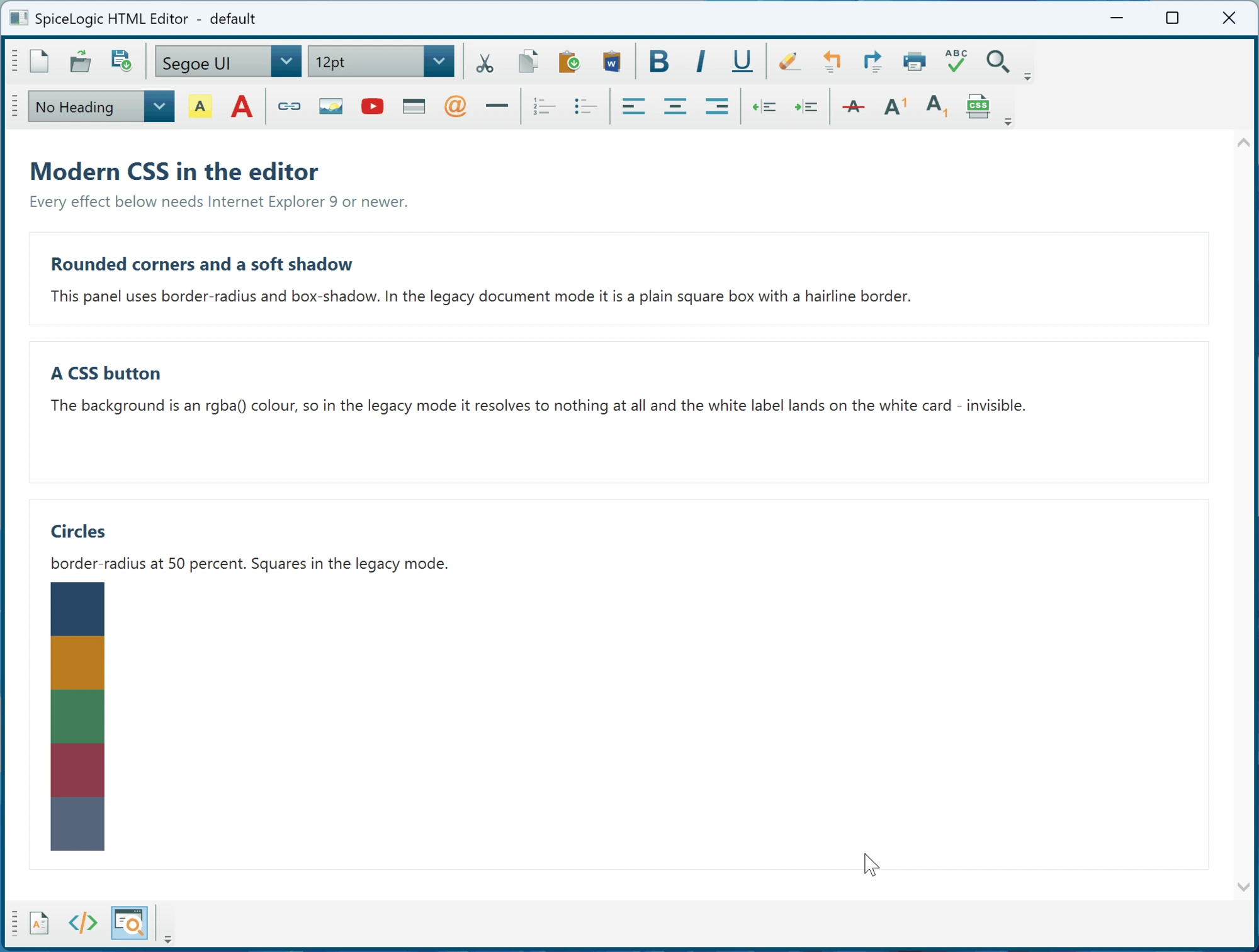
The failure is silent, which is what makes it confusing. Nothing throws and nothing is logged. A declaration the engine does not understand is simply discarded, so:
border-radiusis ignored, and panels, images and avatars stay square.rgba()is not a valid colour, sobackground-color: rgba(40,71,101,.9)resolves to nothing. A button with a white label on a light panel becomes invisible text.box-shadowandtext-shadowdo nothing.@font-faceweb fonts never load, so icon fonts render as blank boxes.position: fixedbehaves likeposition: static.::beforeand::aftergenerated content does not appear.
Why it happens
The editor renders through MSHTML, the engine that shipped with Internet Explorer. When any application hosts that engine, Windows runs it in Internet Explorer 7 document mode unless the application explicitly asks for something newer. That default dates from 2001 and exists so that old intranet applications keep working. It applies to every hosted browser on Windows, not just this control.
The consequence is that the engine is far more capable than the mode it starts in. Everything listed above is supported by Internet Explorer 9, 10 or 11 - you are not hitting the ceiling of what the editor can render, you are sitting at the floor.
Turning it on
Set BrowserEmulation once at application startup, next to your licence key, before the first editor is created. In a WPF application that means App.xaml.cs, not the window that hosts the editor:
using SpiceLogic.HtmlEditor.Infrastructure;
using SpiceLogic.HtmlEditor.WPF;

public partial class App : Application
{
    protected override void OnStartup(StartupEventArgs e)
    {
        WpfHtmlEditor.LicenseKey = "your-license-key-here";
        WpfHtmlEditor.BrowserEmulation = BrowserEmulationMode.InternetExplorer11;

        base.OnStartup(e);
    }
}
Imports SpiceLogic.HtmlEditor.Infrastructure
Imports SpiceLogic.HtmlEditor.WPF
Partial Public Class App
Inherits Application
Protected Overrides Sub OnStartup(e As StartupEventArgs)
WpfHtmlEditor.LicenseKey = "your-license-key-here"
WpfHtmlEditor.BrowserEmulation = BrowserEmulationMode.InternetExplorer11
MyBase.OnStartup(e)
End Sub
End ClassRequires version 3.7.0 or newer. Nothing else in your code or XAML changes.
The timing matters. MSHTML fixes the document mode for the whole process when the first browser in it is created, so a value set after an editor already exists has no effect - which is why the window's constructor is too late if that window contains an editor. If you need to confirm what happened, read BrowserEmulationConfigurator.Status, which explains in plain words what was applied and why. It is also written to the debug output every time your application starts.
What changes when you turn it on
This is a real trade, and it is why the setting is off by default rather than applied for you.
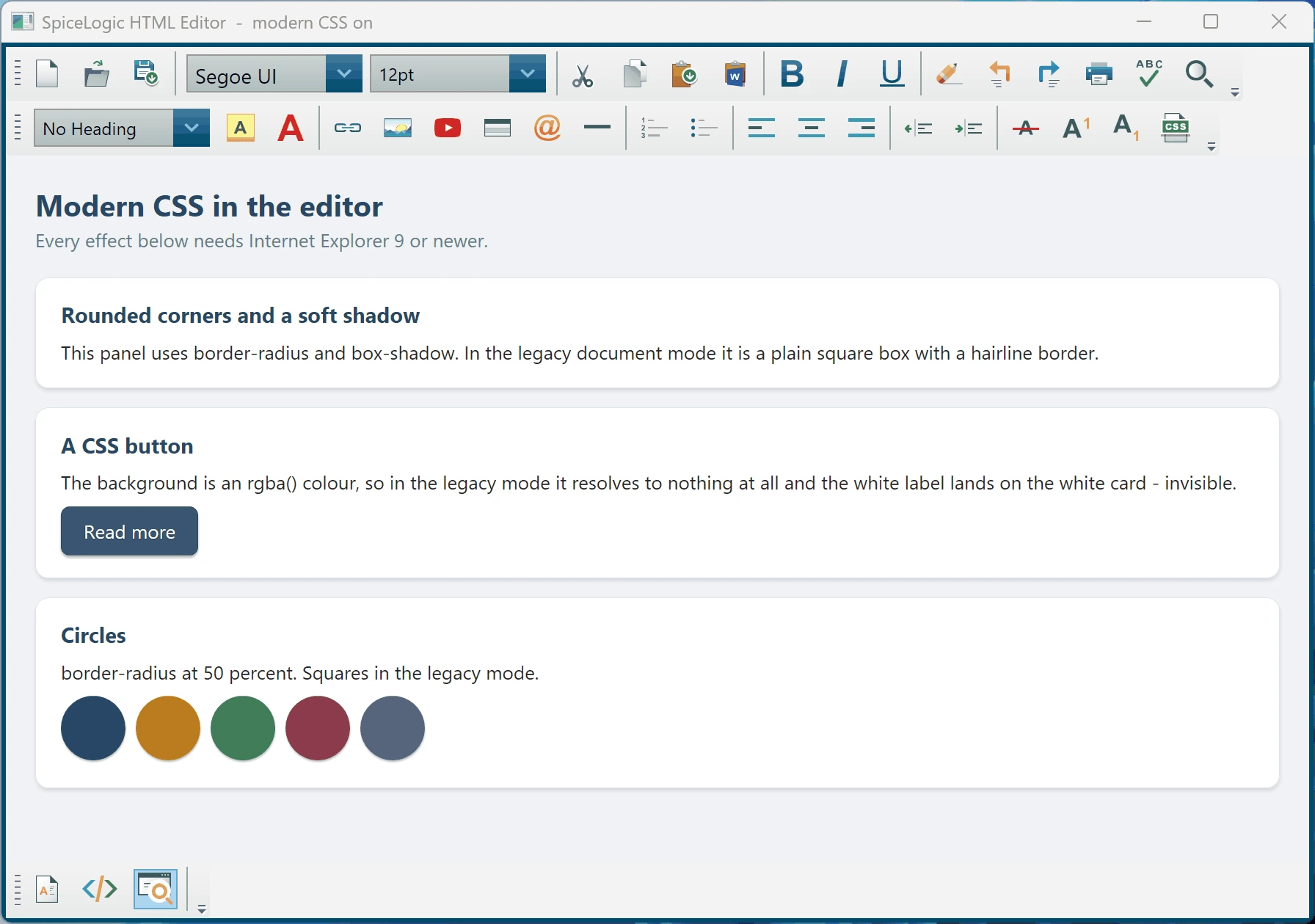
You gain the whole of CSS up to Internet Explorer 11: rounded corners, translucent colours, shadows, transitions, transforms, web fonts, media queries, generated content and fixed positioning.
You do not gain anything newer than that. CSS grid, current flexbox syntax, custom properties (CSS variables), calc() in most positions, object-fit and clamp() still do not work, because Internet Explorer 11 never supported them.
Some editing behaviour changes. The document mode affects more than rendering: it also changes what MSHTML's execCommand produces when the user formats text. In Internet Explorer 11 mode, formatting commands tend to emit CSS in span elements where the legacy mode emitted font tags, some toggle commands behave differently on a second press, and an empty document reports its scrollbars differently. If your application post-processes the editor's HTML, or binds it somewhere that depends closely on the exact markup produced, test that path before shipping the change.
Choosing a different value
| Value | Behaviour |
|---|---|
Unchanged | The default. The editor neither reads nor writes the registry, and rendering is exactly as it was before 3.7.0. |
InternetExplorer11 | Internet Explorer 11 document mode, except on a machine with a Japanese IME installed, which is left alone (see below). |
InternetExplorer11Forced | Internet Explorer 11 document mode on every machine, including one with a Japanese IME. |
Legacy | Removes the editor's registry value again, undoing the change on machines where it was already applied. |
Japanese text entry
Internet Explorer 11 document mode does not accept Japanese IME composition inside an editable document: the user can type in every other application but not in the editor. Because losing modern CSS is a cosmetic disappointment while losing the ability to type is not, InternetExplorer11 checks the installed keyboard layouts and skips machines where a Japanese IME is present. If your users never compose Japanese in the editor, use InternetExplorer11Forced to apply the mode unconditionally.
How the setting is stored
The document mode is selected per executable through the FEATURE_BROWSER_EMULATION value under HKEY_CURRENT_USER\Software\Microsoft\Internet Explorer\Main\FeatureControl. Points worth knowing:
- It is written under
HKEY_CURRENT_USER, so no administrator rights are needed and no elevation prompt appears. - It is keyed to your executable's file name, and it affects every hosted browser in your process, including any
WebBrowsercontrol of your own. - The editor never writes it at design time, and never for a designer process such as
devenv.exeor Blend, so your Visual Studio installation is not affected. - If the write is refused, for example by group policy on a managed machine, the editor carries on rendering as before and records the reason in
BrowserEmulationConfigurator.Status. It never throws. - The value persists after your application exits. Use
Legacyto remove it again.
Confirming which mode you are in
Ask the document directly, and read the status the editor recorded at startup:
dynamic doc = htmlEditor.GetMshtmlDoc2();
int documentMode = (int)doc.parentWindow.document.documentMode;
// 7 = legacy, 11 = Internet Explorer 11

// Why the editor did what it did, in plain words:
Console.WriteLine(BrowserEmulationConfigurator.Status);
Dim doc As Object = htmlEditor.GetMshtmlDoc2()
Dim documentMode As Integer = CInt(doc.parentWindow.document.documentMode)
' 7 = legacy, 11 = Internet Explorer 11
' Why the editor did what it did, in plain words:
Console.WriteLine(BrowserEmulationConfigurator.Status)Before and after
The same document open in the editor, first in the default legacy mode and then with BrowserEmulation set to InternetExplorer11. Nothing changed between the two but that one line at startup. Look at the panel corners, the Read more button (which has no background at all in the first shot, so its white label is invisible), and the row of swatches.