


 NuGet
NuGet
Making Your Own Buttons Context-Aware via SelectionChanged and StateQuery
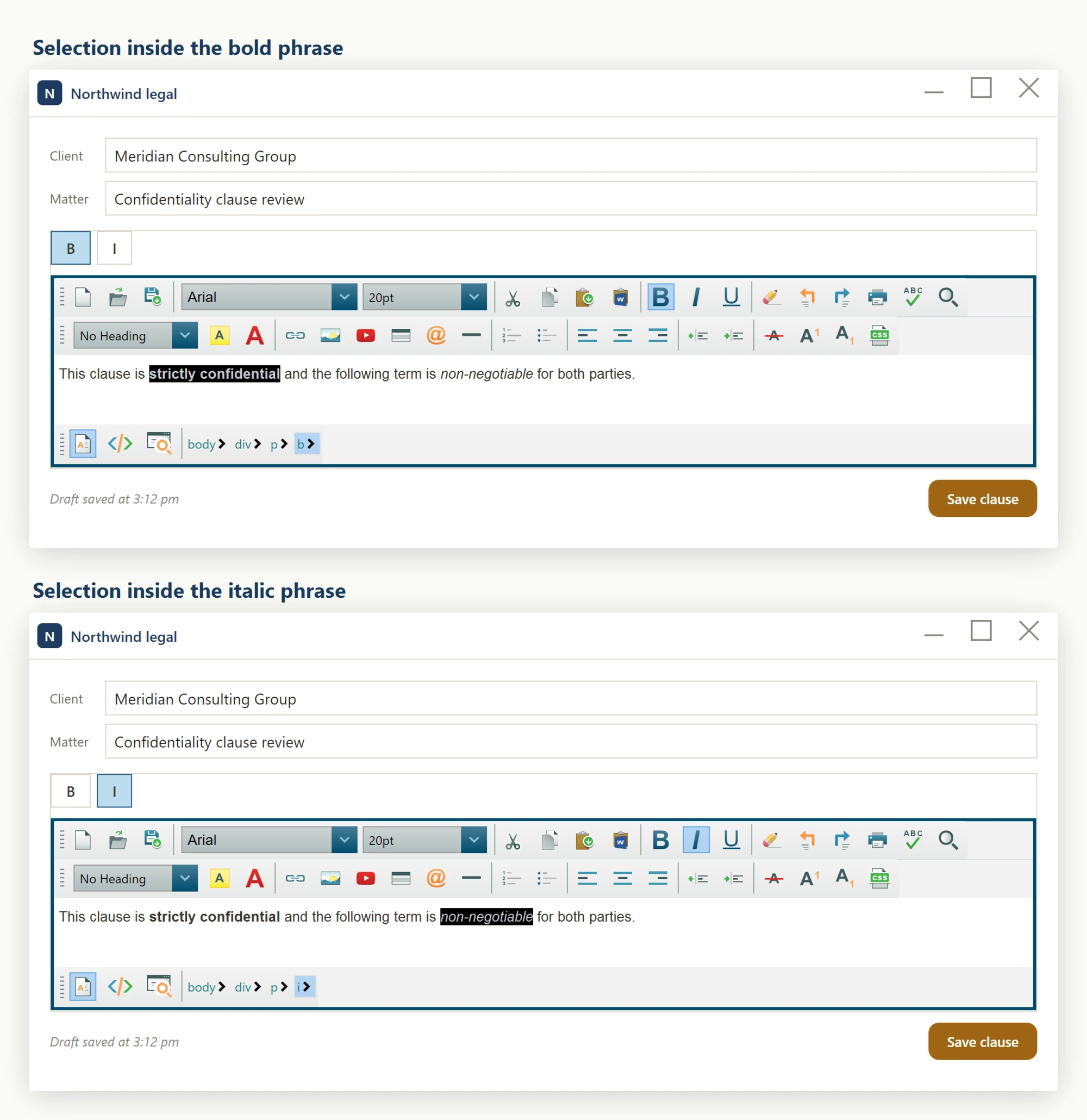
Toolbar buttons wired through ToolbarItemOverrider (see page 156) send commands to the editor, but do not automatically reflect the caret's current formatting - a Bold toggle will not appear pressed when the caret is inside bold text, and a Bullet List toggle will not reflect that the caret is inside a list. If your app uses a custom ribbon or toolbar, for example a branded set of formatting buttons in an invoice template editor or a CRM notes panel, that mismatch is confusing: the button no longer tells the user what is actually happening at the cursor. This page shows how to make custom toolbar or ribbon buttons context-aware, so each button's checked/enabled state always matches the content at the caret.
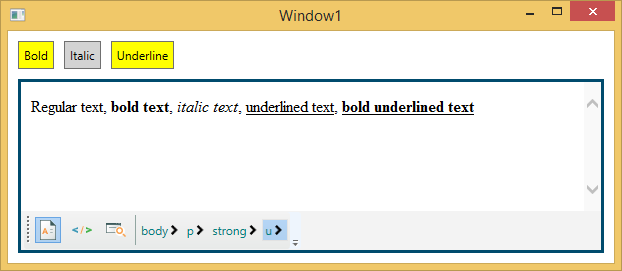
Two members support this. The SelectionChanged routed event on WpfHtmlEditor fires whenever the caret moves or the selection changes. The StateQuery service answers formatting questions such as IsBold(), IsItalic(), IsUnorderedList(), and more.
Subscribe to the event in the editor's Loaded handler, then push the returned state into your view model on each callback, as shown below.
private void ContractEditor_OnLoaded(object sender, RoutedEventArgs e)
{
    ContractEditor.SelectionChanged += ContractEditor_SelectionChanged;
}

private void ContractEditor_SelectionChanged(object sender, RoutedEventArgs e)
{
    var state = ContractEditor.StateQuery;
    var vm = (RibbonViewModel)DataContext;
    vm.IsBold = state.IsBold();
    vm.IsItalic = state.IsItalic();
    vm.IsUnderline = state.IsUnderline();
    vm.IsBulletList = state.IsUnorderedList();
    vm.IsNumberList = state.IsOrderedList();
    vm.IsAlignLeft = state.IsJustifyLeft();
    vm.IsAlignCenter = state.IsJustifyCenter();
    vm.IsAlignRight = state.IsJustifyRight();
    vm.ActiveFontFamily = state.GetActiveFontFamilyName();
    vm.ActiveFontSize = state.GetActiveFontSize();
    vm.CanUndo = state.CanUndo();
    vm.CanRedo = state.CanRedo();
    vm.CanPaste = state.CanPaste();
}
Private Sub ContractEditor_OnLoaded(sender As Object, e As RoutedEventArgs)
AddHandler ContractEditor.SelectionChanged, AddressOf ContractEditor_SelectionChanged
End Sub
Private Sub ContractEditor_SelectionChanged(sender As Object, e As RoutedEventArgs)
Dim state = ContractEditor.StateQuery
Dim vm = CType(DataContext, RibbonViewModel)
vm.IsBold = state.IsBold()
vm.IsItalic = state.IsItalic()
vm.IsUnderline = state.IsUnderline()
vm.IsBulletList = state.IsUnorderedList()
vm.IsNumberList = state.IsOrderedList()
vm.IsAlignLeft = state.IsJustifyLeft()
vm.IsAlignCenter = state.IsJustifyCenter()
vm.IsAlignRight = state.IsJustifyRight()
vm.ActiveFontFamily = state.GetActiveFontFamilyName()
vm.ActiveFontSize = state.GetActiveFontSize()
vm.CanUndo = state.CanUndo()
vm.CanRedo = state.CanRedo()
vm.CanPaste = state.CanPaste()
End SubBind the ribbon toggles in XAML to these properties, for example IsChecked="{Binding IsBold}" and IsChecked="{Binding IsItalic}". Bind Undo/Redo buttons to IsEnabled="{Binding CanUndo}" and IsEnabled="{Binding CanRedo}". As long as RibbonViewModel raises PropertyChanged on each setter, every toggle and button updates automatically as the caret moves.
The StateQuery service exposes many additional context queries beyond the formatting toggles shown above, including IsStrikeThrough(), IsSubscript(), IsSuperscript(), IsHyperLink(), IsImage(), IsTable(), IsTableCell(), IsActiveOrAncestorElementHyperLink(), IsActiveOrAncestorElementTable(), GetActiveForeColor(), GetActiveHighlightColor(), GetActiveHeaderTitleNumber(), IsActiveElementHeaderTitle(), CanCut(), CanCopy(), and CanDelete(). Use these to add more ribbon features with the same event-subscription pattern.
- Hook the routed
SelectionChangedevent onWpfHtmlEditorto be notified whenever the caret or selection moves. - Inside the handler, call
editor.StateQuery.IsBold(),.IsItalic(),.IsUnorderedList(), etc. to learn the caret context. - Push the values into your view-model properties so any bound
ToggleButton.IsCheckedandIsEnabledbinding updates automatically.
Ask your AI to do this
Let your assistant do this for you. With the SpiceLogic MCP server connected, paste this into Claude Code, Cursor, or VS Code Copilot in agent mode.
Using the SpiceLogic WPF HTML Editor already referenced in my project, make my custom ribbon buttons context-aware: subscribe to the editor's SelectionChanged routed event, and inside the handler call StateQuery.IsBold(), IsItalic(), and IsUnorderedList() to learn the caret's current formatting, then push those values into my view model so the bound ToggleButton.IsChecked properties on a "Bold" and a "Bullet list" button update automatically as the caret moves. This should behave the way a word processor's ribbon toggles reflect the cursor position without any manual refresh call. Pull the real StateQuery member list and the SelectionChanged event signature from the SpiceLogic MCP tools before writing any code.