


 NuGet
NuGet
Editor service
The editor service runs editing commands such as copy, paste, undo, search and print. Use it when your application needs to run a command from its own menu, button or keyboard shortcut. Access these operations through the editor control's Editor property.
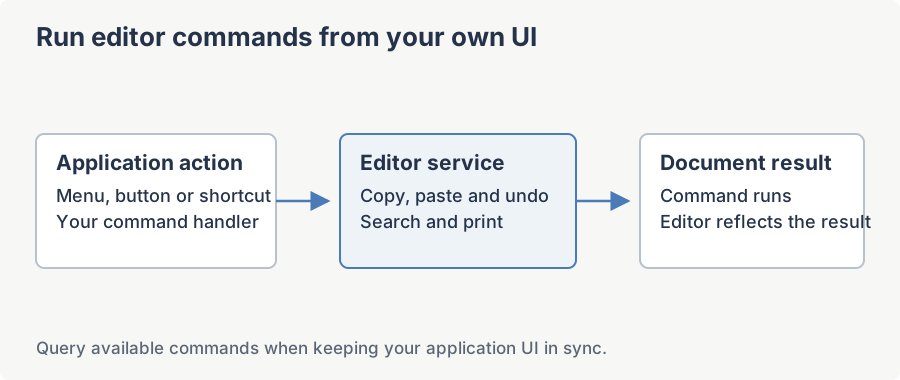
The service covers four broad areas: layout (resizing and scroll bars), the clipboard pipeline (cut, copy, paste, including MS Word paste), command execution (undo, redo, justification, generic exec-commands), and search-and-replace including the IE-style dialog and programmatic variants.
All members operate against the currently loaded document, and most also dispatch on the editor's current mode (design, raw HTML editing, or read-only preview) because the same logical operation runs against a different backing store depending on the mode; a member whose behavior differs by mode says so explicitly below. In every example below, MyEditor is a WpfHtmlEditor declared in XAML with x:Name="MyEditor".
AdjustEditorSize Method
Resizes the editor control so both its width and height match the natural size of the rendered content. Equivalent to calling AdjustEditorWidth followed by AdjustEditorHeight. Silently does nothing in HtmlEdit mode, since there is no rendered document to measure, or if the browser has not yet realized a document.
Syntax
void AdjustEditorSize();Example
private void MyEditor_DocumentReady(object sender, EventArgs e)
{
    // Auto-grow the editor to fit the loaded document.
    MyEditor.Editor.AdjustEditorSize();
}
Private Sub MyEditor_DocumentReady(sender As Object, e As EventArgs)
' Auto-grow the editor to fit the loaded document.
MyEditor.Editor.AdjustEditorSize()
End SubAdjustEditorWidth Method
Resets the control's width so that the horizontal scroll bar is no longer needed to reveal clipped content; the editor expands or shrinks to match the visible content width. Height is left unchanged. Silently does nothing in HtmlEdit mode or if the browser has not yet realized a document.
Syntax
void AdjustEditorWidth();Example
private void FitWidthButton_Click(object sender, RoutedEventArgs e)
{
    MyEditor.Editor.AdjustEditorWidth();
}
Private Sub FitWidthButton_Click(sender As Object, e As RoutedEventArgs)
MyEditor.Editor.AdjustEditorWidth()
End SubAdjustEditorHeight Method
Resets the control's height so that the vertical scroll bar is no longer needed; the editor expands or shrinks to match the visible content height. Pair with AdjustEditorWidth to produce an auto-sized editor. Width is left unchanged. Silently does nothing in HtmlEdit mode or if the browser has not yet realized a document.
Syntax
void AdjustEditorHeight();Example
private void FitHeightButton_Click(object sender, RoutedEventArgs e)
{
    MyEditor.Editor.AdjustEditorHeight();
}
Private Sub FitHeightButton_Click(sender As Object, e As RoutedEventArgs)
MyEditor.Editor.AdjustEditorHeight()
End SubGetScrollBarSetting Method
Returns the editor's current scroll-bar policy as a ScrollBarVisibility value (Auto, Both, Horizontal, Vertical, None, Default, or Custom). Returns Auto if the setting cannot be read, for example before a document is loaded.
Syntax
ScrollBarVisibility GetScrollBarSetting();Returns
ScrollBarVisibility - the active scroll-bar policy.
Example
ScrollBarVisibility before = MyEditor.Editor.GetScrollBarSetting();

MyEditor.Editor.SetScrollBarSetting(ScrollBarVisibility.None);

PrintDocument();

MyEditor.Editor.SetScrollBarSetting(before); // restore
SetScrollBarSetting Method
Changes the editor's scroll-bar policy. Use Custom if you supply your own overflow CSS through BodyStyle; in Custom mode the editor leaves your style untouched. Silently does nothing if no document is loaded yet.
Syntax
void SetScrollBarSetting(ScrollBarVisibility scrollbarValue);Parameters
| Name | Type | Description |
|---|---|---|
| scrollbarValue | ScrollBarVisibility | The desired scroll-bar policy. |
Example
// Show both scrollbars only when content overflows.

MyEditor.Editor.SetScrollBarSetting(ScrollBarVisibility.Auto);
GetScrollPosition Method
Returns the current scroll offset of the editor viewport as a System.Drawing.Point in pixels. Returns Point.Empty when there is no active browser or document yet.
Syntax
System.Drawing.Point GetScrollPosition();Returns
System.Drawing.Point - X is the horizontal scroll offset and Y is the vertical scroll offset.
Example
var saved = MyEditor.Editor.GetScrollPosition();
MyEditor.DocumentHtml = updatedHtml;
MyEditor.Editor.SetScrollPosition(saved.X, saved.Y);
Dim saved = MyEditor.Editor.GetScrollPosition()
MyEditor.DocumentHtml = updatedHtml
MyEditor.Editor.SetScrollPosition(saved.X, saved.Y)SetScrollPosition Method
Scrolls the editor viewport to the absolute pixel offset (x, y). Values are clamped to the valid scroll range of the current document. Silently does nothing if no browser or document is available yet.
Syntax
void SetScrollPosition(int x, int y);Parameters
| Name | Type | Description |
|---|---|---|
| x | System.Int32 | Target horizontal scroll offset in pixels. |
| y | System.Int32 | Target vertical scroll offset in pixels. |
Example
// Jump back to the top of the document.

MyEditor.Editor.SetScrollPosition(0, 0);
IsMsWordContentInClipboard Method
Returns true when the system clipboard holds content originating from Microsoft Word (detected via Word-specific clipboard formats). Use it to decide whether to offer a Paste from Word command in your UI.
Syntax
bool IsMsWordContentInClipboard();Returns
System.Boolean - true if MS Word content is on the clipboard; otherwise false.
Example
PasteFromWordButton.IsEnabled =

    MyEditor.Editor.IsMsWordContentInClipboard();
PasteFromMsWord Method
Pastes clipboard content using the editor's Word-aware cleaning pipeline. Word-specific markup such as MSO conditional comments, mso-* CSS, and VML imagedata is stripped before the content is inserted. Only meaningful in WysiwygDesign mode; silently does nothing in the other modes. If the insertion is refused to avoid data loss (see Paste), the failure is reported through the editor's error event rather than thrown.
Syntax
void PasteFromMsWord();Example
if (MyEditor.Editor.IsMsWordContentInClipboard())
    MyEditor.Editor.PasteFromMsWord();
else
    MyEditor.Editor.Paste();
If MyEditor.Editor.IsMsWordContentInClipboard() Then
MyEditor.Editor.PasteFromMsWord()
Else
MyEditor.Editor.Paste()
End IfCut Method
Performs a standard cut: removes the current selection from the document and places it on the system clipboard. No-op when the selection is empty.
Syntax
void Cut();Example
private void CutCommand_Executed(object sender, ExecutedRoutedEventArgs e)
{
    MyEditor.Editor.Cut();
}
Private Sub CutCommand_Executed(sender As Object, e As ExecutedRoutedEventArgs)
MyEditor.Editor.Cut()
End SubCopy Method
Copies the current selection to the system clipboard without modifying the document. No-op when the selection is empty.
Syntax
void Copy();Example
private void CopyCommand_Executed(object sender, ExecutedRoutedEventArgs e)
{
    MyEditor.Editor.Copy();
}
Private Sub CopyCommand_Executed(sender As Object, e As ExecutedRoutedEventArgs)
MyEditor.Editor.Copy()
End SubDelete Method
Deletes the current selection from the document. When there is no selection, deletes the character to the right of the caret (forward delete).
Syntax
void Delete();Example
private void DeleteCommand_Executed(object sender, ExecutedRoutedEventArgs e)
{
    MyEditor.Editor.Delete();
}
Private Sub DeleteCommand_Executed(sender As Object, e As ExecutedRoutedEventArgs)
MyEditor.Editor.Delete()
End SubPaste Method
Pastes clipboard content at the caret position using the editor's standard paste pipeline. For Word-origin clipboards prefer PasteFromMsWord to apply Word-specific cleaning.
Syntax
void Paste();Remarks
Fires the editor's Pasting event first, if a handler is attached, so the handler can inspect, rewrite, or cancel the paste before it is inserted. If the clipboard yields no HTML to insert, the call is a no-op and the current selection is left untouched. If insertion is refused to protect the document from a destructive whole-body replacement, the failure is reported through the editor's error event rather than thrown, and the document is left unchanged.
Example
private void PasteCommand_Executed(object sender, ExecutedRoutedEventArgs e)
{
    MyEditor.Editor.Paste();
}
Private Sub PasteCommand_Executed(sender As Object, e As ExecutedRoutedEventArgs)
MyEditor.Editor.Paste()
End SubUndo Method
Reverts the most recent edit. The undo stack covers typing, formatting, and structural changes; see ClearUndoStack to reset it. Silently does nothing in ReadOnlyPreview mode or once the undo stack is exhausted.
Syntax
void Undo();Example
private void UndoButton_Click(object sender, RoutedEventArgs e)
{
    MyEditor.Editor.Undo();
}
Private Sub UndoButton_Click(sender As Object, e As RoutedEventArgs)
MyEditor.Editor.Undo()
End SubRedo Method
Reapplies the most recently undone edit. The redo stack is cleared whenever a new edit is made after an undo. Only meaningful in WysiwygDesign mode; a no-op in the other modes, since the raw-HTML textbox has no redo buffer of its own.
Syntax
void Redo();Example
private void RedoButton_Click(object sender, RoutedEventArgs e)
{
    MyEditor.Editor.Redo();
}
Private Sub RedoButton_Click(sender As Object, e As RoutedEventArgs)
MyEditor.Editor.Redo()
End SubToggleOverWriteMode Method
Switches the editor between insert mode and overwrite mode, mirroring the effect of the Insert key. In overwrite mode each typed character replaces the character under the caret. Only meaningful in WysiwygDesign mode; a no-op in the other modes.
Syntax
void ToggleOverWriteMode();Example
private void InsertKeyBinding_Executed(object sender, ExecutedRoutedEventArgs e)
{
    MyEditor.Editor.ToggleOverWriteMode();
}
Private Sub InsertKeyBinding_Executed(sender As Object, e As ExecutedRoutedEventArgs)
MyEditor.Editor.ToggleOverWriteMode()
End SubPrint Method
Prints the current document. When showDialog is true the standard Windows print dialog is shown first so the user can choose a printer and options; otherwise the default printer is used silently.
Syntax
void Print(bool showDialog);Parameters
| Name | Type | Description |
|---|---|---|
| showDialog | System.Boolean | If true, show the print dialog before printing. |
Remarks
If no printer is installed on the machine the editor shows a message box; the caption of that box is controlled by NoPrinterMessageCaption.
Example
private void PrintButton_Click(object sender, RoutedEventArgs e)
{
    MyEditor.Editor.Print(showDialog: true);
}
Private Sub PrintButton_Click(sender As Object, e As RoutedEventArgs)
MyEditor.Editor.Print(showDialog:=True)
End SubExecCommand Method
Executes one of the underlying browser exec-commands (the same command identifiers used by the legacy document.execCommand DOM API). Useful as an escape hatch when a built-in editor method does not cover the operation you need. Silently does nothing in HtmlEdit mode. In the other modes, an unrecognized cmdId is passed straight through to MSHTML uncaught, which throws a COMException that propagates to the caller.
Syntax
void ExecCommand(string cmdId, bool showUi = false, object? value = null);Parameters
| Name | Type | Description |
|---|---|---|
| cmdId | System.String | The exec-command identifier, for example "Bold" or "InsertOrderedList". |
| showUi | System.Boolean | Whether the command may show a user-interface element. Default false. |
| value | System.Object | Optional command parameter; semantics depend on cmdId. |
Example
// Apply a red foreground colour to the current selection.
MyEditor.Editor.ExecCommand("ForeColor", false, "#cc0000");
' Apply a red foreground colour to the current selection.
MyEditor.Editor.ExecCommand("ForeColor", False, "#cc0000")ShowPrintPreviewDialog Method
Opens the system print-preview dialog showing how the current document will appear on paper. The dialog is modal with respect to the editor's host window. If Windows reports no default printer installed, the dialog is not shown; a message box captioned NoPrinterMessageCaption is shown instead.
Syntax
void ShowPrintPreviewDialog();Example
private void PrintPreviewButton_Click(object sender, RoutedEventArgs e)
{
    MyEditor.Editor.ShowPrintPreviewDialog();
}
Private Sub PrintPreviewButton_Click(sender As Object, e As RoutedEventArgs)
MyEditor.Editor.ShowPrintPreviewDialog()
End SubShowPageSetupDialog Method
Opens the system page-setup dialog so the user can adjust margins, orientation, and paper size. Settings chosen here apply to subsequent Print and ShowPrintPreviewDialog calls. If Windows reports no default printer installed, the dialog is not shown; a message box captioned NoPrinterMessageCaption is shown instead.
Syntax
void ShowPageSetupDialog();Example
private void PageSetupButton_Click(object sender, RoutedEventArgs e)
{
    MyEditor.Editor.ShowPageSetupDialog();
}
Private Sub PageSetupButton_Click(sender As Object, e As RoutedEventArgs)
MyEditor.Editor.ShowPageSetupDialog()
End SubJustifyLeft Method
Toggles left-justification on the block containing the caret. Calling the method twice removes the justification. A no-op in HtmlEdit mode.
Syntax
void JustifyLeft();Example
private void AlignLeftButton_Click(object sender, RoutedEventArgs e)
{
    MyEditor.Editor.JustifyLeft();
}
Private Sub AlignLeftButton_Click(sender As Object, e As RoutedEventArgs)
MyEditor.Editor.JustifyLeft()
End SubJustifyRight Method
Toggles right-justification on the block containing the caret. A no-op in HtmlEdit mode.
Syntax
void JustifyRight();Example
private void AlignRightButton_Click(object sender, RoutedEventArgs e)
{
    MyEditor.Editor.JustifyRight();
}
Private Sub AlignRightButton_Click(sender As Object, e As RoutedEventArgs)
MyEditor.Editor.JustifyRight()
End SubJustifyCenter Method
Toggles centred justification on the block containing the caret. A no-op in HtmlEdit mode.
Syntax
void JustifyCenter();Example
private void AlignCenterButton_Click(object sender, RoutedEventArgs e)
{
    MyEditor.Editor.JustifyCenter();
}
Private Sub AlignCenterButton_Click(sender As Object, e As RoutedEventArgs)
MyEditor.Editor.JustifyCenter()
End SubSearch Method
Searches the document for the next or previous occurrence of text. When a match is found the editor selects it and scrolls it into view; the method returns true. When no match is found nothing is selected and the method returns false. Works in both WysiwygDesign and HtmlEdit mode; always returns false without searching in ReadOnlyPreview mode.
Syntax
bool Search(string text, bool forward, bool matchWholeWord, bool matchCase, bool useCaretPosition = false);Parameters
| Name | Type | Description |
|---|---|---|
| text | System.String | The text to find. |
| forward | System.Boolean | If true, search forward from the current selection or caret; otherwise search backward. |
| matchWholeWord | System.Boolean | If true, only whole-word matches count. |
| matchCase | System.Boolean | If true, the comparison is case-sensitive. |
| useCaretPosition | System.Boolean | If true and the current selection is empty, start the search from the caret position instead of the document start. Default false. |
Returns
System.Boolean - true if a match was found and selected; otherwise false.
Example
bool found = MyEditor.Editor.Search(text: "invoice", forward: true, matchWholeWord: false, matchCase: false);
if (!found)
    MessageBox.Show("No more matches.");
Dim found As Boolean = MyEditor.Editor.Search(text:="invoice", forward:=True, matchWholeWord:=False, matchCase:=False)
If Not found Then MessageBox.Show("No more matches.")Replace Method
If the current selection equals searchString (subject to the case and whole-word flags), replaces it with replacement. Returns true when a replacement actually happened. Typically called in a loop with Search to implement an interactive Find and Replace workflow. Shows a message box and returns false without changing the document in ReadOnlyPreview mode.
Syntax
bool Replace(string searchString, string replacement, bool matchWholeWord, bool matchCase);Parameters
| Name | Type | Description |
|---|---|---|
| searchString | System.String | The text that the current selection must match. |
| replacement | System.String | The replacement text. |
| matchWholeWord | System.Boolean | If true, only whole-word matches qualify. |
| matchCase | System.Boolean | If true, the comparison is case-sensitive. |
Returns
System.Boolean - true if the selection matched and was replaced; otherwise false.
Example
// Interactive workflow: Find, then Replace on user click.
if (MyEditor.Editor.Search("colour", true, false, false))
{
    MyEditor.Editor.Replace("colour", "color", false, false);
}
' Interactive workflow: Find, then Replace on user click.
If MyEditor.Editor.Search("colour", True, False, False) Then
MyEditor.Editor.Replace("colour", "color", False, False)
End IfReplaceAll Method
Replaces every occurrence of replaceWhat in the document with replaceWith. Returns the number of replacements performed. Shows a message box and returns 0 without changing the document in ReadOnlyPreview mode.
Syntax
int ReplaceAll(string replaceWhat, string replaceWith, bool matchWholeWord, bool matchCase);Parameters
| Name | Type | Description |
|---|---|---|
| replaceWhat | System.String | The text to find. |
| replaceWith | System.String | The replacement text. |
| matchWholeWord | System.Boolean | If true, only whole-word matches qualify. |
| matchCase | System.Boolean | If true, the comparison is case-sensitive. |
Returns
System.Int32 - the number of occurrences found and replaced.
Example
int n = MyEditor.Editor.ReplaceAll(replaceWhat: "colour", replaceWith: "color", matchWholeWord: true, matchCase: false);
MessageBox.Show($"Replaced {n} occurrence(s).");
Dim n As Integer = MyEditor.Editor.ReplaceAll(replaceWhat:="colour", replaceWith:="color", matchWholeWord:=True, matchCase:=False)
MessageBox.Show($"Replaced {n} occurrence(s).")SearchWithDefaultIeDialog Method
Opens the built-in IE-style search dialog so the end user can interactively find text within the editor. The dialog raises the editor's search-related events (see SearchEventArg, ReplaceEventArg, ReplaceAllEventArg). Only meaningful in WysiwygDesign mode; a no-op in the other modes.
Syntax
void SearchWithDefaultIeDialog();Example
private void FindButton_Click(object sender, RoutedEventArgs e)
{
    MyEditor.Editor.SearchWithDefaultIeDialog();
}
Private Sub FindButton_Click(sender As Object, e As RoutedEventArgs)
MyEditor.Editor.SearchWithDefaultIeDialog()
End SubDeleteText Method
Deletes length characters starting at the plain-text startIndex. Useful for programmatic editing without disturbing the user's selection. Only meaningful in WysiwygDesign mode; a no-op in the other modes.
Syntax
void DeleteText(int startIndex, int length);Parameters
| Name | Type | Description |
|---|---|---|
| startIndex | System.Int32 | Zero-based plain-text offset where the deletion begins. |
| length | System.Int32 | Number of characters to delete. |
Example
// Strip the first ten characters of plain text from the document.

MyEditor.Editor.DeleteText(startIndex: 0, length: 10);
ReplaceText Method
Replaces length characters starting at the plain-text startIndex with replacementText. The replacement may be longer or shorter than the original span. Only meaningful in WysiwygDesign mode; a no-op in the other modes.
Syntax
void ReplaceText(int startIndex, int length, string replacementText);Parameters
| Name | Type | Description |
|---|---|---|
| startIndex | System.Int32 | Zero-based plain-text offset where the replacement begins. |
| length | System.Int32 | Number of characters to replace. |
| replacementText | System.String | The text to insert in place of the original span. |
Example
// Replace 4 characters at offset 12 with a longer word.

MyEditor.Editor.ReplaceText(12, 4, "Hello");
PrintPageSetup Method (Uniform Margin)
Sets uniform page margins (top, bottom, left, and right) for subsequent printing. The value is in inches.
Syntax
void PrintPageSetup(double margin);Parameters
| Name | Type | Description |
|---|---|---|
| margin | System.Double | Uniform page margin in inches, applied to all four sides. |
Example
// One-inch margins, then print silently.
MyEditor.Editor.PrintPageSetup(margin: 1.0);
MyEditor.Editor.Print(showDialog: false);
' One-inch margins, then print silently.
MyEditor.Editor.PrintPageSetup(margin:=1.0)
MyEditor.Editor.Print(showDialog:=False)PrintPageSetup Method (Per-Side Margins)
Sets per-side page margins for subsequent printing. All values are in inches. These are process-wide Internet Explorer settings, not scoped to this editor instance, and take effect the next time Print, ShowPrintPreviewDialog, or ShowPageSetupDialog is used. Failures (for example, no write access to the registry) are reported through the editor's error event rather than thrown.
Syntax
void PrintPageSetup(double topMargin, double bottomMargin, double rightMargin, double leftMargin);Parameters
| Name | Type | Description |
|---|---|---|
| topMargin | System.Double | Top margin in inches. |
| bottomMargin | System.Double | Bottom margin in inches. |
| rightMargin | System.Double | Right margin in inches. |
| leftMargin | System.Double | Left margin in inches. |
Example
// Wider left margin for binding.

MyEditor.Editor.PrintPageSetup(

    topMargin:    1.0,

    bottomMargin: 1.0,

    rightMargin:  0.75,

    leftMargin:   1.25);
ClearUndoStack Method
Clears the WYSIWYG editor's undo history. Typically called immediately after loading a document so the user cannot undo past the load point.
Syntax
void ClearUndoStack();Example
// Load fresh content and prevent users from undoing into the previous document.

MyEditor.DocumentHtml = myHtml;

MyEditor.Editor.ClearUndoStack();
HasHorizontalScrollbar Property
Gets a value indicating whether the editor is currently showing a horizontal scroll bar. The value reflects the actual visible state, not the configured policy. Returns false when no document is loaded.
Syntax
bool HasHorizontalScrollbar { get; }Returns
System.Boolean - true when the horizontal scroll bar is visible; otherwise false.
Example
if (MyEditor.Editor.HasHorizontalScrollbar)
    MyEditor.Editor.AdjustEditorWidth();
If MyEditor.Editor.HasHorizontalScrollbar Then MyEditor.Editor.AdjustEditorWidth()HasVerticalScrollbar Property
Gets a value indicating whether the editor is currently showing a vertical scroll bar. Returns false when no document is loaded.
Syntax
bool HasVerticalScrollbar { get; }Returns
System.Boolean - true when the vertical scroll bar is visible; otherwise false.
Example
if (MyEditor.Editor.HasVerticalScrollbar)
    MyEditor.Editor.AdjustEditorHeight();
If MyEditor.Editor.HasVerticalScrollbar Then MyEditor.Editor.AdjustEditorHeight()NoPrinterMessageCaption Property
Gets or sets the caption of the message box shown when Print, ShowPrintPreviewDialog, or ShowPageSetupDialog is invoked on a machine with no printer installed. Defaults to an empty string, so the message box shows with no caption text until you set one. Localise this string to match your application's language.
Syntax
string NoPrinterMessageCaption { get; set; }Returns
System.String - the caption of the "no printer" message box.
Example
// Localise the no-printer message caption at startup.

MyEditor.Editor.NoPrinterMessageCaption = "Printer not available";
Ask your AI to do this
Connect the SpiceLogic MCP server, then give your coding assistant this prompt.
I use the SpiceLogic WPF HTML Editor. Help me use the Editor service to control document editing commands. Confirm the exact API names, types and defaults with the SpiceLogic MCP documentation, then show the changes for my project.