


 NuGet
NuGet
Theme and style customization
WpfHtmlEditor can share the visual language of your application without pretending to have a built-in dark mode. Apply WPF resources to the two public toolbar rows, replace individual button content, coordinate the editor border, and style the HTML document separately.
What you can customize
- Toolbar surfaces: apply normal WPF brushes and resources to
Toolbar1.ToolBarandToolbar2.ToolBar. - Buttons and lists: reach live controls through
ToolbarItemOverrider.ToolbarItemsto set content, tooltips, visibility, and other standard WPF properties. - Editor frame: coordinate
EditorBorderColorandEditorBorderWidthwith the host application. - Document defaults: use
BodyStyle,DefaultFontFamily,DefaultFontSizeInPt, andDefaultForeColorto establish the editing canvas.
The result can feel native to a resource-driven WPF application while all editing commands remain the real shipped control.
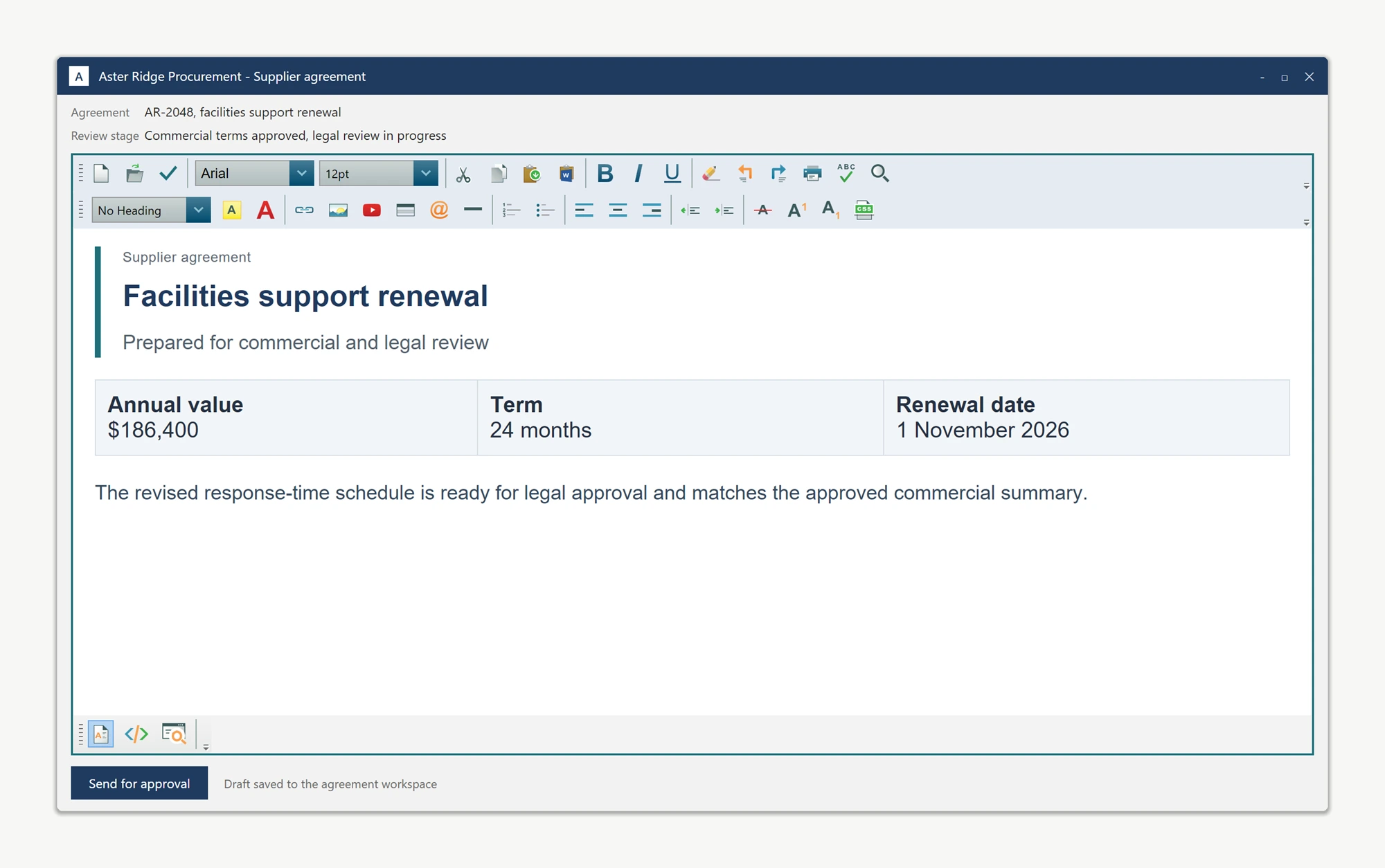
Apply resources to the live toolbars
Define application-level resource keys, then resolve them on the editor's public ToolBar instances. A later resource change can update the same controls without replacing the editor.
htmlEditor1.Resources["EditorToolbarBrush"] =
    new SolidColorBrush(Color.FromRgb(228, 235, 243));
htmlEditor1.Resources["EditorAccentBrush"] =
    new SolidColorBrush(Color.FromRgb(31, 111, 120));

htmlEditor1.Toolbar1.ToolBar.SetResourceReference(
    Control.BackgroundProperty, "EditorToolbarBrush");
htmlEditor1.Toolbar2.ToolBar.SetResourceReference(
    Control.BackgroundProperty, "EditorToolbarBrush");

htmlEditor1.EditorBorderColor = Color.FromRgb(31, 111, 120);
htmlEditor1.EditorBorderWidth = new Thickness(2);
htmlEditor1.Resources("EditorToolbarBrush") =
New SolidColorBrush(Color.FromRgb(228, 235, 243))
htmlEditor1.Resources("EditorAccentBrush") =
New SolidColorBrush(Color.FromRgb(31, 111, 120))
htmlEditor1.Toolbar1.ToolBar.SetResourceReference(
Control.BackgroundProperty, "EditorToolbarBrush")
htmlEditor1.Toolbar2.ToolBar.SetResourceReference(
Control.BackgroundProperty, "EditorToolbarBrush")
htmlEditor1.EditorBorderColor = Color.FromRgb(31, 111, 120)
htmlEditor1.EditorBorderWidth = New Thickness(2)Use application-owned vector icons
The live factory buttons accept normal WPF content. This example replaces Save with a resource-colored vector while leaving its editing command in place.
var save = htmlEditor1.ToolbarItemOverrider.ToolbarItems.Save;
var icon = new Path
{
    Data = Geometry.Parse("M2,9 L7,14 L16,3 L18,5 L7,18 L0,11 Z"),
    Width = 18,
    Height = 18,
    Stretch = Stretch.Uniform
};

icon.SetResourceReference(Shape.FillProperty, "EditorAccentBrush");
save.Content = icon;
save.ToolTip = "Save agreement to workspace";

htmlEditor1.BodyStyle =
    "background-color:#ffffff; color:#253143; " +
    "font-family:Arial; font-size:12pt; margin:0;";
Dim save = htmlEditor1.ToolbarItemOverrider.ToolbarItems.Save
Dim icon = New Path With {
.Data = Geometry.Parse("M2,9 L7,14 L16,3 L18,5 L7,18 L0,11 Z"),
.Width = 18,
.Height = 18,
.Stretch = Stretch.Uniform
}
icon.SetResourceReference(Shape.FillProperty, "EditorAccentBrush")
save.Content = icon
save.ToolTip = "Save agreement to workspace"
htmlEditor1.BodyStyle =
"background-color:#ffffff; color:#253143; " &
"font-family:Arial; font-size:12pt; margin:0;"Keep the boundary clear
The host window, editor toolbars, toolbar content, editor border, and document defaults are customizable. Built-in dialogs and the WYSIWYG document surface do not automatically inherit a host dark palette, so theme those areas deliberately instead of assuming a global dark-mode switch.
For complete ownership of the command surface, see build a custom toolbar. To supply application-specific dialogs, see replacing the default dialogs.
Ask your AI to do this
Let your assistant do this for you. With the SpiceLogic MCP server connected, paste this into Claude Code, Cursor, or VS Code Copilot in agent mode.
Using the SpiceLogic WPF HTML Editor already referenced in my project, make the editor match my application theme. Apply DynamicResource brushes to Toolbar1.ToolBar and Toolbar2.ToolBar, coordinate EditorBorderColor and EditorBorderWidth, replace ToolbarItemOverrider.ToolbarItems.Save.Content with my vector icon, and set BodyStyle for the document defaults. Do not claim or simulate a built-in dark mode. Verify every member against the SpiceLogic MCP documentation before writing code.