


 NuGet
NuGet
Using a Custom Spell-Check Engine
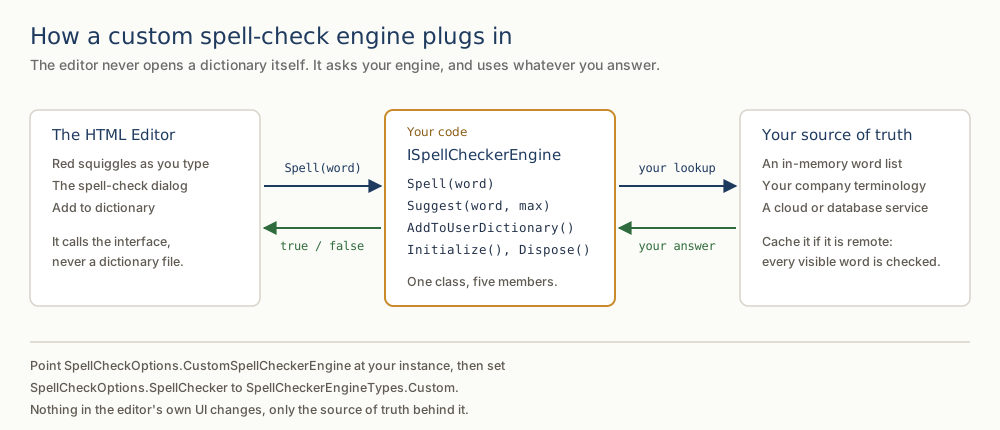
Spell checking normally means matching against the dictionary file that ships with the WPF HTML Editor, and for most applications that is enough. Use a custom spell-check engine when the built-in dictionary is not the right source of truth, for example when approved terms must come from an external service or a domain-specific glossary rather than a local word list. Implement the ISpellCheckerEngine interface in SpiceLogic.HtmlEditor.Abstractions.Entities.SpellCheck and assign an instance to the editor. Every spell-check decision (the inline squiggle, the suggestion dialog, and the right-click menu) then routes through your implementation.
What the interface asks for
The interface defines four methods plus Dispose. Initialize is called once with the dictionary, affix, and user-dictionary file paths configured on the editor; ignore these if you are not using local dictionary files. Spell returns whether a single word is correct. Suggest returns the alternatives shown on right-click. AddToUserDictionary fires when the user selects Add to Dictionary, so you can route new words to your own storage or approval workflow instead of a local file.
public interface ISpellCheckerEngine
{
    void Initialize(string dictionaryPath, string affixPath, string userDictionaryPath);
    bool Spell(string word);
    IEnumerable<string> Suggest(string word, int? max = null);
    void AddToUserDictionary(string word);
    void Dispose();
}
Public Interface ISpellCheckerEngine
Sub Initialize(dictionaryPath As String, affixPath As String, userDictionaryPath As String)
Function Spell(word As String) As Boolean
Function Suggest(word As String, Optional max As Integer? = Nothing) As IEnumerable(Of String)
Sub AddToUserDictionary(word As String)
Sub Dispose()
End Interface
Plugging it in
Two property assignments complete the swap: one supplies the engine instance, the other tells the editor to call it instead of the built-in checker.
BrochureEditor.SpellCheckOptions.CustomSpellCheckerEngine = new TrialsTerminologyEngine(_terminologyClient);
BrochureEditor.SpellCheckOptions.SpellChecker = SpellCheckerEngineTypes.Custom;
BrochureEditor.SpellCheckOptions.CustomSpellCheckerEngine = New TrialsTerminologyEngine(_terminologyClient)
BrochureEditor.SpellCheckOptions.SpellChecker = SpellCheckerEngineTypes.CustomFrom that point on, the editor's inline squiggles, the suggestion dialog, and Add to Dictionary all reflect your custom engine's decisions. Nothing in the editor's UI changes, only the source of truth behind it.
When the engine cannot answer fast
Inline spell checking calls Spell on every word in the viewport, so a fresh document can fire many network calls at once if your engine is backed by a remote service. Two settings help: cache results inside your ISpellCheckerEngine implementation to avoid repeat lookups, and use the InlineSpellCheckDebounceMilliseconds setting on SpellCheckOptions (default 300 ms), which delays the scan until the user pauses typing. For very large documents, consider turning inline checking off and relying only on the dialog walker.
Shipping it
Ship your ISpellCheckerEngine implementation as part of the same assembly that hosts the editor; no additional configuration is required on user machines. Select the target environment (for example, production versus a sandbox) through your application's existing dependency-injection setup. The 07-CustomSpellChecker-CS sample in our public sample repository includes a working ISpellCheckerEngine implementation backed by an in-memory list, a useful starting point when a network-backed engine is unnecessary. A VB.NET version sits alongside it in 07-CustomSpellChecker-VB. You can read the engine itself without cloning anything: CustomSpellCheckerEngine.cs.
Ask your AI to do this
Let your assistant do this for you. With the SpiceLogic MCP server connected, paste this into Claude Code, Cursor, or VS Code Copilot in agent mode.
Using the SpiceLogic WPF HTML Editor already referenced in my project, implement the ISpellCheckerEngine interface from SpiceLogic.HtmlEditor.Abstractions.Entities.SpellCheck in a class named GlossaryTerminologyEngine that checks words against an external terminology service instead of the built in dictionary, wiring up Spell, Suggest, and AddToUserDictionary so approved domain terms route to that service. Assign the instance to SpellCheckOptions.CustomSpellCheckerEngine and set SpellCheckOptions.SpellChecker to the custom engine type so the inline squiggle and right click suggestions use my implementation. Look up the exact interface members and enum values with the SpiceLogic MCP tools before writing any code.