


 NuGet
NuGet
Getting and Setting HTML Value
The WPF HTML Editor gives you two different ways to get HTML into and out of the editor, and which one you reach for depends on where that markup is going next. If you store editor content in a database column that will later be embedded inside a larger document, for example an email template rendered inside an outer email shell, storing a complete HTML document is a problem: nested DOCTYPEs, conflicting <head> blocks, and mail clients reporting malformed HTML. Store only the inner markup, what goes between the <body> tags, instead. This page shows how to read and write both shapes with the editor's HTML properties, and when to reach for each one.
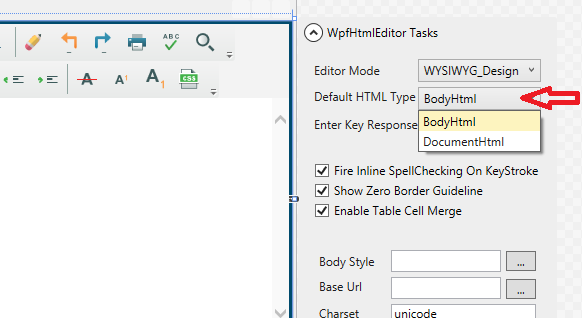
WpfHtmlEditor exposes this distinction through two dependency properties.
Two properties, two storage models
BodyHtml returns the markup inside the <body> element and nothing else - no DOCTYPE, no <html>, no <head>. Use this shape for a fragment that will be embedded somewhere later: an email body composed inside a larger shell, a CMS rich-text field, a PDF report cell, a chat message.
DocumentHtml returns the complete document, DOCTYPE through closing </html>, with the head block intact, including any <link> stylesheet references and <style> rules the user added. Use this shape for a standalone HTML file: a newsletter opened directly in a browser, an exported report, or a self-contained snapshot saved to disk.
Two-way binding in XAML
Both properties are dependency properties, registered with two-way binding on by default and an UpdateSourceTrigger of LostFocus. Bind BodyHtml directly to a view-model property without touching the editor from code-behind:
<Window xmlns:editor="clr-namespace:SpiceLogic.HtmlEditor.WPF;assembly=SpiceLogic.HtmlEditor.WPF"
        DataContext="{Binding TemplateEditorViewModel, Source={StaticResource Locator}}">
    <editor:WpfHtmlEditor x:Name="TemplateEditor"
                          BodyHtml="{Binding TemplateBody, Mode=TwoWay,
                                              UpdateSourceTrigger=LostFocus}" />
</Window>
The LostFocus default is deliberate. Per-keystroke updates would generate hundreds of source updates while a user types a paragraph, each one re-serializing the body HTML. Updating when focus leaves the editor matches typical form semantics - the user finishes the field, tabs out, and the view-model has the latest value to validate or save.
The save handler
The binding stays in sync as long as the Save control takes focus before its click handler runs. If Save can be triggered while the editor still has focus, for example by a hotkey, call UpdateBindings() on the editor explicitly - it pushes BodyHtml, DocumentHtml, and DocumentTitle back to their binding sources synchronously:
private async Task SaveAsync()
{
    TemplateEditor.UpdateBindings();
    await _templateRepo.SaveAsync(_viewModel.TemplateId, _viewModel.TemplateBody);
}
Private Async Function SaveAsync() As Task
TemplateEditor.UpdateBindings()
Await _templateRepo.SaveAsync(_viewModel.TemplateId, _viewModel.TemplateBody)
End Function
Exporting a standalone HTML file
Sometimes users need to export editor content as a standalone HTML file, for example to preview a template in an email client before sending it. The body-only fragment is not enough there since a mail client needs the full document. Use DocumentHtml instead:
private void ExportTemplate_Click(object sender, RoutedEventArgs e)
{
    var dialog = new SaveFileDialog
    {
        Filter = "HTML files (*.html)|*.html"
    };
    if (dialog.ShowDialog() == true)
        File.WriteAllText(dialog.FileName, TemplateEditor.DocumentHtml);
}
Private Sub ExportTemplate_Click(sender As Object, e As RoutedEventArgs)
Dim dialog = New SaveFileDialog With {
.Filter = "HTML files (*.html)|*.html"
}
If dialog.ShowDialog() Is True Then File.WriteAllText(dialog.FileName, TemplateEditor.DocumentHtml)
End SubThe same editor instance provides both shapes with no extra configuration: one property for the fragment stored in the database, another for the standalone document written to disk. The user edits once and both forms are available.
Migrating existing full-document rows
If existing rows in your database already hold full HTML documents, migrate them once: load each value into a hidden editor instance via DocumentHtml, then read back BodyHtml and store that instead. The editor's own parser strips the outer wrapper reliably - the kind of job a hand-rolled regex is likely to fail at on the first inline style block.
Ask your AI to do this
Let your assistant do this for you. With the SpiceLogic MCP server connected, paste this into Claude Code, Cursor, or VS Code Copilot in agent mode.
Using the SpiceLogic WPF HTML Editor already referenced in my project, bind the editor's BodyHtml property to a view model property named EmailBodyFragment so I can store just the inner markup in a database column for an email template, and add an Export button that writes the full DocumentHtml, DOCTYPE through the head and styles, to a local file named newsletter-export.html for a standalone preview in a browser. Explain when I should read BodyHtml versus DocumentHtml for each scenario. Look up the exact property names and their binding behavior with the SpiceLogic MCP tools before writing any code.