


 NuGet
NuGet
Copy and paste over Remote Desktop
Remote Desktop transfers clipboard data between the local computer and the remote session. If formatted text arrives as plain text or does not paste, the HTML clipboard format may not have reached the session. Compare local and remote clipboard formats, then check redirection settings and policy.
In that setup, a paste that includes formatting -- bold, bullet points, a hyperlink -- can lose its formatting: sometimes only plain text arrives, sometimes nothing arrives at all. The first instinct is to treat this as an editor bug. The actual cause is somewhere else entirely.
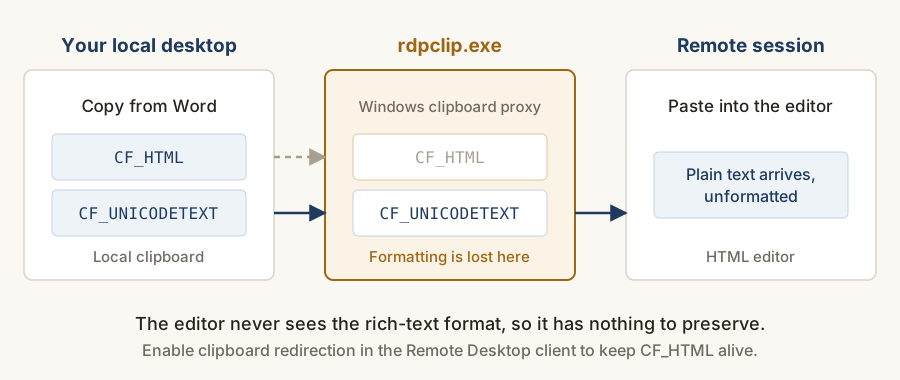
Root cause: the RDP clipboard proxy, not the editor
Remote Desktop redirects the clipboard through rdpclip.exe. Available formats depend on the source application, client, session settings and policy. Compare HTML and plain-text availability inside the session; a failed paste alone does not establish which component dropped it. Microsoft documents the redirection settings and policy controls.
You can confirm this independently of the editor: paste the same formatted content into a blank Word document running inside the same RDP session. The formatting drops there too. This is a Remote Desktop clipboard limitation that affects every Windows application -- WinForms, WPF, native -- that uses the standard clipboard, not an editor bug.
Fix 1: enable clipboard redirection in the RDP client
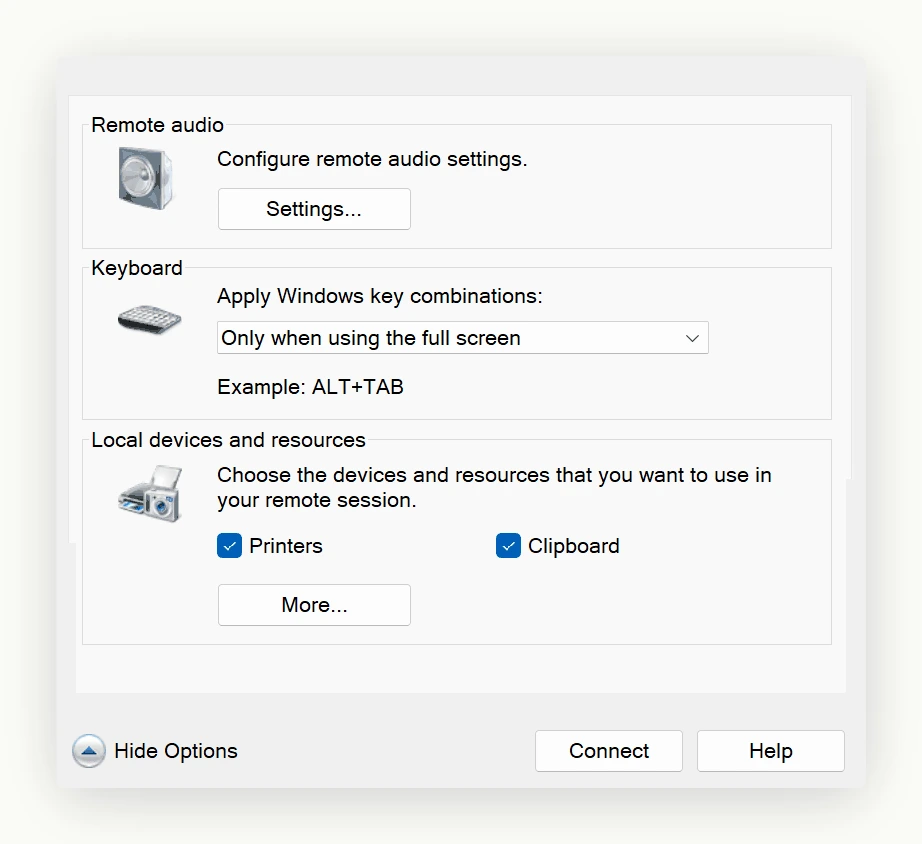
In mstsc.exe, open Show Options > Local Resources > Local devices and resources and confirm Clipboard is checked. Disconnect and reconnect -- rdpclip.exe launches on connect, so an existing session may need to be restarted. Roll this out through Group Policy for a team of any size, rather than relying on each user to set it individually.
Fix 2: restart rdpclip mid-session when formatting drops
Some users report that formatting works earlier in the day and stops working later in the same session - the clipboard channel can wedge over time. Kill rdpclip.exe in Task Manager on the remote machine and relaunch it (Start > Run > rdpclip). The clipboard channel re-negotiates without dropping the session. Consider shipping a small "Repair clipboard" button inside your own app that runs the same restart, so non-technical users do not need Task Manager.
Fix 3: plain text fallback when fidelity matters less than getting the words in
For high-volume workflows where the user will reformat content anyway, train around copy-as-plain-text on the source side. Any HTML that does still land flows through the editor's built-in Word-paste cleanup (Options.AutoDetectWordPaste), so formatted pastes that survive the channel still get sanitised.
Detecting a failed paste with the Pasting event
The Pasting event fires before the incoming HTML is inserted, and PastingHtmlEventArgs.PastingHtml shows exactly what arrived. An empty payload that is not an MS Word paste is a strong signal the clipboard channel dropped the content, which is a better moment to tell the user than letting them discover a blank paste later. Setting e.Cancel stops the insert entirely.
// Wire this to the editor's Pasting event.

htmlEditor1.Pasting += (sender, e) =>

{

    if (string.IsNullOrEmpty(e.PastingHtml) && !e.IsPastingFromMsWord)

    {

        // Nothing arrived on the clipboard: likely a broken RDP redirection.

        MessageBox.Show("Nothing was found on the clipboard. If you are working over " +

            "Remote Desktop, ask your administrator to restart rdpclip.exe on the remote machine.");

    }

};
What the editor cannot do
The editor sits on top of the standard Windows clipboard. It has no privileged path into rdpclip.exe, no way to coerce a disabled clipboard channel into working, and no way to detect with certainty that it is running inside an RDP session with broken redirection. If only plain text arrives on the clipboard, that is exactly what gets pasted; if nothing arrives, the paste is silently empty.
For applications that run primarily inside RDP or Citrix, the cleanest approach is to make sure clipboard redirection is configured on the connection broker at deployment time, rather than asking each end user to tick a box. That is a Group Policy or connection-broker setting, not an editor code change.
Ask your AI to do this
Connect the SpiceLogic MCP server, then give your coding assistant this prompt.
I use the SpiceLogic WinForms HTML Editor. Help me diagnose missing clipboard formats over Remote Desktop. Check clipboard redirection and session policy before changing the editor. Confirm the exact API names, types and defaults with the SpiceLogic MCP documentation, then show the changes for my project.