


 NuGet
NuGet
Additional events
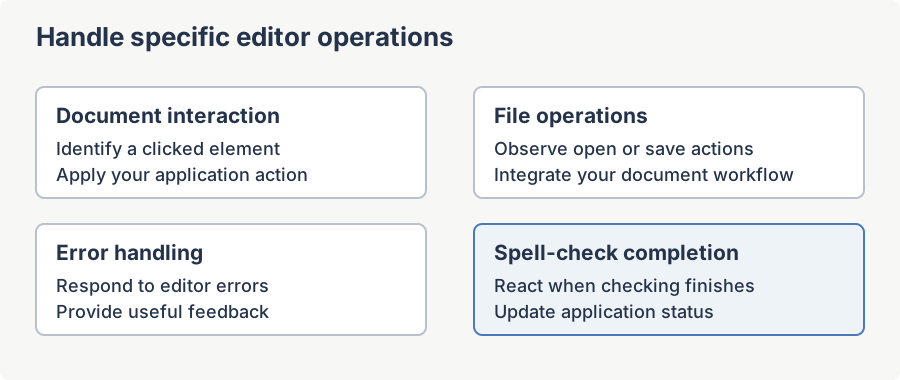
Additional event hooks let your application respond to specific document clicks, file operations, errors and spell-check completion. Use them when the common editing events do not describe the action you need to handle. The sections below explain when each event fires and what its handler receives.
Namespace: SpiceLogic.HtmlEditor.WinForms
Assembly: SpiceLogic.HtmlEditor.WinForms.dll
HtmlElementClicked
Occurs when an HTML element of a registered type is clicked inside the editor surface. To get this event for a given element type, list that type in Options.FireHtmlElementClickEventFor before the editor is initialized; the editor then attaches the necessary MSHTML hooks for you.
Syntax
public event EventHandler<HtmlElementClickedEventArgs> HtmlElementClicked;Public Event HtmlElementClicked As EventHandler(Of HtmlElementClickedEventArgs)Event Data (HtmlElementClickedEventArgs)
| Member | Type | Description |
|---|---|---|
| ElementType | HtmlElementTypes | The classified element type: Hyperlink, Image, Table, Paragraph, Span, Div, Input, or Other. |
| ClickedElement | System.Windows.Forms.HtmlElement | The clicked element. Use GetAttribute, InnerText, etc. to inspect it. |
| EventData | System.Windows.Forms.HtmlElementEventArgs | The raw event args from the underlying MSHTML click. Set EventData.ReturnValue = false to cancel the editor's default handling. |
Remarks
The event does not fire for element types you have not enabled. If Options.FireHtmlElementClickEventFor is empty, no clicks raise this event regardless of the handler.
Example
using SpiceLogic.HtmlEditor.Abstractions;

htmlEditor1.Options.FireHtmlElementClickEventFor = HtmlElementTypes.Hyperlink;
htmlEditor1.HtmlElementClicked += (s, e) =>
{
    if (e.ElementType == HtmlElementTypes.Hyperlink)
    {
        string href = e.ClickedElement.GetAttribute("href");
        MessageBox.Show("Hyperlink clicked: " + href);
    }
};
Imports SpiceLogic.HtmlEditor.Abstractions
htmlEditor1.Options.FireHtmlElementClickEventFor = HtmlElementTypes.Hyperlink
AddHandler htmlEditor1.HtmlElementClicked,
Sub(s, e)
If e.ElementType = HtmlElementTypes.Hyperlink Then
Dim href As String = e.ClickedElement.GetAttribute("href")
MessageBox.Show("Hyperlink clicked: " & href)
End If
End SubHtmlElementMouseDown
Occurs when a mouse-button press is detected on an HTML element of a registered type. Same activation model as HtmlElementClicked -- list the element types in Options.FireHtmlElementMouseDownEventFor.
Syntax
public event EventHandler<HtmlElementClickedEventArgs> HtmlElementMouseDown;Public Event HtmlElementMouseDown As EventHandler(Of HtmlElementClickedEventArgs)Event Data
Same HtmlElementClickedEventArgs shape as HtmlElementClicked.
Remarks
Subscribe to this event when you need to react before the click's default action -- for example, to capture a custom drag-start point on an image.
Example
using SpiceLogic.HtmlEditor.Abstractions;

htmlEditor1.Options.FireHtmlElementMouseDownEventFor = HtmlElementTypes.Image;
htmlEditor1.HtmlElementMouseDown += (s, e) =>
{
    if (e.ElementType == HtmlElementTypes.Image)
        _dragSrc = e.ClickedElement.GetAttribute("src");
};
Imports SpiceLogic.HtmlEditor.Abstractions
htmlEditor1.Options.FireHtmlElementMouseDownEventFor = HtmlElementTypes.Image
AddHandler htmlEditor1.HtmlElementMouseDown,
Sub(s, e)
If e.ElementType = HtmlElementTypes.Image Then _dragSrc = e.ClickedElement.GetAttribute("src")
End SubFileOpened
Raised after the editor successfully loads a file via Content.LoadBodyHtmlFromFile, Content.LoadDocumentHtmlFromFile, or Content.OpenFile. The event args carry the full path of the file that was loaded.
Syntax
public event EventHandler<FileEventArgs> FileOpened;Public Event FileOpened As EventHandler(Of FileEventArgs)Event Data (FileEventArgs)
| Member | Type | Description |
|---|---|---|
| FilePath | string | The full path of the file that was loaded. Never null; will be string.Empty when the editor could not resolve a path. |
Example
htmlEditor1.FileOpened += (s, e) =>
{
    Text = "Editor - " + Path.GetFileName(e.FilePath);
    AddToRecentFiles(e.FilePath);
};
FileSaved
Raised after the editor successfully writes a file via Content.SaveBodyHtmlToFile, Content.SaveDocumentHtmlToFile, or Content.SaveEditorContentAsXml.
Syntax
public event EventHandler<FileEventArgs> FileSaved;Public Event FileSaved As EventHandler(Of FileEventArgs)Event Data (FileEventArgs)
| Member | Type | Description |
|---|---|---|
| FilePath | string | The full path of the file that was written. |
Example
htmlEditor1.FileSaved += (s, e) =>
{
    isDirty = false;
    statusLabel.Text = "Saved to " + e.FilePath;
};
AddHandler htmlEditor1.FileSaved,
Sub(s, e)
isDirty = False
statusLabel.Text = "Saved to " & e.FilePath
End SubErrorOccurred
Raised when an internal error occurs that the editor would otherwise have to swallow silently -- typically a file-IO failure, a clipboard failure, or an MSHTML interop exception. Subscribe to log the error or display a user-facing message.
Syntax
public event EventHandler<ErrorEventArgs> ErrorOccurred;Public Event ErrorOccurred As EventHandler(Of ErrorEventArgs)Event Data (ErrorEventArgs)
| Member | Type | Description |
|---|---|---|
| Message | string | A human-readable description of the error. |
| Exception | System.Exception? | The underlying exception when one is available; null for errors that did not originate from an exception. |
Remarks
The editor never raises fatal exceptions through this event -- those still propagate to the host. Use this event purely for observability.
Example
htmlEditor1.ErrorOccurred += (s, e) =>
{
    Log.Error(e.Exception, e.Message);
    statusLabel.Text = "Error: " + e.Message;
};
StatusChanged
Raised when the editor wants to publish a status update -- for example, "Spell-checking started", "Image loaded", "Document modified". Subscribe to surface these messages in your application's status bar.
Syntax
public event EventHandler<StatusChangedEventArgs> StatusChanged;Public Event StatusChanged As EventHandler(Of StatusChangedEventArgs)Event Data (StatusChangedEventArgs)
| Member | Type | Description |
|---|---|---|
| StatusMessage | string | The status message text. |
Remarks
The editor marshals this event to the UI thread via SynchronizationContext.Post, so it is safe to update WinForms controls directly inside the handler regardless of which thread the message originated on.
Example
htmlEditor1.StatusChanged += (s, e) =>
{
    statusLabel.Text = e.StatusMessage;
};
SpellCheckCompleted
Occurs when a spell-check pass finishes, either because every misspelling has been resolved or because the user dismissed the spell-check dialog.
Syntax
public event EventHandler<SpellCheckCompletedEventArgs> SpellCheckCompleted;Public Event SpellCheckCompleted As EventHandler(Of SpellCheckCompletedEventArgs)Event Data (SpellCheckCompletedEventArgs)
| Member | Type | Description |
|---|---|---|
| Canceled | bool | true when the user closed the dialog before finishing; false when the pass ran to completion. |
Remarks
The spell-check dialog closes automatically when the review finishes, without a separate completion popup. A document with no spelling errors completes without opening a dialog. This event fires for both interactive and inline spell-check passes. Canceled is true for a canceled interactive review and false for successful interactive or inline checks.
Example
htmlEditor1.SpellCheckCompleted += (s, e) =>
{
    statusLabel.Text = e.Canceled
        ? "Spell check canceled"
        : "Spell check complete";
};
See also
For the five most-used events (HtmlChanged, Pasting, SelectionChanged, EditorModeChanged, ContextMenuShowing) see the Useful Events page in this section.
Ask your AI to do this
Connect the SpiceLogic MCP server, then give your coding assistant this prompt.
I use the SpiceLogic WinForms HTML Editor. Help me handle clicks on document images and hyperlinks without disrupting editing. Confirm the exact API names, types and defaults with the SpiceLogic MCP documentation, then show the changes for my project.