


 NuGet
NuGet
Use a custom spell-check engine
A custom spell-check engine lets your application decide which words are valid and which corrections to suggest, using its own vocabulary or spelling service. Implement ISpellCheckerEngine and register it through SpellCheckOptions to use those decisions in inline and dialog checks.
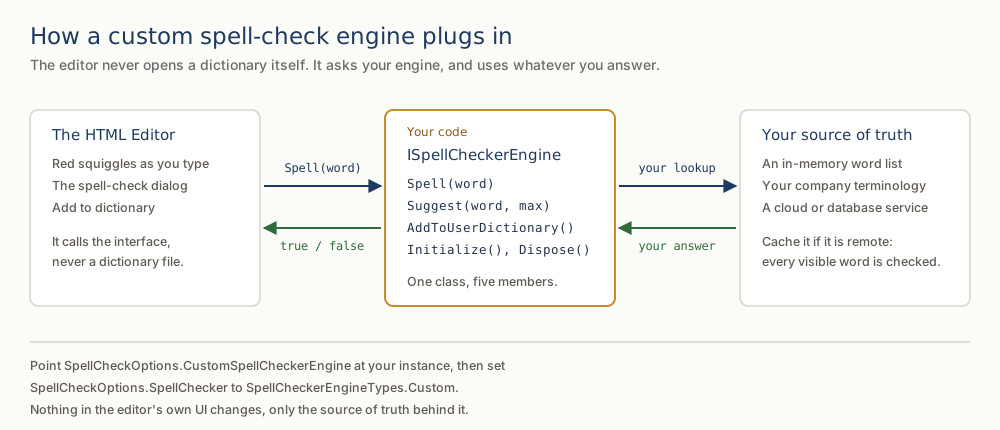
The Interface
Implement ISpellCheckerEngine to plug in a custom spell-check engine. The editor calls only these five methods.
namespace SpiceLogic.HtmlEditor.Abstractions.Entities.SpellCheck;

public interface ISpellCheckerEngine
{
    void Initialize(string dictionaryPath, string affixPath, string userDictionaryPath);
    bool Spell(string word);
    IEnumerable<string> Suggest(string word, int? max = null);
    void AddToUserDictionary(string word);
    void Dispose();
}
Namespace SpiceLogic.HtmlEditor.Abstractions.Entities.SpellCheck
Public Interface ISpellCheckerEngine
Sub Initialize(dictionaryPath As String, affixPath As String, userDictionaryPath As String)
Function Spell(word As String) As Boolean
Function Suggest(word As String, Optional max As Integer? = Nothing) As IEnumerable(Of String)
Sub AddToUserDictionary(word As String)
Sub Dispose()
End Interface
End NamespaceRegistering the Engine
At startup, set CustomSpellCheckerEngine to your engine instance and SpellChecker to SpellCheckerEngineTypes.Custom. This routes inline squiggles and the spell-check dialog through your engine:
public partial class TrialReportForm : Form
{
    public TrialReportForm(TerminologyServiceClient service)
    {
        InitializeComponent();
        editor.SpellCheckOptions.CustomSpellCheckerEngine = new ClinicalTermsEngine(service);
        editor.SpellCheckOptions.SpellChecker = SpellCheckerEngineTypes.Custom;
        editor.SpellCheckOptions.FireInlineSpellCheckingOnKeyStroke = true;
    }
}
Partial Public Class TrialReportForm
Inherits Form
Public Sub New(service As TerminologyServiceClient)
InitializeComponent()
editor.SpellCheckOptions.CustomSpellCheckerEngine = New ClinicalTermsEngine(service)
editor.SpellCheckOptions.SpellChecker = SpellCheckerEngineTypes.Custom
editor.SpellCheckOptions.FireInlineSpellCheckingOnKeyStroke = True
End Sub
End ClassOnce registered, every word is checked against your engine: recognized words are not flagged, unrecognized ones are marked misspelled.

When the simple engine isn't enough
Two production refinements: fail open by wrapping Spell to return true when the backend is unreachable, so a blip does not flag every word until reconnection; and cache suggestions for the most recent few hundred mis-hits per session, avoiding one HTTP call per unknown word on large documents, while honoring the max hint - inline suggestions request three, the dialog ten.
Patterns this same plug-in serves
The interface also supports a company terminology server, a domain-specific dictionary (e.g., legal contracts and citations), or a backend engine that also checks grammar, style, and tone - no Hunspell binary needed, and the inline squiggle UI still works once SpellChecker = SpellCheckerEngineTypes.Custom is set.
Sample to start from
See the Custom Spell Checker sample in the installation's Samples folder: it implements ISpellCheckerEngine against a small in-memory vocabulary, wired into a WinFormHtmlEditor as shown above.
Ask your AI to do this
Connect the SpiceLogic MCP server, then give your coding assistant this prompt.
I use the SpiceLogic WinForms HTML Editor. Help me implement the custom spell-check engine contract. Keep synchronous callbacks fast and avoid a network request for each word. Confirm the exact API names, types and defaults with the SpiceLogic MCP documentation, then show the changes for my project.