


Cost-Effectiveness with DALY
The idea behind DALY (Disability Adjusted Life Years) is simple. Every person is born with a certain number of years they could live in good health. Illness can take some of those years away, and so can dying earlier than expected. The DALY metric measures that loss. If a health problem costs someone ten DALYs, ten healthy years of life were lost, either because the person lived with the illness, died early, or both. One DALY is one healthy year gone.
Theory and Reference:
Calculating disability-adjusted life years to quantify the burden of disease
A DALY has two parts. The first is years lived with disability (YLD). The second is years of life lost to dying early (YLL). The YLD part measures the burden of living with the illness. The YLL part measures the burden of an early death. Add the two together and you get the full picture.
The basic formula is:
DALY = YLL + YLD
The YLD part, the morbidity side of the DALY, is worked out like this:
YLD = Number of cases x duration until remission or death x disability weight
The YLL part, the mortality side of the DALY, is worked out like this:
YLL = Number of deaths x life expectancy at the age of death
The disability weight is a number between 0 and 1 that says how bad the condition is. A weight of 0 means full health. A weight of 1 means the worst case. For example, a mild condition might carry a weight of 0.1, while a severe one might carry 0.7. There is also a more detailed version of these formulas that adds social weighting. With it, a year of healthy life can be valued differently by age, and a future year can be given less weight. The extended YLD and YLL formulas look like this:
Here is what each symbol means. N is the number of cases. M is the number of deaths. DW is the disability weight. K is an on/off switch for age weighting: set it to 1 to turn age weighting on, or 0 to turn it off. A and L are a pair. For the YLD part, A is the age at onset and L is the duration of the illness. For the YLL part, A is the age at death and L is the remaining life expectancy at that age. The letter x stands for the age being counted. C and β are constants that shape the age-weighting curve, and they are usually set to 0.1658 and 0.04.
You do not have to do this math by hand. Once you enter the inputs, the software does it for you. The rest of this page walks through how.
DALY calculation in the SpiceLogic Decision Tree software
The SpiceLogic Decision Tree software has a Cost-Effectiveness criteria editor. Inside it, you can choose DALY as the effectiveness payoff for your Decision Tree. Once DALY is set as the payoff, every option in the tree can be scored by how many healthy life years it costs or saves. That lets you compare your choices on the same footing instead of guessing. Say you are weighing two treatments. With DALY as the payoff, you can see at a glance which one gives back more healthy years. The next sections show the two ways you can set this up.
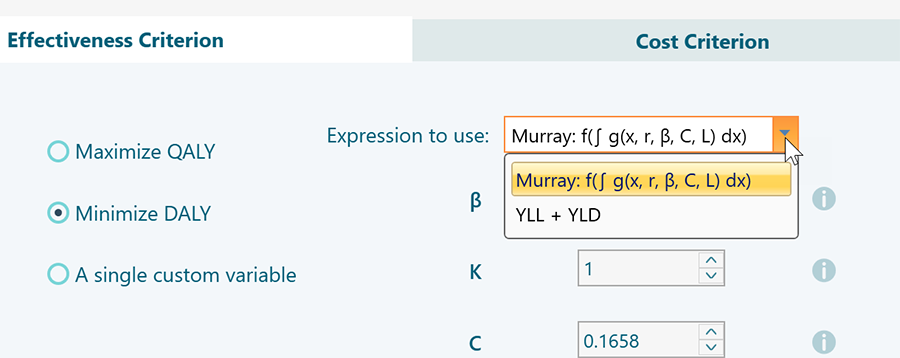
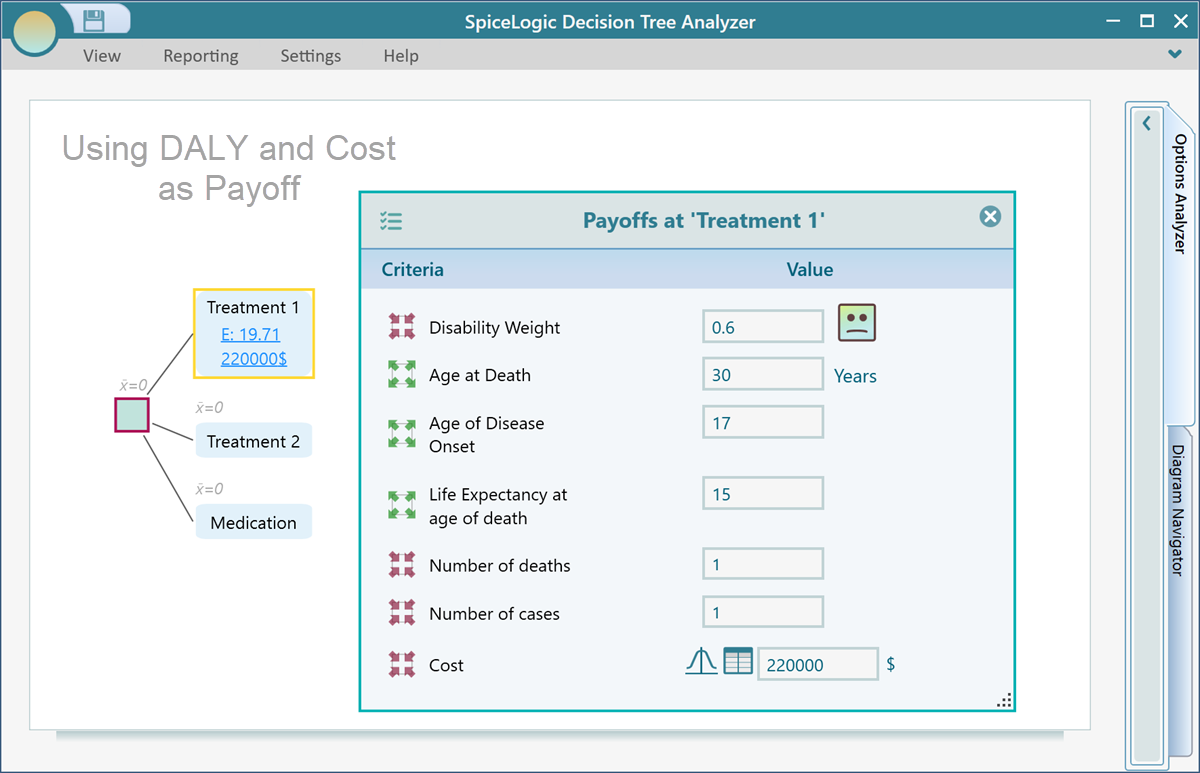
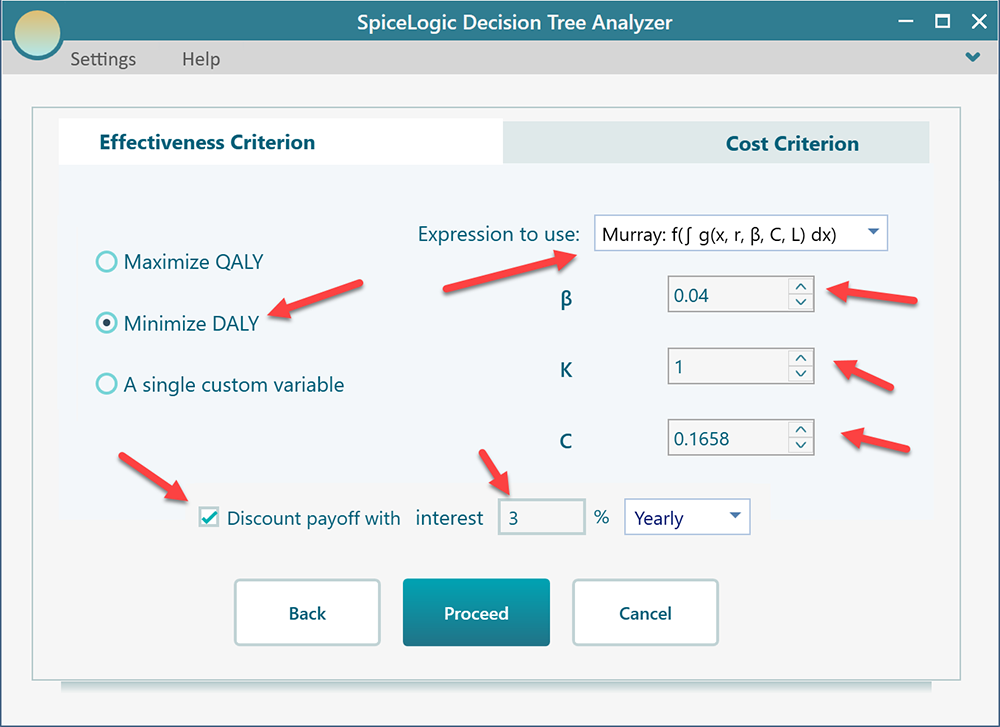
The first option is labeled Murray. Pick this one if you want the software to use the full integral formula shown earlier on this page. When you choose the Murray option, this panel lets you set the values for β, K, and C yourself, so you stay in control of the age-weighting and discounting assumptions. For example, set K to 0 if you do not want age weighting at all, or keep the standard 0.1658 and 0.04 if you want the usual curve. After you set those values, the Decision Tree Payoff editor shows the entry screen below, where you fill in the underlying inputs and the software computes the DALY for you.
The Murray option asks for the raw inputs and does the heavy math for you. But sometimes you already know your YLL and YLD numbers, perhaps from a published study or your own earlier work. In that case you may prefer a more direct route, where you type the YLL and YLD values straight into the Decision Tree yourself. To do that, pick the second option in the DALY setup panel, shown below.
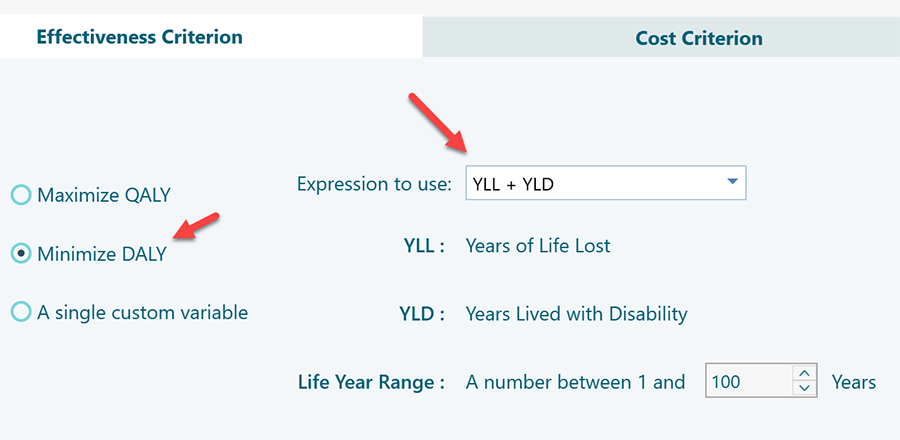
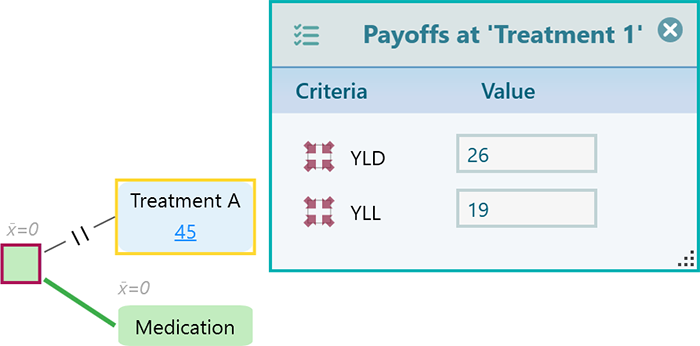
After you pick this second option, the Decision Tree payoff editor changes to show the simpler entry screen below. It has fields for you to enter YLL and YLD directly, with no extra inputs to fill in. This is the quicker path when your numbers are already worked out.
Worked example
Let's put real numbers through it. Imagine a woman comes down with bipolar depression at age 35, lives with it for 10 years, and then dies from it.
⇒ How many DALYs are lost as a result?
⇒ How many DALYs would be saved if she had treatment?
To answer this, we add up the DALYs lost from living with the illness (YLD) and the DALYs lost from dying early (YLL). We will work out the total DALY for two cases: without treatment and with treatment. The difference between the two tells us how much good the treatment does.
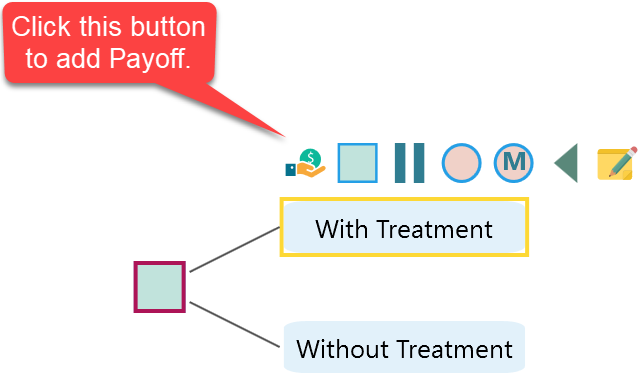
Start by building a Decision Tree with two options, "With Treatment" and "Without Treatment", as shown below. Then click the Payoff button from the flyover menu.
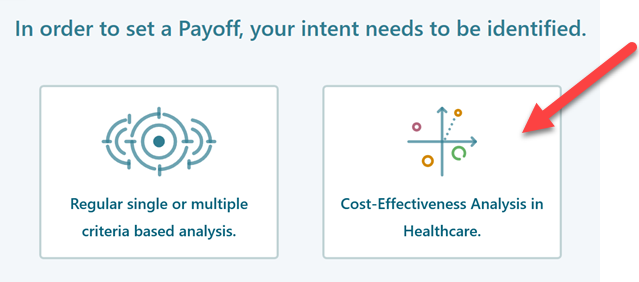
When this window appears, click the second button, "Cost-Effectiveness Analysis". This tells the software you want to score the tree on effectiveness, which is where DALY lives. The other options score the tree in different ways, so this is the one to pick for a DALY study.
Next, choose the second radio button, "Minimize DALY", and pick the formula shown here. We want the smaller DALY because a lower number means fewer healthy years lost, which is the better outcome. For this example, set the discount rate to 3%. The discount rate gives slightly less weight to years further in the future. The value 3% is the one most commonly used in health economics, so it is a safe default if you are not sure what to use.
Click Proceed and the software takes you back to the decision tree. Now enter the values for the "Without Treatment" option as shown below. These are the inputs for the case where the illness runs its course with no treatment at all.
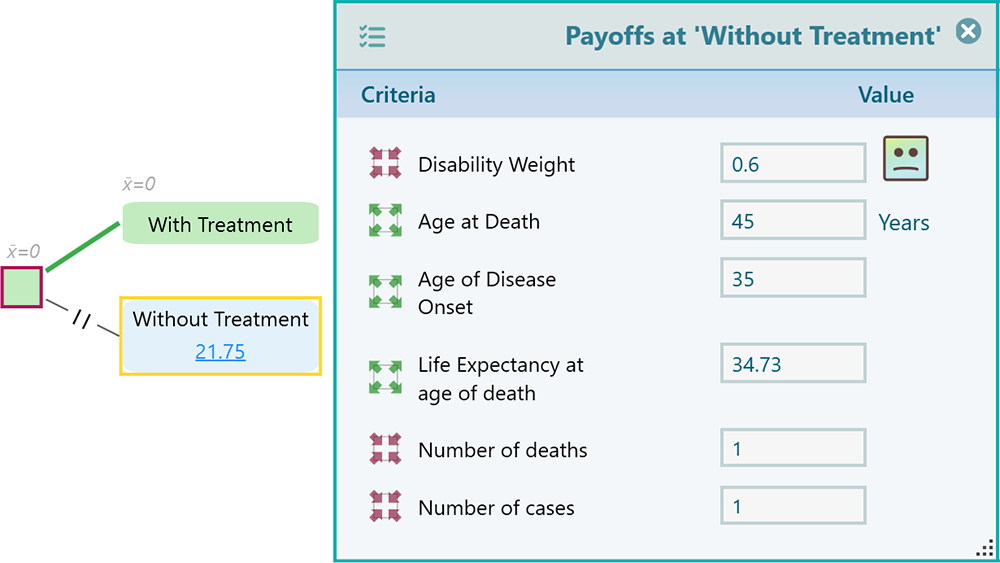
Notice that the DALY for the "Without Treatment" option comes out to 21.75. That is the total healthy life lost when the illness runs its course untreated. It is the sum of the years she lives with the illness and the years lost because she dies early.
Now set the DALY payoff for the "With Treatment" option as shown below.
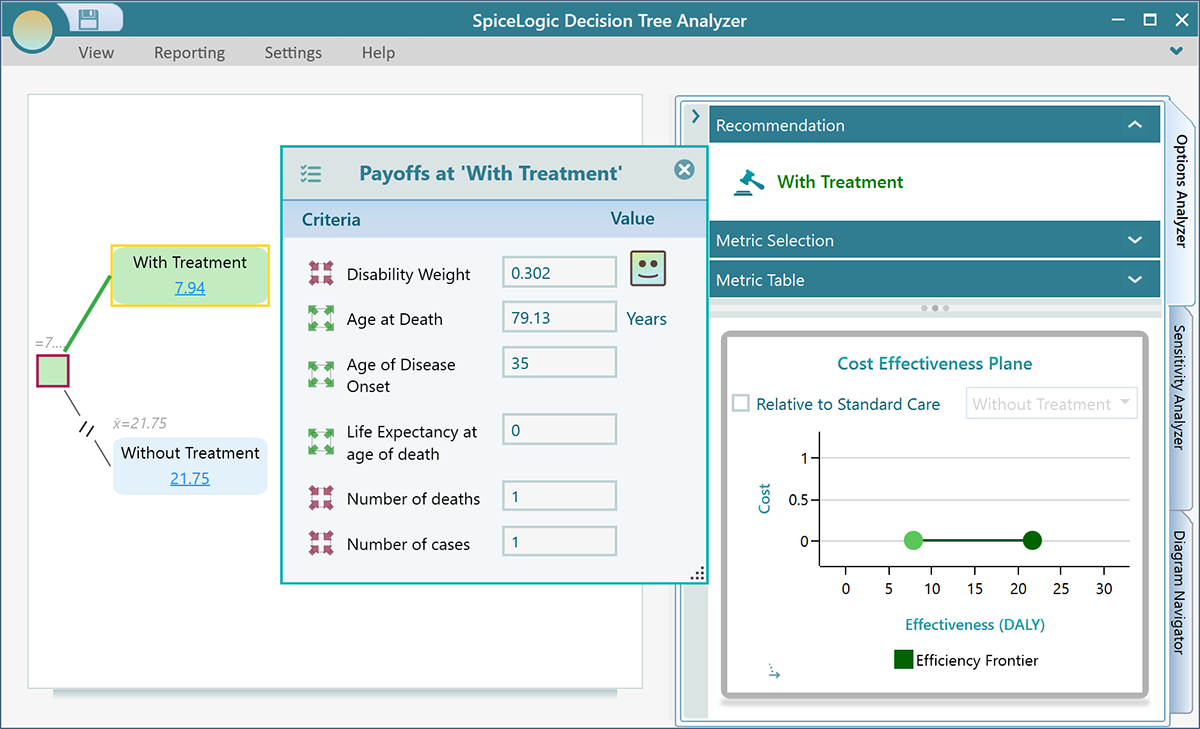
Notice that the DALY for the "With Treatment" option comes out to 7.94. Since our goal is to minimize DALY, the software recommends the "With Treatment" option, because its DALY of 7.94 is lower than the 21.75 for the option without treatment. In plain terms, treatment saves about 13.81 healthy life years in this example, and that is why it wins. That is the kind of clear, side-by-side answer the DALY payoff is built to give you.