


 NuGet
NuGet
Overriding WPF Editor Toolbar Button Icons, Tooltips, and Click Behavior
The WpfHtmlEditor control ships with built-in toolbar buttons, and sooner or later their default icon, tooltip, or click behavior will not fit your app - an icon that clashes with your icon set, a tooltip that needs your app's own wording, or, in an MVVM-style application, a click handler that bypasses your view-model commands entirely. Every user action in an MVVM-style WPF app should flow through view-model commands so it can be tested and audited consistently, and the control's default Save button breaks that pattern: clicking it opens a standard SaveFileDialog and writes the HTML straight to disk, bypassing your command layer. This page shows how to use ToolbarItemOverrider to replace a button's icon, tooltip, and click behavior, using the Save button as the example: routing the save action through your own command instead of the file system.
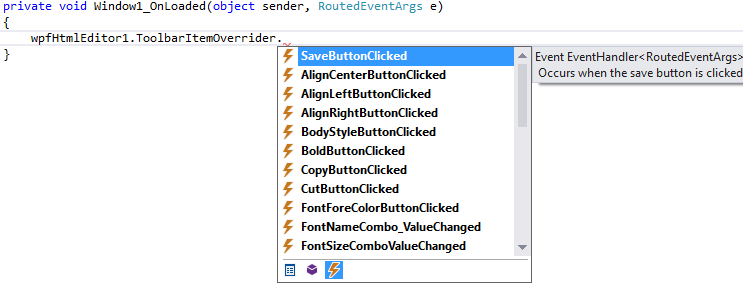
Instead of hiding the factory Save button and adding a separate one, keep it in place and repurpose its click behavior and icon. ToolbarItemOverrider exposes two complementary surfaces for this: the SaveButtonClicked event, which once subscribed skips the default file-dialog flow and routes the click to your handler instead, and the ToolbarItems.Save property, which gives you the live factory Button so you can change its tooltip, hide it, or walk its visual tree to swap the icon, just like any normal Button.
private void IncidentNoteEditor_OnLoaded(object sender, RoutedEventArgs e) { var overrider = IncidentNoteEditor.ToolbarItemOverrider; // Reword the tooltip so operators see "Save to ticket" not just "Save". overrider.ToolbarItems.Save.ToolTip = "Save to ticket database (Ctrl+S)"; // Hide the New button - operators must never start a fresh blank note. overrider.ToolbarItems.New.Visibility = Visibility.Collapsed; // Replace the icon with our app diskette so the toolbar stays visually consistent. if (VisualTreeHelper.GetChild(overrider.ToolbarItems.Save, 0)is Border border && VisualTreeHelper.GetChild(border, 0)is ContentPresenter presenter && VisualTreeHelper.GetChild(presenter, 0)is Image saveImage) { saveImage.Source = new BitmapImage(new Uri("pack://application:,,,/MyConsole;component/Icons/save_db.png", UriKind.Absolute)); } // Route the click straight through to the MVVM command. overrider.SaveButtonClicked += RouteToSaveCommand; overrider.OpenButtonClicked += RouteToLoadCommand; } private void RouteToSaveCommand(object sender, RoutedEventArgs e) { var vm = (IncidentNoteViewModel)DataContext; string html = IncidentNoteEditor.BodyHtml; if (vm.SaveNoteCommand.CanExecute(html)) vm.SaveNoteCommand.Execute(html); } private void RouteToLoadCommand(object sender, RoutedEventArgs e) { var vm = (IncidentNoteViewModel)DataContext; if (vm.LoadNoteCommand.CanExecute(null)) vm.LoadNoteCommand.Execute(null); }Private Sub IncidentNoteEditor_OnLoaded(sender As Object, e As RoutedEventArgs) Dim overrider = IncidentNoteEditor.ToolbarItemOverrider ' Reword the tooltip so operators see "Save to ticket" not just "Save". overrider.ToolbarItems.Save.ToolTip = "Save to ticket database (Ctrl+S)" ' Hide the New button - operators must never start a fresh blank note. overrider.ToolbarItems.[New].Visibility = Visibility.Collapsed ' Replace the icon with our app diskette so the toolbar stays visually consistent. Dim border As Border = Nothing, presenter As ContentPresenter = Nothing, saveImage As Image = Nothing If CSharpImpl.__Assign(border, TryCast(VisualTreeHelper.GetChild(overrider.ToolbarItems.Save, 0), Border)) IsNot Nothing AndAlso CSharpImpl.__Assign(presenter, TryCast(VisualTreeHelper.GetChild(border, 0), ContentPresenter)) IsNot Nothing AndAlso CSharpImpl.__Assign(saveImage, TryCast(VisualTreeHelper.GetChild(presenter, 0), Image)) IsNot Nothing Then saveImage.Source = New BitmapImage(New Uri("pack://application:,,,/MyConsole;component/Icons/save_db.png", UriKind.Absolute)) End If ' Route the click straight through to the MVVM command. overrider.SaveButtonClicked += AddressOf RouteToSaveCommand overrider.OpenButtonClicked += AddressOf RouteToLoadCommand End Sub Private Sub RouteToSaveCommand(sender As Object, e As RoutedEventArgs) Dim vm = CType(DataContext, IncidentNoteViewModel) Dim html As String = IncidentNoteEditor.BodyHtml If vm.SaveNoteCommand.CanExecute(html) Then vm.SaveNoteCommand.Execute(html) End Sub Private Sub RouteToLoadCommand(sender As Object, e As RoutedEventArgs) Dim vm = CType(DataContext, IncidentNoteViewModel) If vm.LoadNoteCommand.CanExecute(Nothing) Then vm.LoadNoteCommand.Execute(Nothing) End Sub Private Class CSharpImpl <System.Obsolete("Please refactor calling code to use normal Visual Basic assignment")> Shared Function __Assign(Of T)(ByRef target As T, value As T) As T target = value Return value End FunctionWith this in place, clicking Save no longer opens a file dialog - the HTML body is passed straight to SaveNoteCommand through your view model.

You can override any factory toolbar action the same way: subscribe to its event to intercept the click and add your own logic (for example, checking a permission flag before allowing copy or paste). Every factory command is overridable - NewButtonClicked, OpenButtonClicked, SaveButtonClicked, CutButtonClicked, CopyButtonClicked, PasteButtonClicked, PasteFromMSWordButtonClicked, PrintButtonClicked, UndoButtonClicked, RedoButtonClicked, BoldButtonClicked, ItalicButtonClicked, UnderlineButtonClicked, StrikeThroughButtonClicked, SubscriptButtonClicked, SuperScriptButtonClicked, TextHighlightColorButtonClicked, FontForeColorButtonClicked, HyperLinkButtonClicked, ImageButtonClicked, YouTubeVideoInsertButtonClicked, OrderedListButtonClicked, UnOrderedListButtonClicked, AlignLeftButtonClicked, AlignCenterButtonClicked, AlignRightButtonClicked, OutdentButtonClicked, IndentButtonClicked, TableInsertButtonClicked, SymbolInsertButtonClicked, HorizontalRuleButtonClicked, FormatResetButtonClicked, BodyStyleButtonClicked, SearchButtonClicked, and SpellCheckButtonClicked.
ToolbarItemOverrider.ToolbarItems.Xexposes the live factoryButton/ToggleButton/ComboBoxfor icon, tooltip, and visibility tweaks.- Subscribing to
ToolbarItemOverrider.XButtonClickedsuppresses the default behavior and routes the click to your handler instead. - Walk the factory button's visual tree to swap the inner
Image.Sourcefor a custom icon.
Ask your AI to do this
Let your assistant do this for you. With the SpiceLogic MCP server connected, paste this into Claude Code, Cursor, or VS Code Copilot in agent mode.
Using the SpiceLogic WPF HTML Editor already referenced in my project, override the built-in Save toolbar button on my editor named IncidentNoteEditor so a click no longer opens a SaveFileDialog and instead invokes my view-model's SaveDocumentCommand, and change its tooltip to read "Save incident note". Do this through ToolbarItemOverrider, subscribing to SaveButtonClicked and reaching ToolbarItems.Save for the tooltip and icon swap. Pull the exact ToolbarItemOverrider members from the SpiceLogic MCP tools before writing the override code.