


 NuGet
NuGet
Override toolbar button properties and click behavior
The WinForms HTML Editor's built-in toolbar looks right for a generic document editor, but your app is not generic: an invoicing tool might want a Send icon in place of Save, a compliance app might need different tooltip text, and an app backed by a versioned content store has no use for the stock file-picker at all. This page shows how to override a built-in button's icon, tooltip, and enabled state in code, and how to replace its click behavior outright so it runs your own logic instead of the editor's default.
By default, clicking the toolbar's Save icon in WinFormHtmlEditor pops a standard SaveFileDialog, the OS file picker. If your app stores documents somewhere other than a plain file (a database, a versioned content store, a custom commit workflow), you can replace the Save icon, its tooltip, and its click behavior entirely.
Layer 1: change the icon and tooltip in code
Every built-in toolbar item is exposed as a typed ToolStripButton property on WinFormHtmlEditor (BtnSave, BtnNew, BtnPrint, …), and the same live items are reachable via ToolbarItemOverrider.ToolbarItems. Set the icon and tooltip from your form's Load handler (or right after InitializeComponent()). Built-in items are intentionally not editable through the Visual Studio Properties window or designer - design-time edits do not persist, and serializing the editor's own toolbar into your form is explicitly unsupported. Code is the single reliable path.
private void RunbookForm_Load(object sender, EventArgs e)
{
    htmlEditor1.BtnSave.Image = MyIcons.CommitRunbook16;
    htmlEditor1.BtnSave.ToolTipText = "Commit runbook (Ctrl+S)";
}
Private Sub RunbookForm_Load(sender As Object, e As EventArgs)
    htmlEditor1.BtnSave.Image = MyIcons.CommitRunbook16
    htmlEditor1.BtnSave.ToolTipText = "Commit runbook (Ctrl+S)"
End Sub
Layer 2: runtime tweaks for state-dependent UI
Toggle a button's visibility or enabled state at runtime the same way: disable Save when nothing has changed, hide it in a read-only mode, and re-enable it on the next edit.
private void RunbookForm_Load(object sender, EventArgs e)
{
    htmlEditor1.BtnSave.Visible = !isReviewMode;
    htmlEditor1.BtnSave.Enabled = false;
    htmlEditor1.HtmlChanged += (s, a) => htmlEditor1.BtnSave.Enabled = true;
    // Hide Paste-From-Word for engineers without an Office license.
    htmlEditor1.BtnPasteFromMsWord.Visible = userHasOfficeLicense;
}
Private Sub RunbookForm_Load(sender As Object, e As EventArgs)
    htmlEditor1.BtnSave.Visible = Not isReviewMode
    htmlEditor1.BtnSave.Enabled = False
    AddHandler htmlEditor1.HtmlChanged, Sub(s, a) htmlEditor1.BtnSave.Enabled = True
    ' Hide Paste-From-Word for engineers without an Office license.
    htmlEditor1.BtnPasteFromMsWord.Visible = userHasOfficeLicense
End Sub
Every built-in button is reachable the same way: BtnNew, BtnOpen, BtnSave, BtnCut, BtnCopy, BtnPaste, BtnPasteFromMsWord, BtnBold, BtnItalic, BtnUnderline, BtnFormatReset, BtnFormatUndo, BtnFormatRedo, BtnPrint, BtnSpellCheck, BtnSearch, BtnHighlightColor, BtnFontColor, BtnHyperlink, BtnImage, BtnInsertYouTubeVideo, BtnTable, BtnSymbol, BtnHorizontalRule, BtnOrderedList, BtnUnOrderedList, BtnAlignLeft, BtnAlignCenter, BtnAlignRight, BtnOutdent, BtnIndent, BtnStrikeThrough, BtnSuperScript, BtnSubscript, BtnBodyStyle. Combos: CmbFontName, CmbFontSize, CmbTitleInsert.
Layer 3: replacing the click behavior
Changing the icon and tooltip only changes how the button looks - the click still opens the OS file picker. To replace that, subscribe to ToolbarItemOverrider.SaveButtonClicked. Once a handler is attached, the editor's default action does not run; your code runs instead.
private void RunbookForm_Load(object sender, EventArgs e)
{
    htmlEditor1.ToolbarItemOverrider.SaveButtonClicked += (s, ea) =>
    {
        // Skip the OS file picker entirely. Run the company commit pipeline.
        var commitMessage = CommitMessageDialog.ShowDialog(htmlEditor1);
        if (commitMessage == null)
            return;
        var html = htmlEditor1.Content.GetDocumentHtml();
        RunbookRepository.Commit(currentRunbookId, html, commitMessage, currentUser);
        htmlEditor1.BtnSave.Enabled = false; // re-enabled on next HtmlChanged
    };
}
Private Sub RunbookForm_Load(sender As Object, e As EventArgs)
    AddHandler htmlEditor1.ToolbarItemOverrider.SaveButtonClicked, Sub(s, ea)
        ' Skip the OS file picker entirely. Run the company commit pipeline.
        Dim commitMessage = CommitMessageDialog.ShowDialog(htmlEditor1)
        If commitMessage Is Nothing Then Return
        Dim html = htmlEditor1.Content.GetDocumentHtml()
        RunbookRepository.Commit(currentRunbookId, html, commitMessage, currentUser)
        htmlEditor1.BtnSave.Enabled = False ' re-enabled on next HtmlChanged
    End Sub
End Sub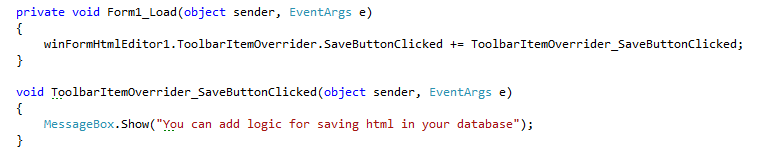
A toolbar button's icon, tooltip, and keyboard shortcut can stay the same while its click action is fully replaced - for example, routing Save to a custom commit pipeline with an audit trail, peer-review queue, and SQL backend.
The full override menu
The same pattern applies to any toolbar button - for example, Save (commit pipeline), New (clear-with-confirmation), or Print (render-to-PDF service). Events open for override on ToolbarItemOverrider include BoldButtonClicked, ItalicButtonClicked, UnderlineButtonClicked, ImageButtonClicked, HyperLinkButtonClicked, TableInsertButtonClicked, NewButtonClicked, OpenButtonClicked, SaveButtonClicked, PrintButtonClicked, SpellCheckButtonClicked, SearchButtonClicked, SymbolInsertButtonClicked, YouTubeVideoInsertButtonClicked, plus the combo-value-changed events FontNameComboValueChanged, FontSizeComboValueChanged, and TitleInsertComboValueChanged. The complete set lives in ToolbarItemOverrideHelper.
Picking the right layer
- To change only icon, tooltip, or visibility, set the
BtnXxxproperty at runtime (inLoador afterInitializeComponent) - built-in items have no design-time Properties-grid path, by design. - To add work alongside the editor's action (audit log, telemetry, validation), subscribe to
ToolbarItemOverrider.XxxButtonClickedand call the matchingFormatting/Content/Editorservice afterward. - To replace the action entirely, subscribe and skip the call to the original service.
Ask your AI to do this
Let your assistant do this for you. With the SpiceLogic MCP server connected, paste this into Claude Code, Cursor, or VS Code Copilot in agent mode.
Using the SpiceLogic WinForms HTML Editor already referenced in my project, change how the Save button behaves on my WinFormHtmlEditor control: update BtnSave's icon and tooltip to read Commit to database, then subscribe to ToolbarItemOverrider.SaveButtonClicked so clicking it writes the current document to my own SQL backend with an audit trail instead of popping the default SaveFileDialog. Verify these exact member names against the SpiceLogic MCP tools before writing code.