


 NuGet
NuGet
Replacing the default Dialogs
The WinForms HTML Editor ships with a full set of built-in dialogs - Insert Image, Insert Table, Insert Hyperlink, and more - so a document can be assembled without writing a single dialog yourself. Those dialogs use standard Windows Forms styling, which may not match a host application's custom theme, ribbon, or color scheme, and sometimes you need a field or a validation step the built-in dialog does not offer. Replacing one does not mean forking the editor's source: each dialog is exposed as a swappable service, so you can drop in your own WinForms form and leave everything else about the editor unchanged. This page shows how that hand-off works and what your custom dialog needs to implement.
The hand-off point
The editor exposes every built-in dialog through a single service hung off the control: editor.Dialog, typed as IDialogService. That service has nine properties, one per dialog, and each property has a setter. Assigning a new instance replaces the default for the lifetime of the editor; leaving a property alone keeps the factory dialog.
Eight of the nine interfaces live in SpiceLogic.HtmlEditor.WinForms.Models.Dialogs; ISpellCheckerDialog lives in the shared SpiceLogic.HtmlEditor.Abstractions.Dialogs namespace instead. Every one of the nine extends the same base contract, IDialog, also from SpiceLogic.HtmlEditor.Abstractions.Dialogs:
public interface IDialog : IDisposable
{
    DialogResult ShowDialog();
}
Public Interface IDialog
Inherits IDisposable
Function ShowDialog() As DialogResult
End Interface
That is the entire surface area. System.Windows.Forms.Form already returns DialogResult from its own ShowDialog() and already implements IDisposable, so a Form-derived class satisfies IDialog without writing a single extra line.
| Interface | What the dialog edits | Property on editor.Dialog |
|---|---|---|
IImageDialog | Image insert / properties | ImageDialog |
IHyperlinkDialog | Hyperlink insert / properties | HyperlinkDialog |
ISearchDialog | Find & Replace | SearchDialog |
IStyleBuilderDialog | CSS style builder for the body / selection | StyleBuilderDialog |
ISymbolDialog | Special-character picker | SymbolDialog |
ITableDialog | Table properties | TableDialog |
ITableCellDialog | Table-cell properties | TableCellDialog |
IYouTubeVideoInsertDialog | YouTube embed | YouTubeVideoInsertDialog |
ISpellCheckerDialog | Modal spell-check window | SpellCheckerDialog |
Replacing the Image dialog
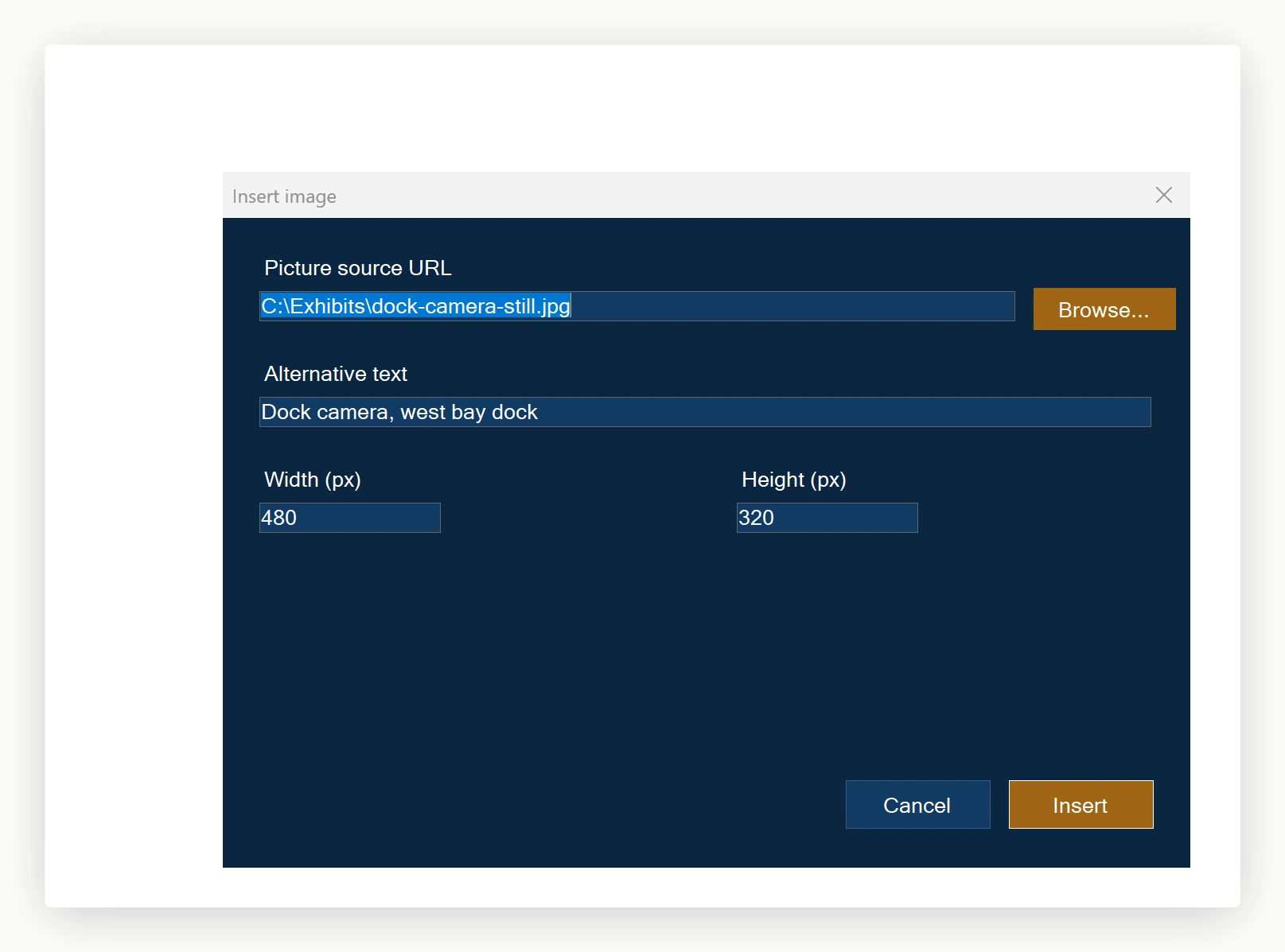
To replace the Image dialog, create a Form (for example, BrandedImageDialog) and implement IImageDialog. That interface adds three members on top of ShowDialog(): an Element property of type ImageElement (the inbound and outbound image model), a bool IsLocalResourceSelectionDisabled hint, and a bool UseInlineStyleForDimensions hint that says "write width and height as inline CSS rather than as legacy attributes."
using System.Windows.Forms;
using SpiceLogic.HtmlEditor.Abstractions.Entities;
using SpiceLogic.HtmlEditor.WinForms.Models.Dialogs;

public class BrandedImageDialog : Form, IImageDialog
{
    // --- IImageDialog members ---
    public ImageElement Element { get; set; }
    public bool IsLocalResourceSelectionDisabled { get; set; }
    public bool UseInlineStyleForDimensions { get; set; }

    public BrandedImageDialog()
    {
        InitializeComponent(); // designer-generated branded layout
        this.Text = "Insert Image";
        this.BackColor = System.Drawing.ColorTranslator.FromHtml("#0A2540"); // brand navy
        this.ForeColor = System.Drawing.Color.White;
        this.Font = new System.Drawing.Font("Segoe UI Variable", 10F);
    }

    protected override void OnLoad(System.EventArgs e)
    {
        base.OnLoad(e);
        // The editor populates Element before calling ShowDialog().
        // For a brand-new image, fields on Element are blank; for an existing
        // selection, they are pre-filled. Map them onto your form controls.
        txtUrl.Text = this.Element?.SrcUrl ?? string.Empty;
        txtAlt.Text = this.Element?.AlternativeText ?? string.Empty;
        nudWidth.Value = int.TryParse(this.Element?.Width, out var w) ? w : 0;
        nudHeight.Value = int.TryParse(this.Element?.Height, out var h) ? h : 0;
        // Honor the editor's "no local files" mode (e.g., when authoring
        // for the web and pasted file URIs are not wanted).
        btnBrowse.Enabled = !this.IsLocalResourceSelectionDisabled;
    }

    private void btnOK_Click(object sender, System.EventArgs e)
    {
        // Push form values back into Element before closing.
        this.Element.SrcUrl = txtUrl.Text;
        this.Element.AlternativeText = txtAlt.Text;
        this.Element.Width = ((int)nudWidth.Value).ToString();
        this.Element.Height = ((int)nudHeight.Value).ToString();
        this.DialogResult = DialogResult.OK;
        this.Close();
    }
}
Imports System.Windows.Forms
Imports SpiceLogic.HtmlEditor.Abstractions.Entities
Imports SpiceLogic.HtmlEditor.WinForms.Models.Dialogs
Public Class BrandedImageDialog
Inherits Form
Implements IImageDialog
' --- IImageDialog members (VB wires interface members explicitly) ---
Public Property Element As ImageElement Implements IImageDialog.Element
Public Property IsLocalResourceSelectionDisabled As Boolean Implements IImageDialog.IsLocalResourceSelectionDisabled
Public Property UseInlineStyleForDimensions As Boolean Implements IImageDialog.UseInlineStyleForDimensions
' Form.ShowDialog already does the work; VB still needs the explicit wiring.
Public Shadows Function ShowDialog() As DialogResult Implements IDialog.ShowDialog
Return MyBase.ShowDialog()
End Function
Public Sub New()
InitializeComponent() ' designer-generated branded layout
Me.Text = "Insert Image"
Me.BackColor = System.Drawing.ColorTranslator.FromHtml("#0A2540") ' brand navy
Me.ForeColor = System.Drawing.Color.White
Me.Font = New System.Drawing.Font("Segoe UI Variable", 10F)
End Sub
Protected Overrides Sub OnLoad(e As System.EventArgs)
MyBase.OnLoad(e)
' The editor populates Element before calling ShowDialog().
' For a brand-new image, fields on Element are blank; for an existing
' selection, they are pre-filled. Map them onto your form controls.
txtUrl.Text = If(Element?.SrcUrl, String.Empty)
txtAlt.Text = If(Element?.AlternativeText, String.Empty)
Dim widthValue As Integer = 0
Integer.TryParse(Element?.Width, widthValue)
nudWidth.Value = widthValue
Dim heightValue As Integer = 0
Integer.TryParse(Element?.Height, heightValue)
nudHeight.Value = heightValue
' Honor the editor's "no local files" mode (e.g., when authoring
' for the web and pasted file URIs are not wanted).
btnBrowse.Enabled = Not IsLocalResourceSelectionDisabled
End Sub
Private Sub btnOK_Click(sender As Object, e As System.EventArgs)
' Push form values back into Element before closing.
Element.SrcUrl = txtUrl.Text
Element.AlternativeText = txtAlt.Text
Element.Width = CInt(nudWidth.Value).ToString()
Element.Height = CInt(nudHeight.Value).ToString()
Me.DialogResult = DialogResult.OK
Me.Close()
End Sub
End ClassOne line in Form1_Load wires the dialog in:
htmlEditor1.Dialog.ImageDialog = new BrandedImageDialog();htmlEditor1.Dialog.ImageDialog = New BrandedImageDialog()From the next click of the Image button onward, the editor calls into BrandedImageDialog. It populates Element with whatever the user selected (or a fresh ImageElement for an insert), sets the runtime hints from the matching UserOption values, calls ShowDialog(), and, if the result is OK, reads Element back and applies it to the document.
The same pattern repeats for the other eight
Each interface adds two or three domain-specific members. IHyperlinkDialog carries a HyperlinkElement Element, an IsLocalResourceSelectionDisabled flag, a RemoveLink flag (set on close when the user chooses "remove link"), and UseCtrlClickTooltipDefault. ITableDialog exposes a single TableElement Element. ISymbolDialog is event-based: it raises SymbolButtonClicked (carrying the picked character's HTML in SymbolEventArg.SymbolHtmlCode) when the user picks a character, and raises DialogClosed when the dialog closes. Each interface's contract is small; see the source under Models/Dialogs/ for the exact members.
The wiring at startup looks the same regardless of which dialogs you choose to replace:
private void Form1_Load(object sender, EventArgs e)
{
    htmlEditor1.Dialog.ImageDialog = new BrandedImageDialog();
    htmlEditor1.Dialog.HyperlinkDialog = new BrandedHyperlinkDialog();
    htmlEditor1.Dialog.TableDialog = new BrandedTableDialog(htmlEditor1.Dialog.TableCellDialog);
    htmlEditor1.Dialog.SearchDialog = new BrandedSearchWindow();
    // SymbolDialog, StyleBuilderDialog, etc. left untouched -- the
    // factory versions are fine for those.
}
Private Sub Form1_Load(sender As Object, e As EventArgs)
htmlEditor1.Dialog.ImageDialog = New BrandedImageDialog()
htmlEditor1.Dialog.HyperlinkDialog = New BrandedHyperlinkDialog()
htmlEditor1.Dialog.TableDialog = New BrandedTableDialog(htmlEditor1.Dialog.TableCellDialog)
htmlEditor1.Dialog.SearchDialog = New BrandedSearchWindow()
' SymbolDialog, StyleBuilderDialog, etc. left untouched -- the
' factory versions are fine for those.
End SubEdge cases worth knowing
The TableDialog default implementation takes a constructor argument of type ITableCellDialog (the table dialog can launch a cell-properties sub-dialog). If you replace both the table dialog and the cell dialog, pass the cell-dialog instance into the table-dialog constructor (or however your custom table form invokes its cell-properties button). Replacing only the table dialog and reusing the factory cell dialog is fine; retrieve it via htmlEditor1.Dialog.TableCellDialog.
Runtime hints arrive on every ShowDialog() call, not just the first. Read them in OnLoad (or a setter that updates UI state), not in the constructor: the editor updates them between calls to reflect changes the host application made to editor.Options.
Returning DialogResult.Cancel aborts the operation cleanly. The editor does not read back Element on Cancel; the document is left untouched.
Shipping
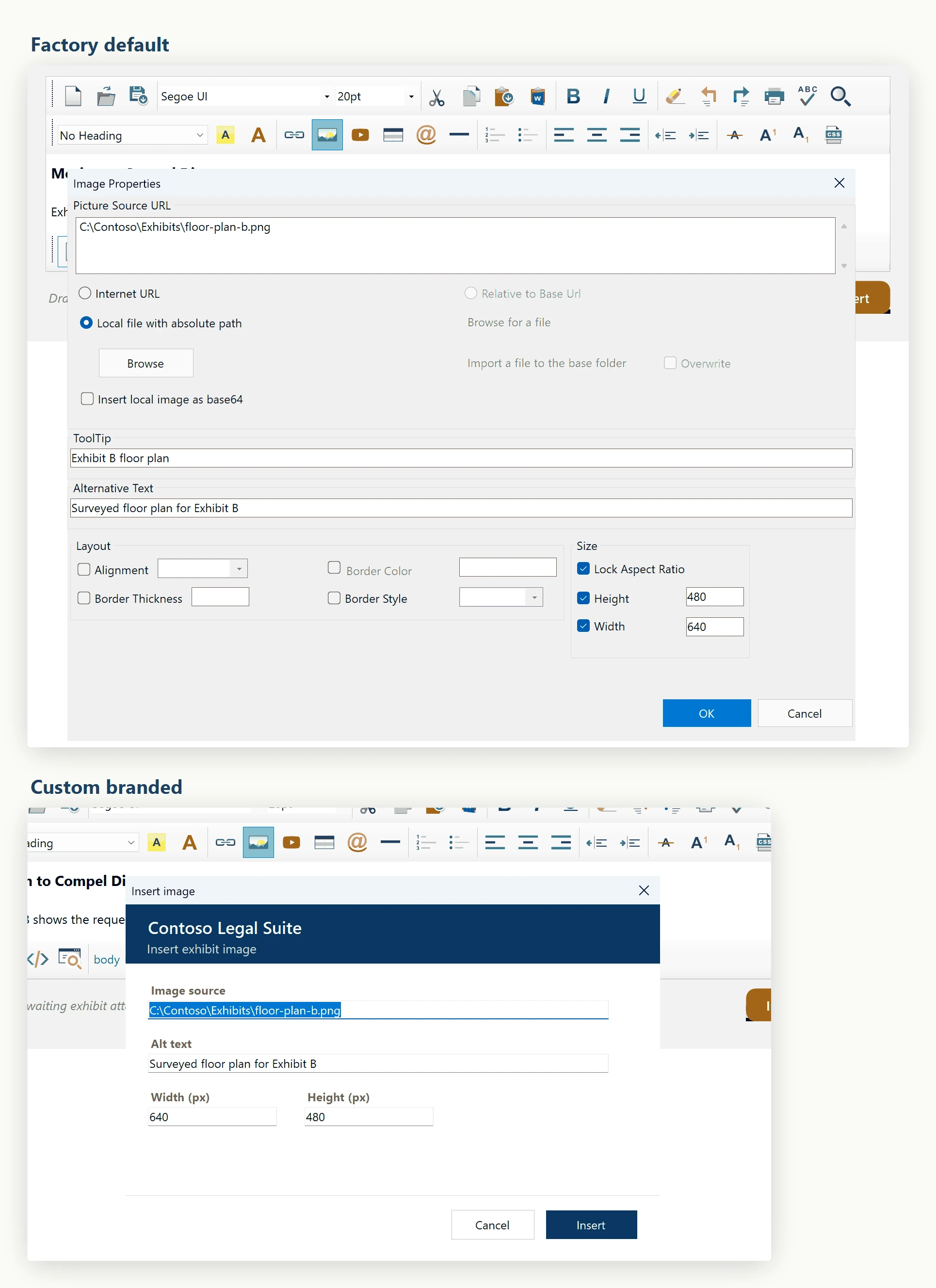
Replaced dialogs (for example the Image, Hyperlink, and Table dialogs) open windows that match the host application's look and feel. Factory dialogs stay in the binary and remain wired up for any interface you did not override. There is no fork of the editor's source, no copy-pasted controls, and no maintenance debt from customizing the editor. One Form per dialog, one property assignment per dialog, and the editor stays on the official upgrade path.
Ask your AI to do this
Let your assistant do this for you. With the SpiceLogic MCP server connected, paste this into Claude Code, Cursor, or VS Code Copilot in agent mode.
Using the SpiceLogic WinForms HTML Editor already referenced in my project, replace the built-in Insert Hyperlink dialog with my own WinForms form that matches our app's dark theme, by implementing IHyperlinkDialog and assigning it to the matching property on the editor's Dialog service, typed as IDialogService. Keep every other built-in dialog, such as Insert Image and Insert Table, on the factory implementation so only the hyperlink flow changes. Pull the exact IDialogService and IHyperlinkDialog member names from the SpiceLogic MCP tools before writing any code.