


 NuGet
NuGet
User Dictionary
Documents in your app often contain words the built-in spell checker does not recognize: product names, internal tool names, technical jargon, or uncommon surnames. Flagging the same term as a typo on every document, over and over, is disruptive and trains users to stop trusting the red squiggle. The WinForms HTML Editor's user dictionary solves this by letting the editor remember a word instead of flagging it again. This page shows how a word gets added to that dictionary and how long the editor remembers it.
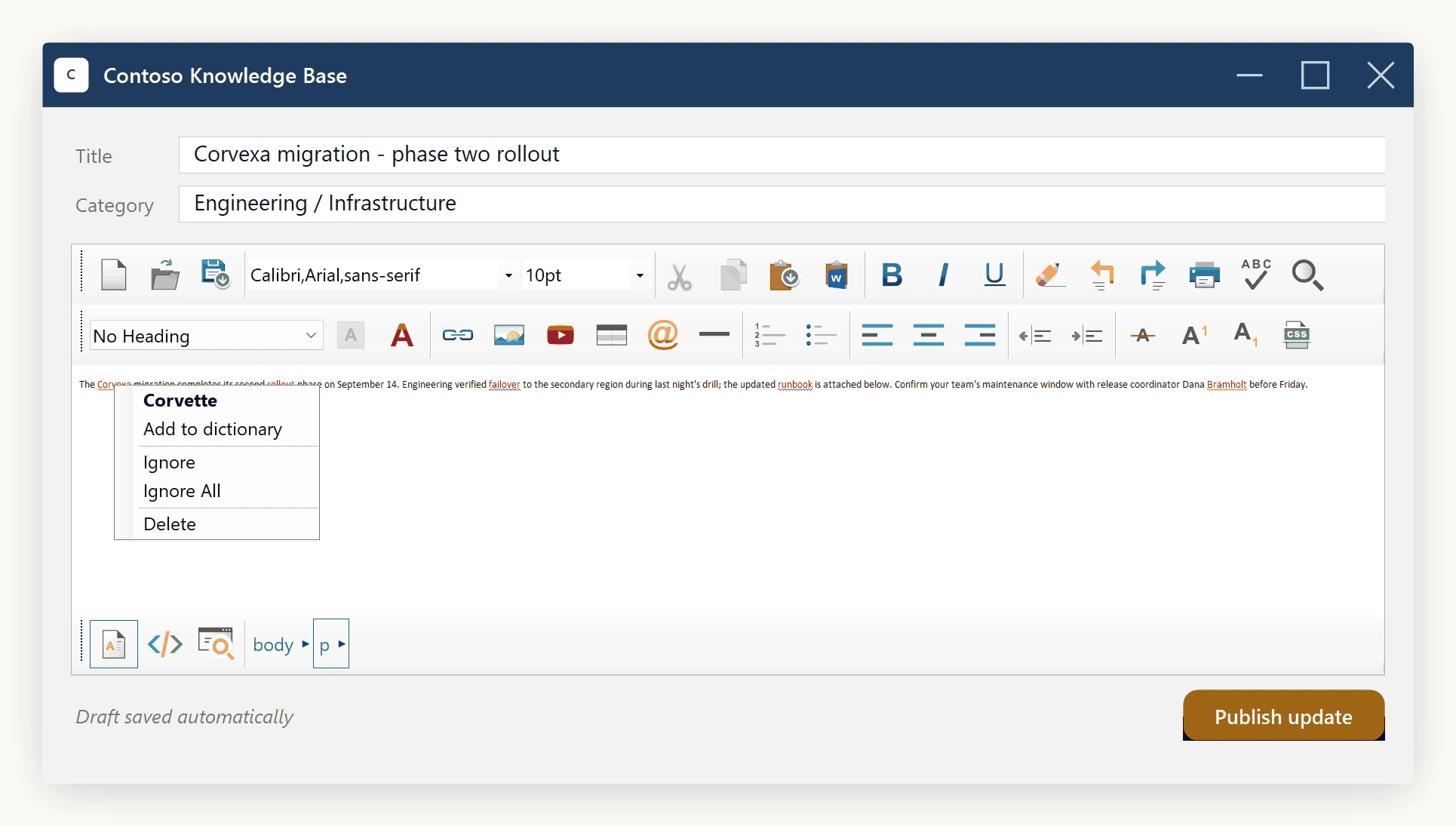
When the user right-clicks a flagged word and selects Add to Dictionary, that word stops being flagged as misspelled on that machine, persisting across sessions.
Built into the control
The Add to Dictionary item ships with the editor, controlled by SpellCheckOptions.DictionaryFile:
UserDictionaryFilePath- absolute path to a plain text file, created on first use.EnableUserDictionary- master switch;falsehides the item and disables the file.
Choosing the folder
Avoid the folder next to the .exe: it fails once installed under Program Files, where standard users cannot write. Use Environment.SpecialFolder.LocalApplicationData instead - per-user, no elevation, survives upgrades.
Set it once, in the constructor:
using System;
using System.IO;

public partial class ArticleEditorForm : Form
{
    public ArticleEditorForm()
    {
        InitializeComponent();
        // %LOCALAPPDATA%\Contoso\KnowledgeBase\user-dictionary.txt
        var localAppData = Environment.GetFolderPath(Environment.SpecialFolder.LocalApplicationData);
        var appFolder = Path.Combine(localAppData, "Contoso", "KnowledgeBase");
        Directory.CreateDirectory(appFolder);
        var userDictPath = Path.Combine(appFolder, "user-dictionary.txt");
        editor.SpellCheckOptions.DictionaryFile.UserDictionaryFilePath = userDictPath;
        editor.SpellCheckOptions.DictionaryFile.EnableUserDictionary = true;
    }
}
Imports System
Imports System.IO
Partial Public Class ArticleEditorForm
Inherits Form
Public Sub New()
InitializeComponent()
' %LOCALAPPDATA%\Contoso\KnowledgeBase\user-dictionary.txt
Dim localAppData = Environment.GetFolderPath(Environment.SpecialFolder.LocalApplicationData)
Dim appFolder = Path.Combine(localAppData, "Contoso", "KnowledgeBase")
Directory.CreateDirectory(appFolder)
Dim userDictPath = Path.Combine(appFolder, "user-dictionary.txt")
editor.SpellCheckOptions.DictionaryFile.UserDictionaryFilePath = userDictPath
editor.SpellCheckOptions.DictionaryFile.EnableUserDictionary = True
End Sub
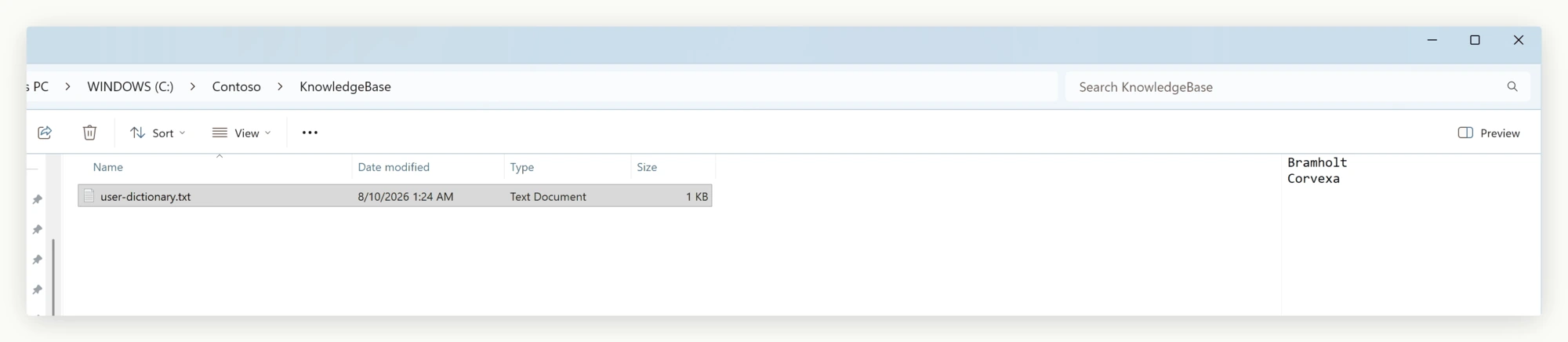
End ClassRight-click a word and choose Add to Dictionary to append it to user-dictionary.txt and clear its underline. The file loads at startup, so the word stays recognized on future runs.
Seeding the dictionary on first run
Ship a seed file with your installer and copy it to the user-dictionary path on first launch if none exists. The user dictionary is a plain text file, one word per line, read on load and appended to on every Add to Dictionary click:
// Run once at first launch
if (!File.Exists(userDictPath))
{
    File.Copy(sourceFileName: "seed/company-glossary.txt", destFileName: userDictPath);
}

editor.SpellCheckOptions.DictionaryFile.UserDictionaryFilePath = userDictPath;
editor.SpellCheckOptions.DictionaryFile.EnableUserDictionary = true;
' Run once at first launch
If Not File.Exists(userDictPath) Then
File.Copy(sourceFileName:="seed/company-glossary.txt", destFileName:=userDictPath)
End If
editor.SpellCheckOptions.DictionaryFile.UserDictionaryFilePath = userDictPath
editor.SpellCheckOptions.DictionaryFile.EnableUserDictionary = TrueWith the seed file loaded, terms like Kestrel are not flagged as misspelled from the start.
The scenario where you turn it off
Regulated deployments (for example, auditor-reviewed filings) may require the dictionary to match the company glossary exactly, with no user additions. Disable the feature for that build:
editor.SpellCheckOptions.DictionaryFile.EnableUserDictionary = false;editor.SpellCheckOptions.DictionaryFile.EnableUserDictionary = FalseThe Add to Dictionary item disappears, the on-disk file is ignored, and the control falls back to the glossary alone - one property switches both policies from the same codebase.
If you have replaced the engine
A custom ISpellCheckerEngine implementation (see Custom Spell-Check Engine) still receives the user-dictionary path via Initialize(dictionaryPath, affixPath, userDictionaryPath); every Add to Dictionary click routes to its AddToUserDictionary method, which persists the word however it chooses - a plain file, a corporate vocabulary server, or a per-user database.
What ships
Three properties, a default folder, and an optional seed file cover both an open, growing team dictionary and a locked-down glossary for regulated builds - toggle one property to switch.
Ask your AI to do this
Let your assistant do this for you. With the SpiceLogic MCP server connected, paste this into Claude Code, Cursor, or VS Code Copilot in agent mode.
Using the SpiceLogic WinForms HTML Editor already referenced in my project, set up the user dictionary so a word a user adds through Add to Dictionary is remembered across sessions instead of being flagged again, pointing SpellCheckOptions.DictionaryFile.UserDictionaryFilePath at a per-user path under Environment.SpecialFolder.LocalApplicationData rather than next to the executable, and turning on EnableUserDictionary. Seed the dictionary on first run by copying a bundled file, say company-glossary.txt, into that path only when it does not already exist, so an internal product name like Zentro never gets flagged as a typo again. Look up the real SpellCheckOptions members with the SpiceLogic MCP tools before writing any code.