


 NuGet
NuGet
How to License the WPF HTML Editor
Starting with version 3.x, the WPF HTML Editor Control uses a license-key activation system that replaces the older "download the unlocked DLL" workflow. In earlier versions, every customer downloaded a separate unlocked build from their account after buying and referenced it by hand. That is no longer how it works. Today you install one NuGet package (SpiceLogic.HtmlEditor.WPF) for both trial and licensed use, and you unlock the licensed mode at runtime by assigning your purchased license key to the WpfHtmlEditor.LicenseKey static property.
There is one exception. If you bought the Source Code license, you still download a file from your account after purchase, not an unlocked DLL, but a ZIP that contains the complete C# source of the editor. So, depending on what you purchased, there are two possible things to collect from My Account: a license key (Developer License) or a source-code download (Source Code license).
Where to find your license key or source-code download
After you purchase, sign in to your My Account page on the SpiceLogic website and find the WPF HTML Editor Control in your Latest license card or your Purchase history. What appears there depends on your license type:
- Developer License - your license key is shown with a copy button. Copy the entire key exactly as it appears, then apply it in code as described below.
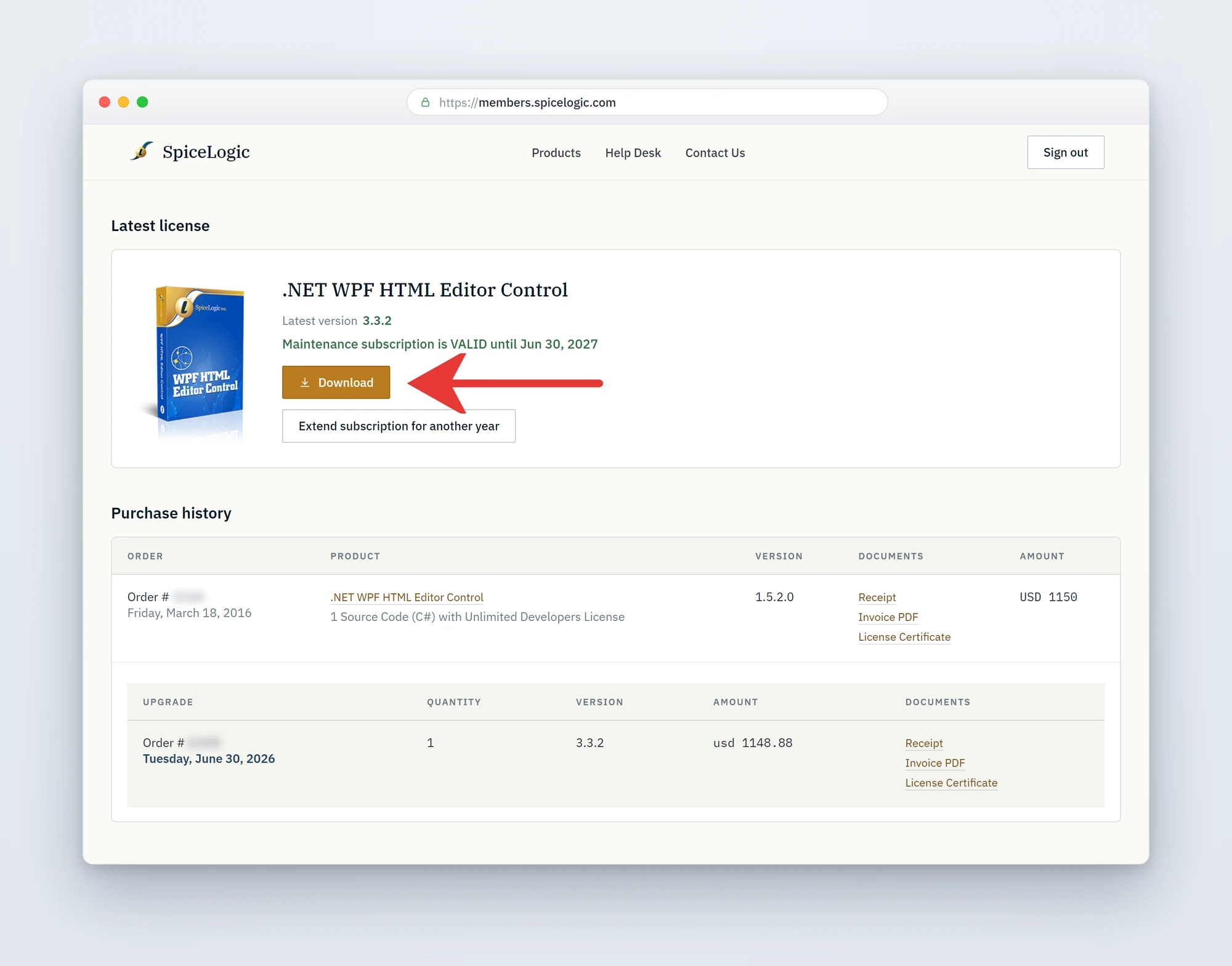
- Source Code license - a Download button appears in its place (shown in the screenshot below). Click it to download the full source-code ZIP. The "Source Code license customers" section further down explains what to do with it.
Apply your license key in code
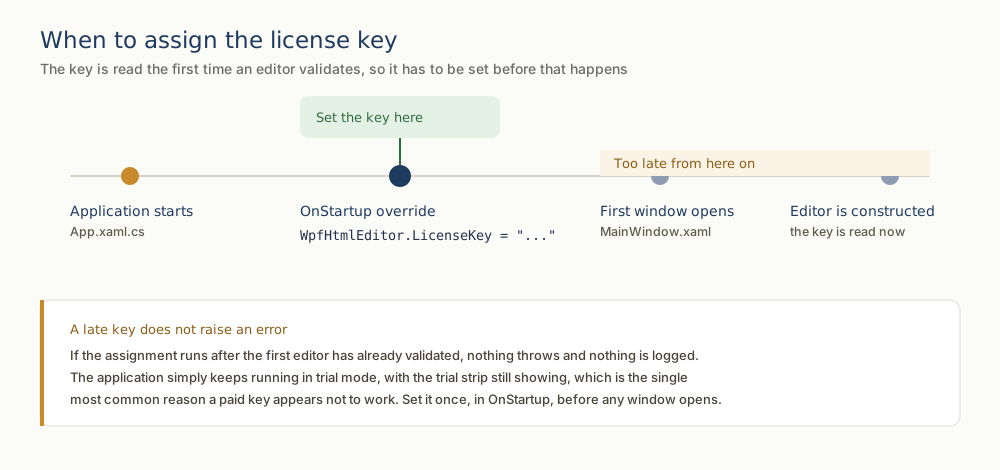
Set the license key once, as early as possible in the application lifetime, before any window that hosts the editor is constructed. The WpfHtmlEditor.LicenseKey property is static, so a single assignment activates every editor instance in the process. The most reliable place is the OnStartup override of your App class in App.xaml.cs (or Application.xaml.vb for VB.NET):
using System.Windows;
using SpiceLogic.HtmlEditor.WPF;

namespace MyWpfApplication
{
    public partial class App : Application
    {
        protected override void OnStartup(StartupEventArgs e)
        {
            WpfHtmlEditor.LicenseKey = "YOUR-LICENSE-KEY-HERE";
            base.OnStartup(e);
        }
    }
}
Imports System.Windows
Imports SpiceLogic.HtmlEditor.WPF
Namespace MyWpfApplication
Partial Public Class App
Inherits Application
Protected Overrides Sub OnStartup(e As StartupEventArgs)
WpfHtmlEditor.LicenseKey = "YOUR-LICENSE-KEY-HERE"
MyBase.OnStartup(e)
End Sub
End Class
End Namespace
XAML usage note
The editor itself is declared in XAML the usual way. The license key is not a XAML-settable property; it is a static .NET property and must be assigned from code-behind (typically App.xaml.cs / Application.xaml.vb as shown above). Reference the WPF namespace in your XAML and drop the control into any window or user control:
<Window x:Class="MyWpfApplication.MainWindow"
        xmlns="http://schemas.microsoft.com/winfx/2006/xaml/presentation"
        xmlns:x="http://schemas.microsoft.com/winfx/2006/xaml"
        xmlns:wpfEditor="clr-namespace:SpiceLogic.HtmlEditor.WPF;assembly=SpiceLogic.HtmlEditor.WPF"
        Title="My Editor Window" Height="600" Width="900">
    <Grid>
        <wpfEditor:WpfHtmlEditor x:Name="MyEditor" />
    </Grid>
</Window>
Trial mode vs licensed mode
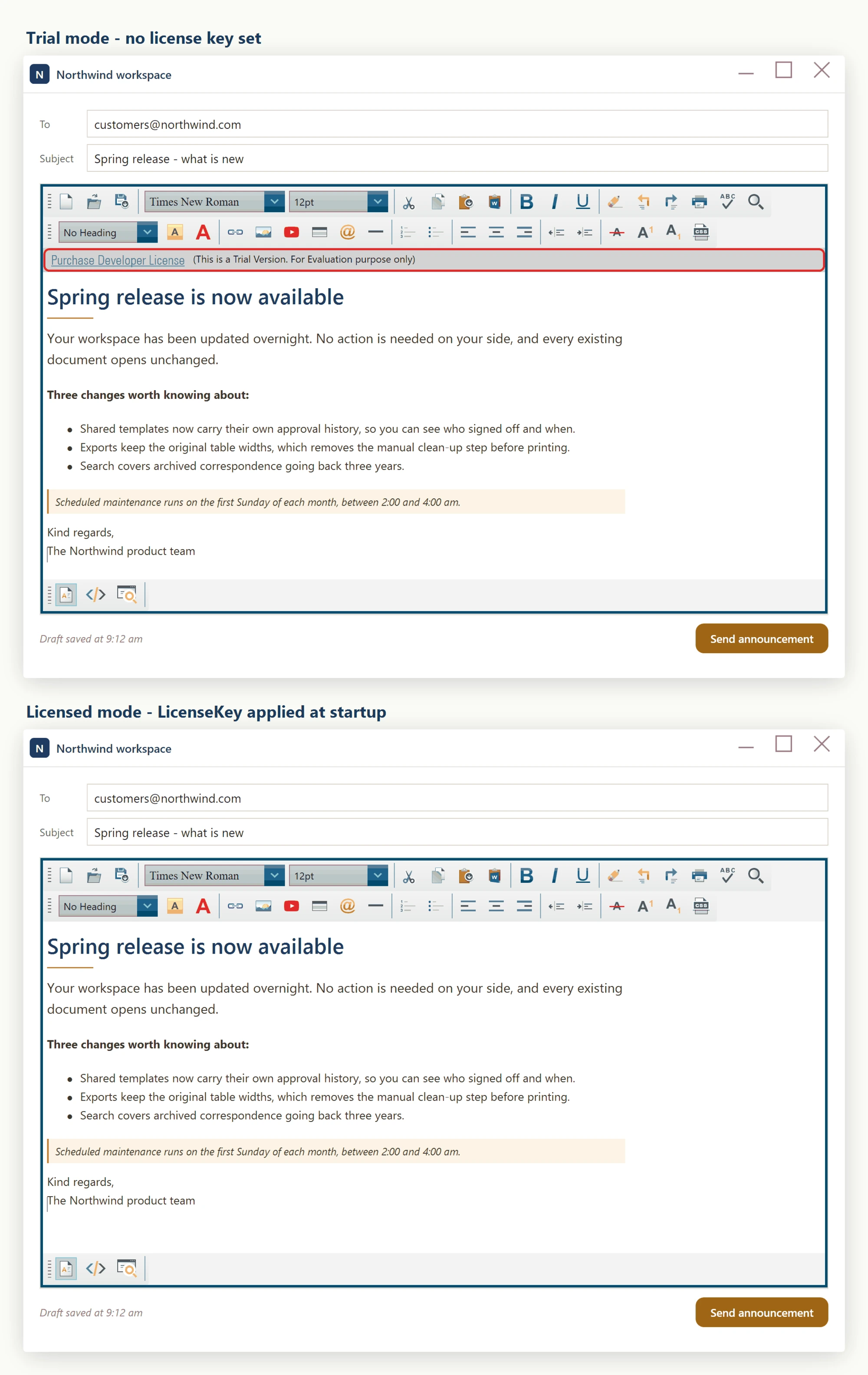
If WpfHtmlEditor.LicenseKey is left unset, or is set to an invalid string, the control runs in trial mode. Trial mode is fully functional for evaluation, but it shows a trial strip directly beneath the toolbar, carrying a purchase link. Once a valid key is assigned at startup, every editor instance in your process runs in licensed mode and that strip is gone.
Verifying activation
Run your application after wiring up WpfHtmlEditor.LicenseKey. If the key is accepted, the trial nag indicators disappear from every editor instance in the running process. If they are still visible, double-check that:
- The key string was copied exactly from My Account, with no leading or trailing whitespace and no line breaks pasted in.
- The assignment runs before the first window that hosts a WpfHtmlEditor is constructed. If you set it from a window constructor or a click handler, earlier-instantiated editors will not pick it up.
- You are running the licensed NuGet package (SpiceLogic.HtmlEditor.WPF) and not an older custom-built DLL from a previous major version.
Source Code license customers
If you purchased the Source Code license, your source code is delivered as a download from your account - the same place, and the same kind of Download button, that used to deliver the unlocked DLLs in older versions. To get it:
- Sign in to your My Account page.
- Find the WPF HTML Editor Control in your Latest license card (or the matching row in Purchase history).
- Click the Download button. The red arrow in the My Account screenshot earlier on this page points to it. Your browser downloads a ZIP,
HtmlEditor-WPF-SourceCode.zip, containing the complete C# source of the editor.
The downloaded source has the license-key logic stripped out. If you reference those projects directly from your own solution and build the editor from your copy of the source, it runs in licensed mode automatically - no WpfHtmlEditor.LicenseKey assignment is needed.
You are not required to build from source. You can keep using the SpiceLogic.HtmlEditor.WPF NuGet package and set WpfHtmlEditor.LicenseKey at startup, exactly like a Developer License customer would. The Source Code license simply gives you the option to switch from the NuGet package to the included source when you need to customize the editor's internals, debug into the source, or satisfy a procurement requirement that every third-party component ships with source.
Upgrading from earlier versions
Earlier (pre-3.x) versions of the WPF HTML Editor shipped two separate NuGet packages or DLLs: a freely downloadable trial assembly and a separate "unlocked" assembly that customers had to download from My Account after purchase. That dual-package workflow is no longer used. To upgrade:
- Remove any reference to the old unlocked DLL from your project.
- Install (or update to) the current SpiceLogic.HtmlEditor.WPF NuGet package - this single package now covers both trial and licensed modes.
- Add the WpfHtmlEditor.LicenseKey assignment shown above in your App.xaml.cs startup code.
No XAML changes are required - existing <wpfEditor:WpfHtmlEditor /> declarations continue to work unmodified.
Ask your AI to do this
Let your assistant do this for you. With the SpiceLogic MCP server connected, paste this into Claude Code, Cursor, or VS Code Copilot in agent mode.
Using the SpiceLogic WPF HTML Editor already referenced in my project, apply my purchased developer license key by setting the static WpfHtmlEditor.LicenseKey property once in the OnStartup override of App.xaml.cs, before any window that hosts the editor is constructed, so the trial nag disappears from every editor instance in the process. Also note in a comment that this only applies to the Developer License, not the Source Code license. Confirm the exact LicenseKey property and OnStartup placement with the SpiceLogic MCP tools before making the change.