


 NuGet
NuGet
Copy from MS Word and Paste to Editor
Most content that lands in your app didn't start there - a user writes it up in Microsoft Word first, then copies and pastes it straight into your WPF HTML Editor. That is convenient for the user, but Word's clipboard output was built for Word, not for clean HTML: left unmodified, formatting that looks fine in the editor can break the moment the content is exported, emailed, or rendered somewhere else. This page shows how the WPF HTML Editor detects Word-origin content on paste and strips out the parts that cause that damage.
Pasted content from Microsoft Word carries a lot of Word-specific markup: MsoNormal classes, <o:p> namespace tags, conditional comments aimed at older Internet Explorer, and a long list of mso-* style properties. Left in place, this noise can break downstream consumers such as PDF exporters (collapsed headings, wrong bullet spacing, fonts changing mid-paragraph).
WpfHtmlEditor auto-detects Word content on the clipboard and strips this noise before inserting it. The behavior is controlled by the AutoDetectWordPaste option, which is enabled by default:
// Enabled by default; shown here for completeness. editor.Options.AutoDetectWordPaste = true;' Enabled by default; shown here for completeness. editor.Options.AutoDetectWordPaste = True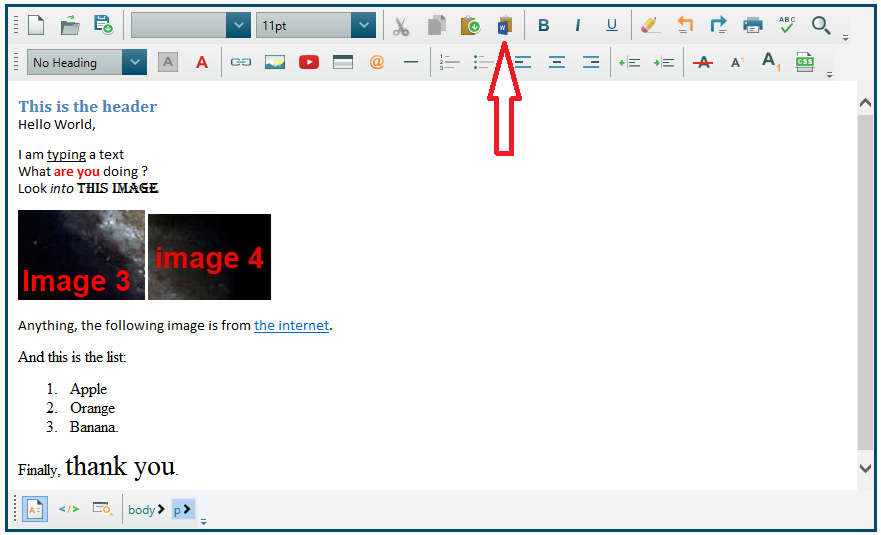
You may need cleanup beyond the automatic Word-noise removal, such as enforcing a house style (a single font and text color) or capping the size of a paste. Subscribe to the Pasting event: it fires after the built-in Word cleanup has run and gives you the already-cleaned HTML, so you can strip anything else you do not want, or cancel the paste outright.
Use e.IsPastingFromMsWord to apply extra rules only to Word-sourced pastes; pastes from plain text editors, IDEs, or web pages pass through untouched. The example below strips inline color and font-family styles and cancels pastes larger than 200 KB:
public MainWindow()
{
    InitializeComponent();
    editor.Pasting += Editor_Pasting;
}

private void Editor_Pasting(object sender, PastingHtmlEventArgs e)
{
    if (e.IsPastingFromMsWord && !string.IsNullOrEmpty(e.PastingHtml))
    {
        // House style: drop inline colors and font-family choices.
        e.PastingHtml = Regex.Replace(e.PastingHtml, @"color\s*:\s*[^;""]+;?", "");
        e.PastingHtml = Regex.Replace(e.PastingHtml, @"font-family\s*:\s*[^;""]+;?", "");
    }

    if (e.PastingHtml != null && e.PastingHtml.Length > 200_000)
        e.Cancel = true;
}
Public Sub New()
InitializeComponent()
editor.Pasting += AddressOf Editor_Pasting
End Sub
Private Sub Editor_Pasting(sender As Object, e As PastingHtmlEventArgs)
If e.IsPastingFromMsWord AndAlso Not String.IsNullOrEmpty(e.PastingHtml) Then
' House style: drop inline colors and font-family choices.
e.PastingHtml = Regex.Replace(e.PastingHtml, "color\s*:\s*[^;""]+;?", "")
e.PastingHtml = Regex.Replace(e.PastingHtml, "font-family\s*:\s*[^;""]+;?", "")
End If
If e.PastingHtml IsNot Nothing AndAlso e.PastingHtml.Length > 200_000 Then e.Cancel = True
End Sub
The IsPastingFromMsWord flag on the event args identifies which pastes came from Word, so you can apply cleanup rules selectively. Pastes from regular text editors, IDEs, or web pages pass through untouched.
The toolbar also includes a dedicated "Paste from Word" button. Clicking it runs the Word cleanup unconditionally, even if the clipboard content is not auto-detected as Word-flavored. Use this button whenever you are not sure of the paste source.
Ask your AI to do this
Let your assistant do this for you. With the SpiceLogic MCP server connected, paste this into Claude Code, Cursor, or VS Code Copilot in agent mode.
Using the SpiceLogic WPF HTML Editor already referenced in my project, make sure content pasted from Microsoft Word into my document editor comes in clean: keep AutoDetectWordPaste enabled so Word's mso-* styles and MsoNormal classes get stripped automatically, then subscribe to the Pasting event to enforce a house style, stripping inline color and font-family and cancelling anything over 200 KB, using e.IsPastingFromMsWord so plain-text and web pastes are left untouched. Wire this cleanup to a "Contract editor" instance in my app. Check the real Pasting event signature and the AutoDetectWordPaste option with the SpiceLogic MCP tools before writing any code.