


 NuGet
NuGet
Add custom fonts to the font dropdown
The WinForms HTML Editor's font dropdown, by default, lists every font installed on the local machine - fine for a general-purpose editor, but not always what your branded application wants. That is often unwanted: a private application font is not installed system-wide and will not appear at all, and end users may see fonts that have no place in a customer-facing document, such as an invoice template or a letterhead. Restricting the dropdown to an approved set of fonts, or adding a private font on top of the system list, keeps documents on-brand and consistent across machines. This page shows how to take control of that list - trimming it to an approved set, adding your own fonts, or both.
How the font combo actually works
The dropdown is exposed as htmlEditor1.CmbFontName, a SpiceFontCombo (a custom ToolStripComboBox). By default it lazily populates from FontFamily.Families the first time the user focuses or opens it - the AddSystemFonts = true path. Each item is a SpiceFontCombo.FontComboBoxItem built from a preview System.Drawing.Font and, optionally, the CSS font-family string the editor writes into the document when the user picks the item.
Path 1: a curated list only
To show only an approved set of fonts, do not populate system fonts at all. Set AddSystemFonts to false before the combo populates itself, clear any existing items, then add the approved entries.
using SpiceLogic.HtmlEditor.WinForms.Helpers.Controls; private void LetterEditor_Load(object sender, EventArgs e) { var combo = htmlEditor1.CmbFontName; combo.AddSystemFonts = false; // do not auto-load FontFamily.Families combo.Items.Clear(); AddBrandFont(combo, "Verdant Sans", "'Verdant Sans', Arial, sans-serif"); AddBrandFont(combo, "Verdant Serif", "'Verdant Serif', Georgia, serif"); AddBrandFont(combo, "Consolas", "Consolas, 'Courier New', monospace"); // for policy IDs } private static void AddBrandFont(SpiceFontCombo combo, string previewName, string cssFontFamily) { var font = new Font(previewName, 12, FontStyle.Regular, GraphicsUnit.Point); combo.Items.Add(new SpiceFontCombo.FontComboBoxItem(font, cssFontFamily)); }Imports SpiceLogic.HtmlEditor.WinForms.Helpers.Controls End Sub Private Sub LetterEditor_Load(sender As Object, e As EventArgs) Dim combo = htmlEditor1.CmbFontName combo.AddSystemFonts = False ' do not auto-load FontFamily.Families combo.Items.Clear() AddBrandFont(combo, "Verdant Sans", "'Verdant Sans', Arial, sans-serif") AddBrandFont(combo, "Verdant Serif", "'Verdant Serif', Georgia, serif") AddBrandFont(combo, "Consolas", "Consolas, 'Courier New', monospace") ' for policy IDsThis produces a dropdown containing only the fonts you added; users cannot select a font outside the approved set.

Path 2: keeping system fonts and adding a custom font
The opposite case: keep all system fonts and add a private or custom font on top of the list. Load the font privately first (for example via a PrivateFontCollection elsewhere in the application), then append an item to the combo.
using SpiceLogic.HtmlEditor.WinForms.Helpers.Controls; private void NotesEditor_Load(object sender, EventArgs e) { // The combo populates system fonts lazily on first focus/dropdown. // Trigger the population, then append the brand font. htmlEditor1.CmbFontName.ComboBox.PerformLayout(); var previewFont = new Font("Verdant Sans", 12, FontStyle.Regular, GraphicsUnit.Point); htmlEditor1.CmbFontName.Items.Add(new SpiceFontCombo.FontComboBoxItem(previewFont, "'Verdant Sans', Arial, sans-serif")); }Imports SpiceLogic.HtmlEditor.WinForms.Helpers.Controls End Sub Private Sub NotesEditor_Load(sender As Object, e As EventArgs) ' The combo populates system fonts lazily on first focus/dropdown. ' Trigger the population, then append the brand font. htmlEditor1.CmbFontName.ComboBox.PerformLayout() Dim previewFont = New Font("Verdant Sans", 12, FontStyle.Regular, GraphicsUnit.Point) htmlEditor1.CmbFontName.Items.Add(New SpiceFontCombo.FontComboBoxItem(previewFont, "'Verdant Sans', Arial, sans-serif"))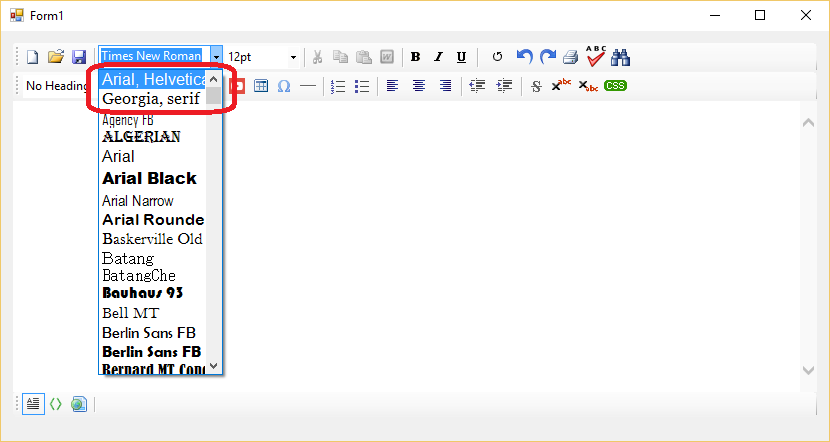
Providing a fallback font stack
The second argument to FontComboBoxItem is the CSS string written into the document's inline font-family rule. Passing just the font name (for example "Verdant Sans") works while the private font is loaded in the current process, but on a machine where the font is not installed the browser falls back to a default and the layout can shift. Use a web-safe fallback stack instead, for example "'Verdant Sans', Arial, sans-serif", so any machine without the custom font still renders the document sensibly.
Notes
- When a user picks an item, the editor applies
font-familyusing the CSS string passed to the item (not the preview font'sName). - The preview text in the dropdown renders using the preview
Fontobject you constructed, so a custom font only previews correctly when it is loaded into the process (typically viaPrivateFontCollectionat app startup). - If a document's
BodyStylealready declaresfont-family, that body-level rule wins until the user actively picks a font from the dropdown for a selection. Align the default body style with your brand font so new documents start out compliant.
Ask your AI to do this
Let your assistant do this for you. With the SpiceLogic MCP server connected, paste this into Claude Code, Cursor, or VS Code Copilot in agent mode.
Using the SpiceLogic WinForms HTML Editor already referenced in my project, restrict the font dropdown to an approved brand list by setting AddSystemFonts to false on htmlEditor1.CmbFontName before it populates, then add curated FontComboBoxItem entries for fonts such as a custom brand font named Verdant Sans, giving each item a fallback CSS stack so documents still render sensibly on a machine that does not have that font installed. Load the custom font through a PrivateFontCollection at startup so its preview renders correctly in the dropdown, and align BodyStyle with the same brand font so new documents start out compliant. Look up the real SpiceFontCombo and FontComboBoxItem members with the SpiceLogic MCP tools before writing any code.