


 NuGet
NuGet
Properties
Properties let your application configure the editor and read or replace its content. Use them to set document appearance, choose editing behavior, and access the services that handle commands and selections. This reference explains each property and shows how to use it from your application.
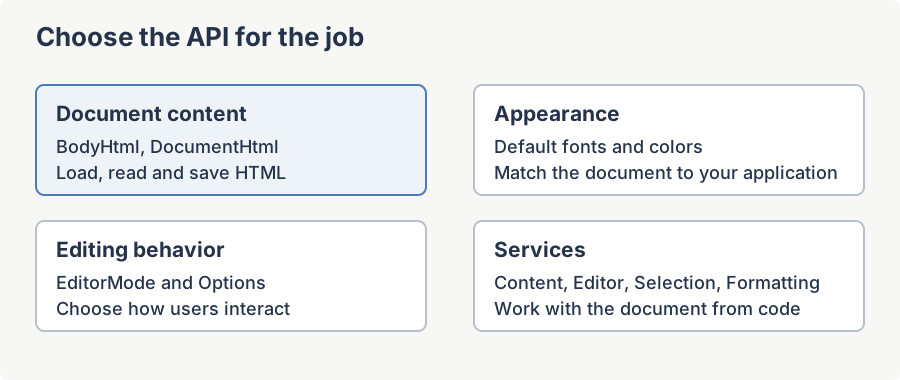
Most value properties (those marked [Category("Value")]) round-trip through the live HTML document, so reading the property reflects the current state of the document and writing it mutates the document immediately. Behavior properties (marked [Category("Behavior")]) configure how the control reacts to user input and host events. Properties that return references to other objects (services, toolbar items, web-browser hosts) are read-only and are exposed primarily so a host application can customise the surrounding chrome or hook directly into the underlying engines.
In every example below, htmlEditor1 is a WinFormHtmlEditor instance dropped onto a WinForms designer. The namespace is SpiceLogic.HtmlEditor.WinForms.
BodyHtml
Gets or sets the HTML markup contained in the document's <body> element. Reading normalizes and returns the body markup; writing replaces the body content with the supplied markup. This is the most commonly used property for binding the editor to a data field that stores HTML fragments rather than full HTML documents.
Syntax
public string BodyHtml { get; set; }Public Property BodyHtml As StringProperty value
String - the HTML between the document's <body> open and close tags. Default is an empty string.
Example
// Load a fragment into the editor:
htmlEditor1.BodyHtml = "<p>Hello, <strong>world</strong></p>";
// Read it back (for example, before saving to your data store):
string fragment = htmlEditor1.BodyHtml;
' Load a fragment into the editor:
htmlEditor1.BodyHtml = "<p>Hello, <strong>world</strong></p>"
' Read it back (for example, before saving to your data store):
Dim fragment As String = htmlEditor1.BodyHtmlDocumentHtml
Gets or sets the complete HTML document, including the <!DOCTYPE> declaration, <html>, <head>, and <body> elements. Use this when the host application needs to round-trip a full HTML file rather than just a body fragment.
Syntax
public string DocumentHtml { get; set; }Public Property DocumentHtml As StringProperty value
String - the complete HTML document text.
Example
// Save the full document the user has been editing:

System.IO.File.WriteAllText("page.html", htmlEditor1.DocumentHtml);


// Load a document from disk into the editor:

htmlEditor1.DocumentHtml = System.IO.File.ReadAllText("page.html");
BodyText (via Content service)
A plain-text representation of the body is not surfaced as a direct property on the control; it is available through the Content service. See the Content Services page for full documentation of GetBodyText and SetBodyText.
Example
// Pull the body as plain text for word-count or accessibility checks:
string plain = htmlEditor1.Content.GetBodyText();
// Replace the body with plain text (paragraphs are auto-wrapped):
htmlEditor1.Content.SetBodyText("Hello world");
' Pull the body as plain text for word-count or accessibility checks:
Dim plain As String = htmlEditor1.Content.GetBodyText()
' Replace the body with plain text (paragraphs are auto-wrapped):
htmlEditor1.Content.SetBodyText("Hello world")DocumentTitle
Gets or sets the value of the document's <title> element. Setting this property while EditorMode is HtmlEdit is ignored; the editor must be in WYSIWYG or preview mode for the title to be applied.
Syntax
public string DocumentTitle { get; set; }Public Property DocumentTitle As StringProperty value
String - the document title. Default is an empty string.
Example
htmlEditor1.DocumentTitle = "Customer Welcome Letter";
this.Text = htmlEditor1.DocumentTitle; // mirror to the form caption
htmlEditor1.DocumentTitle = "Customer Welcome Letter"
Me.Text = htmlEditor1.DocumentTitle ' mirror to the form captionBodyStyle
Gets or sets the value of the style attribute on the document's <body> element. Use this to apply a block of inline CSS to the body in a single assignment, instead of poking individual style properties.
Syntax
public string BodyStyle { get; set; }Public Property BodyStyle As StringProperty value
String - an inline CSS declaration list (for example "margin:8px; background-color:#fefefe"). Default is empty.
Example
htmlEditor1.BodyStyle = "margin:8px; background-color:#fefefe; font-family:Calibri";BodyCSSClassName
Gets or sets the class attribute on the document's <body> element. Useful when the document references an external stylesheet (via DocumentCSSFilePath) that defines body-level rules keyed by class name.
Syntax
public string BodyCSSClassName { get; set; }Public Property BodyCSSClassName As StringProperty value
String - the CSS class name to attach to the <body> element. Default is null.
Example
// Attach an external stylesheet, then pick the matching body class:

htmlEditor1.DocumentCSSFilePath = "skins/site.css";

htmlEditor1.BodyCSSClassName    = "article-body";
BodyStyleAsDOM
Gets the IHTMLStyle object that wraps the body element's style. Use this when an algorithm needs to read or mutate individual style properties (color, margin, fontFamily, etc.) without parsing a CSS string. Returns null in source-edit mode.
Syntax
public IHTMLStyle BodyStyleAsDOM { get; }Public ReadOnly Property BodyStyleAsDOM As IHTMLStyleProperty value
mshtml.IHTMLStyle - the style DOM wrapper for the body element, or null when not in WYSIWYG or preview mode.
Example
var style = htmlEditor1.BodyStyleAsDOM;
if (style != null)
{
    style.marginLeft = "12px";
    style.marginRight = "12px";
}
Dim style = htmlEditor1.BodyStyleAsDOM
If style IsNot Nothing Then
style.marginLeft = "12px"
style.marginRight = "12px"
End IfBodyColor
Gets or sets the background colour of the document body. Setting this property is ignored in source-edit mode.
Syntax
public Color BodyColor { get; set; }Public Property BodyColor As ColorProperty value
System.Drawing.Color - the background colour. Default is Color.White.
Example
htmlEditor1.BodyColor = System.Drawing.Color.LightYellow;DefaultFontFamily
Gets or sets the default font-family persisted in the style attribute of the body element. This is the font new text inherits when the user types into an unstyled region.
Syntax
public string DefaultFontFamily { get; set; }Public Property DefaultFontFamily As StringProperty value
String - a CSS font-family name. Default is the value of ModuleConstants.DefaultFontName.
Example
htmlEditor1.DefaultFontFamily = "Calibri";DefaultFontSizeInPt
Gets or sets the default body font size, in points. If the value is supplied without an explicit unit, it is interpreted as pixels and converted to points before being persisted. Use the pt suffix to set point sizes directly (for example "12pt").
Syntax
public string DefaultFontSizeInPt { get; set; }Public Property DefaultFontSizeInPt As StringProperty value
String - the font size including its unit suffix. Default is the value of ModuleConstants.DefaultFontSizePtStr.
Example
htmlEditor1.DefaultFontSizeInPt = "14pt";DefaultForeColor
Gets or sets the default foreground (text) colour of the editor. The value is persisted in the body element's style attribute. This member hides the base Control.ForeColor and operates on the HTML document, not on the WinForms control surface.
Syntax
public new Color DefaultForeColor { get; set; }Public Overloads Property DefaultForeColor As ColorProperty value
System.Drawing.Color - the default text colour. Default is Color.Black.
Example
htmlEditor1.DefaultForeColor = System.Drawing.Color.FromArgb(0x22, 0x22, 0x22);BackgroundImagePath
Gets or sets the URL or local path of the body background image. The value is written to the body's background-image CSS property as url(...). Returns an empty string when in source-edit mode.
Syntax
public string BackgroundImagePath { get; set; }Public Property BackgroundImagePath As StringProperty value
String - image path or URL. Default is empty.
Example
htmlEditor1.BackgroundImagePath = "file:///C:/skins/paper.jpg";BaseUrl
Gets or sets the document's base URL, written as the <base href="..."> element inside <head>. The base URL controls how relative resource references (image src, anchor href, stylesheet href) are resolved. A common usage is to set BaseUrl = Application.StartupPath + "\\images" when the host form loads, so relative resources work after the application is deployed.
Syntax
public string BaseUrl { get; set; }Public Property BaseUrl As StringProperty value
String - a folder path or URL used as the base for relative resource references. Default is empty.
Example
private void Form1_Load(object sender, EventArgs e)
{
    htmlEditor1.BaseUrl = System.Windows.Forms.Application.StartupPath + "\\images";
    htmlEditor1.BodyHtml = "<img src='banner.png' />"; // resolves under images\banner.png
}
Private Sub Form1_Load(sender As Object, e As EventArgs)
htmlEditor1.BaseUrl = System.Windows.Forms.Application.StartupPath.ToString() & "\images"
htmlEditor1.BodyHtml = "<img src='banner.png' />" ' resolves under images\banner.png
End SubCharset
Gets or sets the document's character set, persisted in the <meta charset> element. The getter returns the explicit charset declared in the source HTML; if no <meta charset> element is present, the getter returns an empty string (instead of MSHTML's default "unicode"). Setting the property in source-edit mode is ignored.
Syntax
public string Charset { get; set; }Public Property Charset As StringProperty value
String - an IANA charset name (for example "utf-8") or an empty string when none is declared. Default is empty.
Example
htmlEditor1.Charset = "utf-8";DocumentCSSFilePath
Gets or sets the href of the document's default external stylesheet. Setting the property writes a <link rel="stylesheet"> element into <head>; setting it to null or whitespace removes any existing <link> elements from <head>.
Syntax
public string DocumentCSSFilePath { get; set; }Public Property DocumentCSSFilePath As StringProperty value
String - URL or local file path of a CSS stylesheet. Default is empty.
Example
htmlEditor1.DocumentCSSFilePath = "file:///C:/skins/article.css";HeaderStyleContentElementID
Gets or sets the id attribute used by the HeaderStyleContent getter and setter to locate the <style> block inside <head>. When the id is changed to a new non-empty value at run time, any previously named <style> block is removed from <head> so the document does not accumulate stale style blocks (ALM bug #197).
Syntax
public string HeaderStyleContentElementID { get; set; }Public Property HeaderStyleContentElementID As StringProperty value
String - the id of the managed <style> element inside <head>. Default is null.
Example
htmlEditor1.HeaderStyleContentElementID = "page_style";HeaderStyleContent
Gets or sets the inner text of the <style> element identified by HeaderStyleContentElementID. If HeaderStyleContentElementID is null or empty, the getter returns null and the setter is a no-op. If the identified element does not yet exist, the setter inserts a new <style> block into <head>.
Syntax
public string HeaderStyleContent { get; set; }Public Property HeaderStyleContent As StringProperty value
String - raw CSS text. Default is empty.
Example
htmlEditor1.HeaderStyleContentElementID = "page_style";

htmlEditor1.HeaderStyleContent = "p { line-height: 1.5; } a { color: #06c; }";
EditorMode
Gets or sets the editor mode. Switching mode at run time triggers a refresh of the underlying surface: WYSIWYG mode binds the WebBrowser editor host, source mode shows the raw HTML TextBox, and preview mode shows the read-only WebBrowser preview host.
Syntax
public EditorModes EditorMode { get; set; }Public Property EditorMode As EditorModesProperty value
EditorModes - one of WysiwygDesign, HtmlEdit, or ReadOnlyPreview. Default is EditorModes.WysiwygDesign.
Example
// Toggle to source mode so the user can hand-edit the HTML:

htmlEditor1.EditorMode = EditorModes.HtmlEdit;
Language
Gets or sets the UI language for the editor control. When changed, all toolbar tooltips, dialog labels, context-menu items, and messages are updated to the selected language. When SpellCheckOptions.SpellCheckLanguage is set to SameAsEditorLanguage (the default), the spell checker language is kept in sync automatically.
Syntax
public EditorLanguage Language { get; set; }Public Property Language As EditorLanguageProperty value
EditorLanguage - the active UI language. Default is EditorLanguage.EnglishUs.
Example
htmlEditor1.Language = EditorLanguage.German;ScrollBarSetting
Gets or sets the scroll-bar visibility policy for the editor surface. The setting is ignored in HtmlEdit source mode (which has its own raw TextBox scroll bars) and applied to the WYSIWYG and preview hosts otherwise.
Syntax
public ScrollBarVisibility ScrollBarSetting { get; set; }Public Property ScrollBarSetting As ScrollBarVisibilityProperty value
ScrollBarVisibility - one of Default, Auto, None, etc. Default is ScrollBarVisibility.Default.
Example
htmlEditor1.ScrollBarSetting = ScrollBarVisibility.Auto;WordWrap
Indicates whether lines are automatically word-wrapped. When false, the body's white-space CSS property is set to nowrap, which suppresses line breaks inside text except those generated explicitly by <br> elements.
Syntax
public bool WordWrap { get; set; }Public Property WordWrap As BooleanProperty value
Boolean - true to wrap; false to disable wrapping. Default is true.
Example
// Long lines should scroll horizontally instead of wrapping:
htmlEditor1.WordWrap = false;
' Long lines should scroll horizontally instead of wrapping:
htmlEditor1.WordWrap = FalseScrollRectangle
Gets the scrollable region of the body element as a Rectangle. Returns an empty rectangle in source-edit mode.
Syntax
public Rectangle ScrollRectangle { get; }Public ReadOnly Property ScrollRectangle As RectangleProperty value
System.Drawing.Rectangle - the scrollable region of the document body.
Example
var rect = htmlEditor1.ScrollRectangle;
Debug.WriteLine($"Document body is {rect.Width} x {rect.Height} pixels");
Dim rect = htmlEditor1.ScrollRectangle
Debug.WriteLine($"Document body is {rect.Width} x {rect.Height} pixels")VerticalScrollPosition
Gets the current vertical scroll position of the editor surface. Always returns 0 when in source-edit mode.
Syntax
public int VerticalScrollPosition { get; }Public ReadOnly Property VerticalScrollPosition As IntegerProperty value
Int32 - scroll offset in pixels.
Example
int y = htmlEditor1.VerticalScrollPosition;
lblStatus.Text = $"Scrolled {y}px from the top";
Dim y As Integer = htmlEditor1.VerticalScrollPosition
lblStatus.Text = $"Scrolled {y}px from the top"HorizontalScrollPosition
Gets the current horizontal scroll position of the editor surface. Always returns 0 when in source-edit mode.
Syntax
public int HorizontalScrollPosition { get; }Public ReadOnly Property HorizontalScrollPosition As IntegerProperty value
Int32 - scroll offset in pixels.
Example
int x = htmlEditor1.HorizontalScrollPosition;
if (x > 0)
    Trace.WriteLine("Document is wider than the viewport.");
Dim x As Integer = htmlEditor1.HorizontalScrollPosition
If x > 0 Then Trace.WriteLine("Document is wider than the viewport.")Options
Gets or sets the UserOption instance that holds the editor's behavior settings: paste handling, image storage, hyperlink encoding, footer tag navigator, Enter-key response, doctype overrides, and more. The Property Grid renders this as an expandable node.
Syntax
public UserOption Options { get; set; }Public Property Options As UserOptionProperty value
UserOption - the bag of behavior options. The control creates a default instance on first access.
Example
htmlEditor1.Options.AutoDetectWordPaste = true;
htmlEditor1.Options.AutoResizeLargeImages = true;
htmlEditor1.Options.MaxPastedImageWidth = 720;
htmlEditor1.Options.EnterKeyResponse = EnterKeyResponses.Paragraph;
htmlEditor1.Options.AutoDetectWordPaste = True
htmlEditor1.Options.AutoResizeLargeImages = True
htmlEditor1.Options.MaxPastedImageWidth = 720
htmlEditor1.Options.EnterKeyResponse = EnterKeyResponses.ParagraphSpellCheckOptions
Gets or sets the spell-checker configuration: dictionary language, ignore-digits flag, custom dictionary path, and so on. The instance is created lazily on first access if not provided.
Syntax
public SpellCheckerOption SpellCheckOptions { get; set; }Public Property SpellCheckOptions As SpellCheckerOptionProperty value
SpellCheckerOption - the spell-checker settings.
Example
htmlEditor1.SpellCheckOptions.SpellCheckLanguage = SpellCheckLanguage.SameAsEditorLanguage;
htmlEditor1.SpellCheckOptions.IgnoreWordsWithNumbers = true;
htmlEditor1.SpellCheckOptions.SpellCheckLanguage = SpellCheckLanguage.SameAsEditorLanguage
htmlEditor1.SpellCheckOptions.IgnoreWordsWithNumbers = TrueKeyBindings
Gets the customer-facing API for binding, rebinding, overriding, and disabling keyboard shortcuts on the editor. Parallel to ToolbarItemOverrider: where the toolbar overrider intercepts clicks on built-in toolbar items, this manager intercepts presses of the keyboard combinations assigned to built-in editor actions.
Syntax
public KeyBindingsManager KeyBindings { get; }Public ReadOnly Property KeyBindings As KeyBindingsManagerProperty value
KeyBindingsManager - the keyboard-shortcut manager.
Example
// Redirect Ctrl+S to a host-app save handler:

htmlEditor1.KeyBindings.Override(EditorActionId.Save, () => SaveDocument());


// Disable the built-in Ctrl+P print shortcut:

htmlEditor1.KeyBindings.Disable(EditorActionId.Print);
ToolbarItemOverrider
Holds the events used to override the factory toolbar-item click behavior. Subscribe to entries on this object to substitute custom logic for the built-in handlers (for example, show a custom file-open dialog).
Syntax
public ToolbarItemOverrideHelper ToolbarItemOverrider { get; }Public ReadOnly Property ToolbarItemOverrider As ToolbarItemOverrideHelperProperty value
ToolbarItemOverrideHelper - the toolbar override helper.
Example
// Replace the built-in Save handler with a host-app implementation:
htmlEditor1.ToolbarItemOverrider.SaveButtonClicked += (s, e) => MyDocumentRepository.Save(htmlEditor1.DocumentHtml);
' Replace the built-in Save handler with a host-app implementation:
AddHandler htmlEditor1.ToolbarItemOverrider.SaveButtonClicked, Sub(s, e) MyDocumentRepository.Save(htmlEditor1.DocumentHtml)LicenseKey (static)
Gets or sets the license key that applies to all instances of WinFormHtmlEditor in the current process. Set this once at application startup (for example in Program.cs) before creating any editor instance.
Syntax
public static string LicenseKey { get; set; }Public Shared Property LicenseKey As StringProperty value
String - the product license key.
Example
// In Program.cs, before Application.Run(...):

WinFormHtmlEditor.LicenseKey = "your-license-key-here";
BrowserEmulation (static)
BrowserEmulationMode.Unchanged leaves existing Windows feature-control settings alone. With no host-specific configuration, the browser commonly uses legacy document mode. Select an explicit mode before creating the first editor instance when your application needs a different mode.
Syntax
public static BrowserEmulationMode BrowserEmulation { get; set; }Public Shared Property BrowserEmulation As BrowserEmulationModeProperty value
BrowserEmulationMode - one of Unchanged (default), InternetExplorer11, InternetExplorer11Forced, or Legacy.
Remarks
Set this once, at the very top of application startup next to LicenseKey, before the first editor instance is constructed. The hosted MSHTML browser reads the relevant Windows feature-control registry keys the first time a browser is created in the process, so a value assigned afterward, even from a form's own constructor, cannot take effect; the property applies its change immediately at set time instead of waiting for an editor to exist, which is also what lets it correct the document's rendered scale on a scaled display from the very first run. InternetExplorer11 opts in to modern CSS support, but it also changes how some execCommand-based editing operations behave, so it is a deliberate choice, not an automatic upgrade: our own integration suite passes every case in the default legacy mode and fails several dozen under Internet Explorer 11 mode, including a second bold or italic toggle no longer removing the formatting. InternetExplorer11 is silently skipped on a machine with a Japanese IME installed, because that document mode breaks Japanese IME text composition inside the editor; use InternetExplorer11Forced to apply it unconditionally. Legacy removes a previously-applied value rather than merely leaving it alone. The change is one-shot per process: once MSHTML has created its first browser, a later assignment is silently ignored.
Example
// At the very top of application startup, before any editor is created:
WinFormHtmlEditor.LicenseKey = "your-license-key-here";
WinFormHtmlEditor.BrowserEmulation = BrowserEmulationMode.InternetExplorer11; // opt in to modern CSS
ProductVersion
Gets the product version, which equals the assembly version. This member hides the base Control.ProductVersion.
Syntax
public new string ProductVersion { get; }Public Overloads ReadOnly Property ProductVersion As StringProperty value
String - the version string, for example "9.0.14".
Example
lblAbout.Text = $"SpiceLogic HTML Editor v{htmlEditor1.ProductVersion}";DefaultContextMenu
Read-only System.Windows.Forms.ContextMenuStrip exposing the original built-in menu for reordering existing items and adding native commands. Requires WinForms 10.2.0 or later. Configure these properties after InitializeComponent. Assign EditorContextMenuStrip for complete replacement.
ContextMenuItems
Read-only named references to existing built-in menu items. Each reference exposes Item, Visible, Enabled, Text and Image. Use the permissions for persistent restrictions; true restores automatic selection rules. Captions and icons survive localization. Native Item retains its built-in command handler.
editor.ContextMenuItems.ViewSource.Visible = false;
editor.ContextMenuItems.Paste.Enabled = false;
editor.ContextMenuItems.ViewSource.Visible = False
editor.ContextMenuItems.Paste.Enabled = False
Named commands include ViewSource, ImageProperties, LinkProperties, CellProperties, Table, TableProperties, InsertRowBefore, InsertRowAfter, DeleteRow, InsertColumnBefore, InsertColumnAfter, DeleteColumn, MergeCells, YouTubeVideoProperties, Alignment, AlignLeft, AlignCenter, AlignRight, RemoveAlignment, Cut, Copy, Paste, Delete and SelectAll. PropertiesSeparator is available on both hosts; WinForms additionally exposes AlignmentSeparator and SelectionSeparator.
Context-menu customization examples explain ordering, added commands and pre-show customization. Hiding ViewSource changes only this menu entry.
EditorContextMenuStrip
Gets or sets the context-menu strip shown when the user right-clicks inside the editing surface. Set this property to provide a custom context menu in place of the built-in one.
Syntax
public ContextMenuStrip EditorContextMenuStrip { get; set; }Public Property EditorContextMenuStrip As ContextMenuStripProperty value
System.Windows.Forms.ContextMenuStrip - the custom context-menu strip, or null to keep the built-in menu.
Example
var menu = new ContextMenuStrip();
menu.Items.Add("Insert Customer Name", null, (s, e) => htmlEditor1.Content.InsertHtml("{{customer}}", false));
htmlEditor1.EditorContextMenuStrip = menu;
Dim menu = New ContextMenuStrip()
menu.Items.Add("Insert Customer Name", Nothing, Sub(s, e) htmlEditor1.Content.InsertHtml("{{customer}}", False))
htmlEditor1.EditorContextMenuStrip = menuToolbarContextMenuStrip
Gets or sets the context-menu strip shown when the user right-clicks the toolbar. To customise the editor's context menu instead, set EditorContextMenuStrip.
Syntax
public ContextMenuStrip ToolbarContextMenuStrip { get; set; }Public Property ToolbarContextMenuStrip As ContextMenuStripProperty value
System.Windows.Forms.ContextMenuStrip - the custom toolbar context-menu strip.
Example
var menu = new ContextMenuStrip();
menu.Items.Add("Hide Toolbar", null, (s, e) => htmlEditor1.Toolbar1.Visible = false);
htmlEditor1.ToolbarContextMenuStrip = menu;
Dim menu = New ContextMenuStrip()
menu.Items.Add("Hide Toolbar", Nothing, Sub(s, e) htmlEditor1.Toolbar1.Visible = False)
htmlEditor1.ToolbarContextMenuStrip = menuFocused
Gets a value indicating whether the editor control currently has input focus. The implementation accounts for the active mode: it checks the raw TextBox in source mode, returns false in read-only preview mode, and queries the underlying HtmlDocument in WYSIWYG mode.
Syntax
public override bool Focused { get; }Public Overrides ReadOnly Property Focused As BooleanProperty value
Boolean - true if the editor has focus; otherwise false.
Example
// Only auto-save when the user is actually typing into the editor:
if (htmlEditor1.Focused)
    AutoSave(htmlEditor1.DocumentHtml);
' Only auto-save when the user is actually typing into the editor:
If htmlEditor1.Focused Then AutoSave(htmlEditor1.DocumentHtml)Content
Gets or sets the content service. This is the primary entry point for programmatically manipulating the document: inserting HTML, reading the body, embedding images, loading and saving files, and so on. See the Content Services page for the full member documentation.
Syntax
public IContentService Content { get; set; }Public Property Content As IContentServiceProperty value
IContentService - the content-manipulation service.
Example
// Insert a hyperlink at the caret position:

htmlEditor1.Content.InsertHtml("<a href='https://spicelogic.com'>SpiceLogic</a>", false);
Selection
Gets or sets the selection service, which exposes the user's current text/element selection inside the editor.
Syntax
public ISelectionService Selection { get; set; }Public Property Selection As ISelectionServiceProperty value
ISelectionService - the selection service.
Example
string selected = htmlEditor1.Selection.GetSelectedHtml();
if (!string.IsNullOrEmpty(selected))
    MessageBox.Show(selected);
Dim selected As String = htmlEditor1.Selection.GetSelectedHtml()
If Not String.IsNullOrEmpty(selected) Then MessageBox.Show(selected)Caret
Gets or sets the caret service, which lets the host inspect or move the editor caret programmatically.
Syntax
public ICaretService Caret { get; set; }Public Property Caret As ICaretServiceProperty value
ICaretService - the caret service.
Example
// Move the caret to the end of the body, then insert text:

htmlEditor1.Caret.MoveCaretToEnd();

htmlEditor1.Content.InsertHtml("<p>Appended paragraph</p>", false);
Editor
Gets or sets the editor service, which surfaces lower-level editor commands such as undo, redo, scrollbar configuration, and editing-host queries.
Syntax
public IEditorService Editor { get; set; }Public Property Editor As IEditorServiceProperty value
IEditorService - the editor service.
Example
// Wire a host-app Undo button to the editor:

btnUndo.Click += (s, e) => htmlEditor1.Editor.Undo();
Formatting
Gets or sets the formatting service, which applies inline and block-level formatting: bold, italic, alignment, lists, indentation, fonts, colours, etc.
Syntax
public IFormattingService Formatting { get; set; }Public Property Formatting As IFormattingServiceProperty value
IFormattingService - the formatting service.
Example
// Bold the current selection from a custom toolbar button:

btnBold.Click += (s, e) => htmlEditor1.Formatting.Bold();
StateQuery
Gets or sets the state-query service, which answers questions about the current document state (font size at element, selected element type, etc.).
Syntax
public IStateQueryService StateQuery { get; set; }Public Property StateQuery As IStateQueryServiceProperty value
IStateQueryService - the state-query service.
Example
// Sync a host toolbar button's checked state with the editor:

btnBold.Checked = htmlEditor1.StateQuery.IsBold();
Dialog
Gets or sets the dialog service, which the editor uses to display the built-in image-properties, link-properties, table-properties, and similar modal dialogs.
Syntax
public IDialogService Dialog { get; set; }Public Property Dialog As IDialogServiceProperty value
IDialogService - the dialog service.
Example
// Open the built-in Insert Image dialog from a custom button:

btnInsertImage.Click += (s, e) => htmlEditor1.BtnImage.PerformClick();
Toolbar1
Gets the top toolbar (file / clipboard / format / undo / spell-check / search). Use this reference to add, remove, or reorder toolbar items, or to apply custom styling. Not browsable in the Property Grid.
Syntax
public ToolStrip Toolbar1 { get; }Public ReadOnly Property Toolbar1 As ToolStripProperty value
System.Windows.Forms.ToolStrip - the top toolbar.
Example
// Add a custom button to the right end of the top toolbar:
var btn = new ToolStripButton("Insert Date");
btn.Click += (s, e) => htmlEditor1.Content.InsertHtml(DateTime.Today.ToShortDateString(), false);
htmlEditor1.Toolbar1.Items.Add(btn);
' Add a custom button to the right end of the top toolbar:
Dim btn = New ToolStripButton("Insert Date")
AddHandler btn.Click, Sub(s, e) htmlEditor1.Content.InsertHtml(DateTime.Today.ToShortDateString(), False)
htmlEditor1.Toolbar1.Items.Add(btn)Toolbar2
Gets the second toolbar row (heading / colour / insert / list / alignment / indent / sub-super-script / body-style).
Syntax
public ToolStrip Toolbar2 { get; }Public ReadOnly Property Toolbar2 As ToolStripProperty value
System.Windows.Forms.ToolStrip - the second toolbar.
Example
// Hide the second toolbar row entirely:
htmlEditor1.Toolbar2.Visible = false;
' Hide the second toolbar row entirely:
htmlEditor1.Toolbar2.Visible = FalseToolbarFooter
Gets the footer toolbar that hosts the WYSIWYG / source / preview mode-switch buttons.
Syntax
public ToolStrip ToolbarFooter { get; }Public ReadOnly Property ToolbarFooter As ToolStripProperty value
System.Windows.Forms.ToolStrip - the footer toolbar.
Example
// Force-hide the footer for a kiosk-mode form:
htmlEditor1.ToolbarFooter.Visible = false;
' Force-hide the footer for a kiosk-mode form:
htmlEditor1.ToolbarFooter.Visible = FalseShowPlaceholderToolbar
Gets or sets whether the built-in mail-merge placeholder toolbar is shown, as a third toolbar row below the two regular toolbars, with a field dropdown and an Insert button backed by Content.MailMerge.PlaceholderFields. Defaults to false, so existing applications see no UI change.
Syntax
public bool ShowPlaceholderToolbar { get; set; }Public Property ShowPlaceholderToolbar As BooleanProperty value
Boolean - true to show the toolbar; false (default) to hide it.
Remarks
The toolbar's Insert button is automatically disabled outside EditorModes.WysiwygDesign: inserting a placeholder is a no-op in HTML-source or read-only preview mode, and the button reflects that instead of appearing live and silently doing nothing when clicked. Host applications that already have their own field picker (a side panel, a context menu) should leave this false and call Content.MailMerge.InsertPlaceholder directly instead.
Example
htmlEditor1.ShowPlaceholderToolbar = true;PlaceholderToolbar
Gets the built-in mail-merge placeholder toolbar, lazily created the first time ShowPlaceholderToolbar is set to true. Use it to rebind the field list after changing Content.MailMerge.PlaceholderFields at runtime.
Syntax
public PlaceholderToolStrip PlaceholderToolbar { get; }Public ReadOnly Property PlaceholderToolbar As PlaceholderToolStripProperty value
PlaceholderToolStrip - the placeholder toolbar, or null until ShowPlaceholderToolbar has been set true at least once.
Example
htmlEditor1.PlaceholderToolbar?.RebindFields();Toolbar1 Item Properties
The control exposes each individual toolbar item on Toolbar1 as a read-only public property. These are typed as ToolStripButton (or ToolStripSeparator / ToolStripComboBox where appropriate), and are not browsable in the Property Grid. Use them to hide, disable, retag, or relocate built-in commands.
| Property | Type | Purpose |
|---|---|---|
BtnNew | ToolStripButton | New file |
BtnOpen | ToolStripButton | Open file |
BtnSave | ToolStripButton | Save file |
TlstrpSeparator1 | ToolStripSeparator | Separator |
CmbFontName | SpiceFontCombo | Font-name combo box |
CmbFontSize | ToolStripComboBox | Font-size combo box |
TlstrpSeparator2 | ToolStripSeparator | Separator |
BtnCut | ToolStripButton | Cut |
BtnCopy | ToolStripButton | Copy |
BtnPaste | ToolStripButton | Paste from clipboard |
BtnPasteFromMsWord | ToolStripButton | Paste from MS Word |
TlstrpSeparator3 | ToolStripSeparator | Separator |
BtnBold | ToolStripButton | Bold |
BtnItalic | ToolStripButton | Italic |
BtnUnderline | ToolStripButton | Underline |
TlstrpSeparator4 | ToolStripSeparator | Separator |
BtnFormatReset | ToolStripButton | Reset formatting |
BtnFormatUndo | ToolStripButton | Undo |
BtnFormatRedo | ToolStripButton | Redo |
BtnPrint | ToolStripButton | |
BtnSpellCheck | ToolStripButton | Spell check |
BtnSearch | ToolStripButton | Search |
Example
// Hide the Print and Spell-check buttons in a lite edition of the host app:
htmlEditor1.BtnPrint.Visible = false;
htmlEditor1.BtnSpellCheck.Visible = false;
// Disable Open while a long-running save is in progress:
htmlEditor1.BtnOpen.Enabled = false;
' Hide the Print and Spell-check buttons in a lite edition of the host app:
htmlEditor1.BtnPrint.Visible = False
htmlEditor1.BtnSpellCheck.Visible = False
' Disable Open while a long-running save is in progress:
htmlEditor1.BtnOpen.Enabled = FalseToolbar2 Item Properties
Each item on Toolbar2 is exposed as a read-only public property as well.
| Property | Type | Purpose |
|---|---|---|
CmbTitleInsert | ToolStripComboBox | Heading style picker |
BtnHighlightColor | ToolStripButton | Highlight colour |
BtnFontColor | ToolStripButton | Font colour |
TlstrpSeparator5 | ToolStripSeparator | Separator |
BtnHyperlink | ToolStripButton | Insert hyperlink |
BtnImage | ToolStripButton | Insert image |
BtnInsertYouTubeVideo | ToolStripButton | Insert YouTube video |
BtnTable | ToolStripButton | Insert table |
BtnSymbol | ToolStripButton | Insert symbol |
BtnHorizontalRule | ToolStripButton | Insert horizontal rule |
TlstrpSeparator6 | ToolStripSeparator | Separator |
BtnOrderedList | ToolStripButton | Ordered list |
BtnUnOrderedList | ToolStripButton | Unordered list |
TlstrpSeparator7 | ToolStripSeparator | Separator |
BtnAlignLeft | ToolStripButton | Align left |
BtnAlignCenter | ToolStripButton | Align centre |
BtnAlignRight | ToolStripButton | Align right |
TlstrpSeparator8 | ToolStripSeparator | Separator |
BtnOutdent | ToolStripButton | Outdent |
BtnIndent | ToolStripButton | Indent |
TlstrpSeparator9 | ToolStripSeparator | Separator |
BtnStrikeThrough | ToolStripButton | Strike-through |
BtnSuperScript | ToolStripButton | Superscript |
BtnSubscript | ToolStripButton | Subscript |
BtnBodyStyle | ToolStripButton | Body-style dialog |
Example
// Remove the YouTube-insert button (host app does not permit external embeds):

htmlEditor1.Toolbar2.Items.Remove(htmlEditor1.BtnInsertYouTubeVideo);


// Re-tint the highlight button:

htmlEditor1.BtnHighlightColor.ToolTipText = "Apply highlight (Ctrl+Shift+H)";
GetTheWebBrowser Method
Returns the underlying WYSIWYG WebBrowser control. Use this only when an algorithm absolutely requires direct access to the browser host. Most use cases are served by the service-layer APIs (Content, Selection, Caret, etc.).
Syntax
public WebBrowser GetTheWebBrowser()Public Function GetTheWebBrowser() As WebBrowserReturns
System.Windows.Forms.WebBrowser - the WYSIWYG editor host.
Example
var webBrowser = htmlEditor1.GetTheWebBrowser();
webBrowser.ScriptErrorsSuppressed = true;
Dim webBrowser = htmlEditor1.GetTheWebBrowser()
webBrowser.ScriptErrorsSuppressed = TrueGetTheRawHtmlTextEditor Method
Returns the raw TextBox used in source-edit mode for direct HTML editing.
Syntax
public TextBox GetTheRawHtmlTextEditor()Public Function GetTheRawHtmlTextEditor() As TextBoxReturns
System.Windows.Forms.TextBox - the source-mode text box.
Example
// Switch to source mode then tweak the underlying TextBox:
htmlEditor1.EditorMode = EditorModes.HtmlEdit;
var tb = htmlEditor1.GetTheRawHtmlTextEditor();
tb.Font = new Font("Consolas", 10F);
' Switch to source mode then tweak the underlying TextBox:
htmlEditor1.EditorMode = EditorModes.HtmlEdit
Dim tb = htmlEditor1.GetTheRawHtmlTextEditor()
tb.Font = New Font("Consolas", 10F)GetThePreviewWebBrowser Method
Returns the read-only preview WebBrowser control used in preview mode.
Syntax
public WebBrowser GetThePreviewWebBrowser()Public Function GetThePreviewWebBrowser() As WebBrowserReturns
System.Windows.Forms.WebBrowser - the preview-mode host.
Example
htmlEditor1.EditorMode = EditorModes.ReadOnlyPreview;
var preview = htmlEditor1.GetThePreviewWebBrowser();
preview.Print();
htmlEditor1.EditorMode = EditorModes.ReadOnlyPreview
Dim preview = htmlEditor1.GetThePreviewWebBrowser()
preview.Print()GetMshtmlDoc2 Method
Returns the underlying mshtml.IHTMLDocument2 for the active surface (WYSIWYG or preview). Returns null in source-edit mode. Useful when an algorithm needs to call MSHTML APIs not surfaced by the service layer.
Syntax
public IHTMLDocument2 GetMshtmlDoc2()Public Function GetMshtmlDoc2() As IHTMLDocument2Returns
mshtml.IHTMLDocument2 - the MSHTML document, or null when not in a browser-hosted mode.
Example
var doc = htmlEditor1.GetMshtmlDoc2();
if (doc != null)
{
    var imgs = doc.images;
    Trace.WriteLine($"Document has {imgs.length} image(s).");
}
Dim doc = htmlEditor1.GetMshtmlDoc2()
If doc IsNot Nothing Then
Dim imgs = doc.images
Trace.WriteLine($"Document has {imgs.length} image(s).")
End IfFocus Method
Sets input focus to the active editing surface. In source mode this focuses the underlying TextBox; in WYSIWYG mode it focuses the document body.
Syntax
public new void Focus()Public Overloads Sub Focus()Example
// After loading a document, put the caret in the editor:

htmlEditor1.DocumentHtml = template;

htmlEditor1.Focus();
UnFocus Method
Removes input focus from the body of the WYSIWYG editor (no-op in source mode).
Syntax
public void UnFocus()Public Sub UnFocus()Example
// Take focus away from the editor before showing a modal validation dialog:

htmlEditor1.UnFocus();

MessageBox.Show("Please correct the highlighted errors.");
ForceInlineSpellCheck Method
Forces an inline spell-check pass over the current document. Only meaningful in WYSIWYG mode: calling it in another mode does nothing immediately and is not queued for when WYSIWYG becomes active again. The one case where the call is queued is invoking it in WYSIWYG mode before the editor has finished its internal setup; it then runs once setup completes.
Syntax
public void ForceInlineSpellCheck()Public Sub ForceInlineSpellCheck()Example
// After loading content programmatically, re-run spell-check immediately:

htmlEditor1.BodyHtml = importedHtml;

htmlEditor1.ForceInlineSpellCheck();
CleanUpInlineSpellCheckMarkers Method
Removes the inline spell-check marker spans the editor inserts to highlight misspellings. Call this before reading DocumentHtml if the consumer expects clean HTML without spell-check decoration.
Syntax
public void CleanUpInlineSpellCheckMarkers()Public Sub CleanUpInlineSpellCheckMarkers()Example
// Save clean HTML to disk:

htmlEditor1.CleanUpInlineSpellCheckMarkers();

System.IO.File.WriteAllText("clean.html", htmlEditor1.DocumentHtml);
Remarks
The WinFormHtmlEditor class also inherits the full set of members from System.Windows.Forms.UserControl. The members documented above are the ones added (or overridden / hidden) by the SpiceLogic editor on top of the base WinForms control surface.
Ask your AI to do this
Connect the SpiceLogic MCP server, then give your coding assistant this prompt.
I use the SpiceLogic WinForms HTML Editor. Help me configure the control properties needed to load a document and switch editor modes. Confirm the exact API names, types and defaults with the SpiceLogic MCP documentation, then show the changes for my project.