


 NuGet
NuGet
Using a Custom Spell-Check Engine
The built-in spell checker covers everyday US English, but plenty of applications work in a vocabulary it was never meant to know: legal case citations, pharmaceutical compound names, internal part numbers, or an industry's own shorthand. Flagging every one of those terms as a typo trains users to ignore the red squiggle altogether, defeating the point of having a spell checker at all. For that situation, the WinForms HTML Editor lets you swap in your own spell-check engine instead of the built-in one - your dictionary, your rules, your suggestions. Implement the five-method ISpellCheckerEngine interface and assign your implementation to the control; the built-in checker is bypassed entirely, and every Spell, Suggest, and Add call, for both inline squiggles and dialog mode, is routed through your code instead.
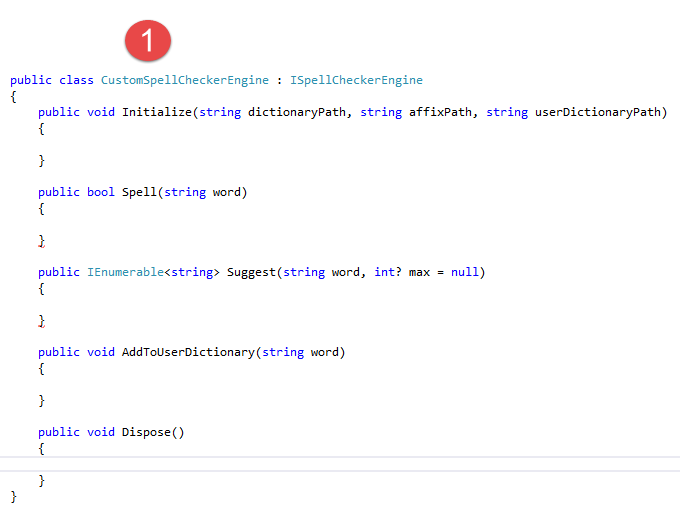
The Interface
Implement ISpellCheckerEngine to plug in a custom spell-check engine. The editor calls only these five methods.
namespace SpiceLogic.HtmlEditor.Abstractions.Entities.SpellCheck; public interface ISpellCheckerEngine { void Initialize(string dictionaryPath, string affixPath, string userDictionaryPath); bool Spell(string word); IEnumerable<string> Suggest(string word, int? max = null); void AddToUserDictionary(string word); void Dispose(); }Namespace SpiceLogic.HtmlEditor.Abstractions.Entities.SpellCheck Public Interface ISpellCheckerEngine Sub Initialize(dictionaryPath As String, affixPath As String, userDictionaryPath As String) Function Spell(word As String) As Boolean Function Suggest(word As String, Optional max As Integer? = Nothing) As IEnumerable(Of String) Sub AddToUserDictionary(word As String) Sub Dispose() End Interface End Namespace Registering the Engine
At startup, set CustomSpellCheckerEngine to your engine instance and SpellChecker to SpellCheckerEngineTypes.Custom. This routes inline squiggles and the spell-check dialog through your engine:
public partial class TrialReportForm : Form { public TrialReportForm(TerminologyServiceClient service) { InitializeComponent(); editor.SpellCheckOptions.CustomSpellCheckerEngine = new ClinicalTermsEngine(service); editor.SpellChecker = SpellCheckerEngineTypes.Custom; editor.SpellCheckOptions.FireInlineSpellCheckingOnKeyStroke = true; } }End Sub Public Partial Class TrialReportForm Inherits Form Public Sub New(service As TerminologyServiceClient) InitializeComponent() editor.SpellCheckOptions.CustomSpellCheckerEngine = New ClinicalTermsEngine(service) editor.SpellChecker = SpellCheckerEngineTypes.Custom editor.SpellCheckOptions.FireInlineSpellCheckingOnKeyStroke = TrueOnce registered, every word is checked against your engine: recognized words are not flagged, unrecognized ones are marked misspelled.

When the simple engine isn't enough
Two production refinements: fail open by wrapping Spell to return true when the backend is unreachable, so a blip does not flag every word until reconnection; and cache suggestions for the most recent few hundred mis-hits per session, avoiding one HTTP call per unknown word on large documents, while honoring the max hint - inline suggestions request three, the dialog ten.
Patterns this same plug-in serves
The interface also supports a company terminology server, a domain-specific dictionary (e.g., legal contracts and citations), or a backend engine that also checks grammar, style, and tone - no Hunspell binary needed, and the inline squiggle UI still works once SpellChecker = SpellCheckerEngineTypes.Custom is set.
Sample to start from
See the Custom Spell Checker sample in the installation's Samples folder: it implements ISpellCheckerEngine against a small in-memory vocabulary, wired into a WinFormHtmlEditor as shown above.
Ask your AI to do this
Let your assistant do this for you. With the SpiceLogic MCP server connected, paste this into Claude Code, Cursor, or VS Code Copilot in agent mode.
Using the SpiceLogic WinForms HTML Editor already referenced in my project, implement the ISpellCheckerEngine interface so spell-checking routes through my own dictionary of internal part numbers instead of the built-in US English checker, wrap the Spell method so it fails open (returns true, meaning no red squiggle) when my backend is unreachable, and set SpellChecker to SpellCheckerEngineTypes.Custom so both inline squiggles and the spell-check dialog use it. Look up the exact ISpellCheckerEngine method signatures via the SpiceLogic MCP tools before implementing the interface.