


 NuGet
NuGet
Aligning a Single Line vs the Whole Paragraph
Naomi is the email-template dev at a marketing-automation vendor. Her customers build transactional emails -- order confirmations, shipping notices, password resets -- inside a desktop designer powered by WinFormHtmlEditor. The signature block at the bottom of every template is the standing problem: three short lines (name, title, phone) that designers want to align independently, often with the name centred and the title and phone left-aligned, or every line centred on a single column.
Until recently this was a known issue. Naomi maintained a roughly 200-line workaround that scraped the document for "signature" comment markers, split the trailing <p> into multiple paragraphs in JavaScript, reapplied alignment to each, and stitched the result back. It worked. It also drifted out of sync every time the editor's output normalisation changed. She was not proud of it.
With the recent per-line alignment feature, the workaround is gone. The page she used to call Cannot align middle line without moving all paragraph -- a known-issue page -- is now this how-to. It explains the structural model and shows designers the one option that controls it.
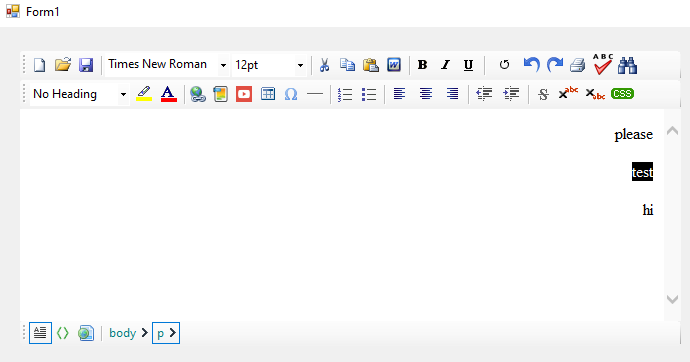
Why the old workaround existed: alignment is block-level in HTML
In HTML, text-align applies to a block-level container -- <p>, <div>, <li>. It does not align an arbitrary "visual line". If three lines of text live inside a single <p> joined by <br>, setting text-align: center on that paragraph centres all three lines, because all three share the same block. To align only one of those lines, that line has to be its own block.
<!-- One paragraph, three lines: align centres every line -->

<p style="text-align:center">Sarah Lee<br>VP of Customer Success<br>+1 555 0100</p>


<!-- Three paragraphs: each can be aligned independently -->

<p style="text-align:center">Sarah Lee</p>

<p>VP of Customer Success</p>

<p>+1 555 0100</p>
Same visible text. Different DOM. Different alignment behaviour. The question becomes: when the designer hits Enter at the end of a line, do you want the editor to produce a new block, or a soft line break?
The one option that controls it: EnterKeyResponse
Options.EnterKeyResponse takes one of two values from the EnterKeyResponses enum in SpiceLogic.HtmlEditor.Abstractions:
EnterKeyResponses.Paragraph -- Enter starts a new paragraph; the editor emits </p><p>. Each line becomes a separate block, so the alignment toolbar buttons affect only the paragraph containing the caret. This is what most word-processor users expect, and it is what Naomi sets as the default for her signature designer.
EnterKeyResponses.LineBreak -- Enter inserts a soft <br> inside the current paragraph. Everything typed stays inside one block, so the alignment toolbar buttons apply to the whole block at once. This is closer to a plain text-editor feel and useful for single-paragraph composer fields like reply boxes or short subject-line entries.
// Per-line alignment is what Naomi's signature designer needs:

htmlEditor1.Options.EnterKeyResponse =

    SpiceLogic.HtmlEditor.Abstractions.EnterKeyResponses.Paragraph;


// Force single-block behaviour (Enter = <br>, alignment is paragraph-wide):

htmlEditor1.Options.EnterKeyResponse =

    SpiceLogic.HtmlEditor.Abstractions.EnterKeyResponses.LineBreak;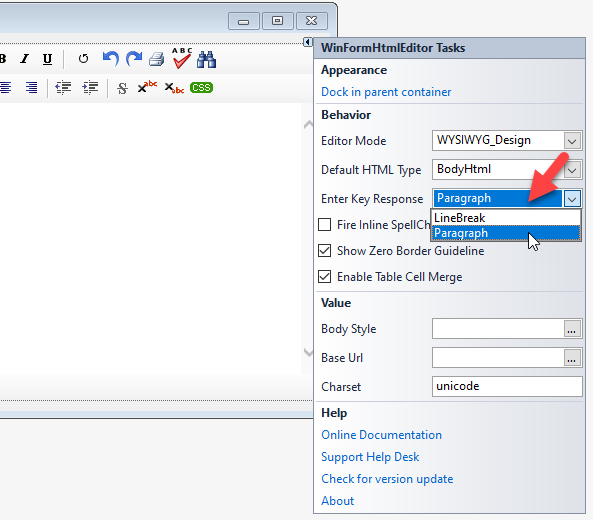
Fixing legacy templates: a single line trapped inside a paragraph
Some of Naomi's legacy templates have signature blocks already saved as one <p> with <br> separators. To align only the middle line, the designer splits that paragraph so the middle line becomes its own block:
1. Place the caret at the start of the line that should be aligned and press Enter (with EnterKeyResponse = Paragraph).
2. Place the caret at the end of that line and press Enter again.
3. With the caret still on the now-isolated line, click the alignment toolbar button.
The middle line is its own <p> and is the only one affected by the alignment command.
Letting the end user pick the mode
Naomi exposes a single checkbox in the designer preferences -- "Treat Enter as a line break (single paragraph mode)" -- and binds it to the option. The change applies to future Enter presses only; existing content is not rewritten:
chkUseLineBreaks.CheckedChanged += (sender, e) =>

{

    htmlEditor1.Options.EnterKeyResponse = chkUseLineBreaks.Checked

        ? SpiceLogic.HtmlEditor.Abstractions.EnterKeyResponses.LineBreak

        : SpiceLogic.HtmlEditor.Abstractions.EnterKeyResponses.Paragraph;

};
Where Naomi ends up
The 200-line JavaScript workaround is deleted. The signature block in every shipped template now has each line in its own paragraph, with alignment applied per line, exactly the way her designers always expected it to work. The page used to be a known issue. It is not anymore.
Ask your AI to do this
Let your assistant do this for you. With the SpiceLogic MCP server connected, paste this into Claude Code, Cursor, or VS Code Copilot in agent mode.
Using the SpiceLogic WinForms HTML Editor already referenced in my project, give my template designer control over whether Enter starts a new paragraph or only a soft line break, by exposing a checkbox labeled Treat Enter as a line break bound to Options.EnterKeyResponse, switching between EnterKeyResponses.Paragraph and EnterKeyResponses.LineBreak from the SpiceLogic.HtmlEditor.Abstractions namespace. Use this so a three-line signature block, for example a name, a title and a phone number, can have each line aligned independently once it lives in its own paragraph, instead of all three sharing one alignment because they sit inside a single paragraph joined by line breaks. Confirm the real EnterKeyResponses enum values and namespace with the SpiceLogic MCP tools before writing any code.