Parsed View
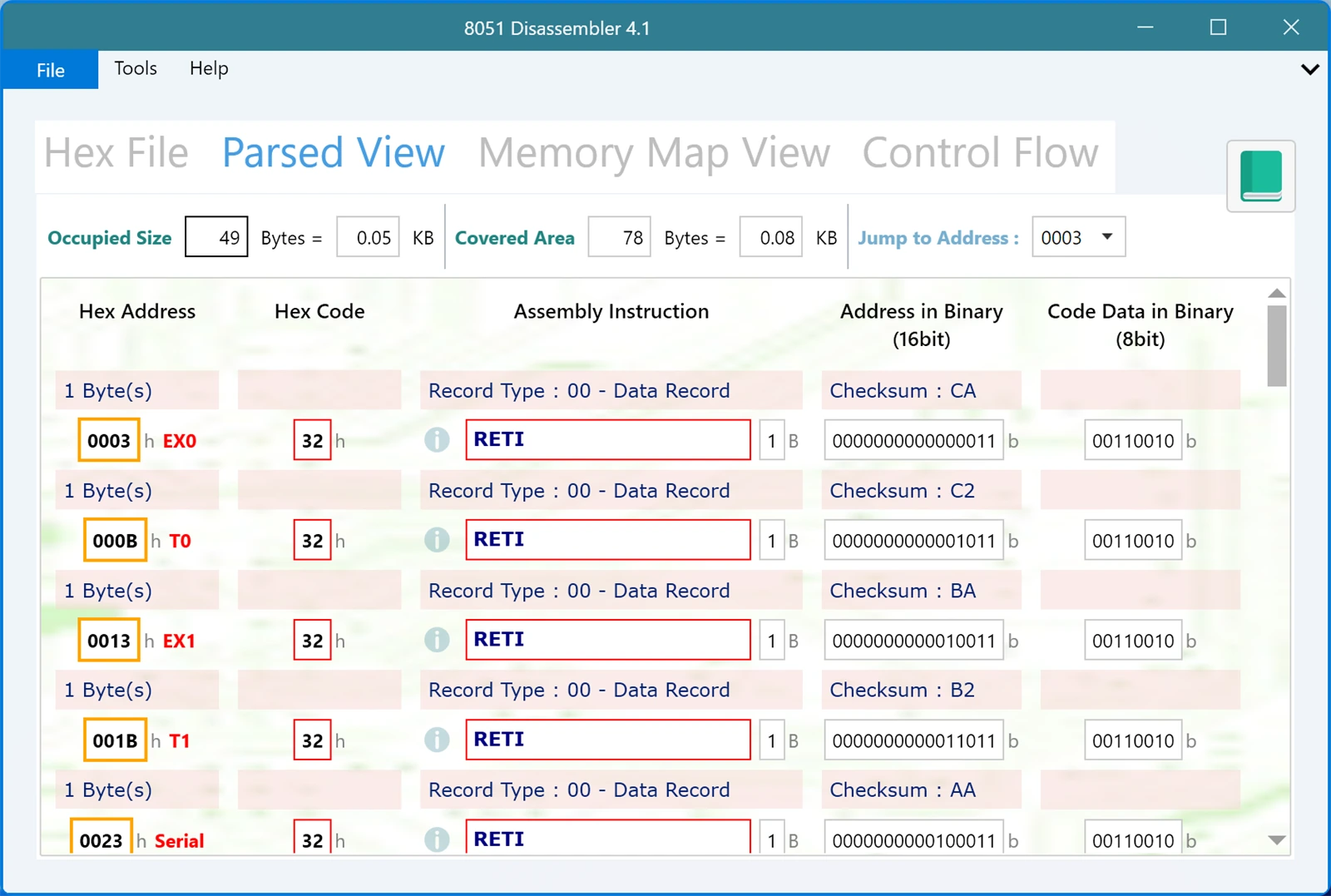
The Parsed View shows the same program as the Memory Map View, but organised by the file instead of by the chip. It follows your hex file record by record, in the order the records appear, and it skips the empty memory in between.
If the Memory Map View answers "what is at this address?", the Parsed View answers "what does this line of my file do?".
The extra rows
The difference you will notice first is the shaded rows sitting between the instructions. Each record in your file contributes three pieces of information, and they are shown right where that record starts:
- Byte count, shown as something like 1 Byte(s). This is how many data bytes the record carries.
- Record Type, shown in full, for example Record Type : 00 - Data Record. All six Intel HEX record types are recognised and named, so you are never left decoding a bare number.
- Checksum, for example Checksum : CA. This is the value from the end of that line.
Underneath each of those headers you get the bytes that record delivered, disassembled exactly as they are in the Memory Map View, with the same columns, the same red boxes around real instructions, and the same info button for looking an instruction up.
Why the record structure is worth seeing
Most of the time you do not care how your compiler chopped the program into records. But when something is wrong, this is where the answer usually is.
A file that will not program correctly often has a structural problem rather than a code problem: a record that claims more bytes than it carries, an end of file record in the wrong place, or a file that was truncated during a copy and paste and simply stops. Reading the records in order makes that obvious, because the point where the file stops making sense is the point where the trouble is.
It is also the fastest way to understand a file someone else sent you. The record types tell you whether the file uses extended addressing, and the addresses tell you where the code is meant to live before you commit anything to hardware.
Switching between the two views
You do not have to choose. Both tabs are filled in from the same parse, so you can move between them freely. Use the Parsed View while you are checking the file itself, and the Memory Map View while you are reading the program.