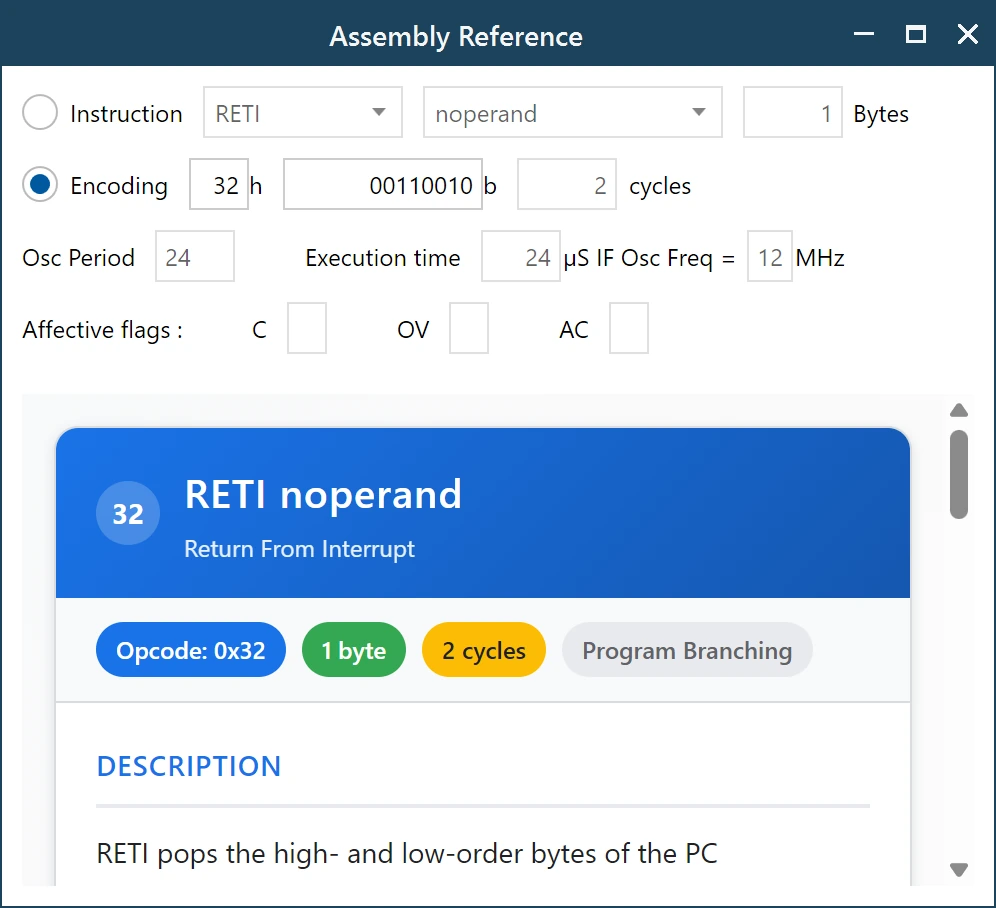
The Assembly Reference window
Sooner or later you hit a mnemonic you do not remember. The Assembly Reference window is the built-in answer, so you do not have to go looking for a datasheet in a browser tab and lose your place.
There are two ways in. Click the small info button beside any decoded instruction and the window opens on that exact instruction. Or click the green book button in the top right of the main window to open it empty and look up whatever you like.
Two ways to ask
The window works in both directions, which is the useful part:
- By instruction. Choose the mnemonic and the operand form, and it tells you the encoding. This is the direction you use when writing or reading assembly.
- By encoding. Type the opcode in hex or binary and it tells you the instruction. This is the direction you use when staring at a raw byte and wondering what it is.
Pick whichever radio button matches the question you have, and the rest of the window fills in from there.
What it tells you
For the selected instruction you get the facts that matter when you are counting bytes or counting time:
- Bytes. How much program memory the instruction takes.
- Cycles. How many machine cycles it costs.
- Oscillator period and execution time. The window converts cycles into real microseconds. Set the oscillator frequency to match your board, and the execution time updates to the number you actually care about.
- Affected flags. Whether the instruction touches the carry, overflow and auxiliary carry flags. This is the detail that quietly causes bugs when it is forgotten.
- Description. A plain explanation of what the instruction does, not just its name expanded.
The card at the bottom repeats the essentials as badges, so the opcode, size and cycle count are readable at a glance, and it says whether the instruction affects program branching.
Timing, in practice
The execution time figure deserves a mention because it is easy to overlook. An instruction that takes two cycles is not slow in the abstract; it is slow relative to your crystal. By putting your real oscillator frequency into the window, a delay loop stops being a mystery and becomes arithmetic you can check.
Using it as a plain lookup table
You do not need a parsed file to use the reference. Open it from the green book button at any time and it works as a standalone 8051 instruction lookup, which is often quicker than finding the right page of a datasheet.