


Download WPF HTML Editor Control
The control is a NuGet package, so there is no product installer to download. Adding it to your own project is all it takes. Or start from a sample project instead, which already references the package, so there is nothing to install first. Either route, not both.
Just get from NuGet, nothing to install
dotnet add package SpiceLogic.HtmlEditor.WPFPM> Install-Package SpiceLogic.HtmlEditor.WPFOr start from a sample project, with the package already referenced
Get the sample projects
Runnable C# and VB.NET samples that already reference the package, so they build without installing anything first.
Open the GitHub repositorygit clone https://github.com/spicelogic/wpf-html-editor-control-samples.gitDownload the samples as a zip
The same sample projects, zipped. Windows blocks every file inside, so you have to clear that by hand before the solution will build.
Download the zip anywayUnblocking the zip
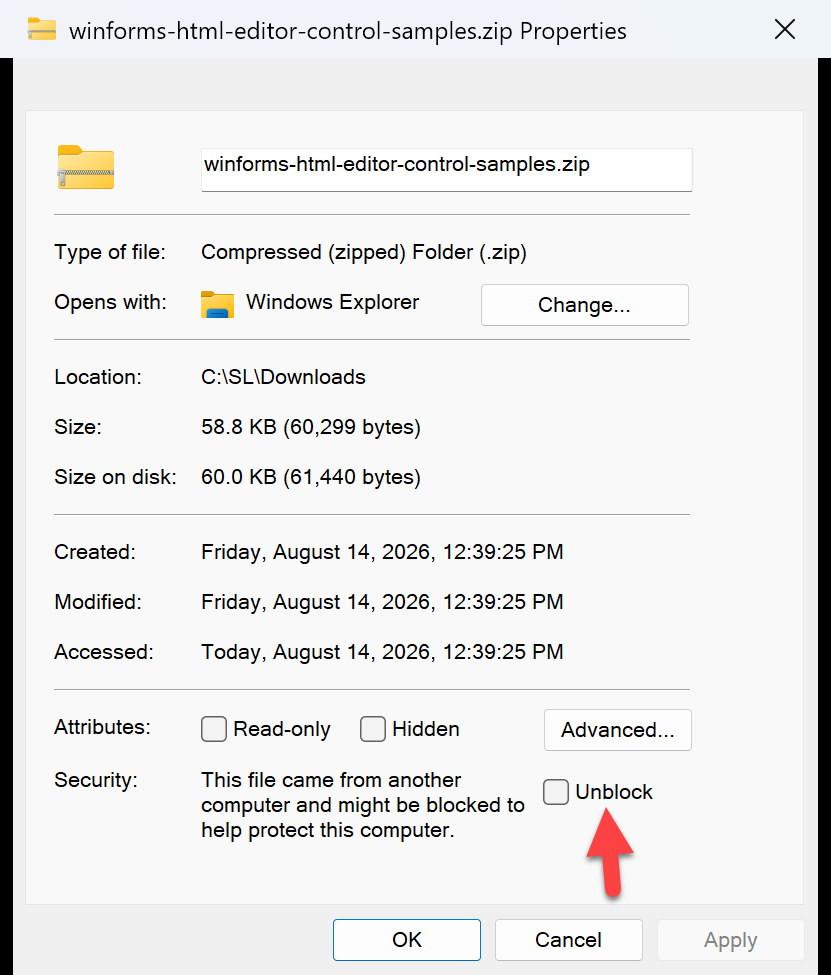
Windows blocks every file inside a downloaded zip, so the build stops with this error until you clear it: Here is what that looks like:
error MSB3825: Couldn't process file MainForm.resx due to its being in the
Internet or Restricted zone or having the mark of the web on the file.- Right-click the downloaded .zip file and choose Properties.
- On the General tab, look at the bottom for a Security line.
- Tick Unblock, then click OK.
- Extract the zip and open the solution as normal.
We do not ship a script for this on purpose: running one to silence a security warning is a worse habit than the one-time checkbox.