



Three buttons and one expectation
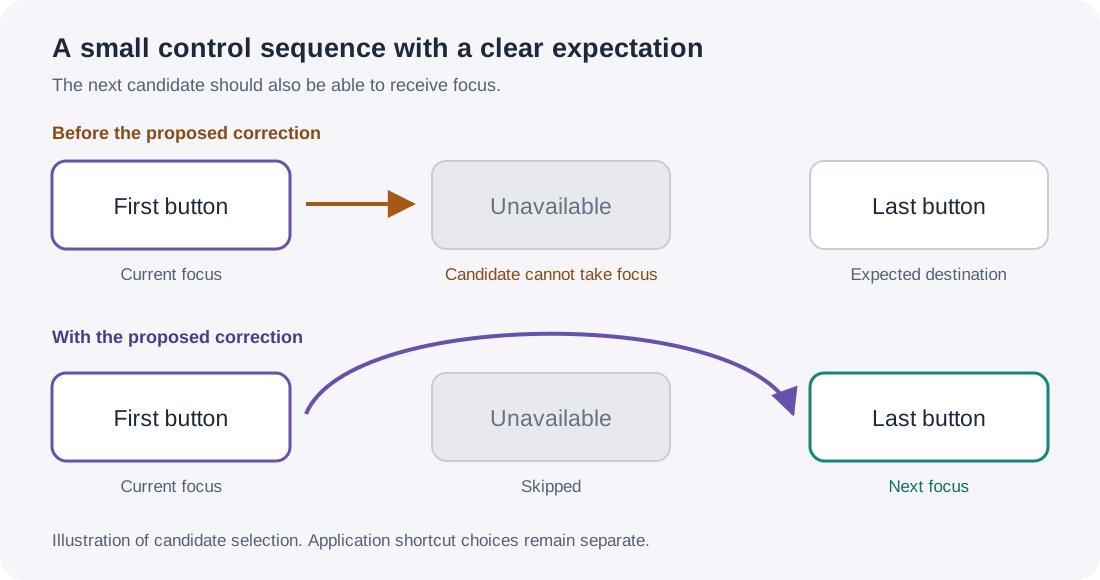
The first button was ready. The middle button was greyed out. The last button was ready too.
From the first button, moving forward should have taken keyboard focus to the last one. Instead, the navigation search could return the unavailable middle button. The subsequent request to focus it could not complete.
We encountered this issue while developing our Avalonia HTML Editor Control and testing keyboard navigation around the editing surface. We reduced the larger interface to this three-button example so we could separate our editor's shortcut choices from the framework's focus navigation.
We created regression tests and submitted a focused fix upstream. The pull request records the discussion, review and outcome. Contributing at the framework level gives the same improvement a path to other Avalonia applications.
Finding the next control is only half the journey
Keyboard navigation has two distinct jobs. First, it finds a candidate. Then it moves focus to that candidate.
A control can be marked focusable and still be unavailable. It might be disabled. Its parent might be disabled. A hidden control also needs to stay out of the route. Choosing such a target and discovering the problem only when focus is requested leaves a gap between the two jobs.
In the reproduced disabled-target cases, FindNextElement could return a candidate that TryMoveFocus would refuse. The useful rule is straightforward: the navigation search and the focus operation should agree about which controls are available.
A reproduction small enough to reason about
The essential layout is ordinary Avalonia XAML. Put this inside a window in an existing Avalonia application:
<StackPanel xmlns="https://github.com/avaloniaui"
            Spacing="12">
  <Button Name="First" Content="First" />
  <Button Content="Unavailable" IsEnabled="False" />
  <Button Name="Last" Content="Last" />
</StackPanel>
Start with focus on First and request forward sequential navigation. The expected destination is Last. Then start from Last and request backward navigation: First should be the destination.
For the inherited-state case, put the middle button inside a disabled container instead of disabling the button itself. A child's own enabled setting does not tell the whole story when an ancestor makes the subtree unavailable.
The actual regression in the pull request checks the returned candidate, the result of moving focus and the final focused element. Those are three useful observations; simply sending a key does not establish where focus ended up.
Test the rule in both directions
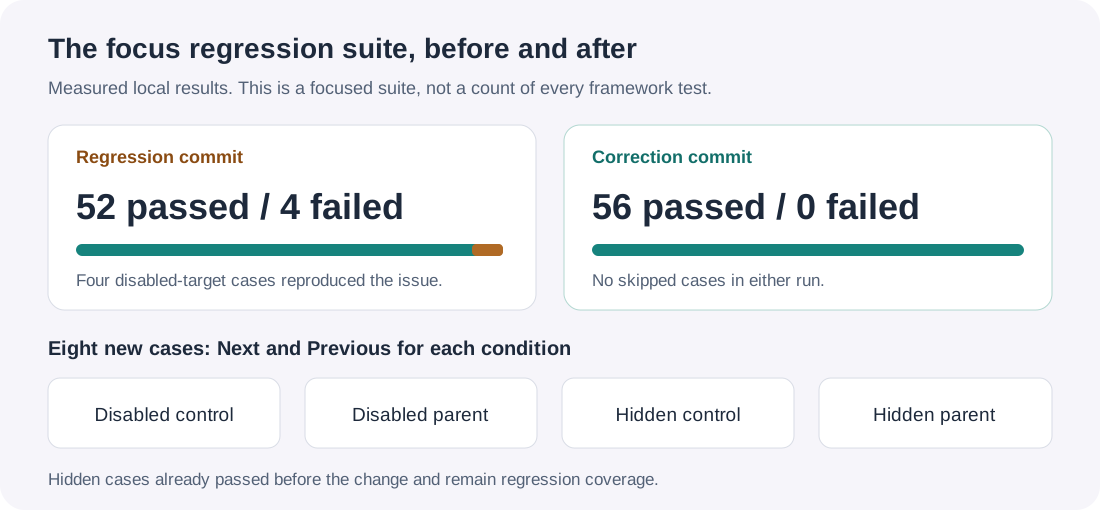
One successful forward movement would have been a thin test. We added eight cases: Next and Previous for four availability conditions.
| Middle control or subtree | Directions tested | Expected result |
|---|---|---|
| Disabled control | Next and Previous | Skip it |
| Disabled parent | Next and Previous | Skip its child |
| Hidden control | Next and Previous | Skip it |
| Hidden parent | Next and Previous | Skip its child |
Before the correction, four disabled-target cases reproduced the issue. The four hidden cases already passed; they stay in the regression to protect that neighbouring behaviour.
Across the focused suite, the regression commit produced 52 passes and four failures. With the correction, all 56 focus tests passed, with no skipped cases. Both local builds completed without warnings or errors.
Why effective availability matters
The correction we submitted keeps candidate selection consistent with actual focus admission. It checks effective enabled state and visibility when deciding whether an element is focusable, and avoids descending into unavailable parent subtrees.
Effective is the important word. A child can have its own enabled property set to true while a disabled ancestor prevents the child from being used. Navigation needs to respect the state the user experiences, rather than the child's local setting alone.
This is also separate from choosing keyboard shortcuts. A text editor may intentionally use Tab to insert indentation, while its host offers another command to leave the editing surface. The contribution addresses the destination when sequential navigation is requested. It does not assign application shortcuts or redefine document editing.
A contribution shaped for review
Avalonia's contribution guide recommends a failing-test commit followed by a correction commit. We followed that order.
A reviewer can check out the regression commit to reproduce the four failures, then inspect the correction commit to see the change and repeat the same tests. The patch stays within candidate eligibility and traversal, accompanied by the focused regression.
This is a practical part of contributing to an open-source framework: reduce the example, make the expected behaviour explicit and give maintainers evidence they can reproduce. The review remains theirs.

What the public checks establish
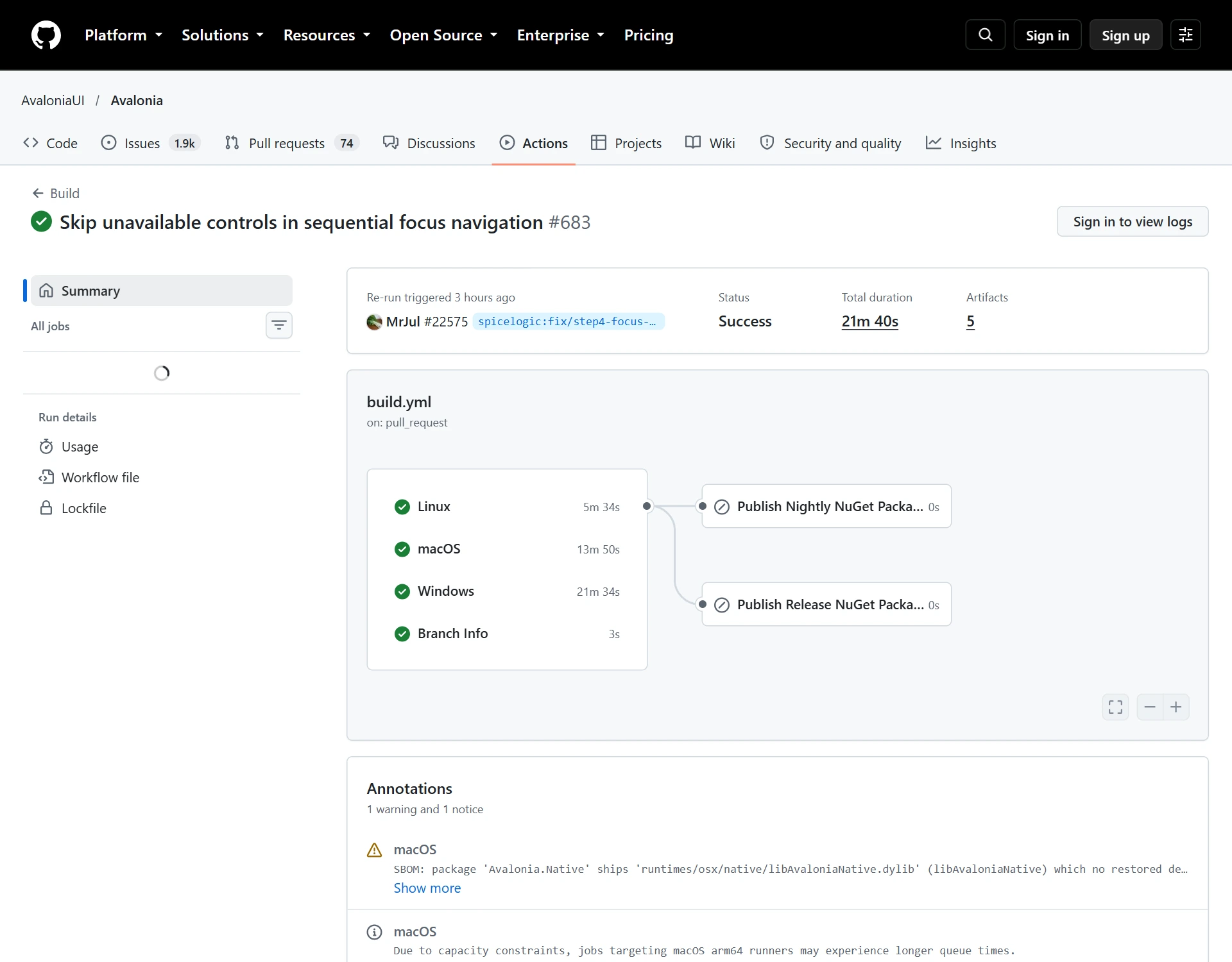
The framework checks for this contribution included successful Windows, macOS and Linux builds, plus successful Windows and macOS integration checks. The recorded build run preserves the results for the tested commit.
These are framework checks for a specific change. They do not establish the behaviour of every application that uses Avalonia.
We submitted the fix and its regression tests as Avalonia pull request 22575. The pull request records the discussion, review and outcome, including any follow-up changes.
For framework release availability, consult Avalonia's release notes. A contribution's test results and its inclusion in a stable release are separate facts.
A keyboard test worth keeping in your own app
You can apply the same testing discipline without reproducing this particular issue. For each important keyboard route:
- Check the actual focused element after the action.
- Exercise forward and backward movement.
- Include disabled controls and disabled parent containers.
- Include hidden controls and hidden subtrees.
- Repeat the route after opening and closing a dialog or changing the editing mode.
- Verify your application's own shortcut choices, especially where Tab also has an editing meaning.
Automation can check candidate identities and final focus. Visible keyboard testing adds another question: can the person using the application see where they are? Keep both observations in the workflow.
The payoff is an uninterrupted task
The effect of a focus edge case is usually smaller than a crash and more personal than a test count. Someone is moving through a form, a toolbar or an editor with the keyboard. The next action should feel routine. When the route stops unexpectedly, they have to work out where focus went, repeat the action or reach for a mouse.
Reducing that interruption is the point of the exercise. A concise regression makes the expectation repeatable. An upstream contribution gives maintainers a concrete proposal that can benefit other applications using the same navigation path.
A keyboard path is complete only when it reaches a control the user can actually use.
Where this meets HTML editing
This investigation grew out of our work on the SpiceLogic Avalonia HTML Editor Control. Embedding an editing surface brings its own keyboard expectations: formatting commands, document navigation, Source mode and the surrounding host interface need to work together.
The product documentation explains integration and editor keyboard shortcuts, and the public sample projects provide practical starting points. Our goal is to make HTML authoring fit naturally into an Avalonia application, including the parts of the experience people navigate without a mouse.
The hero image and focus diagrams are explanatory illustrations. The GitHub image is an actual capture of the public contribution. Framework and project names identify the work discussed; review and release decisions remain with the Avalonia project.